UKG Pro Learning
- 121.00
- 3.0
- Installs
- 100.00K
- Price
- Free

Screenshots
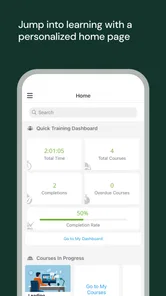
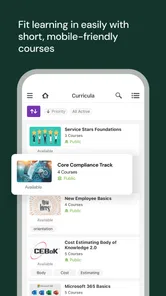
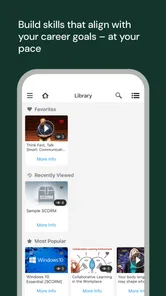
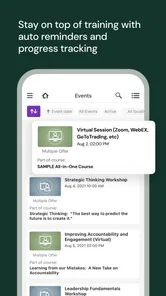
Analysis by Reviewed
I approached UKG Pro Learning as a practical workplace-learning tool rather than as a general education app. It is a free Business app from UKG, Inc., built around the mobile side of UKG Pro Learning. That distinction matters: this is mainly useful when an employer already uses the UKG learning environment and expects staff to complete assigned training, check learning material, or keep up with professional development away from a desk.
My first impression is that the app makes the most sense as a companion to an organization’s existing training setup. It is not trying to replace a university course platform, a public video-learning service, or a personal study planner. Its value depends heavily on how a company has organized its learning content and whether employees need mobile access. When that connection is in place, having training available on a phone can remove a surprisingly common obstacle: waiting until you are back at a computer.
How the current mobile experience fits into workplace learning
The app sits in the Business category and carries an Everyone age rating, which fits its intended use as a workplace tool rather than a consumer entertainment product. It has passed the point of being a new experiment, having first appeared on October 9, 2017. The current version is 12.2.1, and the app supports devices running Android 8.0 or later.
That history gives the product a particular character. I would not describe it as a flashy learning app designed to impress during a quick store visit. Its purpose is more operational: bring an employer’s learning experience to a mobile screen and make participation more convenient. If I were deciding whether to install it, I would first ask whether my organization uses UKG Pro Learning. Without that connection, the download alone does not offer much personal value.
The audience is fairly clear. Employees may use it to handle training during a commute, between shifts, while traveling for work, or during a short break. Managers and learning teams may benefit when staff can access assigned material without needing a shared office computer. The app is especially relevant for workplaces with deskless or distributed employees, where mobile access can be more practical than a browser-only arrangement.
A realistic example would be a new employee who receives a required training assignment near the end of a shift. Instead of remembering to return to it later on a desktop, the employee can use the mobile app when there is a suitable quiet moment. That does not make the course content better by itself, but it can make the path to completion less dependent on location.
What I would use it for during a normal week
I see three sensible mobile patterns. The first is catching up on assigned learning when a laptop is inconvenient. The second is reviewing material shortly before applying it at work, such as revisiting a procedure or internal lesson. The third is maintaining awareness of training obligations without treating the learning portal as a separate task that only exists during office hours.
More From Our News Desk

Weather by Xiaomi Review: Clear at a Glance, Less Clear Up Close

X Under Pressure: Can It Recover When Posting Goes Wrong?

Clash of Clans Is Won Between the Battles

Android Auto Makes the Case for Quieter Car Software

MobiOffice: Transforming Mobile Productivity with Seamless Integration

EA SPORTS FC™ Mobile Soccer: Redefining Mobile Sports Gaming
The important trade-off is that a phone is convenient but not always the best screen for serious study. Short reading or quick review can feel natural. Long lessons, detailed documents, or anything requiring careful note-taking may be more comfortable on a larger display. I would use the app to keep learning moving, but I would not assume that every training activity is equally pleasant on a phone.
That is one of the less obvious points about a mobile learning client: convenience can improve access while reducing concentration. I would choose a quiet setting, use headphones when appropriate, and avoid starting a substantial lesson when I know I will be interrupted. The app can remove the barrier of needing a computer, but it cannot remove the need for time and attention.
What the version and release history tell me
The current version, 12.2.1, shows that the application has continued beyond its original release. That is useful context for existing users because a mature app is generally being maintained as part of a larger product ecosystem rather than left as a one-time mobile companion. Still, a version number alone does not tell me that every part of the experience has been redesigned or that all workplace workflows are equally polished.
I would interpret the product’s evolution cautiously. The app has moved from its 2017 starting point to a current 12.2.1 release, which suggests ongoing iteration. What I can reasonably take from that is continued product development, not a promise about a particular feature, interface change, or performance improvement. For a business app, that restraint is important: an update may matter greatly to one employer’s setup and barely affect another user’s daily routine.
For someone already using an older installation, the practical question is not simply whether the app has a newer version. It is whether the current release works smoothly with the organization’s learning environment and the employee’s device. Keeping the app current is sensible, especially when workplace systems evolve, but I would also expect the employer’s administrators to be part of the support chain if access or course behavior becomes confusing.
How existing users may feel the evolution
Long-term users are likely to judge the app less by novelty and more by reliability. If the mobile experience helps them reach assigned learning with fewer steps, the benefit is immediate. If an update changes navigation or authentication behavior, even a small adjustment can feel disruptive when training is time-sensitive.
My advice to an existing user would be to treat the phone app as one part of the UKG learning workflow, not as an isolated product. If something appears missing, I would check whether the item is actually assigned to the account, whether the employer has made it available on mobile, and whether the same issue appears in the organization’s usual web access. Those checks help separate a mobile problem from an account or configuration issue.
This is also where the app’s audience affects expectations. A consumer learning service usually lets one person choose courses, manage a personal library, and switch between providers freely. A workplace learning app can be more structured because the employer controls much of the learning environment. That structure may feel limiting to an independent learner, but it can be exactly what a company needs for consistent training participation.
I would also avoid assuming that mobile access means every task should be completed on mobile. A useful workflow is to use the phone for reminders, review, and convenient progress, then move to a larger screen when the material demands more space. That blended approach is more realistic than forcing every lesson into a small display.
Where it compares well with ordinary alternatives
The usual alternative is opening the learning portal in a mobile browser. A dedicated app can feel more direct because it is designed to be launched as a workplace tool rather than found through a browser bookmark. For employees who repeatedly return to the same learning environment, that lower-friction entry point is meaningful.
Another alternative is waiting for access to a desktop or shared workstation. UKG Pro Learning is more useful than that arrangement when staff work away from desks or have irregular schedules. The phone becomes a practical bridge between formal training requirements and the reality of the workday.
On the other hand, a browser may be preferable for users who dislike installing business apps, need to work across different devices, or prefer a larger interface. A general learning platform may also be a better fit for someone seeking broad public courses rather than employer-assigned material. I would not choose this app as my personal learning library unless my workplace already depended on it.
The app’s free price is another reason it is easy for an employee to try, but “free” should be understood from the user’s perspective. The learning experience is tied to an organization’s UKG Pro Learning setup, so the absence of a download charge does not turn it into an independent catalog of lessons. Its usefulness comes from access to the right workplace environment.
Small workflow choices that make a difference
One practical tip is to open the app before a planned learning session rather than waiting until the last possible moment. This gives me time to discover whether the account is recognized and whether the expected assignment is visible. That simple check is especially worthwhile before a deadline or during a break that cannot be extended.
A second tip is to separate “review on the go” from “complete carefully.” I would use a short mobile session to refresh key material, then reserve a longer uninterrupted period for anything that requires concentration. This avoids turning a convenient phone session into a frustrating attempt to study through constant interruptions.
A third insight is that the app can support a more flexible rhythm for shift-based work, but only if the employee treats learning time responsibly. A phone makes access easier; it does not automatically make work training appropriate in every location. I would avoid using it while driving, operating equipment, or handling customer-facing duties, and I would follow workplace rules about when training can be completed.
A fourth useful habit is to note the exact point where a problem occurs. If a lesson will not open, an assignment seems absent, or progress does not appear as expected, recording the course name and the step that failed gives an administrator something actionable. Saying only that “the app does not work” makes business support slower. This is a small but important difference between a consumer app complaint and a workplace learning issue.
Remaining gaps and situations where I would skip it
The biggest limitation is its dependence on an employer’s UKG Pro Learning environment. Someone looking for self-directed courses, language practice, hobby lessons, or a broad public catalog should choose a different category of app. Installing this one without an organizational reason is unlikely to produce a satisfying experience.
I would also hesitate to rely on it as the only way to handle complex learning. Mobile access is valuable, but a small screen can make detailed content, extended reading, or formal assessment less comfortable. If my goal were deep study, I would want a desktop or tablet option available as well.
The average rating is 3.0 from around 364 ratings, with about 121 written reviews. I read that as a reason to keep expectations measured rather than as a final verdict. Business applications often receive feedback shaped by login systems, employer configuration, device differences, and required workflows. A person with a smooth organizational setup may have a very different experience from someone whose account or training assignments need administrative attention.
The app has more than 100K installs, which indicates that it is used beyond a tiny internal test group. That scale is reassuring in one narrow sense: the mobile product has a real audience. It does not, however, guarantee that every company’s configuration will feel identical. In workplace software, the surrounding setup can matter as much as the application itself.
I would skip it if my employer does not use UKG Pro Learning, if I need a completely independent course marketplace, or if I strongly prefer browser-based access. I would also avoid making it my main study tool when the content requires extensive writing, research, or a large-screen interface.
What I would watch as the product continues
For future updates, I would pay attention to how smoothly the mobile experience handles the everyday details that determine whether employees actually return to it. Clear navigation, dependable account access, sensible progress behavior, and comfortable reading matter more to me than decorative changes.
I would also watch how well the current release supports mixed-device learning. The strongest version of a workplace learning app is not one that insists on mobile for everything. It is one that lets me start conveniently on a phone, continue on a larger screen when needed, and understand where I stand without confusion.
Existing users should watch update notes and their organization’s internal guidance, particularly when a new release arrives. If the app is required for work training, keeping it updated is sensible, but users should know whom to contact when the problem involves account access, assignment availability, or company policy rather than the phone software itself.
My overall view is cautiously positive. UKG Pro Learning is a focused mobile companion for organizations that already use UKG’s learning tools. I like the practical idea behind it: workplace training should not stop simply because an employee has left a desk. The app is most convincing for distributed teams, shift workers, and employees who need occasional access during a busy week.
At the same time, I would not recommend it as a general-purpose learning app. Its value is contextual, and that context is the whole point. If your employer relies on this system, the free download is worth trying because mobile access can make assigned learning easier to fit into real life. If you are searching for independent courses or a richer personal study environment, another option will serve you better.
My recommendation is simple: use it as a convenient extension of your workplace training, combine it with a larger screen for demanding material, and judge it by how well it fits your organization’s setup rather than by the app alone.
UKG Pro Learning Frequently Asked Questions
What devices and operating systems does UKG Pro Learning support?
UKG Pro Learning is a mobile app for accessing workplace learning on a phone or tablet. The current version is 12.2.1, and the Android app requires Android 8.0 or later. Before installing, check that your device meets the operating-system requirement and has enough available storage for the app and any learning materials you may use.
Who develops UKG Pro Learning, and what kind of app is it?
UKG, Inc. develops UKG Pro Learning, a business app associated with workplace training and learning. It is the mobile application for Ultimate Kronos Group’s UKG Pro Learning platform. Its audience is primarily people whose organizations use the service, rather than learners looking for a general-purpose public course catalog, so your employer’s setup plays an important role in what you can access.
What is UKG Pro Learning used for?
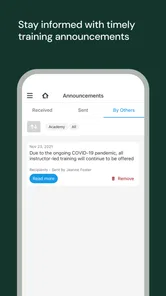
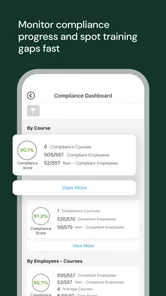
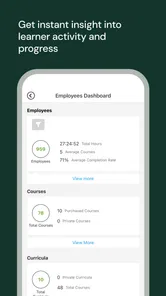
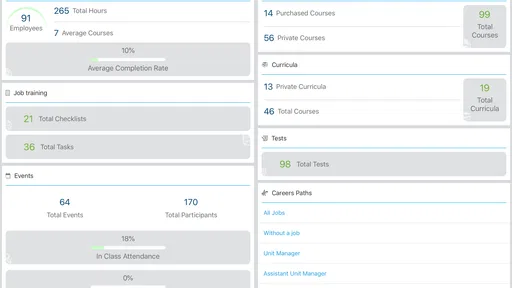
UKG Pro Learning is a workplace learning platform designed for employees and organizations. It lets users access assigned training, browse available courses, complete learning activities, and track progress from a mobile device. Depending on the employer’s setup, the app may include compliance training, onboarding materials, professional development courses, videos, quizzes, and other resources connected to the company’s UKG environment.
Can anyone download and use UKG Pro Learning?
Although the application may be available for download from official app stores, it is generally intended for employees, managers, or learners whose organizations use UKG Pro Learning. You normally need valid company credentials or an invitation from your employer to sign in. Downloading the app alone does not guarantee access, because account availability and enabled features depend on your organization’s UKG configuration.
How do I sign in to UKG Pro Learning?
The sign-in process can vary depending on how your employer manages access. Some organizations use standard UKG credentials, while others require single sign-on, a company-specific login page, or additional verification. If you cannot log in, confirm that your username and password are correct, check your internet connection, and contact your company’s HR or IT support team rather than creating an unrelated personal account.
Pros
- Mobile-friendly access to courses
- training
- and required learning tasks.
- Push notifications help users keep track of deadlines and new assignments.
- Progress tracking makes completed courses and pending activities easy to review.
- Supports different learning formats
- including videos
- documents
- and quizzes.
- Useful for organizations managing employee training in one central platform.
Cons
- Available features depend heavily on the employer’s UKG configuration.
- Some screens can feel slow when loading courses or training content.
- Users may need separate credentials or access permissions to sign in.
- Limited value for individuals without an organization using UKG Pro Learning.
- Course navigation and search may feel less intuitive for new users.













