UKG Pro
- 6.70K
- 4.2
- Installs
- 5.00M
- Price
- Free

Screenshots
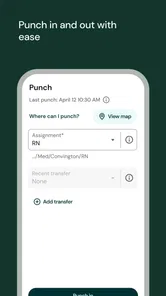
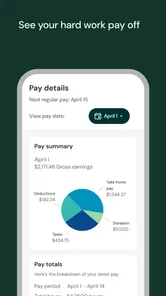
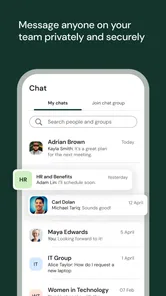
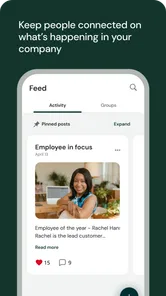
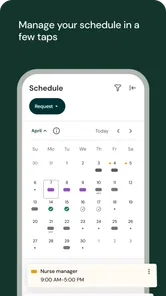
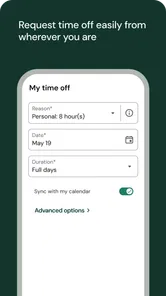
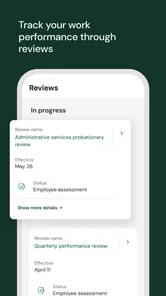
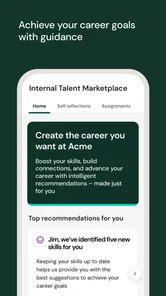
Analysis by Reviewed
Ever felt like managing your HR tasks is like trying to juggle flaming torches while riding a unicycle? Well, let me introduce you to UKG Pro, your new best friend in the workplace. This app is all about making life easier for employees and employers alike, by putting essential HR functionalities right in the palm of your hand.
The first week: getting oriented
My first impression is that this is a workplace tool, not a general-purpose organizer. UKG Pro is a business app from UKG, Inc., and its usefulness depends on whether your employer uses it and which parts of the platform are available to you. It is free to install, rated for Everyone, and runs on Android 8.0 or later. The current version is 5.01.01.0658. Its 4.3 average from around 61,000 ratings and more than a million installs suggest it has a substantial audience, though those figures alone cannot tell you whether your own workplace has configured it well.
For a new employee, the practical appeal is having a place to handle routine work-life admin instead of searching through messages or waiting to ask a manager where to find something. I would start by checking which self-service actions are actually enabled for your account, then make sure your personal details are accurate. That small setup step matters: an app can make information easier to reach, but it cannot correct a record that was entered incorrectly at work.
Where it fits among workplace apps
UKG Pro makes the most sense when it is already part of your employer’s work setup. It is not a personal finance app that can gather pay information from any job, nor is it a generic calendar that automatically knows your workplace schedule. Access and usefulness are tied to the company’s arrangements, so the first practical question is not how many tools the app claims to offer, but whether your organization has enabled the ones you need.
That distinction also helps set expectations for people choosing between a single HR app and a mix of workplace tools. A payroll-only app may be easier if all you ever do is view pay information. Separate systems can be less confusing when each one has a clearly defined job, but they also mean more places to check. UKG Pro’s appeal is consolidation: when your employer uses several parts of its platform, one familiar starting point can save you from hunting across separate channels.
I would not install it expecting it to replace your manager, payroll contact, or formal HR process. It can make routine information and actions more accessible, but a phone screen cannot decide whether a request meets workplace rules or resolve a disputed record by itself. If you are a contractor, a new hire whose access is not ready, or someone whose employer uses another system, this is unlikely to become useful simply because you downloaded it.
A One-Stop HR Solution
UKG Pro is more than just your average app; it’s a comprehensive HR management platform. Imagine having all your payroll, talent management, and employee data needs sorted in one place. That's what UKG Pro offers. The app integrates seamlessly with various systems, saving you from the hassle of juggling multiple platforms.
More From Our News Desk

Weather by Xiaomi Review: Clear at a Glance, Less Clear Up Close

X Under Pressure: Can It Recover When Posting Goes Wrong?

Clash of Clans Is Won Between the Battles

Android Auto Makes the Case for Quieter Car Software

MobiOffice: Transforming Mobile Productivity with Seamless Integration

EA SPORTS FC™ Mobile Soccer: Redefining Mobile Sports Gaming
User-Friendly Interface
First things first, the interface. It’s clean, intuitive, and honestly, a joy to navigate. You don’t need a PhD in tech to find your way around. Whether you’re looking to update your personal information, check your pay stub, or request time off, everything is just a few taps away.
Features That Make a Difference
Let’s talk features. One of the standout aspects of UKG Pro is its robust reporting capabilities. You can generate reports on just about anything HR-related, which is a game-changer for HR professionals who thrive on data.
Plus, the app’s self-service options empower employees to manage their profiles and benefits, reducing administrative overhead and letting you focus on what really matters. And did I mention the mobile app? Having access to all these features on-the-go is like having your HR department in your pocket.
Making the routine easier
The lasting value is less about opening the app for novelty and more about whether a recurring task becomes simpler. A realistic use is checking a pay stub after payday, then using the same place to update a detail or submit a time-off request when plans change. I would treat the app as a convenient front door to workplace processes, not as a guarantee that every request is approved or every payroll question can be resolved there.
For HR staff, reporting can be useful when they need a view across employee information rather than handling each query individually. A useful trade-off to keep in mind is that employee self-service may reduce routine back-and-forth, while more complex corrections still require a conversation with the appropriate person at work. The app helps organize access; it does not replace the judgment or decision-making of a manager or HR team.
A useful workday habit
One low-effort way to make the app earn its place is to connect it to an existing routine rather than trying to remember it at random. For example, after checking a pay stub, I would take a moment to confirm that the details I rely on are current, then close the app instead of repeatedly revisiting it. If your employer makes time-off requests available there, starting the request when you first know your dates gives you more room to follow up through the proper workplace channel if needed.
For a shift-based employee, the same principle applies to any work information the employer has chosen to make available: check the app at a sensible point before plans depend on it, rather than treating it as a last-minute source of truth. I would still use the workplace’s established contact route for urgent changes. The useful insight is that a self-service app works best as a checkpoint in a process, not as the whole process.
It can also help to learn the route to the two or three screens you genuinely use, rather than exploring every area once and assuming you will remember it later. That small bit of familiarity reduces friction when you are checking something quickly. If a section is not visible for your account, there is little value in repeatedly searching for it; ask whether your employer enables that task in UKG Pro and use the approved alternative meanwhile.
Security and Support
In this digital age, security is king, and UKG Pro doesn’t disappoint. The app comes loaded with top-notch security features to protect sensitive employee data. You can rest easy knowing that your information is in safe hands.
And if you ever find yourself in a pickle, the customer support team is ready to help. They’re responsive and knowledgeable, ensuring that any issues are resolved swiftly.
What affects month-to-month value
Before relying on it for a deadline, I would check how your employer handles requests and where to look for their status. That habit is more dependable than assuming that tapping submit completes the whole process. If a pay detail looks wrong, keeping the relevant information to hand and contacting HR through the route your workplace uses is more sensible than repeatedly refreshing the app.
Compared with a basic payroll viewer or a collection of separate workplace tools, UKG Pro aims to bring more employee and HR tasks together. That breadth can be convenient when your employer uses the platform broadly. If you only need to see a single document, a simpler tool may feel lighter; if your workplace does not use UKG Pro for the tasks you need, installing it will not create those functions for you.
Handling changes without adding busywork
Its recurring value is easiest to judge during ordinary changes, not only on payday. If your contact details change, updating them through the available self-service route may be more direct than sending a message and waiting for someone to enter them. But I would not assume one edit updates every workplace record or every system connected to it. After making an important change, check what the app confirms and follow your employer’s instructions if another step is required.
Benefits and personal information are areas where convenience should not replace careful reading. I would take time to review the exact details shown before submitting a change, especially when the result could affect payroll or workplace records. A phone makes it easy to act quickly, but that is not always an advantage: for a complicated choice, a larger screen or a conversation with HR may be the better tool.
Who should keep it installed?
I can see it earning a lasting place on the phone of someone who regularly checks work information, manages personal details, or handles time-off and benefits tasks through their employer. It is less compelling for someone who rarely needs HR self-service, prefers to keep work apps off a personal device, or expects a standalone app to manage employment matters independently of their company’s setup.
There is also a maintenance trade-off: a work app is most useful when your account stays current and you remember where its relevant tools are, but it can become background clutter if you use it only once in a while. I would keep it if it replaces repeated searches and messages; otherwise, occasional access through your workplace’s usual channel may suit you better. The app has over 4,900 written reviews, but individual experiences can vary with the employer’s configuration and support process.
When convenience becomes fatigue
The main source of fatigue is not necessarily the act of opening the app; it is having one more place to check without knowing whether it is the right place. If a workplace sends updates through other channels, or if a particular task still requires a separate conversation, checking everything repeatedly can create more effort instead of less. I would decide which questions UKG Pro reliably answers for my account and reserve it for those, rather than treating it as a universal dashboard.
There is a personal-device trade-off too. Some people are comfortable keeping work tools beside their everyday apps; others prefer a boundary between work and personal life. If the app is used only occasionally, that boundary may matter more than the convenience of quick access. In that case, using a work device or the channel your employer already supports may be a better fit than keeping another account active on your phone.
For someone who needs support, it is worth separating an app problem from a workplace decision. Difficulty signing in or finding a feature is different from a question about eligibility, a correction, or approval. Identifying which kind of issue you have before contacting anyone can save a round of back-and-forth: use the appropriate technical or workplace contact route, and include the specific task or record that needs attention rather than repeatedly trying the same screen.
At the end of the day, UKG Pro is a powerhouse when it comes to HR solutions. It’s like having a personal assistant who never sleeps and always has your back. If you’re looking for a way to streamline your HR processes and foster a more productive work environment, UKG Pro might just be the answer you’ve been searching for.
My long-term verdict
I would recommend it when your employer already relies on UKG Pro and the app gives you regular access to the tasks you actually need. Its strongest case is not flashy novelty but the possibility of making recurring HR chores easier to reach from a phone. I would not choose it as a substitute for your employer’s official process, nor expect the same experience in every workplace. If the tools fit your routine, it can justify staying installed; if they do not, convenience quickly turns into one more app to maintain.
What I would check before relying on it
Before making it part of a routine, I would confirm that my account is active, find out which tasks the employer has made available, and learn what happens after submitting a request. Those checks answer the questions that matter more than a broad feature list: can I access what I need, where will I see progress, and who should I contact if something needs attention? They also keep a useful distinction clear: the app can provide access, while the employer’s process determines what happens next.
The app is free to install and is listed for everyone, but that does not mean every employee will find it useful or that every tool is open to every account. UKG, Inc. has built a product with broad workplace uses, and its substantial audience reflects that it serves many people; the day-to-day experience still depends on how each workplace puts it to work. I would judge it by whether it cuts friction in my own recurring tasks, not by its reach alone.
My lasting recommendation is practical rather than universal. If you already use UKG Pro at work, give it a fair trial around a few real tasks, such as checking pay information, reviewing your profile, or beginning a time-off request. Keep it if those actions become easier to manage and you know where to go for follow-up. If it adds another login without replacing any effort, or if your needs are limited to a single document, a simpler route may be the better choice.
UKG Pro Frequently Asked Questions
Do I need an employer account before downloading UKG Pro?
Yes, UKG Pro is designed to work with an employer’s UKG Pro setup, so downloading it by itself does not create an employee account or unlock workplace services. Before installing, check whether your organization uses UKG Pro and ask how employees receive access. You may need work-specific sign-in details or instructions from your employer to get started.
Can I use UKG Pro if my workplace does not use UKG Pro?
UKG Pro is intended as a companion to an organization’s workplace system, rather than a standalone employment or HR service. If your employer does not use UKG Pro, the app is unlikely to provide the workplace information you want. It is sensible to confirm with your HR department or manager before downloading, especially if you are looking for pay or schedule details.
Is UKG Pro free to download, and who can use it?
UKG Pro is a free business app developed by UKG, Inc. Its general audience rating is Everyone, but access to work-related information depends on an employer using UKG Pro and providing employees with the appropriate account access. Downloading the app alone does not necessarily give you access to HR or payroll features, so check with your workplace before installing it.
What platforms is UKG Pro available on?
UKG Pro is available on both Android and iOS platforms, making it accessible to users of a wide range of devices. The app can be downloaded from Google Play Store for Android users and the Apple App Store for iOS users. This cross-platform availability ensures that all employees can access their HR and payroll information seamlessly.
How secure is my personal information in UKG Pro?
UKG Pro prioritizes the security and privacy of user data. It employs advanced encryption technologies to protect personal and sensitive information from unauthorized access. The app also follows strict compliance with data protection regulations, so users can rest assured that their information is in safe hands. Regular security updates further bolster its defense against potential threats.
Pros
- Intuitive user interface
- Comprehensive employee management
- Streamlined payroll processing
- Customizable reporting features
- Mobile access for on-the-go use
Cons
- Occasional system slowdowns
- Limited third-party integrations
- Complex initial setup
- Customer support can be slow
- Higher cost for advanced features













