UKG Ready
- 8.89K
- 4.7
- Installs
- 1.00M
- Price
- Free

Screenshots
Analysis by Reviewed
I judge a workplace app less by how polished it looks than by whether it helps me finish a routine task without having to chase a manager or dig through old messages. UKG Ready is designed for that kind of day-to-day work, but its usefulness depends on one important condition: your employer needs to have UKG Ready configured for mobile use. That makes it a practical tool for employees at participating workplaces, not a general-purpose timekeeping app anyone can set up alone.
Where people can get stuck
The first hurdle may come before you can use any of the mobile tools: your organization has to enable the service and provide the right access. If you install the app and cannot get past sign-in, I would check with your manager or HR team before repeatedly changing passwords or reinstalling it. A mobile app cannot fix an account or company setup issue on its own.
That dependency is also the main trade-off. UKG Ready can bring work-related information together when an employer has configured it, but it is not especially useful to someone whose workplace uses another HR system or has not enabled mobile access. If you only need a personal calendar or a basic shift reminder, your phone’s built-in tools may be simpler.
Setup checks before your first shift
Before relying on the app for a time-sensitive task, I would confirm that you are using the access details your employer expects and that your account is active. Then check whether the information you need is actually available to your role. Employee access and manager responsibilities are not necessarily the same, so a colleague’s screen or workflow may not match yours.
A useful habit is to open the app before you need to act, rather than waiting until a shift is about to start or a request is urgent. That gives you time to spot a sign-in problem and ask the right person for help. Keep your usual workplace contact route available as a backup; an app should make routine work easier, not become the only way to report an immediate scheduling issue.
Streamlining Your Workforce Management
First things first, UKG Ready is all about efficiency. The app integrates workforce management and human resources into one seamless platform. From tracking employee hours to processing payroll, it’s a one-stop-shop for all things HR. And let me tell you, the user experience is pretty solid. The interface is intuitive, making it easy for even the least tech-savvy managers to navigate through its features.
Features That Stand Out
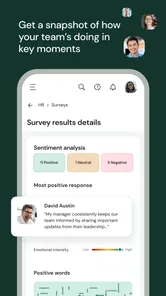
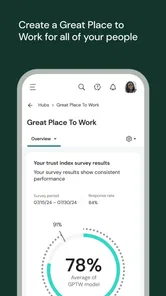
One of the standout features is the real-time insights it provides. You can monitor employee attendance, performance metrics, and even track compliance with labor laws. It’s like having an HR assistant in your pocket. Plus, the app supports mobile access, so whether you’re in the office or on the go, all your workforce data is right at your fingertips.
More From Our News Desk

Weather by Xiaomi Review: Clear at a Glance, Less Clear Up Close

X Under Pressure: Can It Recover When Posting Goes Wrong?

Clash of Clans Is Won Between the Battles

Android Auto Makes the Case for Quieter Car Software

MobiOffice: Transforming Mobile Productivity with Seamless Integration

EA SPORTS FC™ Mobile Soccer: Redefining Mobile Sports Gaming
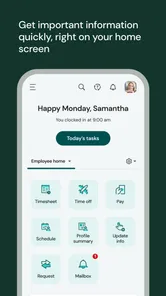
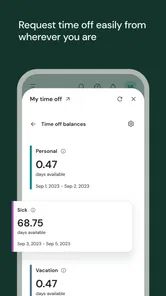
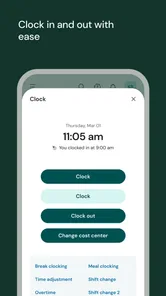
Another nifty feature is the employee self-service portal. Employees can clock in and out, request time off, and check their schedules directly from the app. No more paperwork or endless email threads. This not only saves time but also empowers employees by giving them control over their schedules and personal information.
Making everyday workflows less messy
A realistic benefit is having a single place to check a shift and handle a routine time-off request instead of relying on a paper notice or an old message thread. I would still treat the app as the place to submit or review information, not as proof that a manager has seen an urgent change. For a last-minute absence, contact the workplace through its normal channel as well, especially if the schedule affects coverage.
There is a useful trade-off in self-service: employees can take care of straightforward tasks themselves, but they also need to review what they submit. Before sending a time-off request, check the dates and any details your employer requires. Before relying on a displayed schedule, make sure you are looking at the relevant work period. These small checks reduce avoidable back-and-forth without assuming the app can make staffing decisions for you.
Keeping a useful personal record
Even when routine tasks live in the app, I would keep a simple personal note of important dates and the time I submitted a request. That is not a substitute for the workplace’s official records; it is a practical way to explain what you did if a request or schedule needs follow-up. For example, if you ask for time off well ahead of a busy period, noting the date helps you check in through the right channel without sending duplicate requests.
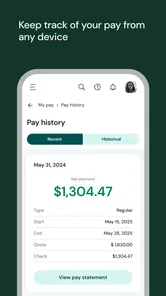
The same approach helps with time entries. Review them while the shift is still fresh in your mind rather than waiting until a later payroll question makes details harder to recall. If something seems wrong, describe the specific day and entry when you contact the person responsible. This makes the conversation more concrete and avoids guessing at what the app or employer has recorded.
Integration and Customization
Now, let’s talk about customization. Every business is unique, and UKG Ready gets that. The app allows you to customize dashboards and reports to suit your specific business needs. It also integrates smoothly with other systems, ensuring that your data flows effortlessly between platforms. Whether you’re using it for a small business or a large enterprise, it scales beautifully.
On the integration front, it connects with a variety of payroll systems, making it easier to process payments. The API capabilities also mean you can blend it with other business applications you might be using, creating a cohesive digital ecosystem.
Choosing the right channel for each task
For an employee deciding what to use, the practical comparison is not simply app versus no app. A paper form or email may suit a workplace that has no mobile process, while a calendar can be enough for remembering a shift after it has been confirmed. UKG Ready makes more sense when your employer has made it part of the actual workflow, so submitting a request or checking a work detail is connected to the system your workplace relies on.
That distinction matters because a mobile interface does not automatically replace every conversation. A request that needs discussion, a disputed time entry, or an urgent coverage issue still calls for the appropriate workplace contact. I see the app as a useful front door for routine actions, not as a promise that every issue can be resolved inside one screen.
When the app may not be the cause
If a schedule, time entry, or account detail looks wrong, I would first separate an access problem from a workplace-data problem. Try closing and reopening the app, check that your connection is working, and sign in again if the session has ended. If the same information still appears incorrect, contact your manager or HR team; they are better placed to confirm what your employer has entered or enabled.
For a missing option, do not assume that reinstalling will unlock it. The feature may depend on your employer’s configuration or your role. A clear message to the person who administers the system—what you were trying to do, what you see, and when it happened—is more useful than repeatedly trying the same steps. This is especially true for payroll questions, where the app is a route to workplace information rather than a substitute for the people responsible for correcting it.
Before treating a display as final
If you see a change in a schedule or a time record, pause long enough to identify exactly what looks different. Check that you are viewing the intended period and that you have not confused a submitted request with an approved workplace decision. If the distinction is unclear, ask your manager or HR contact to clarify the status rather than acting on an assumption. That small check can prevent a missed shift or an avoidable misunderstanding.
When a screen seems out of date, basic recovery steps are reasonable: confirm the connection, close and reopen the app, and try again later if the service is temporarily unavailable. But repeated refreshes will not correct information that has not been changed in the employer’s system. If the issue persists, report the item and the steps you took, and use the workplace’s established process for anything that cannot wait.
Compared with spreadsheets, paper forms, and separate email requests, a configured UKG Ready setup can keep employee tasks closer to the workplace’s HR and timekeeping process. Compared with a simple clock-in utility, it covers a broader range of workforce needs, but that breadth means it may feel unnecessary if your employer only wants one basic function or has not put mobile workflows in place.
Who is likely to get the most from it?
I would recommend it to employees who regularly need to check schedules, record work time, or submit routine requests through an employer that actively uses UKG Ready. Managers may also benefit when their organization has configured the tools and reporting they need. It is less suitable for someone expecting to create an independent account, manage a personal schedule, or replace direct contact with HR when a workplace decision needs clarification.
A particularly good fit is someone whose working week involves recurring, small administrative tasks: checking a shift, reviewing a time entry, or sending a routine request without waiting to be at a desk. The benefit is less dramatic than a complete change to how a workplace operates, but those repeated checks can be easier when they are handled through the employer’s established mobile route. If you rarely use such tools, or your workplace handles everything through another system, there may be little reason to add this app to your routine.
What to expect from access and support
A common practical question is whether downloading the app is enough to get started. In my view, it is not: first confirm that your employer uses UKG Ready for mobile access and find out how your account should be activated. If you are unsure whether a particular task belongs in the app, ask your manager or HR team which process they expect employees to follow. That short check is more useful than trying to infer your organization’s setup from what another employee can see.
UKG Ready is free, rated for Everyone, and developed by UKG, Inc. It has an average rating of 4.6 from around 31,000 ratings, with more than a million installs. Those figures suggest that it is widely used, but broad adoption does not guarantee that every employer has enabled the same mobile experience. The current version is 1.102.4, and it requires iOS 11 or later.
The Final Verdict
In a world where time is money, having an efficient system like UKG Ready can be a game-changer. It simplifies complex processes, provides valuable insights, and enhances communication within the workforce. While it might take some time to set up initially, the benefits far outweigh the initial effort.
So, if you’re looking to streamline your HR processes and boost productivity, giving UKG Ready a shot might just be the best decision you make. Trust me, your future self will thank you!
My practical verdict
I would install it when my employer confirms mobile access and explains which tasks the app is meant to handle. Once that groundwork is in place, it can be a handy everyday companion for checking work details and completing employee self-service tasks. If access is not enabled, information seems inconsistent, or you need an immediate answer about a workplace decision, go straight to your manager or HR team instead. That is the sensible way to get value from it without expecting the app to solve issues that belong to your employer’s setup.
UKG Ready Frequently Asked Questions
What should I check about my workplace before downloading UKG Ready?
Before downloading UKG Ready, ask your employer whether your organization uses the platform and has enabled mobile access. The app is connected to your workplace’s UKG Ready setup, so having the app installed by itself does not create an account or unlock workplace tools. Confirming this first can help you know whether you will be able to sign in and use the features your employer provides.
Will UKG Ready work on my phone?
UKG Ready requires a compatible mobile operating system, so check your device’s version before installing. The current version is 1.102.4, and the minimum operating system is 11. Meeting that requirement is only one part of getting started: your employer must also have UKG Ready configured for mobile, and the features you can use will depend on your workplace’s setup.
Is UKG Ready intended for employees, managers, or both?
UKG Ready can be relevant to employees and managers, but the app is not a standalone personal HR service. It connects to an employer’s UKG Ready system, and the organization determines which tools and information are available to each user. If you are unsure whether your role has mobile access or which functions are enabled, check with your employer before downloading.
Do I need an employer account to use UKG Ready?
Yes. UKG Ready is intended for people whose employer uses the UKG Ready platform and has configured it for mobile access. Downloading the app alone does not provide access to an employer’s workplace tools; your organization’s setup determines whether you can sign in and which features are available. Check with your employer if you are unsure whether mobile access is enabled.
Who develops UKG Ready, and what kind of app is it?
UKG Ready is a business app developed by UKG, Inc. It is designed to support workforce and human resources activities through a mobile experience connected to an employer’s UKG Ready system. Its usefulness therefore depends on your workplace’s configuration and the tools your employer makes available, rather than on the app being a standalone personal HR service.
Pros
- User-friendly interface simplifies navigation.
- Comprehensive employee management tools.
- Seamless integration with payroll services.
- Real-time updates enhance productivity.
- Cloud-based
- ensuring data accessibility.
Cons
- Initial setup can be time-consuming.
- Limited customization options.
- Mobile app occasionally lags.
- Higher cost for small businesses.
- Requires consistent internet connectivity.













