UKG Dimensions
- 5.63K
- 4.3
- Installs
- 1.00M
- Price
- Free

Screenshots
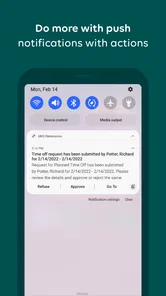
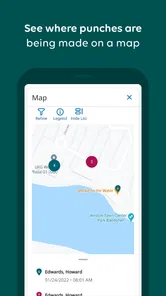
Analysis by Reviewed
For someone deciding whether to install a workplace app, the first question is practical: will it connect to the systems and routines your employer already uses? I would put that question ahead of any feature list when considering UKG Dimensions. It is a business app from UKG, Inc., intended to bring work-related tasks onto a phone for people whose organization uses UKG. It is not a general-purpose planner that becomes useful on its own.
That distinction shapes both the app’s appeal and its limits. A worker may want an easy way to keep track of work matters away from a desk; a supervisor may need to respond to routine requests while moving between responsibilities. But access and available tasks depend on the organization’s setup. I would check with your workplace before treating the app as the place where every schedule question or approval will be handled.
What to check before relying on it
Before your first busy shift, find out which tasks your employer expects you to complete in the app and which still belong in another system or conversation. That simple check helps avoid a common workplace-tool problem: assuming that a mobile view is the complete record when a team has several processes in play. It also gives you a sensible answer if a request or schedule detail is not where you expect it to be.
The app is free to install and rated for Everyone. It has an average rating of 4.3 from around 62,000 ratings, and it has been installed over a million times. Those figures show that it has a substantial audience, but they cannot tell an individual employee which features their organization has made available. For me, the key test is whether the specific tasks I need appear and fit the way my workplace handles them.
Unpacking the Features
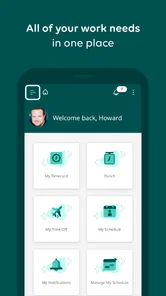
At its core, UKG Dimensions is all about optimizing the way businesses handle their workforce. From scheduling to payroll, this app takes a comprehensive approach to ensure everything runs smoothly. What really caught my attention was its intuitive user interface. Navigating through the app is a breeze, which is a huge plus for anyone who isn’t particularly tech-savvy.
One of the standout features is its AI-powered analytics. This feature doesn’t just crunch numbers; it provides actionable insights that can help managers make informed decisions. Imagine having a smart assistant who keeps tabs on all the important metrics and nudges you with suggestions to improve efficiency. That’s exactly what you get!
How it fits into a working day
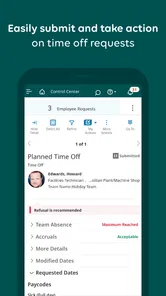
The app is most useful when a task is tied to a shift and cannot wait until someone is back at a desk. For example, a manager handling a busy day can check staffing needs and respond to a schedule request between other duties, while an employee can use the mobile channel to keep up with work matters away from a computer. That kind of quick access is practical, but it does not replace a clear process: teams still need to know who approves changes and where to resolve a discrepancy.
More From Our News Desk

Weather by Xiaomi Review: Clear at a Glance, Less Clear Up Close

X Under Pressure: Can It Recover When Posting Goes Wrong?

Clash of Clans Is Won Between the Battles

Android Auto Makes the Case for Quieter Car Software

MobiOffice: Transforming Mobile Productivity with Seamless Integration

EA SPORTS FC™ Mobile Soccer: Redefining Mobile Sports Gaming
A useful habit is to treat the phone as a place to review and act on straightforward items, not as the only place to investigate complex ones. If a schedule looks wrong, note what needs checking and follow the workplace’s normal route rather than assuming a mobile screen tells the whole story. This is especially important in organizations where different roles see different information or have different responsibilities.
Flexibility and Integration
Another aspect where UKG Dimensions shines is in its integration capabilities. It seamlessly connects with other enterprise systems, making it easier to manage data across platforms. Whether you’re dealing with HR, finance, or operations, this app ensures that data flows smoothly without any hiccups.
Plus, the mobile app version is a godsend for managers on the move. You can access crucial information, approve requests, and even modify schedules right from your smartphone. It’s like carrying your office in your pocket!
Where it differs from simpler tools
Compared with a shared calendar, spreadsheet, or lightweight shift-planning app, UKG Dimensions is aimed at organizations that need workforce activity to connect with broader business processes. That can be an advantage when managers and employees need a common system rather than separate documents, but it also means the app is not automatically the simplest choice for a small team that only needs to post a rota. A basic scheduling tool may be easier to set up if there is no wider UKG system behind it.
For employees, the key question is less whether the app has a long feature list and more whether their employer has configured the parts they actually use. Before relying on it for a time-sensitive change, I’d check that the relevant requests and approvals appear in the app and confirm what to do if a manager is unavailable. That small bit of preparation can prevent a mobile convenience from becoming a source of confusion.
Real-World Application
Now, let’s talk about how this app performs in real-world scenarios. Businesses of all sizes can benefit from UKG Dimensions, but it’s particularly useful for large enterprises with complex workforce structures. The scalability of the app means it grows with your business, adapting to new challenges as they arise. This adaptability is crucial in today’s fast-paced business environment.
Moreover, the app’s emphasis on compliance ensures that your business adheres to labor laws and regulations, which is a huge relief for any HR department.
For a worker whose shifts change from week to week, the practical benefit is having a mobile route to check work details and handle relevant requests without waiting to sit down at a workstation. For a supervisor, it can help keep routine decisions moving while away from the office. I would not recommend it as a personal planner for someone whose employer does not use UKG, though; without that organizational connection, the main reason to install it disappears.
A realistic shift-change scenario
Imagine that you notice a shift detail that needs attention while you are away from a computer. The useful first move is to open the app and see whether the relevant work information or request is available to you. If it is a straightforward matter, you may be able to deal with it through the mobile workflow your employer uses. If it involves a disputed time, a missing approval, or a change that affects another person’s coverage, the app should be the starting point for checking—not a reason to assume the issue has been settled.
I find that distinction important because convenience can create false certainty. A request sent from a phone is not necessarily the same as a confirmed change, and a screen that is useful for quick decisions may not explain why something was declined or delayed. Before making plans around a change, check the status your workplace treats as final and use the established contact route if the outcome is unclear.
Who gets the most value from it
This is a better fit for employees and managers who already have a UKG-based workplace process and need a mobile way to take part in it. It can be especially practical when work happens across locations or when supervisors cannot stay at a desk to handle every routine matter. Its value is less obvious for someone who only wants a personal calendar, or for a small team that has no need to connect scheduling with a wider business system.
If you are evaluating it on behalf of a team, I would begin with a short list of actual tasks rather than a broad promise to “manage everything.” Ask which roles need to check work details, which people handle requests, and what the team should do when an item needs explanation. That gives you a grounded way to judge whether a mobile workflow removes friction or merely moves it onto another screen.
Who should choose it—and what to keep in mind
UKG Dimensions is a business app developed by UKG, Inc. It is free to install, has an Everyone age rating, and has an average rating of 4.3 from around 62,000 ratings, with more than a million installs. Those figures suggest it is widely used, but they do not tell you whether your employer has enabled the workflows you need. I’d treat access through your organization as the deciding factor, rather than assuming every function will be available to every user.
The version currently listed is 2.09.00.0034, and the app supports Android 7.0 and later. For existing users, a version number alone is not a reason to expect a particular change in day-to-day behavior. I’d look for improvements that make routine actions clearer or more dependable, while judging the app by whether it fits your organization’s actual process. In any workplace tool, clarity around approvals and schedule changes matters as much as a polished interface.
What a mobile workflow does—and does not—replace
One practical trade-off is that a phone makes small actions easier to fit between other duties, but it is not always the best environment for reviewing a complicated situation. A supervisor may be able to respond to a routine item on the move, yet still need a fuller view or a conversation to understand a conflict involving coverage or policy. Likewise, an employee can use the app to keep work matters within reach without treating it as a substitute for asking a manager to clarify an unusual case.
I would also avoid using a personal note or a separate calendar as proof that a change has been approved. Those tools can help you remember what you requested, but they do not necessarily reflect your employer’s official process. A sensible approach is to use personal reminders for your own planning and the workplace’s designated system to verify the decision. This keeps convenience from creating two competing versions of a schedule.
Questions worth settling with your workplace
People often want to know whether they can use the app before an employer has connected them to its system. In practice, its usefulness depends on that organizational connection, so I would ask the relevant workplace contact how access is provided and which tasks are expected to appear. The same conversation can clarify whether mobile requests are appropriate for urgent matters or whether a direct call or another route is preferred.
Another sensible question is what to do when information looks incomplete or a request remains unresolved. I would not keep resubmitting the same item without checking the workplace’s process, since that can make it harder to tell which request is current. Instead, note the issue, check its status, and ask the appropriate person how to proceed. For a team, agreeing on that fallback in advance is more valuable than assuming every edge case can be solved on a phone.
For someone choosing between this and a simpler scheduling app, the deciding factor is the scope of the problem. If all a small group needs is a visible rota, a lightweight shared planner may be quicker and easier to maintain. If the organization already uses UKG and expects work-related tasks to connect to its wider processes, the UKG route is more coherent than scattering updates across calendars and spreadsheets. I would choose the smallest tool that reliably matches the team’s real workflow.
The Final Verdict
In conclusion, UKG Dimensions is more than just a workforce management tool; it’s a comprehensive solution that enhances productivity and ensures smooth operations. Whether you’re a small business owner or managing a large team, this app can make a significant difference in how you manage your workforce.
Overall, my experience with UKG Dimensions has been nothing short of impressive. The combination of powerful analytics, seamless integration, and user-friendly interface make it a must-try for anyone looking to optimize their workforce management processes. Give it a go, and you might just find it’s the solution you’ve been searching for!
My recommendation is more specific: if your employer relies on UKG and you need to handle work matters while away from a computer, the app is worth trying as part of that setup. If you are choosing a tool for an independent small team, or you mainly need a simple shared rota, a lighter alternative may suit you better. The point to watch is whether the mobile workflow makes everyday tasks genuinely easier for your team, rather than adding another place to check.
What to watch as it evolves
The app was released on March 5, 2018, and the current listed version is 2.09.00.0034. Those facts give a little context for its history, but they do not establish what changed between releases or predict what may arrive next. I would separate that confirmed information from expectations and judge any future change by whether it improves the actions people actually use, such as understanding a request’s status or checking work details without unnecessary back-and-forth.
For existing users, the most useful thing to watch is not a version label by itself but the effect of updates on familiar routines. If your employer depends on the app, take a moment after an update to confirm that the screens and steps you rely on still make sense, especially before a time-sensitive shift change. For anyone considering installation, I would first confirm workplace access, then try one ordinary task and see whether the mobile process is clear enough to trust. That is a more meaningful test than expecting the app to solve every workforce problem on its own.
UKG Dimensions Frequently Asked Questions
What should I check with my workplace before installing UKG Dimensions?
Before downloading, ask whether your employer uses UKG Dimensions and whether employees are expected to use the mobile app. It is a business tool for work needs on the go, and installing it alone does not create an account or connect you to workplace information. Your employer can tell you how access is arranged and whether the app is part of your organization’s usual process.
What phone requirements should I check before downloading UKG Dimensions?
Check that your phone runs a compatible operating system before installing the app. The Android version requires Android 7.0 or later, and UKG Dimensions is also available for iOS devices. Keeping your device’s software updated can help you avoid compatibility problems and use the app smoothly. Your workplace may also have guidance about which devices employees should use.
Can UKG Dimensions help me manage work needs while away from a computer?
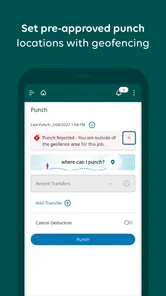
UKG Dimensions is intended to help users manage work needs on the go. Its workplace functions can include checking time and attendance, schedules, and other workforce tasks, depending on the access and setup provided by your employer. It is most useful when your organization uses UKG Dimensions and has enabled the relevant features for employees. Ask your workplace which tasks you can handle through the app.
Do I need an employer account to use UKG Dimensions?
UKG Dimensions is a work-focused app, so it is most useful when your employer has set up access for you. Before downloading, check with your workplace about whether it uses UKG Dimensions and how employees are expected to sign in. Having the app installed on your phone does not, by itself, provide access to your organization’s work information.
What is UKG Dimensions and what does it offer?
UKG Dimensions is an advanced workforce management solution designed to streamline operational processes. It offers features such as time and attendance tracking, scheduling, payroll integration, and analytics. The app aims to enhance productivity and employee engagement by providing real-time insights and a user-friendly interface for managing workforce tasks efficiently.
Pros
- User-friendly interface design.
- Comprehensive scheduling features.
- Real-time data syncing.
- Customizable dashboards.
- Robust mobile app support.
Cons
- Steep learning curve for new users.
- Occasional syncing delays.
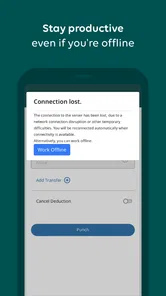
- Limited offline functionality.
- High subscription costs.
- Complex integration process.













