TracFone My Account
- 18.98K
- 3.4
- Installs
- 5.00M
- Price
- Free

Screenshots
Analysis by Reviewed
I see TracFone My Account as a practical companion to TracFone service rather than a general-purpose phone tool. Its job is to put account management within reach on your phone, which can be useful when you want to check on your service without looking for a computer or calling for routine details. The app is free, and that makes trying it a straightforward choice for existing customers; the value comes from whether its account tools fit the way you manage your line.
Where the convenience matters most
The clearest benefit is having a place to handle recurring account tasks. If you are already a TracFone customer, it can save you from treating every balance check, service purchase, or airtime addition as a separate errand. I would keep it for quick account checks and simple upkeep, especially if you prefer doing those things from your phone.
A useful habit is to check your account before you actually need your phone for something important. For example, before a day trip, I would look at the available service information and take care of any needed account action while I still had time to sort it out. That is a modest workflow, but it can prevent a last-minute scramble. The app is most valuable as a way to stay ahead of routine service management, not as a substitute for planning your phone use.
How it fits alongside other options
Compared with managing a mobile account through a browser or seeking help for ordinary questions, a dedicated account app can make repeat checks feel more direct. The trade-off is that it is tied to TracFone: it is not a universal dashboard for accounts from different providers. If you switch carriers often or want one tool to compare several plans, a carrier-neutral approach will suit you better. For someone staying with TracFone, keeping service tasks close at hand is the more relevant benefit.
I would also treat convenience and reliability as separate things. A quick app-based route is helpful when it works for the task at hand, but it is sensible to keep your account details accessible and allow time before a renewal or other time-sensitive action. If a transaction needs attention and the app is not cooperating, use another available way to manage the account rather than repeatedly tapping through the same screen. That is a practical backup habit, not a reason to expect every issue to be solved inside the app.
Cost, reach, and fit
There is no purchase price to weigh here: the app is free. That does not tell you what TracFone service itself will cost, so I would judge the app separately from any plan decision. Its audience is also specific. It makes the most sense for current TracFone customers who want account access on a phone; if you do not use TracFone, there is little reason to install it.
TracFone My Account is a communication app from TracFone Wireless, Inc. It has an Everyone content rating, has been available since October 17, 2013, and its current version is R26.16.0, with Android 7.0 as the minimum operating system. Its average rating is 3.4 from around 54,000 ratings, with around 19,000 written reviews, and it has been installed over 5 million times. I read that mixed rating as a reason to keep expectations practical: the app addresses a specific need, but a large user base does not guarantee a smooth experience for every person or device.
You May Like

Clash of Clans Is Won Between the Battles

Android Auto Makes the Case for Quieter Car Software

MobiOffice: Transforming Mobile Productivity with Seamless Integration

EA SPORTS FC™ Mobile Soccer: Redefining Mobile Sports Gaming

How Microsoft OneDrive Became a Mobile Productivity Giant

How Google Translate Breaks Language Barriers Effortlessly
All About Convenience
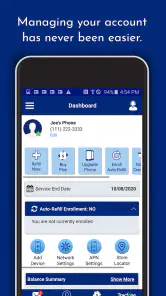
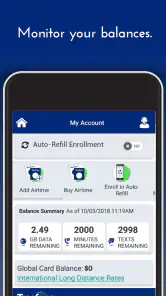
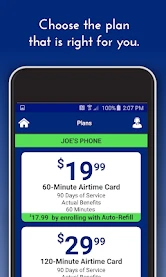
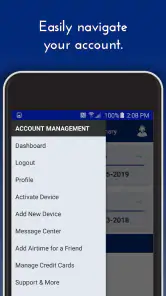
First off, let me say that the TracFone My Account app is all about convenience. You know those times when you’re scrambling to find out how many minutes you have left or when your service is due for renewal? This app has your back. It’s got a super simple interface that even the least tech-savvy among us can navigate. You can check your balance, purchase new service plans, and even add airtime, all with just a few taps.
User-Friendly Interface
The app’s design is as straightforward as it gets. As soon as you open it up, you’re greeted with all your necessary info displayed in a neat, organized manner. I particularly love how it shows my data usage right on the home screen—no digging through menus to find it. Plus, the colors and layout are easy on the eyes, making it a pleasant experience overall.
Managing Multiple Accounts
If you’re someone who manages multiple TracFone lines, this app is a game changer. You can link various accounts and switch between them without any hassle. This feature is especially useful for families or small businesses where keeping track of multiple lines can be a nightmare. Just a few taps, and you’re good to go!
Seamless Payment Options
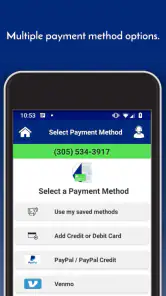
Ever been stuck because you forgot to renew your plan? The app’s payment options are seamless, allowing you to handle renewals and add-ons without breaking a sweat. You can securely save your payment methods, making future transactions a breeze. Just a quick tap, and your airtime is updated—no more last-minute scrambles!
A calmer way to manage a busy household
For a family using several TracFone lines, the account-switching option can be more than a convenience: it can make the person handling household phone upkeep less likely to confuse one line’s balance or renewal with another’s. I would make a habit of checking which account is active before buying service or adding airtime. That small pause matters whenever several lines are involved, because a useful shortcut is only useful when the action is applied to the intended account.
That same workflow can help a caregiver who keeps an eye on a relative’s phone service, provided the relevant account access is in place. Instead of waiting for a call that the line is running low, they can make account checks part of a regular routine. I would still keep the account holder involved in decisions about purchases and renewals. The app makes line management more accessible; it does not remove the need to agree on what should be added or when.
Small habits that prevent avoidable hassles
One practical tip is to check usage and service information at a quiet moment rather than while trying to solve an urgent problem. If I were preparing for a long day away from home, I would open the account early, review what is available, and handle any necessary service action before leaving. Doing it in advance leaves room to switch to another account-management route if something does not go through as expected.
I would also avoid treating a displayed balance or usage figure as a complete plan for the day. The app can help you see account information, but deciding whether your service will suit a particular trip depends on how you expect to use your phone. For a day with navigation, calls, and data-heavy tasks, checking the account is a useful first step, not a guarantee that the available service will match every demand. That distinction keeps the app in its proper role: an account tool, not a usage planner.
When managing more than one line, I would use a simple personal routine: check the account identity, review the relevant service information, then confirm the intended purchase before submitting it. This may sound obvious, but it is an easy safeguard when switching between family lines. The convenience of having several accounts in one place is strongest when you slow down for the one moment where a mistaken selection could create extra work.
What the app does—and what it does not replace
For routine carrier tasks, a dedicated app is generally more direct than opening a browser and finding the right account page each time. That is where this app’s focused design has an advantage over a general phone utility: the account actions it supports sit alongside the service information a TracFone customer is likely to check. At the same time, it cannot help someone compare service from several carriers in one neutral place, and it is not a replacement for broader customer support when an account problem needs personal attention.
If you only need to manage a line occasionally, using a browser or another established account channel may be enough. Installing a dedicated app makes more sense when you expect to check service regularly, make purchases from your phone, or oversee more than one TracFone account. I would not download it just because it exists; I would use it when repeated access saves time in a way that matters to my own routine.
Another reasonable question is whether the app costs extra. The app itself is free, so there is no purchase price for installing it. That should not be confused with the cost of service, plans, airtime, or add-ons, which are separate decisions. I would compare those service choices on their own terms and use the app as a way to manage an account, not as evidence that a particular plan is inexpensive or right for me.
Who is most likely to appreciate it
I would recommend it first to existing TracFone customers who prefer handling routine account checks on a phone. It is especially relevant if you often check data usage, keep track of service timing, add airtime, or help manage several lines. The best fit is someone who values a direct route to those specific tasks and is comfortable keeping a carrier-specific app for them.
It is a weaker fit for people who do not use TracFone, customers who rarely need to check or change account details, and anyone looking for a single dashboard across multiple providers. People who prefer speaking with a representative for every account question may also get little from installing it. The app’s practical value depends on whether its self-service approach matches how you like to manage phone service.
The Everyone content rating makes the app broadly suitable from an age-classification perspective, but that does not change its audience: its tools are aimed at managing a TracFone account. It has been around since October 17, 2013, and the current version is R26.16.0. Android users need version 7.0 or later. I would check that requirement before installing it on an older device, then decide based on whether the account features fit my needs.
The rating picture is mixed rather than glowing: it averages 3.4 from around 54,000 ratings, alongside around 19,000 written reviews. With over 5 million installs, many people have tried it, but reach alone does not tell me whether the app will behave smoothly on a particular phone or suit every customer’s expectations. I take those numbers as context, not a promise. For a free account-management app, my decision would rest more on whether I need its specific tools than on popularity alone.
My recommendation for everyday use
In an ordinary week, I would use the app as a quick checkpoint: open it when I have time, review the line I care about, and handle routine account upkeep before it becomes urgent. If I were preparing for a trip, I would check service beforehand rather than waiting until I was already on the road. If the account action were time-sensitive, I would leave a buffer and keep another way to manage the account in mind.
That approach also answers the question of whether this should be the only way to manage a TracFone line. I would not rely on any single route for an important transaction. The app can be the convenient first choice for everyday checks, while a browser or another available account channel can serve as a backup if the app is unavailable or a task needs a different kind of help. That is not a criticism unique to this app; it is a sensible way to handle any account tool tied to essential phone service.
In conclusion, if you’re a TracFone user, the TracFone My Account app is definitely worth downloading. It’s an intuitive, streamlined way to manage your mobile service with ease. While it might not win any awards for innovation, it sure wins in practicality. So, if convenience is what you're after, give it a try and see how it simplifies your mobile life.
TracFone My Account Frequently Asked Questions
Is TracFone My Account the right app for someone who is not a TracFone customer?
TracFone My Account is intended for TracFone customers who want to manage their service from a phone. If you do not have a TracFone account, its account-management features are unlikely to be useful to you. The app is free to download, but its main purpose is tied to handling TracFone account details rather than serving as a general communication or phone-management tool.
What operating system does TracFone My Account require?
On Android, TracFone My Account requires Android 7.0 or later. Checking your device’s operating system before downloading is a simple way to avoid compatibility trouble. The app is also offered for iOS, so iPhone users should check the app’s requirements in the Apple App Store before installing. Keeping your device’s software current can also help with general app compatibility.
Who develops the TracFone My Account app, and what is its age rating?
TracFone Wireless, Inc. develops the TracFone My Account app. Its Everyone age rating makes it suitable for a broad audience, while its purpose is specifically to help TracFone customers manage their accounts from a phone. Before downloading, check that you are choosing the official app from TracFone Wireless, Inc., so you can use the intended account-management service.
What is the TracFone My Account app used for?
The TracFone My Account app is designed to help TracFone users manage their account details conveniently. With this app, users can check their current balance, monitor usage history, view service end dates, and even purchase airtime easily. It's a comprehensive tool for managing your TracFone services without needing to visit a physical store or use a computer.
How do I check my balance using the TracFone My Account app?
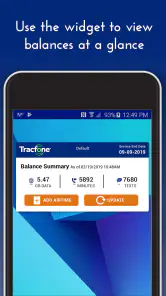
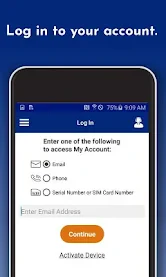
To check your balance using the TracFone My Account app, simply log in with your TracFone credentials. Once logged in, the home screen will display your current balance, including details about your remaining minutes, messages, and data. This feature provides users with real-time information about their account status, ensuring they stay informed about their usage.
Pros
- User-friendly interface
- Easy balance tracking
- Quick payment methods
- Detailed usage history
- Multi-device sync
Cons
- Limited customer support
- Frequent app crashes
- Occasional login issues
- No dark mode
- Limited notification options

- Category
- Communication
- Version
- R26.16.0











