TotalAV Antivirus & Security
- 23.03K
- 4.2
- Installs
- 10.00M
- Price
- Free

Screenshots
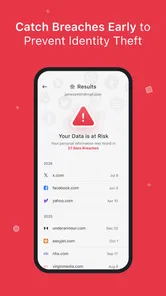
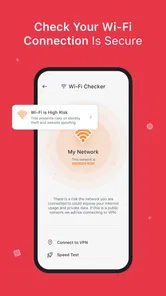
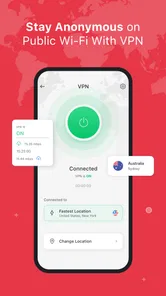

Analysis by Reviewed
I judge a mobile security app less by how many tools it promises and more by whether it makes everyday decisions clearer. TotalAV Mobile Security is a free security app from Protected.net Group Limited T/A Total Security, and its current version is 3.0.9. It has an average rating of 4.2 from around 153,000 ratings, with more than 10 million installs. Those figures suggest it has found a broad audience, but what matters to me is whether its approach suits the way you actually use your phone.
Where it fits in a mobile routine
I think a dedicated security app is most useful when it changes a repeatable habit, rather than simply adding another icon to your home screen. With TotalAV, I’d decide in advance what I want it to help me remember: checking the phone before travel, using a VPN on an unfamiliar network, or having a single place to review security tools. That small bit of planning makes it easier to judge whether the app is earning its place.
It can suit people who want a guided, visible layer over the protections already on a phone, especially if they don’t enjoy digging through system settings. It is less compelling for someone who is confident managing those settings and rarely connects outside trusted networks. In that case, a dedicated app may be more about reassurance than a practical change in protection, and the extra interface can become clutter.
Who will get the most from it
I’d consider it if you want security tools gathered in one place rather than assembling separate apps and settings yourself. That can be useful for someone who often connects to public Wi-Fi, shares a phone with family, or simply wants a clear place to start when checking mobile security. It’s rated for Everyone, and it’s free to install, though in-app purchases range from $4.99 to $59.99 per item, so I’d check what is included before paying for anything.
For example, imagine you’re waiting at a station and need to check a booking over public Wi-Fi. The practical question isn’t just whether a VPN exists, but whether you remember to use it before opening an account or entering details. My tip is to make that connection part of the routine: open the security app first, then do sensitive browsing. A tool only helps when its place in your day is easy to remember.
Choosing between an all-in-one app and built-in tools
Compared with relying only on the security features already built into a phone, TotalAV offers a more visible, consolidated experience. That can feel reassuring if you prefer one app to guide your checks. The trade-off is another app to maintain and another interface to learn. If you’re comfortable with your phone’s built-in protections and rarely use unfamiliar networks, those may already fit your needs better; installing a dedicated suite just for reassurance can add friction without changing your habits.
I’d also avoid treating a VPN as a substitute for careful browsing. It can be a useful part of a public-network routine, but it doesn’t make every link trustworthy or remove the need to think before sharing personal details. Likewise, a security scan is most useful as a check-in, not a reason to assume every possible risk has disappeared. Keeping your phone and apps updated and reviewing what you install still matters.
More From Our News Desk

 Lark Player:Music Player & MP3
Switching to Lark Player: A Better Fit for Music Stored on Your Phone?
Lark Player makes sense if your music already lives on your phone. Here is what changes, what does not transfer by assumption, and how to test the switch without regret.

 Tile Master® - Matching Game
Tile Master Finds Its Place in the Gaps of a Noisy Phone
OS changes rarely transform a tile puzzle, but they reshape the small rituals around it. Tile Master’s appeal lies in how well its brief, tactile rounds fit the modern phone.

 Google Docs
 Shows What Mobile Writing Still Gets Wrong
Google Docs still makes a strong case for the shared document, but its real significance is how it exposes the gap between cloud convenience and genuinely capable mobile work.

 YouTube Studio
 Is Becoming a Creator’s Daily Control Room
As publishing turns into a daily, data-led habit, YouTube Studio is becoming the control room creators reach for between uploads—not another tool for making videos.

 Tiles Hop Music & Ball Game
Tiles Hop Review: When the Beat Is Clear, Every Miss Counts
Tiles Hop turns a simple bouncing-ball premise into a sharp test of timing. Its best design is immediate and readable; its weakest moments come when recovery feels less clear than the beat.

 Piano - Music Keyboard & Tiles
: Inviting Rhythm, Unproven Recovery
A tile-tapping piano game lives or dies by timing. This resilience-focused review separates what its format promises from what players still need to verify.
Latest News



Getting Started with TotalAV Mobile Security
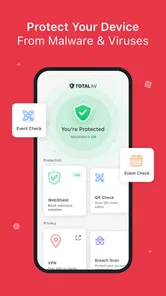
Jumping into TotalAV Mobile Security is like getting a new pair of sneakers; it feels fresh and promising. Installing the app was a breeze, as it’s available on both the Google Play Store and Apple App Store. Within minutes, I had it up and running. The user interface is sleek and user-friendly, which is always a plus in my book. No one wants to fumble around trying to figure out how to use an app that promises to protect your precious data.
Making the tools useful beyond the first scan
One non-obvious way I’d use a security suite is as a prompt for a quick phone check before a trip, rather than as something to open only after a warning appears. Before leaving home, I’d make sure the app is up to date, take a moment to run any check I intend to rely on, and decide how I’ll handle public Wi-Fi. Doing that while I have a stable connection avoids trying to sort out unfamiliar controls in a hurry.
If you share a device with a partner or family member, the value of a central security app depends on whether everyone understands the same routine. A tool that one person uses while everyone else ignores it can create a false sense that the whole phone is covered. I’d explain which actions are still personal responsibilities—such as avoiding suspicious links and being selective about downloads—so the app complements good habits instead of replacing them.
Another useful trade-off to consider is convenience versus duplication. A consolidated dashboard is easier to remember than several separate utilities, but some tools may overlap with features already supplied by the operating system or another app. Before installing additional security software, I’d identify the specific gap I’m trying to address. If I can’t name one, I’d first review the phone’s built-in protections rather than collect overlapping apps.
Features That Stand Out
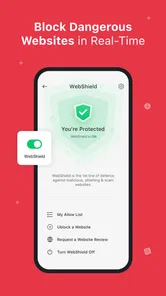
Once you dive into the app, you’ll find a treasure trove of features designed to keep your phone safe and sound. First off, the real-time antivirus protection is a lifesaver. It scans for malware and other threats, ensuring your personal information stays under lock and key. I personally loved the fact that it didn’t slow down my phone – it’s like having a security guard who’s both vigilant and discreet.
Another highlight for me was the VPN service. It’s not every day you find a mobile security app that throws in a VPN for good measure. This feature lets you browse safely on public Wi-Fi without the fear of prying eyes. Trust me, with cyber threats lurking everywhere, this feature is worth its weight in gold.
Usability and Performance
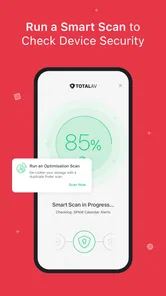
The app doesn’t just rest on its laurels with a bunch of features. Performance-wise, it’s smooth sailing. The battery consumption is minimal, which, let’s be honest, is a blessing. There’s nothing more annoying than an app that drains your battery faster than you can say "cybersecurity." The security scans are thorough yet quick, meaning you can get back to doing what you love without any annoying delays.
On the usability front, TotalAV Mobile Security is straightforward. Everything is laid out intuitively, which means even if you’re not tech-savvy, you won’t find yourself lost in a labyrinth of settings and options. It’s approachable, and that’s something I appreciate.
What I’d check before paying
The app is free to install, but that doesn’t mean every tool or level of access will necessarily be included at no cost. Since in-app purchases vary in price, I’d look carefully at the screen describing an offer and confirm what it covers before accepting it. I’d also consider how often I actually use the VPN or other available tools. Paying for something I open only once would be hard to justify, even if the feature sounds useful in theory.
That’s also why I wouldn’t compare a paid tier with a phone’s built-in security as if they were automatically equivalent. The right question is whether a particular option solves a recurring problem for you. If your main concern is staying cautious on public Wi-Fi, build that behavior first and then decide if the app’s paid offering adds enough convenience to be worthwhile. If your concern is simply general peace of mind, the free experience may be the more sensible place to start.
When I’d think twice
It won’t be the right choice for everyone. If your priority is the lightest possible setup, or you prefer to manage security entirely through your phone’s own settings, an additional suite may feel unnecessary. I’d also be cautious about paying for extras before deciding which tools you will genuinely use. Try the free app first, note which features you reach for during a normal week, and only then weigh whether an in-app purchase makes sense for you.
One practical way to judge the fit is to use it around a specific habit rather than expecting it to solve security in general. If you travel, connect to unfamiliar networks, or want a dedicated security app to make checks more visible, that routine gives you a clear test. If you mostly stay on trusted networks and never open the app after installing it, the convenience of an all-in-one dashboard may not outweigh the extra step.
How it compares with other security choices
The usual alternatives are not all other security suites. For many people, the first comparison should be the phone’s built-in protections, which avoid adding another app and may be enough for someone who keeps their device current and installs apps carefully. A separate antivirus app can be a better fit if you want a dedicated place to run checks, while an individual VPN may suit someone whose only regular need is safer browsing on public networks.
TotalAV’s appeal is the bundled approach: it brings security tools together instead of asking you to choose and manage each one separately. That is convenient if you want a recognizable starting point, but it is not automatically better than a smaller setup. A single-purpose alternative may be clearer if you know exactly what you need, and built-in settings are simpler if you don’t want another service to manage. I’d choose based on the routine I’ll actually follow, not on the size of a feature list.
There is a practical limitation in any all-in-one approach: a broad collection of tools can make it harder to tell which one is doing useful work for you. I’d keep a short mental note for a week—when did I open the app, and what did I use? If the answer is consistently “nothing,” that is meaningful evidence that the suite is not the right match for my habits. If I keep returning to one particular tool, I can judge that tool on its own merits before considering any purchase.
What the version tells me—and what I’d watch
TotalAV Mobile Security was released on September 21, 2016, and its current version is 3.0.9. That gives the app a long-running presence, but a version number alone doesn’t tell me what changed between releases or how those changes affect every phone. I wouldn’t infer a particular new feature from it. For existing users, the useful approach is to keep the app current and check its interface after an update rather than assume that familiar controls have stayed in exactly the same place.
On Android, the minimum operating-system requirement is Android 6.0, which makes compatibility worth checking before installing on an older device. If the app doesn’t suit your phone or your expectations, the sensible alternative may be its built-in security settings rather than another third-party suite. I’d also keep an eye on how clearly the app distinguishes free access from paid options; knowing what you actually use is a better basis for deciding than buying simply because an upgrade prompt appears.
For existing users, a change in version is a good reason to revisit—not panic over—the way the app fits into daily use. I’d check whether the tools I rely on are still easy to find and whether any purchase prompts affect my normal routine. If a control has moved, taking a moment to locate it before I need it on a trip is more useful than assuming the app works exactly as it did before.
For someone considering a first install, the main practical question is whether the phone can run it and whether a dedicated suite is genuinely needed. The Android requirement is clear, and the app is also offered through the Apple App Store. Either way, I’d start with the free version, explore the available controls at a calm moment, and avoid buying anything until I understand which functions I personally want to keep using.
Final Thoughts
So, what’s the verdict? If you’re in the market for a reliable and comprehensive mobile security solution, TotalAV Mobile Security might just be your new best friend. With its robust antivirus protection, handy VPN service, and smooth performance, it’s a well-rounded app that covers all bases. It’s like having a Swiss Army knife of mobile security in your pocket.
At the end of the day, our smartphones are an extension of ourselves. Keeping them secure should be a top priority, and with TotalAV Mobile Security, you’re in good hands. Give it a try and see for yourself. After all, peace of mind is just a download away.
TotalAV Antivirus & Security Frequently Asked Questions
What does TotalAV Mobile Security do, and who might find it useful?
TotalAV Mobile Security is a mobile security app intended to help keep you safe while you are on the go. It may suit people who want a security-focused tool on their phone, whether they are new to mobile security or already comparing apps. Before installing, think about what you expect from a security app and review the available features and purchase options to see whether they fit your needs.
Is TotalAV Mobile Security suitable for families and younger users?
The app has an Everyone content rating, which can help families assess whether it is appropriate for their intended use. That rating is a useful starting point, but parents may still want to look through the app themselves and discuss safe device habits with younger users. Consider the app’s purpose and the way your family uses mobile devices before deciding whether to install it.
Can I use TotalAV Mobile Security without creating an account?
Whether an account is needed can affect how convenient an app feels, so it is worth checking the sign-in prompts and setup steps when you first open TotalAV Mobile Security. If you prefer not to create accounts for every app, review the app’s on-screen instructions before proceeding with setup. This helps you understand what is required for the experience you want.
Is TotalAV Mobile Security free to download, and are there optional purchases?
TotalAV Mobile Security is a free app, so you can download it without paying an upfront price. It also offers in-app purchases, giving users the option to pay for additional offerings. If you are comparing it with other security apps, check the purchase details in the app before committing, and consider whether the features you want are included at no cost or require a purchase.
Which devices and operating systems can run TotalAV Mobile Security?
TotalAV Mobile Security is an app for mobile devices, and its minimum operating system requirement is Android 6.0. Before downloading, check the operating system version on your device to make sure it meets that requirement. The app is categorized as a tool and is rated for everyone, which may also help families decide whether it is suitable for their intended use.
Pros
- Comprehensive virus protection
- Easy-to-use interface
- Real-time threat detection
- Includes VPN for secure browsing
- Regular updates and improvements
Cons
- Can slow down older devices
- Some features require premium
- Occasional false positives
- Limited free version functionality
- May drain battery quickly