Tim Hortons
- 3.63K
- 3.2
- Installs
- 5.00M
- Price
- Free

Screenshots
Analysis by Reviewed
I find the Tim Hortons app most useful when I already know what I want and would rather sort out the order on my phone than start from scratch at the counter. It brings menu browsing, customization and ordering together in one place, with store-finding and promotions alongside them. That makes it practical for regular visits, though it is less compelling if you rarely go to Tim Hortons or prefer choosing from several nearby cafés.
When the app earns its place on your phone
I would think of this as a chain-specific tool rather than a general food-ordering app. Its strongest case is a familiar stop that already fits your routine: the same morning drink, a snack on the commute, or a planned visit when you are passing a location. If you are still deciding between different cafés, a broader map or search app gives you a more useful starting point because it can help you compare options beyond one brand.
That distinction matters before you install it. The app can make a Tim Hortons visit easier to organize, but it does not replace the judgment involved in choosing where to eat or what suits your budget. I would use it after deciding that this is where I want to go, then let its menu and ordering tools help with the details.
Using the app for everyday visits
The app is free to download, so trying it does not require paying for the app itself. That is a useful distinction when judging its value: any spending comes from the food or drinks you choose to order, not an app purchase. The developer is The TDL Group Corp., and the app is rated for Everyone. I would treat it as a convenience for ordering from the chain, not as a way to make a visit free or automatically cheaper.
Make repeat orders work for you
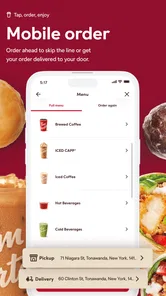
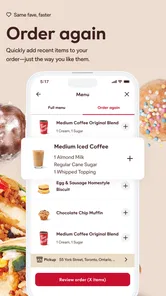
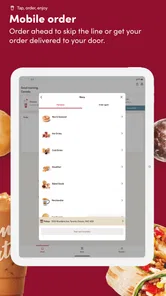
The ordering flow lets me browse the menu, customize a choice and put it in the cart. Saving a regular order is especially handy if your usual breakfast is predictable: rather than rebuilding it while you are in a hurry, you can return to a familiar choice and check it before placing the order. I would still review the customizations each time, particularly if I am ordering for someone else or changing a drink, since a saved favorite is a shortcut, not a reason to skip checking the cart.
A useful habit is to treat that saved order as a starting point, not a final instruction. Before you submit, pause on the cart and confirm that the drink and any changes match what you want today. This quick check is particularly worthwhile when ordering for a colleague or family member: familiar choices can be easy to mix up when several people want slightly different versions.
A realistic use is placing an order before leaving home, then using the time on the way to decide whether anything needs changing. That can make a routine stop feel less rushed, but it only helps if the location and timing suit your plans. If you are already at the counter, have a complicated request, or want staff to help you choose, ordering in person may be simpler than navigating a screen.
More From Our News Desk

Weather by Xiaomi Review: Clear at a Glance, Less Clear Up Close

X Under Pressure: Can It Recover When Posting Goes Wrong?

Clash of Clans Is Won Between the Battles

Android Auto Makes the Case for Quieter Car Software

MobiOffice: Transforming Mobile Productivity with Seamless Integration

EA SPORTS FC™ Mobile Soccer: Redefining Mobile Sports Gaming
Plan around the stop, not just the screen
For a weekday commuter, the useful workflow is to decide on the branch and order before the usual rush, then keep the app as a way to prepare rather than a guarantee that the whole stop will take no time. If your route changes, check the location before relying on an order you started for a different stop. That small bit of planning helps avoid the frustrating mismatch of having a ready choice but needing to go somewhere else.
The same approach works for a group pickup, but I would keep the order simple and confirm every item before submitting. A phone makes it easy to collect several choices in one place; it can also make a wrong selection less obvious than saying each item aloud. When requests are unusual or need explanation, the counter gives you a more direct chance to clarify them.
Rewards and promotions need a little attention
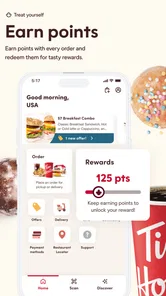
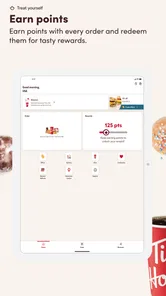
The app includes a rewards program where purchases earn points that can be redeemed for items such as coffee and baked goods. That can add value for someone who visits often, but I would not count rewards as an immediate discount on every order. The benefit depends on making eligible purchases and eventually using the points, so occasional visitors may find the program less meaningful than regular customers do.
I would also separate “earning points” from “saving money today.” If you already planned to buy something, rewards can make a repeat habit feel more worthwhile over time. If you are adding an extra item just to build a balance, the apparent benefit may not justify the additional spend. The app is free, but that fact does not make every order or promotion a bargain.
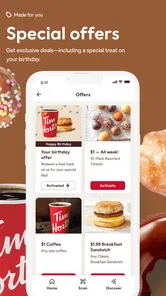
Promotions and limited-time offers can also help me spot something worth trying. I would check them before settling on my usual order rather than assume every offer applies to every visit. A practical trade-off is that promotions can tempt you to add something you did not plan to buy; the app is most useful when an offer fits what you wanted anyway, not when it creates extra spending.
Finding a location without changing your routine
The store locator is useful when I am away from my normal route or exploring an unfamiliar area. It gives the app a purpose beyond repeat ordering: I can look for a nearby Tim Hortons before deciding whether a detour makes sense. Still, if I am choosing among several cafés based on distance, opening hours or a broader range of menus, a general map or local search may be a better first step. This app is focused on one chain, which is convenient when that is the destination and limiting when it is not.
In practice, I would use the locator to narrow down a chain-specific stop, then check that the location makes sense for my route before committing to an order. If convenience is the deciding factor and there are several kinds of food nearby, compare them first rather than letting the first familiar brand set the plan. This is a small but useful distinction: finding a branch and finding the best nearby option are different tasks.
How it compares with other ways to order
Compared with ordering at the counter, the app gives you more time to browse and inspect a familiar order before placing it. In person, though, you can ask questions and explain an unusual request directly. I would choose the phone for a straightforward repeat visit and the counter when I am unsure about a menu choice or need a conversation to get the order right.
Compared with a general delivery or restaurant-search service, this app is more focused on Tim Hortons rather than helping you weigh a wide selection of businesses. That focus is a benefit if the chain is already your destination; it is a limitation if you want to compare restaurants or have not decided what kind of meal you want. For a quick coffee stop, opening a dedicated app may be simpler than browsing a broad marketplace, while a broad search is better for discovering alternatives.
For a commuter who buys the same drink and snack several times a week, the combination of a saved order, points and location search is more useful than any one feature alone. Someone who visits only now and then may get more value from simply checking the menu and finding a branch. The app is available at no charge, but that does not settle whether a particular purchase is good value: I would compare the order with what I actually want, rather than treating points or a promotion as a reason to spend.
What to expect from the experience
The interface feels approachable, and the basic path from browsing to customizing and adding an order is easy to follow. The app has an average rating of 3.0 from around 128,000 ratings, which suggests experiences are mixed rather than universally smooth. I would approach it as a handy option for straightforward visits, not assume every interaction will be effortless. Its current version is 7.1.493, and it requires Android 7.0 or later; it has been available since July 27, 2017.
The main practical trade-off is that convenience depends on the order being clear and the visit fitting your plans. A saved choice can reduce repeated browsing, but it does not remove the need to check the cart. A location tool can help when you are away from home, but it is not a substitute for comparing the wider area. I would keep those limits in mind rather than expect the app to make every stop seamless.
There are over five million installs and around 3,500 written reviews, so it is a well-established app, but popularity alone does not tell me whether it fits my habits. If you mainly want a quick way to repeat a familiar chain order, it is worth trying. If you value comparing independent cafés, need help deciding what to order, or visit too rarely to care about points, I would skip installing it and use a broader search or order at the counter instead.
Who is most likely to get value
I see the clearest fit for people who already choose Tim Hortons regularly and have a fairly stable order. They can use the app to prepare a familiar selection, keep an eye on rewards and find a location when their usual route changes. It also suits someone who likes browsing before arriving, rather than making a decision while others are waiting behind them.
It is a weaker fit for someone who visits only occasionally, wants to discover local cafés, or prefers a staff member to guide the choice. A person who does not want another account or app in their routine may also find that ordering in person is enough. The app costs nothing to download, but convenience has value only if you actually use it; installing it for a rare visit may not improve much.
My verdict on the value
The first thing that caught my eye was the app's user-friendly interface. Upon opening the app, you're greeted with a clean and intuitive design that makes navigation a breeze. Whether you're a tech-savvy individual or someone who's just getting started with apps, you'll find this interface welcoming and easy to use.
Ordering Made Simple
One of the standout features of the app is its streamlined ordering process. You can easily browse the menu, customize your order, and add it to your cart with just a few taps. I particularly love how you can save your favorite orders for quick reordering—perfect for those mornings when you're in a rush and need your caffeine fix pronto!
Even with a quick reorder, I would make a point of checking the final selection rather than tapping through automatically. That is the small trade-off behind speed: it saves you from rebuilding a routine order, but it can also encourage you to move too quickly. A glance at the cart keeps the convenience without turning a familiar choice into an avoidable mistake.
Rewards That Keep You Coming Back
Now, let's talk about the rewards system. As someone who frequents coffee shops, I always appreciate a good rewards program. With the app, every purchase earns you points that can be redeemed for free coffee, baked goods, and more. It's a fantastic way to get more value for your money, and who doesn't love free coffee?
Find a Tim Hortons Near You
Another handy feature is the store locator. Whether you're traveling or just exploring new parts of town, the app can help you find the nearest Tim Hortons location. This feature has saved me countless times when I'm in unfamiliar areas and in desperate need of a coffee break.
Staying Updated with Promotions
The app also keeps you in the loop with the latest promotions and limited-time offers. It's like having a personal barista who lets you know when there's a new flavor to try or a special deal you shouldn't miss. Trust me, staying updated with these promotions can lead to some delightful surprises!
In conclusion, the app offers a comprehensive and enjoyable experience for coffee lovers. Its intuitive design, rewarding system, and handy features make it a must-have for anyone who frequents the chain. Whether you're grabbing a quick coffee on your way to work or enjoying a leisurely afternoon treat, this app enhances your Tim Hortons experience in more ways than one. So, why not give it a try and see for yourself? You might just find that it's the perfect companion for your coffee adventures!
My buy-or-skip take
I would try it if Tim Hortons is already part of my routine: there is no app charge, and the combination of menu browsing, order customization, saved choices, points and location search can make repeat visits easier to manage. I would not download it expecting free food, a guaranteed lower bill, or a better choice than every café nearby. Its value is practical and personal: it depends on whether the chain, its menu and its ordering flow suit the way you already eat and drink.
If I were recommending it to a friend, I would put it this way: use it for straightforward orders you expect to repeat, check the cart before submitting, and treat rewards or offers as a bonus only when they fit your plans. Skip it if you want broad restaurant discovery or prefer a conversation at the counter. For regular customers, it is a useful no-cost companion; for everyone else, it is easy to do without.
Tim Hortons Frequently Asked Questions
What should I know about the Tim Hortons app before installing it?
Tim Hortons is a Food & Drink app for customizing and ordering food and drinks. Its store description is simply “Tim Hortons,” while its main purpose is reflected in the app’s focus on orders and menu choices. It is free to download, and the app is intended for everyone. If you regularly visit Tim Hortons, its ordering tools may make it a useful addition to your phone.
Does the Tim Hortons app support older Android phones?
The Tim Hortons app requires Android 7.0 or later, so it can run on phones using that version or a newer one. Checking your device’s Android version before downloading is a simple way to avoid compatibility surprises. The app is also available for iOS devices, giving customers on both major mobile platforms a way to access its ordering and customization features.
Is the Tim Hortons app free to download, and what devices can run it?
The Tim Hortons app is free to download and is available for Android and iOS devices. On Android, it requires version 7.0 or later, so it’s worth checking your phone’s software before installing. The app is listed for everyone and focuses on customizing and ordering your favorite food and drinks. Its current version is 7.1.493.
What features does the Tim Hortons app offer?
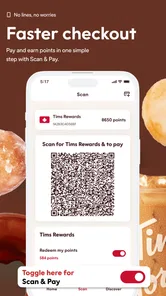
The Tim Hortons app offers a variety of features designed to enhance your coffee shop experience. You can use it to order ahead, skip the line, and pick up your order at your convenience. The app also allows you to earn rewards points on your purchases, which you can redeem for free beverages and food items. Additionally, you can customize your orders, find nearby Tim Hortons locations, and receive exclusive offers and promotions directly through the app.
How does the rewards program work on the Tim Hortons app?
The rewards program on the Tim Hortons app is simple and user-friendly. When you make purchases through the app, you earn points based on the amount you spend. These points accumulate and can be redeemed for free menu items, ranging from coffee and donuts to sandwiches and specialty drinks. The app keeps track of your points balance, and it notifies you when you have enough points to redeem a reward. It's a great way to enjoy your favorite Tim Hortons treats while saving money.
Pros
- User-friendly interface for easy navigation.
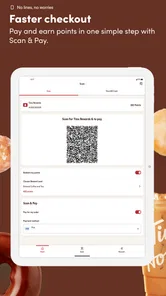
- Offers a variety of payment options.
- Loyalty rewards for frequent customers.
- Easy access to nutritional information.
- Push notifications for exclusive deals.
Cons
- Limited customization options for orders.
- Occasional app crashes and bugs.
- Requires stable internet connection.
- Limited availability in certain regions.
- Some features are not intuitive.











