Textra SMS
- 117.01K
- 4.2
- Installs
- 10.00M
- Price
- Free

Screenshots
Analysis by Reviewed
I use SMS differently from chat apps: it is where delivery updates, appointment changes, and messages from people who do not share my preferred messenger tend to land. That is the sort of everyday texting Textra SMS is built around. It is a communication app from Delicious, and I find its appeal less about replacing every way I talk to people and more about making ordinary SMS and MMS feel easier to manage.
What the free option means
The app is free to download, so you can try its basic texting experience without paying upfront. In-app purchases are listed at $9.99 per item; that is a price point, not a promise that every user needs to buy something. I would judge the free experience on whether its day-to-day tools suit you before considering any purchase. The listing also describes it as suitable for everyone, which makes it a straightforward option for a broad range of users.
Its reach is substantial: Textra has over 10 million installs, with a 4.3 average from around 437,000 ratings and about 116,000 written reviews. Those figures suggest it has found an audience, but they cannot tell you whether its approach fits your habits. The current version is 4.82, and it works on Android 8.0 or later, so check your device before making it your main texting app.
Where the value comes from
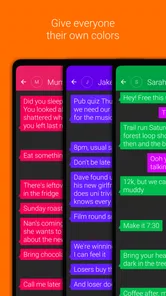
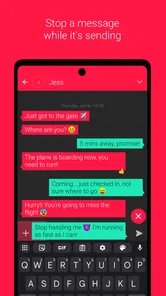
For me, the strongest value is in the small choices that make a busy inbox more comfortable to use. Changing conversation colors can help distinguish chats at a glance, while individual notification icons give another visual cue when a message arrives. These are practical touches if several conversations are active, not just decoration. I would set up the appearance once, then keep the layout simple enough that the messages remain the focus.
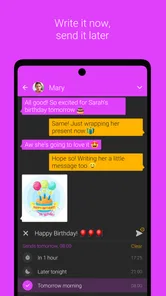
Scheduled messages are useful when the timing matters but I know I may forget later: I can prepare a birthday greeting or a reminder while I am thinking of it, then have it go out at a more suitable time. Quick reply is handy when I need to answer briefly without returning to the full conversation list. Neither replaces careful checking before sending, but together they reduce a bit of daily friction.
How it fits into everyday texting
When it comes to messaging apps, simplicity, speed, and customization are key. And let me tell you, Textra SMS delivers on all fronts. This app has been my go-to for managing SMS and MMS messages, and I'm here to spill the beans on why it's worth your time.
Customization Galore
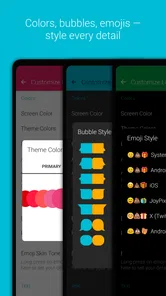
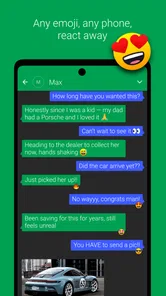
One of the standout features of Textra SMS is the sheer level of customization it offers. Whether you want to change the color of your chat bubbles, set unique notification icons, or even adjust the app's overall theme, Textra has got you covered. I spent a good hour just tweaking the settings to match my style, and it was totally worth it. The cherry on top? You don't need to be a tech wizard to navigate these options.
More From Our News Desk

 Lark Player:Music Player & MP3
Switching to Lark Player: A Better Fit for Music Stored on Your Phone?
Lark Player makes sense if your music already lives on your phone. Here is what changes, what does not transfer by assumption, and how to test the switch without regret.

 Tile Master® - Matching Game
Tile Master Finds Its Place in the Gaps of a Noisy Phone
OS changes rarely transform a tile puzzle, but they reshape the small rituals around it. Tile Master’s appeal lies in how well its brief, tactile rounds fit the modern phone.

 Google Docs
 Shows What Mobile Writing Still Gets Wrong
Google Docs still makes a strong case for the shared document, but its real significance is how it exposes the gap between cloud convenience and genuinely capable mobile work.

 YouTube Studio
 Is Becoming a Creator’s Daily Control Room
As publishing turns into a daily, data-led habit, YouTube Studio is becoming the control room creators reach for between uploads—not another tool for making videos.

 Tiles Hop Music & Ball Game
Tiles Hop Review: When the Beat Is Clear, Every Miss Counts
Tiles Hop turns a simple bouncing-ball premise into a sharp test of timing. Its best design is immediate and readable; its weakest moments come when recovery feels less clear than the beat.

 Piano - Music Keyboard & Tiles
: Inviting Rhythm, Unproven Recovery
A tile-tapping piano game lives or dies by timing. This resilience-focused review separates what its format promises from what players still need to verify.
Latest News



Speed and Performance
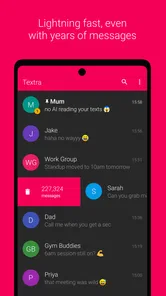
Nothing grinds my gears more than a slow app, especially when it comes to messaging. Thankfully, Textra is designed with speed in mind. Messages load quickly, and there's no lag when opening threads or sending texts. It's smooth sailing all the way, which is exactly what I need in my fast-paced daily life.
Emoji Heaven
Who doesn't love emojis? Textra takes your emoji game to the next level with a vast collection that's constantly updated. Whether you're an iOS emoji fan or you prefer the Android style, you can choose your favorite set. I found myself spending way too much time just scrolling through the emojis, but hey, no complaints here!
Top-Notch Features
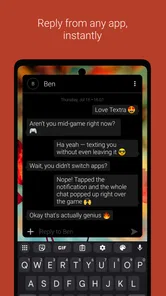
Beyond customization, Textra offers features that are genuinely useful. I particularly love the scheduled messages feature. You can draft a message and set it to send at a later time. This has saved me from many forgotten birthday texts! Plus, the quick reply pop-up allows you to respond without even opening the app, making multitasking a breeze.
Let's not forget about group messaging. It's seamless with Textra, and the app handles MMS like a pro. You can send high-resolution photos and videos without a hitch. I tested it out with my family group chat, and it was smooth sailing even with all the media flying around.
Trade-offs to consider
Textra is an SMS and MMS app, so it is best viewed as a focused texting tool rather than a substitute for internet-based messengers. If your friends coordinate mainly in a service with features such as shared online presence or cross-device chat, switching to Textra will not bring that whole experience with it. I would keep using those services for the conversations that depend on them and use Textra for standard texts, picture messages, and contacts who rely on SMS.
There is also a difference between customizing an app and improving every conversation. Theme and bubble options can make the inbox feel personal, but they take a little time to choose and may be unnecessary if you prefer a plain interface. My practical tip is to change only the settings that solve a real annoyance, such as making important chats easier to recognize. That avoids turning setup into a project.
A realistic day with Textra
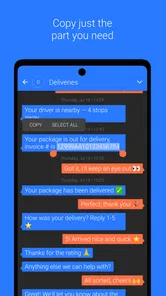
Imagine getting a delivery update in the morning, a last-minute change to a family plan, and a reminder you want to send later when someone is likely to see it. I can handle the incoming texts in their threads, use a distinct notification cue to spot a particular conversation, and schedule the reminder instead of trusting my memory. Later, a quick reply can deal with a simple confirmation while I am doing something else. That is where the app's combination of familiar texting and small workflow helpers makes sense.
For a group arranging a dinner, MMS can keep a photo or other media in the same conversation, while the faster, simpler SMS exchange remains easy to follow. Still, group messaging depends on the people and devices involved, so I would not assume every recipient sees every message in exactly the same way. If a group needs reliable shared files or a persistent online space, a dedicated chat service may be the better fit.
Who is most likely to appreciate it
I would recommend Textra to someone who texts frequently, wants more control over the look of the inbox, and values scheduled sending or quick replies. It also makes sense for people who want a dedicated Android SMS and MMS interface instead of relying on the phone's default app. With 10M+ installs, it is clearly not an obscure option, but popularity alone should not decide the switch: check whether its style and workflow feel natural on your device.
I would skip it if you rarely send SMS, are already happy with your default messaging app, or need one app to bring all your internet chats into a single place. It is also not the right choice for an older Android phone running below 8.0. For an iPhone user, this Android-focused review is not a reason to expect the same app experience on iOS; choose a messaging option designed for the device you actually use.
Choosing it over a phone's default app
The most useful comparison is not with every chat service, but with the SMS app already on your Android phone. If the default app reliably handles your texts and its layout feels comfortable, switching may bring little practical benefit. I would make the change only if a specific annoyance is pushing me to look elsewhere: perhaps I want distinct conversation cues, a different visual style, or a way to prepare a message ahead of time. That gives the decision a clear test rather than turning customization into a reason by itself.
There is a small but important trade-off in moving a core communication task to another app: you need to make sure the app you choose is actually the one you want to use for everyday texting. Before relying on it for an important appointment or family conversation, I would open a few existing threads, send a test message to someone I know, and check that incoming messages are appearing where I expect. This is a sensible transition check, not a complicated setup ritual.
Useful habits for scheduled messages
Scheduling is most helpful when I use it for a clear, low-risk purpose: a birthday greeting, a reminder to follow up, or a note I want to send during someone’s usual waking hours. I would write the message in full and double-check the recipient and timing before scheduling it. That matters because a message composed in haste can become awkward when it goes out later without me looking at it again. For anything dependent on changing circumstances, a reminder to review and send manually may be wiser than an automatic send.
Quick reply has a different sweet spot. It works well for a short confirmation when I only need to say “I’m on my way” or acknowledge a simple update. For a sensitive conversation, a long explanation, or a message where tone matters, I would open the thread and read the context first. The convenience is real, but answering from a small pop-up can make it easier to respond too quickly or miss what came just before.
Making notification choices useful
Conversation colors and notification icons are most valuable when they help me identify a thread without reading every alert. I would reserve distinctive cues for a handful of conversations that genuinely need attention, rather than giving every contact a different treatment. Too many custom signals become visual noise, and then the feature stops helping. A restrained setup can also make it easier to notice an important family message among routine delivery updates.
Appearance settings are personal, so I would not assume the best-looking theme is the easiest one to use. I prefer a readable conversation view that stays clear in the situations where I actually check messages, such as a quick glance between errands. If a color choice makes text or incoming messages harder to distinguish, it is not worth keeping just because it looks distinctive. The useful customization is the kind that makes the inbox easier to scan.
What to expect from MMS and groups
Textra can be a convenient home for a group conversation that uses regular texting and media messages, especially when the group is coordinating a simple plan rather than maintaining an ongoing online community. I would use it to share a photo while arranging a meal or to keep a family update in the same thread as the replies. But SMS and MMS do not make every group behave like a modern internet chat: the experience can depend on the recipients and their devices, and a dedicated messenger is usually a better choice for shared spaces or ongoing coordination.
For media-heavy conversations, I would also keep expectations practical. A text thread is handy for sending a picture as part of a quick exchange, but it is not the same as a shared album or file workspace. When the group needs to find, organize, and revisit lots of material, I would use a service built for that purpose and keep Textra for the straightforward message that accompanies it.
How I would decide whether to switch
I would give the app a fair trial during an ordinary week rather than judging it by a few minutes of theme changes. Notice whether scheduled sending, quick replies, and visual cues solve recurring problems, and whether the standard tasks—opening a conversation, finding a recent message, and replying—feel natural. If the benefits show up repeatedly, the change has a practical case. If I keep forgetting to use its extra tools, or the default app already feels just as easy, I would switch back without treating that as a failure.
A common question is whether this can replace an internet messenger. For my needs, the answer is no: its role is SMS and MMS, so I would keep a separate chat service for conversations that depend on internet-based features. Another natural question is whether I need to pay to get started. No—the app is free to download, and I would first see whether the free experience fits my routine before weighing any in-app purchase.
Final Thoughts
In a world filled with messaging apps, finding one that ticks all the boxes can be a challenge. But with Textra SMS, you're getting a robust, fast, and highly customizable messaging app that knows how to keep things fresh. Whether you're looking to jazz up your texting experience or simply want an app that performs flawlessly, Textra is a solid choice.
So, if you're ready to upgrade your messaging game, give Textra a shot. It's free to download, though there's a pro version available if you're looking to remove ads and unlock a few extra features. Trust me, your texting life will thank you.
My buy-or-skip verdict
I would try the free app if SMS and MMS are part of my daily routine and I want a more personal, flexible inbox. I would not pay simply because a purchase is available; first decide whether the features you actually use justify spending. The price of $9.99 per item gives a clear reference point, while the exact value depends on what you want from the paid option. If basic texting already works well for you, staying with your current app is a perfectly sensible choice.
Textra SMS Frequently Asked Questions
Does Textra SMS replace my phone’s default messaging app?
Textra SMS is designed as an alternative messaging app for Android, so you can consider using it in place of the messaging app already on your device. As with other SMS apps, check the prompts shown during setup and choose it as your default messaging app if you want it to handle your text conversations. You can decide whether its appearance and features suit your everyday use.
Can I use Textra SMS to send and receive both SMS and MMS?
Textra SMS is intended for SMS and MMS messaging, covering ordinary text conversations as well as multimedia messages. Whether messaging works as expected also depends on your Android device and mobile service, so make sure those are set up for texting and picture or media messages. If you mainly want a dedicated app for these types of conversations, Textra is built for that purpose.
Does Textra SMS work without an internet connection?
Textra SMS focuses on SMS and MMS rather than being described as an internet-based chat service. Sending and receiving messages therefore depends on the messaging service available through your device and mobile plan; MMS may also have requirements set by your carrier. Before relying on it for a particular conversation, check that your phone service supports the kind of message you plan to send.
Can I personalize the look and notifications in Textra SMS?
Textra SMS is known for letting users customize its appearance, including themes, bubble styles, and colors. It also offers quick reply pop-ups and scheduled messages, giving you ways to shape how you interact with conversations. If you enjoy adjusting a messaging app to your preferences, these options may be appealing; the exact choices available can depend on the version you use.
Can I send scheduled texts with Textra SMS?
Textra SMS includes scheduled messages, which can be useful when you want to prepare a text now and have it sent later. This can help with reminders, greetings, or messages you do not want to forget to send at the right time. Check the scheduling controls in the app and confirm the message details before relying on a scheduled text.
Pros
- Highly customizable interface
- Fast and smooth performance
- Wide range of emojis available
- Supports group messaging
- Quick reply feature
Cons
- Contains ads in free version
- Limited themes in free version
- No backup to cloud directly
- Some features need in-app purchase
- May not replace built-in SMS app on some devices