textPlus: Text Message + Call
- 101.66K
- 4.1
- Installs
- 50.00M
- Price
- Free

Screenshots



Analysis by Reviewed
I judge a calling and texting app by what happens when I actually need to reach someone: whether I have a usable connection, whether the other person can reply, and whether the setup makes sense for the situation. textPlus: Text Message + Call is a social communication app from textPlus that gives you another number for calls and messages. Its appeal is practical rather than flashy: it can help separate conversations or provide a way to contact people without relying solely on your usual phone number.
When the connection is doing the work
The experience depends on internet access, so I would treat a stable Wi-Fi or mobile-data connection as part of the plan, not as a bonus. At home or in a café with dependable Wi-Fi, messaging can be a convenient way to keep in touch. On a commute or while moving between coverage areas, calls and messages may be less predictable. I wouldn’t make it my only way to handle a time-sensitive conversation unless I also had another way to reach the person.
That distinction matters if you’re weighing it against your phone’s standard messaging and calling tools. Those are usually the simpler choice when you want one number and dependable access through your normal mobile service. textPlus is more interesting when having a separate number is useful enough to accept an internet-dependent setup.
A second number for everyday boundaries
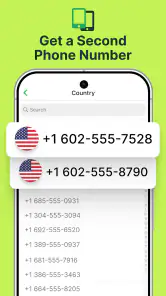
A separate number can be useful for a small side business, online listings, or coordinating a one-off project. For example, I might give it to someone arranging a furniture pickup rather than share the number I use for close friends and family. That creates a practical boundary between types of contact, although it doesn’t automatically make a conversation private or remove the need to decide who should have the number.
If you try this workflow, make the number’s purpose clear to yourself and to the people you share it with. Keep important contacts in a place you can find again, and don’t assume that a second number replaces the account security or recovery options on services tied to your main number. It’s a useful layer of separation, not a complete privacy system.
Freedom to Text and Call
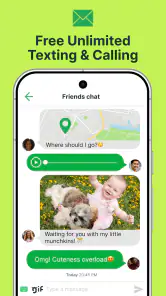
First off, textPlus is all about giving you the freedom to text and call without breaking the bank. This app allows you to send free texts and make calls to any number in the U.S. and Canada. Imagine being able to keep the conversation going without watching the clock or worrying about your balance.
Getting Started
Setting up textPlus is a breeze. Once you download it from the App Store or Google Play, you can register using your email or Facebook account. What’s cool is that you get a real U.S. phone number, which means you can text or call anyone as if you’re using a regular phone service. Plus, it’s perfect for those who need a second number for privacy reasons.
More From Our News Desk

Weather by Xiaomi Review: Clear at a Glance, Less Clear Up Close

X Under Pressure: Can It Recover When Posting Goes Wrong?

Clash of Clans Is Won Between the Battles

Android Auto Makes the Case for Quieter Car Software

MobiOffice: Transforming Mobile Productivity with Seamless Integration

EA SPORTS FC™ Mobile Soccer: Redefining Mobile Sports Gaming
Before you make this your default contact method, I’d first try a short exchange with someone you know. Check that notifications are easy to notice and that you can recognize which number a reply came to. A quick test is especially useful if you plan to keep personal and work messages apart; otherwise, messages from different parts of your day can become easy to mix up.
Features that Stand Out
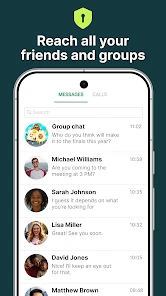
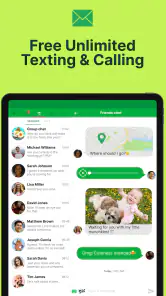
The app isn’t just about texting and calling. It’s packed with features that make communication easier and more enjoyable. You can send pictures, emojis, and even group messages. The interface is user-friendly, so even if you’re not tech-savvy, you’ll find your way around in no time.
Group messaging is handy for coordinating plans, but it can also become noisy when several people reply at once. I’d use it for a bounded task—like deciding where to meet—rather than assuming it will replace a dedicated team or project tool. Pictures and emojis add context to a casual exchange, while a standard text is often clearer when you need to leave precise instructions.
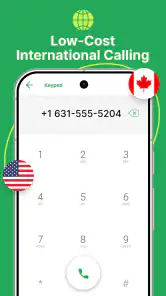
If you’re someone who travels often, the app’s international calling feature is a lifesaver. Although it’s not free, the rates are pretty competitive, allowing you to stay in touch with loved ones overseas without spending a fortune.
For calls abroad, I’d check the available calling costs before making a long conversation part of my routine. A brief call can be a convenient way to reach someone; frequent or lengthy calls are where charges can matter more than the free-to-use label suggests. If both people already use an internet-based messaging service, that may be the more straightforward option for an international chat. If the other person needs an ordinary phone call, this app’s calling option can be more relevant.
Ads and In-App Purchases
Now, let’s talk about the catch. Yes, the app is free, but it comes with ads. If you’re not a fan of interruptions, you might find this annoying. However, there’s an option to go ad-free with a small monthly subscription. Additionally, if you want to enjoy unlimited international calls, you’ll need to purchase credits. It’s a fair trade-off if you ask me, considering the overall savings you get.
The app is free to install, with in-app purchases ranging from $0.99 to $44.99 per item, so I’d decide what I actually need before buying anything. If your use is mostly occasional texts and calls, start with that pattern and see whether ads or international calling costs are a genuine problem. Someone who wants a completely ad-free experience from the outset, or a predictable all-in-one phone plan, may be happier with a paid carrier service instead.
Keeping the conversation going
Connectivity also affects recovery when something goes wrong. If a message seems delayed, I’d check whether the connection is stable before sending it repeatedly; duplicate texts can confuse the conversation. For a call that won’t connect, switching between Wi-Fi and mobile data, where available, is a sensible first check. If the exchange is urgent, use your regular calling option rather than waiting on an app connection to recover.
I’d also avoid relying on any single app as the only route for essential contacts. A second number is useful for sorting conversations, but the people who need to reach you should know which number to use and what to do if you’re unavailable there. That small bit of expectation-setting can prevent a missed message from turning into a bigger problem.
Planning around mobile data
Because the connection is central to the experience, I’d think about where I usually use the app before deciding whether it belongs in my daily routine. Someone who spends most of the day on trusted Wi-Fi may find it convenient for casual exchanges, while a person who moves through weak-coverage areas may experience more uncertainty. When you’re away from Wi-Fi, calls and messages use mobile data, so the app is not a way to avoid your data plan’s limits.
A practical habit is to reserve longer conversations for a place where your connection is steady and use short messages when you’re on the move. If your data allowance is tight, check your device’s data-use controls and avoid treating an internet-based call as automatically cost-free. The app itself is free to install, but the connection still has to come from somewhere.
For a day of errands, I might use the separate number to coordinate a pickup, then wait until I’m somewhere with a solid connection before making a longer call. If a message is important, I’d send a clear, self-contained note instead of several fragments that depend on a quick back-and-forth. That reduces confusion if replies arrive later than expected and makes the number easier to manage as a practical contact channel.
Choosing the right communication setup
Compared with a carrier’s built-in calls and texts, textPlus trades some independence from a main number for greater dependence on internet access and an app-based routine. Compared with messaging services that work best when both people use the same service, its appeal is the ability to contact ordinary phone numbers, while the cost and connection details deserve more attention. Which route is better depends on the person you need to reach: don’t ask a relative to install another app if a normal call is the simplest option for them.
I’d also keep the purpose of the extra number narrow at first. Use it for a defined group of contacts or a specific kind of exchange, then see whether it genuinely reduces clutter. If you give it out broadly, the boundary can disappear and you may end up managing two inboxes without gaining much separation. A small, deliberate rollout is more useful than switching every contact over on day one.
For people deciding whether to install it, the basic questions are practical: will you have reliable internet when you need to communicate, are the people you contact comfortable receiving messages at a second number, and are you willing to tolerate ads or check purchase costs? If the answer to those is mostly yes, it can fill a clear role. If your main need is a dependable line for urgent calls, your carrier service is the safer default.
Who will get the most from it
With a 4.1 average from around 548,000 ratings and more than 50 million installs, textPlus has attracted a large audience, though those figures don’t tell me whether it fits an individual’s signal, habits, or tolerance for ads. It’s rated for Everyone, and version 8.3.0 requires Android 7.0 or later. I’d recommend it most to someone who wants a separate number for casual contact, has reliable internet access in the places they communicate, and is comfortable checking costs before making international calls.
I’d be more cautious if you need uninterrupted access for work, emergency coordination, or frequent calls where connection quality and predictable billing matter more than having a second number. In those cases, your carrier’s normal calling service—or a messaging app that your contacts already use—may be a better fit. The key question is not whether another number sounds useful, but whether you’ll consistently have the connection and routine to manage it.
Final Thoughts
In a world where staying connected can be expensive, textPlus: Text Message + Call offers an affordable alternative without sacrificing quality. Whether you’re looking to save on phone bills or need an extra number for personal or business use, this app is worth considering. It’s reliable, easy to use, and gives you the flexibility to communicate on your terms. So why not give it a shot and see how it fits into your life?
My practical verdict is to try it as a complementary number first, not as an automatic replacement for your regular phone service. That lets you learn how it behaves on your usual networks, decide whether ads are tolerable, and see if a second line actually helps organize your day. If those trade-offs suit you, textPlus can earn a useful place on your phone; if your priority is dependable communication regardless of internet access, your standard service is the safer choice.
textPlus: Text Message + Call Frequently Asked Questions
Can I keep my regular phone number when using textPlus?
textPlus is designed to provide a second phone number for texting and Wi-Fi calling, so it can be used alongside the number associated with your regular mobile service. Its app-based messages and calls use an internet connection. This makes it a separate way to communicate, rather than a replacement for your existing carrier number or service.
Do I need a SIM card to use textPlus?
textPlus handles its app-based texting and calling over Wi-Fi or mobile data, so a SIM card is not what carries those communications. You do need an internet connection to use these features, and mobile data may count against your plan’s allowance. If you rely on Wi-Fi, make sure you can connect whenever you want to message or call.
Can people contact me through textPlus if they do not use the app?
The app is intended for texting and calling beyond communication between textPlus users, including messages to U.S. or Canadian numbers and calls to other numbers. Calling non-textPlus numbers may require credits, while internet access is needed for app-based communication. Before relying on it as your main way to stay in touch, consider how you expect to contact people and whether calling costs matter to you.
Can I use textPlus while traveling?
Because textPlus uses Wi-Fi or a data connection for app-based communication, it can be useful when you have internet access away from home. Using mobile data while traveling may count toward your plan’s allowance, and calls to non-textPlus numbers can require credits. Check your connectivity and calling needs before depending on the app during a trip.
Does textPlus require Wi-Fi or mobile data?
textPlus works over Wi-Fi or a data connection, so you need an internet connection to send messages and make calls through the app. It is designed for Wi-Fi calling and texting rather than relying on the usual cellular service for those app-based communications. Keep in mind that using mobile data may count toward your plan’s data allowance.
Pros
- Free unlimited texting to US & Canada.
- Affordable international calling rates.
- No contracts or hidden fees involved.
- Easy-to-use interface for all ages.
- Customizable alerts and ringtones.
Cons
- Contains ads that can be intrusive.
- Requires internet connection to function.
- Limited free calling credits.
- No support for emergency calls.
- Some features need in-app purchases.
- Category
- Social
- Version
- 8.3.0












