Test DPC
- 34.00
- 4.2
- Installs
- 500.00K
- Price
- Free

Screenshots
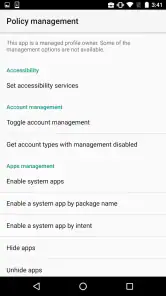
Analysis by Reviewed
If you’re trying to understand how an Android app behaves when device policies are applied, Test DPC is a specialist tool rather than a general-purpose utility. I see its value in controlled testing: it gives developers and IT teams a way to explore managed-device behavior without treating a personal phone as a casual experiment. That focus also sets expectations. This is not an app most people need for everyday phone use.
Who will get the most from it
I’d consider it when building or checking an app intended for Android Enterprise environments, or when learning how managed configurations affect an app’s behavior. For example, a developer can use a test setup to check whether a work-oriented app still makes sense when a policy limits access to a device feature. That kind of check can reveal confusing screens or broken assumptions before the app reaches a managed deployment.
It is less suitable if you simply want to change settings on your everyday phone or manage a team’s devices as an end user. A dedicated management solution is a better fit for routine administration, while a normal Android settings screen is the simpler choice for ordinary personal controls. Test DPC is useful precisely because it focuses on testing policy scenarios, not because it replaces those other tools.
Using a test setup thoughtfully
One practical habit is to change one policy at a time, then check the app behavior you care about before moving on. If several restrictions are changed together, it can be harder to tell which one caused an unexpected result. I’d also keep experiments separate from a primary setup where possible: a policy-testing tool is most helpful when you can reproduce a scenario and undo changes without disrupting normal work.
A realistic example is a developer checking a work app before a release. They can test how its instructions and core flow hold up when a device is managed, record where users might get stuck, and then adjust the app or its guidance. This does not replace testing on the actual devices and configurations an organization uses, but it can make early checks more deliberate and less dependent on guesswork.
A Deep Dive into the Features
First off, Test DPC is super handy for developers working on Android Enterprise and EMM (Enterprise Mobility Management) solutions. The app allows you to see how your app will function under managed configurations. You can simulate a variety of device management scenarios without needing a whole fleet of test devices. How cool is that?
Hands-On Experience
I’ve been fiddling with this app, and let me tell you, it’s like having a mini-laboratory at your fingertips. You can control and test numerous policies and restrictions. Want to see how your app responds when camera access is disabled or when certain apps are whitelisted? This app’s got you covered.
More From Our News Desk

Clash of Clans Is Won Between the Battles

Android Auto Makes the Case for Quieter Car Software

MobiOffice: Transforming Mobile Productivity with Seamless Integration

EA SPORTS FC™ Mobile Soccer: Redefining Mobile Sports Gaming

How Microsoft OneDrive Became a Mobile Productivity Giant

How Google Translate Breaks Language Barriers Effortlessly
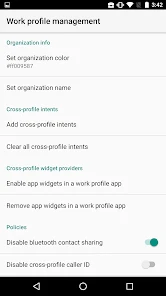
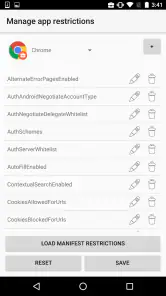
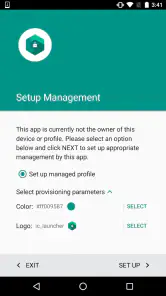
The interface, although a bit utilitarian, is straightforward once you get the hang of it. It’s not meant to win any design awards, but it gets the job done efficiently. You have a range of options to select different user profiles and configure various policy settings.
Why It Stands Out
What really sets Test DPC apart is its ability to test real-world scenarios without the hassle of setting up actual devices. It’s a huge time-saver for developers who want a quick and effective way to check policy changes and app behavior. Moreover, it’s open-source, which means it’s constantly improving with contributions from the community.
However, keep in mind that it’s mainly a tool for developers and IT admins. If you’re expecting a bright, engaging app with lots of graphical elements, you might be disappointed. But for those who need to test and deploy apps in a managed environment, it’s a godsend.
The Final Word
To sum it up, Test DPC is a powerful tool for anyone involved in app development and device management. It’s not just an app; it’s a gateway to understanding how your applications perform under various conditions. While it might not cater to everyday users, for developers and IT professionals, it’s an indispensable part of their toolkit.
So, if you’re in the development scene and need a reliable way to test your app’s compatibility with enterprise policies, give Test DPC a spin. It might just become your new favorite testing companion!
Current state and practical fit
In the Libraries & Demo category, this free app from Sample developer has a 4.2 average from around 1.4 thousand ratings, with over 500 thousand installs and 34 written reviews. It is rated Everyone, runs on Android 5.0 or later, and its current version is 9.0.13. Those details make it accessible to a broad range of Android test setups, but they do not make it a consumer device manager: the useful question is whether you need to inspect managed behavior, not whether you want another settings app.
Test DPC has been available since October 22, 2015, so its role is best understood as a longstanding sample tool rather than a newly introduced enterprise platform. The confirmed version information gives a clear picture of its present release, but it does not by itself tell me what changed between releases. I would avoid assuming that a particular policy option or workflow was added recently; for a real project, check that the behavior you need is available in the version you install.
Choosing the right test device
One decision worth making before installation is whether the phone or tablet is genuinely suitable for experiments. A device you rely on for calls, authentication, work messages, or travel is a poor place to learn policy controls by trial and error. I’d use a spare device or a deliberately prepared test environment when possible, and keep notes about its starting state. That makes it easier to tell whether a result came from the policy being checked or from some unrelated change on the device.
For a small development team, this can make early checks more approachable: one person can prepare a repeatable scenario, while another tests the app’s flow against it. The useful output is not simply “the app opened.” It is whether the relevant task remains understandable and usable under the condition you intended to examine. A short record of the setup and observed result can prevent the same uncertain experiment from being repeated later.
Making policy tests more useful
When a restriction appears to break a feature, I’d first separate the user-facing symptom from the suspected cause. For instance, if a screen depends on camera access, test that pathway specifically and note what the app communicates when the feature is unavailable. A clear explanation or fallback can matter as much as the technical response. This approach helps turn a policy test into a practical product improvement rather than a pass-or-fail check.
It is also sensible to test the reverse direction: after changing a setting, verify that the app still behaves as expected when the restriction is no longer part of the scenario. Otherwise, a workaround may solve one managed case while making the ordinary experience worse. Keeping a baseline run alongside the restricted run gives you a more useful comparison than relying on memory.
What it can and cannot replace
Compared with ordinary Android settings, this tool is aimed at managed-policy experiments, so it is not the easiest route to changing everyday preferences. Compared with a full enterprise management product, it is a focused sample rather than a complete place to handle an organization’s device rollout and ongoing administration. That distinction matters: a test can help you investigate app behavior, but it does not do the administrative work of deploying and supporting a fleet.
For a learner, the narrow scope can be an advantage because it gives policy behavior a concrete place to explore. The trade-off is that the controls may not explain themselves to someone who has never encountered managed profiles or enterprise restrictions. I’d read up on the particular concept you want to test before changing settings, then use the app to make that concept observable. If your need is simply to secure or configure company devices, choose a proper management workflow instead.
Questions I would settle before relying on it
Can it replace testing on a company-managed device? I would not treat it as a replacement. It can make preliminary experiments more structured, but the organization’s actual setup remains the meaningful final check. Could a non-developer use it? Someone learning Android Enterprise may find it useful, but a casual phone owner is unlikely to gain much from policy controls without a specific test goal.
Is it appropriate for a main phone? I would avoid that unless you already understand the scenario and can safely recover from the changes you make. Does a successful test prove an app is ready for every managed environment? No: it only supports a conclusion about the conditions you actually tested. These are practical boundaries, not reasons to dismiss the app; they help keep its results in proportion.
What this means for existing users
If you already use it in a test workflow, the practical benefit is continuity: you can keep using a dedicated policy-testing environment instead of relying only on app behavior under ordinary personal settings. Still, a simulated or sample setup should be one stage of testing, not the final word. Organization-specific configurations and actual managed devices can expose differences that a quick local experiment will not catch.
Before changing settings, write down the scenario you are checking and the result you expect. That small step makes repeated tests easier to compare and helps separate an app defect from a policy-side effect. If you are evaluating a work profile or restrictions, keep the test focused and verify the app’s main task after each change rather than judging it only by whether it launches.
Limits worth keeping in view
The main trade-off is specialization. Test DPC can help investigate policy-related behavior, but it is not a substitute for a full enterprise mobility management system, nor does a successful test guarantee that every device in a company will behave identically. Its utilitarian presentation also assumes that the user knows what they are trying to test; newcomers may need to learn the management concepts before the controls feel meaningful.
I would also treat it as a poor choice for experimenting casually on a phone you depend on every day. Policy changes can alter how a test environment behaves, and the point is to observe those effects deliberately. If you are unsure what a setting does, start with a disposable or otherwise suitable test setup and avoid changing several things at once.
What I would watch next
For anyone deciding whether it belongs in a workflow, I would focus less on the version number alone and more on whether the app supports the specific policy case, Android setup, and target app being tested. The meaningful check is reproducibility: can you set up the same condition again and confirm the same app response? If your work depends on a particular managed configuration, validate that scenario directly before relying on it.
Overall, I recommend it to developers and IT learners who want a focused way to explore Android Enterprise policy behavior, with the understanding that it is a test instrument, not a polished management console. If you need broad deployment, ongoing administration, or a simple personal setting, another tool will be more appropriate. For controlled experiments and early compatibility checks, its narrow purpose is also its clearest strength.
Test DPC Frequently Asked Questions
Is Test DPC free, and what kind of app is it?
Test DPC is a free app in the Libraries & Demo category, intended to help developers and IT professionals explore Android Enterprise behavior. It is not a general-purpose device utility or a productivity app for everyday tasks. Before installing it, consider whether you have a testing need that involves managed profiles or managed devices; its specialized purpose is the main reason to download it.
What is Test DPC and what is its primary function?
Test DPC stands for Test Device Policy Controller. It is a tool that developers can use to test their applications in a managed profile or a managed device environment. It's primarily used to simulate the work profile features of Android devices, allowing developers to ensure that their apps behave as expected in enterprise environments. It is a sample device policy controller for use with Android Enterprise, so its focus is testing and demonstration rather than serving as a complete management solution.
Is Test DPC suitable for end-users or only for developers?
Test DPC is designed specifically for developers and IT professionals who need to test applications in an Android enterprise setup. It is not intended for regular end-users, as it involves functionalities and features pertinent to application development and testing rather than everyday use. If you are simply looking for a way to organize personal apps or make routine changes to your phone, this specialized tool is unlikely to be a useful download.
Can I use Test DPC to manage my personal Android device?
No, Test DPC is not designed for managing personal devices. It's a development tool meant for testing applications in a controlled work profile or managed device environment. Using it for personal device management could lead to unintended consequences, as it's not intended for such use. Treat it as a testing aid, and avoid relying on it as a replacement for the device-management tools or services intended for your everyday phone.
What are the system requirements for installing Test DPC on my device?
To install Test DPC, your device needs to run on Android 5.0 Lollipop or higher. Additionally, you should have a basic understanding of Android's enterprise features, as Test DPC is aimed at developers and IT administrators who need to test apps in managed profiles or device owner setups. The current version is 9.0.13, so check that your device meets the Android requirement before you proceed with installation.
Pros
- Free and open-source tool.
- Supports multiple user profiles.
- Enables security policy testing.
- Simplifies app management.
- Compatible with Android devices.
Cons
- May require technical knowledge.
- Limited to Android platform.
- Occasional bugs reported.
- Not for end-user purposes.
- Requires admin permissions.
- Category
- Libraries & Demo
- Version
- 9.0.13










