TeraBox: 1TB Cloud & AI Space
- 23.07K
- 4.5
- Installs
- 100.00M
- Price
- Free

Screenshots


Analysis by Reviewed
When my phone starts warning me about storage, the tempting fix is to delete a few old videos and hope that buys another week. That works until I need one of those clips again. I like the idea of moving from that last-minute cleanup to a repeatable routine: gather files, back them up, check the result, and only then decide what can leave the device. TeraBox: 1TB Cloud & AI Space is built for that kind of roomy personal archive, with cloud storage and AI tools brought together in one app.
Start with the files you actually want to keep
Before I send an entire camera roll to the cloud, I would spend a few minutes deciding what belongs there. A useful first pass is to separate everyday screenshots and duplicate downloads from the photos, videos, and documents I would miss if my phone were lost. This matters because a large storage allowance can make it easy to save everything without thinking; more space does not automatically make an archive easier to use.
For a family trip, for instance, I might begin with the camera folder, then add the best clips from a shared chat and a few booking documents. Keeping those items together under a clear folder name gives me a route back to them later. I would avoid relying on vague names such as “new” or “misc,” especially if I expect to share the material with someone else. A small amount of labeling at the start saves more effort than trying to identify hundreds of files months later.
From phone backup to a useful shared archive
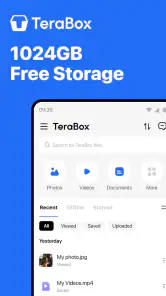
So, what makes TeraBox stand out in the crowded cloud storage market? First off, it offers a whopping 1TB of free cloud storage. Yes, you heard that right, 1 terabyte for free! That's enough to stash away roughly 300,000 photos or over 250 full-length movies. If you're someone who hoards digital memories like me, this is nothing short of a godsend.
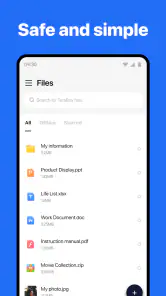
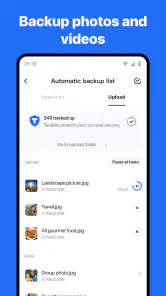
The app is incredibly user-friendly. With a sleek and intuitive interface, even the least tech-savvy among us can navigate its features with ease. Uploading files is a breeze, and the automatic backup feature ensures that your files are safe even if your device decides to take an unexpected dip in the pool. Plus, with its smart AI photo management, you can organize your photos by categories, dates, or even facial recognition.
Make the first backup a deliberate one
Once I know what I want to keep, I would start with a small test batch rather than selecting every file at once. A few recent photos and one longer video are enough to show how the workflow feels on my connection and whether the chosen folders are the right ones. If I am satisfied, I can let the larger upload run when I do not need the phone for something urgent. Trying to transfer a whole library while heading out the door is a good way to become impatient and lose track of what is finished.
Afterward, I would open the cloud copy and check several files, including at least one video and a document. Seeing a thumbnail or a filename is not the same as confirming that the item opens as expected. Only after that check would I consider removing local copies to recover space. For anything I need offline—such as a document for an appointment—I would keep a device copy too, rather than assuming a cloud archive will be available in every situation.
More From Our News Desk

Weather by Xiaomi Review: Clear at a Glance, Less Clear Up Close

X Under Pressure: Can It Recover When Posting Goes Wrong?

Clash of Clans Is Won Between the Battles

Android Auto Makes the Case for Quieter Car Software

MobiOffice: Transforming Mobile Productivity with Seamless Integration

EA SPORTS FC™ Mobile Soccer: Redefining Mobile Sports Gaming
Security: Your Digital Lock and Key
In today's digital age, security is paramount. TeraBox doesn't skimp on this front, offering robust encryption methods to keep your data safe from prying eyes. You can also set up a passcode lock within the app for an extra layer of security. It’s like having a high-tech lock for your digital vault.
Use AI organization as a way to find, not just store
A large photo collection is only valuable if I can locate the picture I have in mind. The AI photo-management tools are most useful when they reduce the rummaging: browsing by category or date can narrow a collection before I start opening images one by one, and facial recognition can help when I am looking for pictures of a particular person. I would still treat those groupings as a shortcut, not as a perfect filing system. A manually named folder remains helpful for a specific event or project that I want to revisit as a set.
One practical approach is to use both methods for different jobs. Let the app’s photo organization help with broad searches, then keep selected collections in named folders for sharing or long-term reference. This avoids forcing every image into a complicated structure while giving important sets a clear home. If a family member does not want their pictures grouped or shared, I would keep that material out of a shared selection rather than sending an entire camera roll for convenience.
Sharing is a handoff, not the end of the workflow
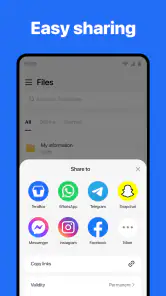
One of my favorite features is the ease of sharing files with friends, family, or colleagues. You can share large files with just a link, and the recipient doesn't even need to have the app installed. This is particularly handy if you're sharing a photo album or a hefty work document.
Before sending anything, I would open the selected files and check that the folder contains only what the recipient needs. A link can make a handoff simple, but it also shifts responsibility to me to choose the right material and explain what is inside. For a work document, I would use a clearly named file rather than making someone guess which version is current. For family photos, I would share the chosen album instead of sending a broad archive with unrelated personal images mixed in.
Moving between devices without losing the thread
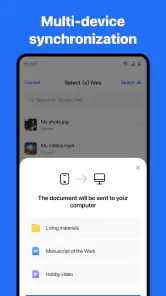
Accessibility is another strong suit. Whether you're on your phone, tablet, or computer, TeraBox ensures your files are just a tap away. The cross-platform compatibility means you can start a project on your laptop and finish it on your phone without missing a beat.
That handoff is especially useful for files that change context during the day. I might collect photos on my phone, open them later on a computer to choose a few, then send a link to a relative who is not using the same device ecosystem. The point is not that every step becomes automatic; it is that I have a shared place to return to instead of repeatedly moving attachments between devices. I would still keep a local working copy of an important document when I need to edit it reliably without depending on access to the cloud.
From Phone Clutter to a Useful Archive
I find this most useful when I want to clear space without losing track of what I have. For example, after a family gathering, I can back up the photos and videos, then share a link to the selected album instead of sending individual files through a chat. That keeps the handoff simple for relatives who do not want to install another app, while leaving the originals available in my cloud collection.
A practical habit is to make a small review part of the backup routine: check that the latest files have finished uploading before deleting local copies, and sort important items into clearly named folders while they are still easy to recognize. Cloud storage can make a phone feel less crowded, but it is not a reason to erase files before confirming the upload. For documents I need immediately, I keep a local copy as well; that way a weak connection does not interrupt a task.
What the free starting point means in practice
The app is free to install, which makes it easy to try the basic archive workflow before deciding whether it belongs in my routine. I would first see how well its folders, backup habits, and sharing fit my needs rather than assuming that a large allowance alone solves every storage problem. In-app purchases range from a few cents to several hundred dollars per item, so I would read the details shown for any purchase and make sure I understand what I am paying for before confirming it.
That distinction matters if I am comparing it with a service bundled into a phone or computer. An integrated option may ask less of me because it already sits within a familiar account and device workflow. TeraBox’s appeal is different: it gives me another place to store and pass around files, with photo organization and AI tools alongside that storage. Whether that trade is worthwhile depends on whether I want a separate archive enough to manage it.
Where Convenience Has Limits
Compared with the usual cloud-drive alternatives, the appeal here is the large storage allowance and a workflow that combines file backup with photo organization and sharing. A more basic drive may feel better if you mainly want a plain folder system, while a service already built into your phone or computer can be more convenient if you value staying within one ecosystem. I would choose TeraBox when capacity and easy sharing matter more than keeping every part of my digital life in a single familiar platform.
There are trade-offs. Uploading a large library takes time and a dependable connection, and an automatic backup can include clutter if I never review what is being saved. I would not treat a cloud copy as my only copy of irreplaceable work or family records. The app’s passcode lock is useful for adding a barrier on the device, but I still avoid putting highly sensitive material anywhere without first considering whether cloud storage suits it.
Where the routine can break down
The weak point in this workflow is usually not the act of tapping upload; it is the waiting and checking around it. A slow or unstable connection can make a large first transfer inconvenient, and a phone that is busy with other tasks is not the moment when I want to be guessing whether a batch is complete. I would split a massive archive into manageable groups, check progress before clearing space, and avoid treating a started upload as a finished backup.
Another source of friction is the difference between having files stored and having them organized. Automatic backup can preserve plenty of material, but it can also leave me with screenshots, duplicate images, and one-off downloads mixed into a collection. A brief review every so often—deleting obvious clutter and naming the folders I truly use—keeps the archive from becoming a digital attic where everything is safe but nothing is easy to find.
I would also think carefully about the role of the passcode lock. It can add a useful barrier when someone gets access to the unlocked device, but I would not confuse that convenience with a complete security plan or use it as a reason to store every sensitive file in the cloud. For personal records that require stricter handling, a different storage arrangement may be the better fit. The right choice depends on the material, not just on how convenient the app feels.
Who benefits most, and who may prefer another setup
For someone who takes lots of photos, swaps files between devices, or needs a convenient place for a growing personal archive, this tools app from Flextech Inc. is worth considering. It is free to install, rated for Everyone, and has in-app purchases ranging from a few cents to several hundred dollars per item, so I would check the purchase details before paying for anything. Its 4.5 average from around 3.6 million ratings and more than 100 million installs suggest broad use, though popularity alone does not tell me whether its workflow will suit you.
I can see it working well for a parent who wants to gather school-event photos, a traveler who wants a place for trip media, or a person who regularly sends large collections to relatives. It is less compelling for someone with only a handful of files, a strict preference for keeping everything inside one device maker’s services, or no interest in maintaining another account and archive. If I mainly need a plain folder for a few documents, a simpler drive may be less effort than adding a broad photo workflow.
Version, compatibility, and the decision to try it
The app first appeared in 2020, and version 4.8.5 supports Android 5.1 and later. The AI tools may be attractive if you want help making a large photo collection easier to browse, but I would skip it if you prefer not to manage another cloud account, rarely need extra capacity, or want a service tightly integrated with a particular device ecosystem. Its best role is a roomy, practical archive—not a replacement for careful file habits.
That gives me a simple way to decide whether to keep using it: try the workflow with a small group of files, make sure I can find them again, and test a share with someone who does not have the app. If those steps feel straightforward and I have a genuine need for extra room, the app may earn a place in my routine. If I find myself avoiding the cleanup and verification steps, the extra capacity will not solve the underlying problem.
A practical choice, not a substitute for good habits
In conclusion, if you're looking for a reliable, secure, and generous cloud storage solution, TeraBox: Cloud Storage Space is a top contender. It's like having a digital attic that never gets full, and with its user-friendly interface and robust security features, it's a no-brainer for anyone looking to declutter their device. So go ahead, give it a try and free up some space for your next digital adventure!
My recommendation is more measured: I would try it when photo backup, cross-device access, and uncomplicated file sharing solve a real problem for me. I would keep important offline copies, check uploads before deleting originals, and be selective about what I share. For that kind of careful, everyday workflow, TeraBox can be a useful home for the files that would otherwise crowd my phone; if I want zero maintenance or a service woven into one device ecosystem, I would look elsewhere.
TeraBox: 1TB Cloud & AI Space Frequently Asked Questions
Who develops TeraBox, and what kind of app is it?
TeraBox is a cloud storage and AI tools app developed by Flextech Inc. It brings file storage and related tools together in one space, with a focus on letting users keep and access files online. If you are looking for an app to organize cloud-stored files alongside AI features, TeraBox is designed for that kind of use.
What is the minimum Android version required to install TeraBox?
TeraBox requires Android 5.1 or later. Check your device’s software version before downloading, especially if you use an older phone or tablet. Meeting the minimum requirement means you can install the app, while your experience may also depend on your device and how you plan to use its cloud storage and AI tools.
Is TeraBox free to download, and are there optional purchases?
TeraBox is a free app in the Tools category, so you can download it without an upfront purchase. It also offers in-app purchases, with options ranging from small add-ons to higher-priced items. Before buying anything, check the purchase details shown in the app and consider whether the free storage and features meet your needs.
Will TeraBox work on my Android device?
TeraBox supports Android devices running Android 5.1 or later. If your phone or tablet meets that requirement, you can install the app and explore its cloud storage and AI tools. It is listed for all-ages audiences, but it is still sensible to review the app’s permissions and decide whether they fit how you plan to use it.
What is TeraBox and how does it work?
TeraBox is a cloud storage solution that offers users the ability to store, manage, and access their files online. With TeraBox, you can upload various file types, such as documents, photos, and videos, to a secure cloud environment. It allows users to access their data from any device with an internet connection, making file sharing and collaboration convenient and efficient.
Pros
- Generous free storage capacity.
- Easy file sharing options.
- User-friendly interface design.
- Fast upload and download speeds.
- Cross-platform accessibility.
Cons
- Limited customer support options.
- Some features require premium.
- Occasional sync delays.
- Ads in the free version.
- Privacy concerns with data handling.
- Category
- Tools
- Version
- 4.8.5








