Tera VPN
- 4.46K
- 4.6
- Installs
- 5.00M
- Price
- Free

Screenshots
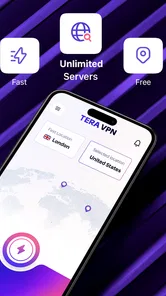
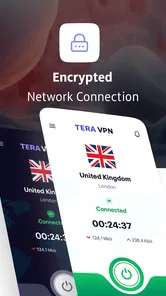

Analysis by Reviewed
In a shared household, a VPN is often less about technical tinkering than about making a quick connection choice before someone checks email, uses public Wi-Fi, or opens an app that behaves differently by location. Tera VPN is a free Android tools app from VRMN Tech, and its appeal is straightforward: it offers a simple route to a VPN connection without asking every household member to become a networking expert. I’d consider it for casual, individual use, but I would not treat installing it on a shared device as a substitute for agreeing on who uses it and when.
When one device serves more than one person
Think of a tablet used by one adult for browsing at a café, then handed to another person for checking messages on the way home. The first person may want a VPN connection on public Wi-Fi; the next may prefer the usual connection for a service that expects a familiar location. On a shared device, the practical question is not only whether the VPN works, but whether the next user knows it is active.
I’d make that state part of the handoff. Before passing the device over, the person who used the VPN can say whether it remains connected; the next person can check before opening anything where location or network behavior matters. This small habit is more useful than trying to remember later who last changed the connection.
A device-level VPN choice can affect more than the app that prompted someone to connect. That makes shared use different from having separate personal phones: the next person inherits the device’s current network setup, not a private setting tailored to them. If users have conflicting needs, a personal device for each person is a cleaner boundary than relying on memory.
Set expectations before the first connection
The store summary points to speed and security, but I’d judge any VPN by how it fits into a person’s routine rather than by a short promise. Before relying on Tera VPN, I’d install it on the device that will actually be used, try a connection in a low-stakes situation, and then open the apps the household normally uses. That quick check can reveal whether the connection is convenient enough for everyday browsing and whether any familiar services behave differently while it is active.
There is a useful trade-off here: a VPN can add a layer between a device and the network it uses, but it can also change how a site or app sees the connection. If a banking app, workplace tool, streaming service, or sign-in flow acts unexpectedly, I would first compare what happens with the VPN on and off before assuming the app itself is broken. That small troubleshooting step can save time, especially when several people share one device and no one remembers who changed its network setup.
I would also keep the setup boundary clear. A household member should not assume that another person’s VPN choice is a private profile that follows them separately. The app may be installed on a device, but the decision to use that connection belongs to the current device user. If separate people need different network settings or independent privacy choices, separate personal devices are a cleaner arrangement than relying on an informal handoff.
More From Our News Desk

Weather by Xiaomi Review: Clear at a Glance, Less Clear Up Close

X Under Pressure: Can It Recover When Posting Goes Wrong?

Clash of Clans Is Won Between the Battles

Android Auto Makes the Case for Quieter Car Software

MobiOffice: Transforming Mobile Productivity with Seamless Integration

EA SPORTS FC™ Mobile Soccer: Redefining Mobile Sports Gaming
Coordinate through simple habits
For a shared phone or tablet, the most helpful coordination is a short conversation, not an elaborate policy. Agree on who is allowed to connect the VPN, whether it should be turned off after a particular task, and how the next person can tell what state the connection is in. These are ordinary usage habits, not special family tools, and they prevent the common confusion of blaming a slow page or failed login on the wrong cause.
One non-obvious tip is to test the VPN before leaving home rather than waiting until a public hotspot is the only available connection. That gives the user time to learn the basic routine while the household can still use its usual network if something behaves oddly. It also makes the first use less rushed: no one has to figure out a new app while juggling travel, a weak connection, and another person waiting to use the device.
Another practical approach is to assign the VPN decision to the person who needs it, instead of leaving the app’s state ambiguous for everyone. If one adult uses it for a specific browsing session, that person can take responsibility for checking the connection afterward. This does not guarantee that every app will behave the same way, but it gives the household a clear starting point when troubleshooting.
What to try during an everyday session
For example, if I were using a shared tablet to read news while waiting at a station, I’d connect before opening the pages I planned to use, then check whether those pages load and whether the connection remains practical. Before handing the tablet to someone else, I’d tell them the VPN status rather than assuming they will notice. If their next task depends on a familiar network location, they can decide whether to disconnect first.
This workflow also helps separate two questions that are easy to blur together: does the VPN connect, and does it suit this particular task? A successful connection does not guarantee that every service will work as usual. Trying a low-stakes activity first, then checking a key app with the VPN on and off if needed, is a more sensible test than discovering a conflict during a rushed sign-in.
I would not use a quick trial as proof of suitability for sensitive work. It can tell me whether ordinary browsing feels manageable and whether a service I use objects to the connection. It cannot replace reviewing a provider’s privacy practices when the consequences of a poor choice would be serious.
Age context and realistic trust
Tera VPN has an Everyone content rating, which makes its age classification broad. That is useful context for a household considering whether the app is age-appropriate, but it should not be mistaken for a promise about how children will use a VPN or what online material they may encounter. A VPN changes a network connection; it is not a substitute for an adult’s guidance, device rules, or conversations about safe browsing.
For younger users, I would explain the purpose of the app in plain terms and avoid presenting it as a way to bypass household expectations. If a child uses a shared device, an adult should decide whether the VPN is appropriate for that situation and make sure the child knows to ask before changing connection settings. Families looking for dedicated parental controls, user profiles, or household administration should choose a solution designed around those needs rather than expecting a general VPN app to provide them.
Trust also depends on understanding what a VPN can and cannot do. It can route a device’s connection through a VPN service, but it does not make every online activity anonymous or guarantee that every website is safe. I would be cautious about making broader privacy promises to family members than the app’s actual behavior supports. That is especially important when a shared device has saved accounts, browsing history, or other personal information that a VPN does not manage.
How it compares with common alternatives
Compared with manually configuring a VPN through Android settings, a dedicated app can be the more approachable choice for someone who wants a simple app-based workflow. Compared with a VPN included in a browser, a system-level VPN can be more relevant when the user wants protection beyond that one browser. Those are category-level distinctions, though; they do not establish that every app on the device is covered in a particular way, so I would check the connection state and test the apps that matter.
The trade-off is control versus convenience. Someone comfortable with network settings may prefer a more configurable option, while a casual user may value a direct app workflow. A browser-only alternative may be enough for someone whose concern is limited to browsing in that browser, but it does not serve the same purpose as a device-level connection. I would choose based on the task, not assume one approach is universally better.
Tera VPN is best suited to someone who wants a free, uncomplicated starting point and is willing to pay attention to how the connection affects everyday use. It is less compelling for people who need detailed control over network behavior, a carefully managed family setup, or a service they have independently assessed for demanding work. In those cases, comparing providers on their documented privacy practices, support, and controls is more sensible than choosing based on a short summary alone.
The app has a 4.6 average from around 64,000 ratings, and it has passed 5 million installs. Those figures suggest that many people have tried it, but popularity does not answer the questions that matter most for a particular household: whether it works smoothly on your device, whether its behavior suits your needs, and whether you are comfortable with the provider. I’d use those figures as context, not as a replacement for a careful first-hand trial.
Who should try it, and who may prefer another option
I’d recommend trying Tera VPN if you use an Android device, want a free VPN app, and can keep track of whether it is connected. It may also suit an adult who occasionally uses public Wi-Fi and prefers an app rather than configuring network settings manually. The current version is 5.1, and Android 8.0 is the minimum operating system, so it is worth checking that the device meets that requirement before planning a household setup.
I would skip it as the main answer for a family that expects separate accounts, child-specific restrictions, or centralized control over each person’s connection. I’d also look elsewhere if a VPN is essential to sensitive work and you need a provider whose policies and technical details you have reviewed closely. Free access is appealing, but a low-friction install is not the same thing as a full privacy assessment.
At the time of writing, the app is free and has a 4.5K review count. It was released on Jul 1, 2025, and its Everyone rating gives families a helpful age-context cue, not a guarantee that it is the right fit for every user. Those details make it easy to assess the basic entry point; the more important decision is whether the household can use it intentionally rather than leaving connection changes unexplained.
Deciding whether it belongs in a shared home
For me, Tera VPN makes the most sense as a straightforward tool for one person at a time, even if the device itself is shared. The strongest household benefit is the possibility of making a VPN connection available without asking every user to handle manual network configuration. The main friction is that shared-device users need to coordinate: one person’s connection choice can affect the next person’s experience, and the app should not be mistaken for a family-management system.
I’d try it first on an adult’s own device or during a calm test session on a shared tablet, then decide whether its everyday behavior is convenient enough to keep. If everyone understands when the VPN is on, who is responsible for switching it, and what it does not replace, it can be a practical free option. If the household needs strong separation, supervision features, or more confidence before using a VPN for sensitive tasks, a different kind of solution is the wiser choice.
Tera VPN Frequently Asked Questions
What is Tera VPN, and what can you use it for?
Tera VPN is a virtual private network app intended to route your internet traffic through a VPN server. People commonly use VPNs to add privacy on public Wi-Fi, reduce exposure of their network address to websites, or connect through a different virtual location. Its features, server options, and performance can vary by version and region, so check the app listing and its current settings before relying on it for a particular use.
Is Tera VPN safe, and what information might it collect?
A VPN changes how your connection is routed, but it does not automatically make all online activity anonymous or secure. Before installing Tera VPN, review its privacy policy, the data-safety disclosures on the app store, and any permissions it requests. Pay particular attention to whether it records connection or usage data, shares information with third parties, or displays advertising. Avoid entering sensitive information unless you are comfortable with the provider’s stated practices.
Does Tera VPN offer free access, and are there limits or paid features?
Availability and pricing can differ between app versions, countries, and platforms. Check Tera VPN’s current store page and in-app subscription screen to see whether access is free, supported by ads, limited by time or data, or offered through a paid plan. Read renewal terms and cancellation instructions carefully before starting a trial or subscription. Do not assume that every server or feature is included at no cost.
Can Tera VPN help access websites or content unavailable in my location?
Connecting to a VPN server in another location may change the region websites see for your connection, but it does not guarantee access to region-restricted services. Streaming platforms, games, and websites can detect or block VPN traffic, and their terms may restrict using a VPN to bypass location rules. Results may also depend on the server available in Tera VPN and your network. Check the relevant service’s policies before attempting access.
Will Tera VPN slow down my connection or work on my device?
VPN routing can add latency and reduce download or upload speeds, with the effect depending on your internet connection, chosen server, server load, and distance. Check Tera VPN’s compatibility details and minimum operating-system requirements on the official app-store listing before downloading. After installation, test it with ordinary browsing and calls before relying on it for demanding tasks. If the connection is unstable, switching servers or disconnecting may help, though availability varies.
Pros
- Simple interface makes it easy to connect without complicated setup.
- Offers a free option for users who want to try a VPN.
- Useful for securing traffic on public Wi-Fi networks.
- Can help access services that are unavailable on your current network.
- No advanced networking knowledge is needed to get started.
Cons
- Free access may come with usage limits or other restrictions.
- Connection speed can vary depending on the server and network conditions.
- VPN use may drain more battery than browsing without a VPN.
- Some websites and streaming services may block VPN connections.
- A VPN does not make you fully anonymous or protect against every online threat.








