Tempest Weather
- 327.00
- 4.3
- Installs
- 100.00K
- Price
- Free

Screenshots
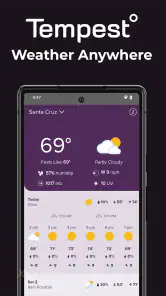
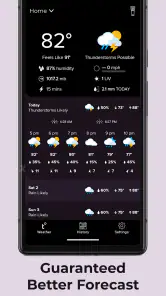
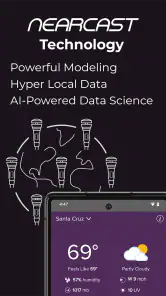
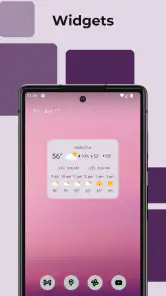
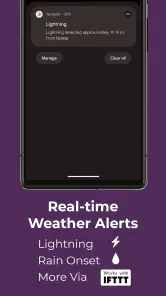
Analysis by Reviewed
I tend to trust a weather app only after using it in the situations where a vague forecast becomes genuinely inconvenient: leaving for a walk when rain is nearby, deciding whether to water plants, or checking conditions before working outside. Tempest Weather takes a more focused approach than a typical general-purpose forecast app. It is built to work with a Tempest sensor device, so its value depends on having that hardware available and properly positioned.
That distinction matters from the first launch. This is not simply another free app that replaces every weather service on a phone. WeatherFlow develops it as the companion for its Tempest weather station, with the aim of making local readings and forecasts more useful around the place where the sensor is installed. If you already own a Tempest device, the app can become a practical daily dashboard. If you do not, its usefulness is much narrower than the familiar weather apps that provide forecasts immediately.
I reviewed it as a weather tool rather than as a novelty. The strongest part of the experience is the connection between a nearby sensor and the decisions I make during the day. The weakest part is also connected to that design: the app makes much more sense as part of the Tempest setup than as a standalone download. That trade-off shapes almost every recommendation I would give.
How I use Tempest Weather as a daily local forecast
My baseline workflow is simple. I open the app before going outside, look at the current local conditions, check the upcoming forecast, and then compare that information with what I can see around me. A sensor installed at home can be more relevant than a broad regional forecast when conditions change quickly across a neighborhood. That is especially useful for outdoor work, gardening, cycling, walking, and anyone who wants to know what is happening at their own property rather than several miles away.
The app is also useful as a routine check rather than something I leave open constantly. I would not treat it like a live control panel for every minute of the day. Instead, I use it at decision points: before starting a task outside, before leaving for an appointment, and again when the sky looks different from the earlier forecast. This habit keeps the app practical and avoids turning weather checking into unnecessary scrolling.
One realistic example is a weekend morning when I plan to clean outdoor furniture and hang laundry. A standard weather app may show the regional forecast, but the Tempest setup gives me a reason to check the conditions at home first. If the local situation looks unsettled, I can delay the task rather than relying only on a broad icon. The app does not remove uncertainty, but it gives the decision a more relevant starting point.
That local focus is the main reason to choose it over a conventional phone weather app. Most alternatives are designed to serve anyone, anywhere, with a forecast based on a selected location. Tempest Weather is better suited to people who care about one physical site and have invested in measuring conditions there. The difference is not just visual. It changes what the app is for.
More From Our News Desk

Clash of Clans Is Won Between the Battles

Android Auto Makes the Case for Quieter Car Software

MobiOffice: Transforming Mobile Productivity with Seamless Integration

EA SPORTS FC™ Mobile Soccer: Redefining Mobile Sports Gaming

How Microsoft OneDrive Became a Mobile Productivity Giant

How Google Translate Breaks Language Barriers Effortlessly
What the sensor relationship changes
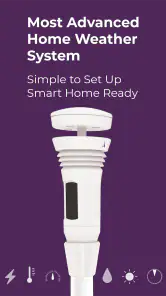
With a Tempest sensor device in the picture, I think about the app as the readable layer of a home weather system. The sensor gathers the local conditions, while the app turns those conditions into something I can consult. That makes the installation itself important. A sensor placed in a poor location can make the most polished dashboard less useful, because nearby structures, shade, heat sources, or obstructions may affect how representative the readings are.
This is one of the less obvious lessons of using the app: the quality of the experience begins outside the phone. Before judging a forecast against a single observation, I would first consider whether the sensor has a clear and sensible location. The app cannot correct an installation that does not reflect the surroundings I actually care about.
I also find it helpful to separate two questions when reading the screen. The first is, “What is happening at my sensor location now?” The second is, “What is likely to happen later?” Those are related, but they are not interchangeable. A current local reading can be very helpful for deciding whether to go outside immediately, while the forecast is more useful for planning the next part of the day. Treating both as the same kind of information can lead to overconfidence.
Settings and setup choices worth checking
The first setting worth checking is the location and device arrangement associated with the Tempest system. I would make sure the app is showing the intended station before relying on it for household decisions. This sounds basic, but it is an easy source of confusion when someone has moved, changed devices, or is looking at a location that is not the one they had in mind.
I would also review the app’s display and notification behavior rather than accepting every default automatically. Weather information is most useful when it arrives at the right moments. Too many alerts can make important changes blend into background noise, while too few may mean I miss the reason I installed a local weather system in the first place. The best balance depends on whether I use the app for gardening, outdoor work, commuting, or general curiosity.
Another practical check is the forecast horizon and the way I interpret it. I would avoid making a detailed outdoor plan from one glance at a distant forecast. The farther out the plan, the more useful it is to revisit the app closer to the event. This is not a criticism unique to WeatherFlow; it is a sensible way to use any forecast. Tempest Weather becomes more valuable when I combine its local view with a repeatable checking habit instead of expecting one screen to settle every question.
For households, I would decide who actually needs access to the app and who only needs the conclusion. One person may monitor the station, while another simply wants to know whether outdoor plans are sensible. Keeping the workflow clear prevents the weather station from becoming an overcomplicated household project. In my experience, the strongest setup is the one people check consistently, not the one with the most elaborate routine.
Faster patterns for experienced users
After the initial setup, I would build a few shortcuts around real decisions. For example, I might check the app at the same points each morning: once after waking, once before leaving, and once before beginning outdoor work. The benefit is not that the forecast becomes more accurate because of the routine. The benefit is that I notice changes consistently and make fewer decisions from memory.
A second useful pattern is to compare the app with the physical environment without treating either one as automatically correct. If the sky is changing quickly, I look at the local conditions and then observe what is happening outside. If they disagree, I use that disagreement as a reason to wait, investigate, or reduce the risk of the planned activity. This is more mature than checking an icon and assuming it describes every corner of the area.
I also recommend using the app before committing to tasks that are annoying to interrupt. Painting, drying clothes outdoors, preparing a garden bed, or setting up equipment are all examples. A quick check can help choose a better time, but I would still keep a backup plan. The app improves preparation; it does not guarantee that a day will remain stable.
For people who already use a general forecast app, the fastest pattern is not necessarily to replace it. I would use the usual app for broad planning and Tempest Weather for the immediate local decision around the sensor. That combination makes sense when a person travels frequently but also wants precise information at home. It is less attractive for someone who wants one app and does not own the Tempest hardware.
There is also a useful mental shortcut: ask whether the decision is local or regional. If I am deciding whether to open windows at home, work in the yard, or leave a bicycle outside, the Tempest view is especially relevant. If I am planning a trip across several areas, a broader forecasting service may be more convenient. Choosing the tool according to the question keeps the app from being judged unfairly for a job it was not designed to handle alone.
Where the experience has limits
The largest limitation is the hardware requirement. The store summary presents the app as a tool for use with a Tempest sensor device, and that is central to the experience. Someone downloading it without that device should not expect the same value as they would get from a standard weather app. For that user, the app may feel incomplete rather than focused.
There is also a commitment involved in maintaining a local weather setup. The phone app is only one part of the system, so the overall experience depends on the sensor, its placement, and the reliability of the connection between the device and the app. That is a different kind of friction from simply opening a free forecast app. It can be worthwhile for a homeowner, gardener, outdoor worker, or weather enthusiast, but it is more effort than many casual users need.
I would also avoid treating a local sensor as a perfect substitute for wider forecasting. Conditions can vary even over short distances, and a reading at one property does not describe every road, park, or destination. When I am traveling, planning a drive, or making a decision that depends on conditions elsewhere, I would use a broader source as well. Tempest Weather is strongest at the place it represents, not as a universal answer for every location.
Another limitation is behavioral. A detailed local reading can create the temptation to overanalyze small changes. I have found that the app works best when I decide in advance what information matters for the task. If I am checking whether to start gardening, I need a practical go-or-wait judgment. I do not need to turn every check into a lengthy weather investigation. The app supports informed choices, but the user still has to keep the process proportionate.
These limits explain why I would not recommend it to everyone. A person who only wants a quick forecast for a commute may be happier with a conventional weather app. Someone who moves between cities constantly may prefer a service built around multiple locations and broad coverage. Tempest Weather makes the most sense when the user values a persistent local station and is willing to use that information repeatedly.
Version, availability, and everyday practicality
WeatherFlow’s app is free, carries an Everyone age rating, and has been available since October 6, 2017. Its current release is v5.10.18, and it supports devices running Android 5.0 or later. Those details make it approachable for a wide range of Android users, including people who are not using a recent phone. The free entry point is helpful, although the practical cost of the experience is tied to whether the user already has, or plans to obtain, the Tempest sensor hardware.
The app has reached over one hundred thousand installs, with an average rating of 4.3 from around seven hundred ratings and more than three hundred written reviews. I see that as evidence of a real user base rather than a reason to assume it will suit everyone. Ratings for a companion app can reflect the complete hardware-and-software setup, so I would read them in that context.
In daily use, I would keep the app for the specific value of local information and avoid expecting it to behave like a general news or travel weather service. That expectation is important. When an app has a narrow purpose, it can feel excellent for the intended workflow and unnecessary outside it. Tempest Weather falls clearly into that category.
Who should install it and who should look elsewhere
I would recommend it to someone who owns a Tempest sensor device and wants a convenient way to consult conditions at home. It is particularly appealing for people who spend time outdoors, manage a garden, maintain property, plan activities around changing weather, or simply enjoy having a more personal view of local conditions. The app rewards repeat use because its information becomes part of a familiar place and routine.
I would also consider it for a household where weather affects several small decisions each day. A local check before outdoor chores, a second look before leaving, and a quick review before evening plans can make the sensor genuinely useful. The value is not one dramatic feature; it is the accumulation of better-informed everyday choices.
I would skip it if I do not have the required Tempest hardware and only want a normal forecast. I would also look elsewhere if my main need is travel planning across many destinations, a simple weather widget with no setup, or a single source that covers every location I visit. In those cases, the usual alternatives are likely to be faster and less demanding.
My verdict after building a repeatable weather habit
Tempest Weather is a focused companion rather than a universal weather replacement. I like it most when I use it as part of a repeatable local workflow: check the sensor before an outdoor decision, compare the information with the conditions around me, and check again when the plan matters. That approach makes the app feel purposeful instead of merely another forecast screen.
The most important trade-off is straightforward. You gain a weather view tailored to a Tempest sensor location, but you accept the need for that hardware and the responsibility of interpreting one local point sensibly. For the right user, that is a fair exchange. For a casual user without a sensor, it is unnecessary friction.
My final recommendation is therefore conditional but positive. If you already use a Tempest device, I would install the app and make it part of your outdoor planning routine. Check the station arrangement, adjust the way alerts fit your day, and use local readings for local decisions rather than treating them as a complete picture of the wider region. The best results come from combining accurate habits with realistic expectations.
WeatherFlow has made a useful tool for people who want more than a broad forecast icon. It will not replace every weather service, and it should not be judged as though it tries to. Used with its intended sensor and a sensible checking routine, it can turn weather from a generic estimate into a practical part of managing one particular place.
Tempest Weather Frequently Asked Questions
Is Tempest Weather free, and which devices can install it?
Tempest Weather is a free weather app from WeatherFlow, so you can download it without an upfront purchase. It runs on Android devices with Android 5.0 or later. The app is rated for Everyone, making it suitable for a general audience. If you plan to use it with a Tempest station, make sure your device can connect to the internet and that you can sign in to the appropriate account.
What is Tempest Weather, and what can I use it for?
Tempest Weather is a weather app designed to provide current conditions, forecasts, radar information, alerts, and readings from compatible Tempest weather stations. It can help you check temperature, humidity, wind, rainfall, pressure, and other local measurements in one place. The app is especially useful for people who want detailed information from a personal weather station rather than relying only on broad regional forecasts.
Do I need a Tempest weather station to use the app?
You may be able to use Tempest Weather to view forecast information and explore available station data without personally owning a station, but its most valuable features are intended for users with a compatible Tempest Weather System. A connected station can provide highly localized measurements from your property. Before downloading, check whether the app supports the station model and account setup available in your region.
Which weather information does Tempest Weather provide?
Depending on the connected station and available services, Tempest Weather can display conditions such as temperature, feels-like temperature, humidity, wind speed and direction, rainfall, barometric pressure, UV information, and lightning-related data. It may also include short-term forecasts, historical observations, graphs, and weather alerts. Some readings depend on the hardware installed and the permissions enabled on your device.
Does Tempest Weather require location access, internet access, or an account?
An internet connection is generally required to synchronize station readings, download forecasts, and receive updated weather information. Location permission may be requested to show nearby stations, local forecasts, or location-based alerts, although the exact requirement can vary by device and app version. An account may also be necessary for managing a Tempest station, sharing data, or accessing connected services.
Pros
- Clear forecasts with useful hourly and daily breakdowns.
- Weather radar helps track incoming rain and storms.
- Supports multiple saved locations for easy travel planning.
- Clean interface makes key conditions quick to check.
- Provides practical details such as wind
- humidity
- and visibility.
Cons
- Some advanced features may require a paid subscription.
- Forecast accuracy can vary between locations and weather conditions.
- Radar coverage and detail may differ by region.
- Frequent alerts can feel excessive unless carefully customized.
- The app may use noticeable battery and data during live updates.
- Category
- Weather
- Version
- v5.10.18












