Tasty
- 27.16K
- 4.7
- Installs
- 10.00M
- Price
- Free

Screenshots

Analysis by Reviewed
My main reason for recommending Tasty is that it turns food browsing into a practical first step: a short video can make an unfamiliar dish feel approachable, and the recipe tools help move an idea toward an actual meal. That combination is especially useful when I know I want to cook but have not decided what. The trade-off is that visual appeal can make a recipe seem easier than it is, so I still read the full instructions before committing.
When a quick idea needs a reality check
I find the app most effective when I use it in two passes. First, I browse for inspiration or search around ingredients I already have. Then I open a promising recipe and check the ingredient list and written steps before I decide. That second look matters: a polished clip shows the result and the broad sequence, but not always how much preparation the dish involves or whether I have everything on hand.
For example, after work I might have eggs, a bell pepper, and little patience for a complicated dinner. Searching with those ingredients can bring up possibilities, but I would compare the full recipes rather than assume every result is a complete meal or uses only those items. If one option calls for several ingredients I do not have, I can save another and avoid turning a quick dinner into an extra shopping trip.
Small habits that make the recipe tools more useful
I would save a few realistic options before shopping, then use the shopping-list feature to keep ingredients in one place. A useful refinement is to check the list against the recipe before leaving: confirm quantities and note anything I already have, rather than treating the list as a finished meal plan. This makes the app more helpful for a short grocery run without expecting it to decide the whole week’s menu.
For a new technique, I use the video as a preview before cooking and replay the relevant moment when I reach that step. I still keep the written directions nearby for quantities and timing. That split works well for visual cues, such as seeing how a mixture changes, while reducing the risk of following a fast-moving clip as if it were a complete set of precise instructions.
Dietary filters can also help me discover dishes I might otherwise overlook, especially when I want vegetarian ideas. I treat them as a starting point rather than a safety check: I read the ingredients and preparation details myself, and I am cautious about substitutions that could change how a dish cooks. For a serious allergy or medically restricted diet, I would choose a source with explicit guidance instead of relying on a discovery filter.
What kind of cook is it for?
I think this works best for curious home cooks who want approachable ideas, beginners who learn by watching, and people who enjoy trying different dishes without starting from a specialist cookbook. It is also a good fit if your usual problem is getting from “I have a few ingredients” to a plausible dinner. The video-led format gives that browsing a more immediate, hands-on feel than scanning a long page of text.
More From Our News Desk

Weather by Xiaomi Review: Clear at a Glance, Less Clear Up Close

X Under Pressure: Can It Recover When Posting Goes Wrong?

Clash of Clans Is Won Between the Battles

Android Auto Makes the Case for Quieter Car Software

MobiOffice: Transforming Mobile Productivity with Seamless Integration

EA SPORTS FC™ Mobile Soccer: Redefining Mobile Sports Gaming
I would skip it as a primary tool if I wanted a tightly organized meal plan, extensive technical explanations, or rigorous support for complex dietary needs. A traditional cookbook can be better when I want a coherent set of recipes and less screen time; a planning-focused recipe service is more suitable when the priority is organizing meals in advance. Tasty’s strength is inspiration and approachable guidance, not taking over every part of cooking.
How it fits beside other recipe sources
Against a browser search, the advantage is having recipe discovery, saved favorites, ingredient search, and shopping lists gathered in an app. Against a conventional cookbook, it is easier to browse visually when I have no dish in mind, though a book may offer a more deliberate sequence and a calmer kitchen experience. I would use Tasty to find candidates, then make my choice based on the written recipe and what my evening allows.
That distinction is important for anyone who tends to pick dinner by watching a tempting clip. The presentation can help me understand what a dish should look like, but it can also make a recipe feel effortless before I have checked prep work or ingredients. I get better results when I decide on effort first—quick and simple, or something I have time to tackle—and only then settle on a recipe.
Exploring the Recipe Wonderland
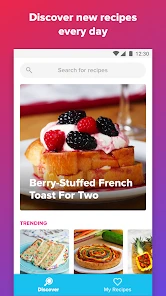
Opening the app feels a bit like stepping into a bustling kitchen filled with aroma and clatter. The interface is sleek and inviting, making it a breeze to navigate through the myriad of recipes. Whether you're a seasoned chef or a complete novice, there's something for everyone. I particularly loved the way recipes are categorized not just by meal type but also by mood and occasion. Feeling like a cozy night in? There's a section for that. Need to impress a date? They've got you covered.
Step-by-Step Guidance
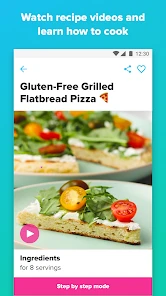
One of the standout features for me was the step-by-step video tutorials. It's like having a friendly chef guiding you through each stage of the process. I found this incredibly helpful, especially when tackling unfamiliar dishes. The videos are short, yet comprehensive, allowing you to pause and replay as needed, which is perfect for anyone who's ever found themselves perplexed by a written recipe instruction.
The visual approach is particularly good for judging the look and texture of a dish as it comes together; written directions alone can leave beginners unsure whether a mixture is ready for the next step. I use the clip as a preview before cooking, then pause or replay it at the point where a technique feels unclear. That is a useful rhythm, but it does not remove the need to read carefully: video moves quickly, and I would not rely on it alone for timings or quantities when precision matters.
Personalization and Convenience
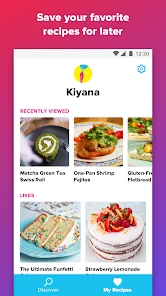
Tasty goes beyond just providing recipes; it offers a personalized cooking experience. By allowing you to input your dietary preferences and restrictions, the app curates a selection of recipes tailored to your needs. As someone who dabbles in vegetarian cooking, I appreciated the ease with which I could filter out meat-based recipes. Plus, the app has a nifty feature where you can save your favorite recipes and even create a shopping list directly from the app. Talk about convenience!
Those filters are best treated as a discovery aid, not as a guarantee that every recipe meets a strict dietary or allergy requirement. I would inspect ingredients and preparation details myself, especially when cooking for someone else. The same caution applies to substitutions: a filter can surface ideas, but changing a central ingredient may affect texture or cooking time. For flexible home cooking, that is manageable; for a medically restricted diet, a specialist source with explicit ingredient guidance is the safer choice.
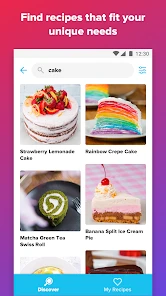
Another feature that resonated with me is the ability to search recipes by ingredients. Ever looked into your fridge and wondered what on earth you could make with a couple of eggs and a lone bell pepper? Tasty has a solution for that, turning what could be a fridge full of random ingredients into a gourmet meal.
Community and Sharing
Cooking can often feel like a solitary activity, but Tasty brings a sense of community into the kitchen. With options to share your culinary creations and see what others are whipping up, it turns cooking into a shared experience. There's a sense of camaraderie in knowing you're not alone in your kitchen escapades, and sometimes, it's just the motivation you need to try something new.
Where it sits among recipe options
Compared with a conventional cookbook, Tasty is quicker for visual inspiration and easier to browse when I do not yet know what I want to eat. Compared with a general recipe website, its video-led presentation is the main draw: I can see the intended result and follow a technique rather than relying only on text. The trade-off is that a video-first experience can encourage choosing a dish because it looks appealing, before I have weighed the effort, ingredients, or whether it fits my needs. When I want a carefully organized week of meals or detailed technical instruction, I would reach for a more planning-focused or specialist cooking resource instead.
Who will get the most from it
I would recommend it to curious home cooks, beginners who benefit from seeing a process, and anyone who often needs a fresh dinner idea. It also suits cooks who like saving recipes and collecting ingredients into a list before heading out. I would be less likely to rely on it as my only cooking resource if I wanted a strict meal-planning system, highly technical instruction, or dependable guidance for complex dietary restrictions. The best fit is someone who enjoys browsing but wants that browsing to lead to a dish on the table.
For a realistic evening, I might check what needs using up after work, search around those ingredients, and save a couple of plausible options. After choosing one, I would review the recipe from start to finish, set out the ingredients, and keep the video handy for any unfamiliar technique. This avoids treating a polished clip as the whole recipe and makes it easier to notice a missing ingredient before I have started cooking. If the plan turns out to be too ambitious, I can choose a simpler idea rather than turning dinner into a project.
Cost, access, and what to expect
The app is free to download, with in-app purchases listed from $2.99 to $27.99 per item, so I would check the purchase details before paying for anything. It is rated for Everyone, has a 4.7 average from around 180,000 ratings, and has passed 10 million installs. Those figures suggest it has broad appeal, but they do not tell me whether its recipe style matches my own kitchen; I would judge that by browsing the dishes and checking whether the instructions suit my habits.
It first appeared on August 14, 2018, and version 2.14.0 requires Android 7.0 or later. If you are choosing between installing it and simply searching recipes in a browser, the app’s appeal is having browsing, saved favorites, ingredient search, and shopping lists gathered in one place. If you prefer a paper cookbook, dislike video-led discovery, or want every meal planned in advance, that convenience may not be enough to make it your main tool.
In conclusion, the Tasty app is more than just a recipe repository; it's an interactive culinary adventure. Whether you're looking to spice up your weeknight dinners or bake the perfect cake for a special occasion, this app has you covered. It's like having a cooking buddy who's always ready to help, no matter the time of day. So, if you're looking to reignite your love for cooking or simply make meal planning a tad easier, I highly recommend giving Tasty a try. Who knows, you might just discover your new favorite dish!
Tasty Frequently Asked Questions
Can I plan meals or build a shopping list with Tasty?
Tasty can help you move from browsing recipes to organizing what you want to cook. You can create shopping lists based on recipes, which is useful when you are preparing for a meal and want to keep ingredients together. It is a practical feature for turning cooking inspiration into a plan, though the app’s main focus remains its food videos and recipes.
Does Tasty include cooking videos as well as written recipes?
Yes. Tasty brings together food videos and recipes, so you can choose between watching a dish come together and reading its instructions. The video format can make cooking techniques easier to follow, while written steps are handy when you want to check details as you cook. Together, these formats make the app useful for both browsing and preparing meals.
Can I save recipes I want to try later?
Yes, you can save favorite recipes in Tasty and return to them later. This is convenient when you come across a dish you like but are not ready to cook immediately, or when you want to keep a few ideas in one place. Saved recipes can also make it easier to revisit cooking guidance when you are ready to prepare a meal.
Is Tasty suitable for quick meal inspiration, or is it mainly for learning full recipes?
Tasty is useful both when you want ideas for what to cook and when you need guidance through a recipe. Its food videos and recipe collection can help you browse dishes, while step-by-step instructions and video guides support you as you prepare them. You can save favorites for later, making it easier to return to meals that appeal to you.
Who makes Tasty, and what kind of app is it?
Tasty is a Food & Drink app developed by BuzzFeed, and it is the official home of Tasty’s food video and recipe network. It is designed for people who want to explore cooking ideas and follow recipes on a phone or tablet. The app is free to download, with optional in-app purchases available.
Pros
- User-friendly interface enhances cooking experience.
- Wide variety of recipes for all skill levels.
- Step-by-step video tutorials aid learning.
- Personalized recipe recommendations.
- Offline access to saved recipes.
Cons
- Some features require in-app purchases.
- Advertisements can be intrusive.
- Limited dietary-specific options.
- Occasional app crashes reported.
- User account creation is mandatory.
- Category
- Food & Drink
- Version
- 2.14.0











