Tape Measure: Measuring Ruler
- 4.39K
- 4.2
- Installs
- 10.00M
- Price
- Free
Screenshots
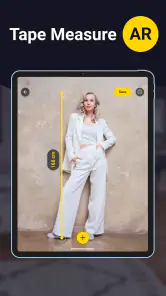
Analysis by Reviewed
I find Tape Measure: Measuring Ruler most useful when I need a quick visual estimate and do not have a physical ruler nearby. It turns a phone into a measuring aid through the camera, which makes it handy for checking the approximate size of furniture, a wall, a box, or an object before I decide what to do next. It is a free tools app from Grymala apps, available to users rated Everyone, and it has built a substantial audience with an average rating of 4.2 from around 270 thousand ratings.
That convenience comes with an important qualification: a phone camera is not the same as a calibrated tape measure. I would use this app for planning, comparing, arranging, and estimating, but I would reach for a real measuring tool when a small error could cause a costly mistake. Its value is not that it replaces every ruler. Its value is that it is already in my pocket and can help me make a useful first measurement in seconds.
How the measuring experience feels in everyday use
I find camera-based measuring most useful when I need a quick estimate but do not have a tape or ruler at hand. The key is to treat the result as a starting point: I first decide which edges matter, then use the estimate to guide a practical choice rather than trusting it as a final specification. That distinction shapes the everyday experience—and makes it easier to see where this kind of tool helps most.
Readability and navigation matter more than flashy extras
The main appeal is easy to understand. Instead of searching through a drawer for a tape measure, I can open the app and use the phone as a visual measuring instrument. That simple purpose is a strength because I do not have to learn a complicated productivity system before getting a result. For someone who only needs occasional room measurement or object sizing, the focused approach feels more appropriate than a full design or renovation suite.
I also appreciate that the app’s role is clear from the start: it belongs to the tools category, not to entertainment or a broader home-planning platform. That helps set the right expectation. I am opening it for a quick measurement task, not for project management, detailed floor plans, or professional surveying.
Readability becomes especially important when I am holding a phone at an awkward angle or looking at the screen while standing across a room. A measurement app should not force me to interpret a dense interface while also keeping the camera pointed at the right area. In practice, I would get the best experience by preparing the object first, clearing the area around it, and keeping the phone steady rather than trying to measure while moving quickly.
One useful habit is to take a moment to identify the exact endpoints before I begin. If I am measuring a shelf, for example, I first decide whether I need the outside edges, the usable interior, or the distance between mounting points. This sounds obvious, but it prevents a common mistake: obtaining a neat-looking number that answers the wrong question. The app can assist with the visual estimate, but I still need to define what I am measuring.
More From Our News Desk

Weather by Xiaomi Review: Clear at a Glance, Less Clear Up Close

X Under Pressure: Can It Recover When Posting Goes Wrong?

Clash of Clans Is Won Between the Battles

Android Auto Makes the Case for Quieter Car Software

MobiOffice: Transforming Mobile Productivity with Seamless Integration

EA SPORTS FC™ Mobile Soccer: Redefining Mobile Sports Gaming
The current version is 6.5.3, and the app has been available since late March of 2013. That long presence suggests a mature concept rather than a novelty, although longevity alone does not make a camera measurement exact. I would still check the interface on my own phone before relying on it for an important task, especially if I am using a compact display or have difficulty distinguishing small on-screen markings.
Making the display easier to follow
People with different visual abilities may experience the same measurement differently. Someone who can comfortably inspect a phone screen may find the app straightforward, while someone with low vision may need to enlarge the display, increase system text size, or move closer to the object. Those adjustments can help with reading labels and controls, but they do not automatically make every visual measurement easy to interpret.
I would avoid measuring in a dim room, against a visually busy background, or with strong reflections on the phone screen. Better lighting improves the distinction between the object and its surroundings, which can make the process less tiring. A plain background is also helpful when I need to identify a straight edge. These are not special app settings; they are practical changes to the environment that make the camera-based workflow more readable.
For someone who struggles with small visual details, a second person can make the app more useful without taking control away completely. One person can hold the phone and frame the scene while the other confirms the physical endpoints. This shared workflow is particularly sensible for measuring a long wall or an item that cannot be viewed comfortably from one position.
I would not assume that a visually clean screen guarantees accessible measurement output. The important question is whether I can distinguish the reference points, understand the unit being shown, and repeat the process consistently. If any of those steps is unclear, I would treat the result as an estimate and verify it with a physical ruler or tape.
Motor and sensory considerations
Camera measuring usually asks for more than simply tapping a button. I may need to hold the phone at a stable height, point it toward a surface, move it into a useful position, and keep track of the edges being measured. That can be demanding for users with hand tremors, limited reach, reduced grip strength, or difficulty maintaining a steady posture.
A practical workaround is to use both hands, rest an elbow against a stable surface, or place the phone on a nearby support when the scene allows it. For a tabletop object, I can often position myself comfortably before starting rather than leaning over the item. For a wall, I would work in short, controlled movements instead of sweeping the phone rapidly across the room. The goal is not just comfort; steadier handling also improves repeatability.
Users who are sensitive to visual motion may prefer a slower workflow. Rapidly moving a camera around a room can make the task uncomfortable, and repeatedly trying to correct a poor angle can add unnecessary strain. I found it more sensible to pause between adjustments, look at the scene, and decide on the next movement. If the phone’s live view feels unpleasant, a conventional tape measure is the better choice because it removes the moving-camera element.
There is also a balance between independence and assistance. The app can reduce the need to carry a separate tool, but it does not remove the physical challenge of positioning a phone. A person who cannot safely hold the device while reaching for a high shelf should not treat the app as a reason to stretch or climb. In that situation, asking for help is safer than trying to make the measurement alone.
Touch interaction can be another consideration. If I have difficulty with precise taps, I would prepare the measuring area first and avoid attempting to select tiny points while walking or balancing. A stable stance, a clean surface, and deliberate movements reduce the number of corrections required. The app is most approachable when the surrounding task is organized to support it.
Situational access: where the app earns its place
The strongest use case is a quick estimate during an ordinary household decision. Imagine I am considering whether a narrow cabinet will fit beside a refrigerator. I can open the app, check the available gap, and compare that result with the cabinet’s listed width before leaving to buy it. I would still confirm the measurement with a physical tape before ordering, but the phone gives me a useful answer while I am standing in the kitchen.
It can also help when I am rearranging furniture and want to compare several possible positions. Rather than repeatedly guessing whether a chair will leave enough walking space, I can use the phone to inspect the gap and make a preliminary plan. The benefit is speed: I can test an idea immediately instead of postponing the decision until I find a measuring tool.
For renters, students, and people moving between homes, carrying fewer objects is a genuine advantage. A phone is already part of the daily routine, so a tool that supports approximate room measurement can be convenient during viewings, packing, or basic layout planning. I would especially value it when I am checking several spaces in succession and need quick comparisons rather than a formal record.
The app may also suit users who find a flexible digital tool easier to access than a retracting metal tape. A physical tape can snap back, require two hands, or be difficult to read at a distance. A phone-based approach avoids some of those particular frustrations, although it introduces its own need for camera positioning and screen interpretation.
There are situations where I would skip it. Measuring a cut line for wood, checking whether an appliance will fit in a tight opening, installing blinds, or confirming a medical or safety-related dimension calls for a properly calibrated physical tool. The same applies when the object has no clear edge, the lighting is poor, or the phone cannot be held steadily. In those cases, convenience is not worth the uncertainty.
Three habits that improve useful results
My first recommendation is to measure the same item more than once when the result affects a purchase or layout. I would approach the object from a slightly different position and compare the readings. If they vary noticeably, that is a warning that the scene, angle, or endpoint selection is not reliable enough. Repetition is not a substitute for calibration, but it reveals when an estimate is unstable.
Second, I would separate the measurement from the decision. The app can tell me what a space appears to be, but I should leave clearance for doors, handles, skirting boards, uneven walls, and the movement needed to use the object. A cabinet that technically fits may still be impractical if its doors cannot open. This is where a phone measurement becomes genuinely useful: it starts the reasoning process rather than ending it.
Third, I would record the context alongside the number. If I measure a room, I would note which wall, height, or opening the result refers to instead of relying on memory. A quick photo or written label can prevent confusion when several similar distances are involved. This workflow is more reliable than collecting isolated figures and trying to reconstruct the scene later.
A fourth useful habit is to keep the phone’s camera lens clean. Fingerprints, dust, or smudges can make the live view harder to interpret, particularly around high-contrast edges. Cleaning the lens before a measurement takes only a moment and can make the visual task less frustrating. It will not turn the app into professional equipment, but it removes an avoidable source of ambiguity.
Remaining barriers and trade-offs
The biggest barrier is the difference between an estimate and a verified dimension. A camera-based measuring tool depends on how I frame the scene and how clearly the app can interpret the visual relationship. Perspective, clutter, reflective surfaces, curved objects, and unclear boundaries can all make the task harder. Even when the interface feels simple, the underlying situation may not be.
Another trade-off is that the phone itself becomes part of the measuring equipment. If the battery is low, the display is difficult to see outdoors, or I need both hands for the object, the convenience disappears. A physical ruler is less dependent on screen brightness, camera positioning, and phone handling. For a toolbox or workshop, I would still consider a real tape measure essential.
People with limited vision, reduced dexterity, motion sensitivity, or difficulty standing for long periods may need a modified setup or another person’s assistance. I like that the app can support a collaborative approach, but I would not describe it as automatically accessible for every ability. The experience depends heavily on the user’s phone, environment, posture, and comfort with visual camera interaction.
The free price makes trying it low-risk, but the app includes in-app purchases ranging from $0.99 to $89.99 per item. I would pay attention to the purchase screen and avoid assuming that every available function is included without charge. For occasional estimates, I would first decide whether the free experience meets my needs before spending anything. A paid option may be reasonable for a frequent user, but it should not be treated as necessary for basic household planning without checking what it changes.
Its Everyone content rating also makes it broadly suitable from an age-classification perspective, but that does not change the practical safety advice. Children should not climb furniture or handle awkward objects just to obtain a measurement. The app can be part of a supervised activity, yet the physical environment remains more important than the software.
How it compares with ordinary alternatives
Compared with a standard ruler, the app is better for objects and spaces that are too large to place beside a fixed measuring edge. It is also more convenient when I am already carrying a phone but not a ruler. The physical ruler wins for small, flat items where accuracy and repeatability matter, such as paper, craft materials, or parts that need to match closely.
Compared with a retractable tape measure, the app is quicker to access and can be easier for a rough room check. The tape measure is superior when I need a dependable physical reference, when the space is dark or visually confusing, or when I must mark a precise cut. A tape also gives me a tactile process that does not depend on interpreting a moving screen.
Compared with a full room-planning application, this tool is less ambitious but potentially less overwhelming. I would choose it for a single question such as “Will this fit here?” I would choose a more specialized planning solution when I need a lasting floor plan, multiple connected dimensions, furniture libraries, or a detailed renovation record. The smaller scope is a benefit only if my task is also small.
The app’s large user base, including more than ten million installs, makes it easy to understand why the pocket-tool idea appeals to people. Still, popularity should not be confused with professional precision. I see it as a practical first step: fast enough for everyday decisions, flexible enough for occasional use, and limited enough that I should know when to verify its result elsewhere.
Who should use it, and who should pass
I would recommend it to renters checking spaces, homeowners planning furniture placement, students measuring a room, shoppers comparing an item with an available gap, and anyone who regularly thinks, “I wish I had a ruler with me.” It is also useful for people who prefer a digital tool to carrying several physical instruments, provided they are comfortable with camera-based interaction.
I would be more cautious recommending it to someone who needs certified or highly precise dimensions, works with construction tolerances, or cannot comfortably hold and view a phone during the task. Those users are better served by a physical measuring instrument suited to the required accuracy, possibly with assistance from another person if handling is difficult.
The developer, Grymala apps, has kept the concept focused enough that a casual user can understand its purpose quickly. My judgment is positive, but conditional: the app earns a place on my phone because it solves the “no ruler nearby” problem well. It does not eliminate the need for judgment, a stable setup, or a backup tool.
Overall, I see Tape Measure: Measuring Ruler as a convenient accessibility-minded option in the practical sense that it can adapt to situations where a physical tape is unavailable or awkward. Its inclusive value comes from flexibility, not from promising the same experience for every user. Better lighting, deliberate movement, larger system text, a stable grip, and occasional assistance can make it much easier to use.
My final advice is simple: use it to explore, compare, and plan, then verify important results with a proper ruler or tape. If that boundary works for you, the free app is worth trying, and its current version remains a sensible pocket utility. If you need exact dimensions every time, or if camera movement and screen reading create more difficulty than they solve, the traditional alternative is the better fit.
Tape Measure: Measuring Ruler Frequently Asked Questions
Can I use the app to measure a room or plan where furniture will go?
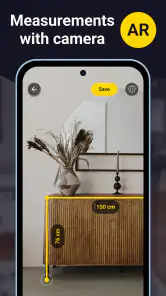
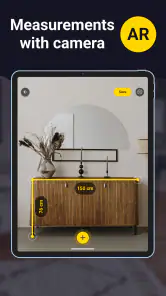
The app’s store summary highlights photo measuring and room measurement, which can help when you are sketching out a space or checking whether furniture may fit. It is best to treat the result as a planning aid rather than a final measurement. For purchases, installations, or changes where a small discrepancy matters, confirm the dimensions with a physical tape measure.
Can I save or share measurements and photos from the app?
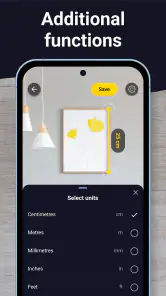
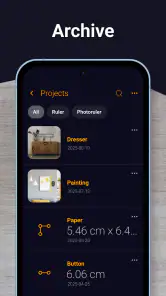
A photo-based measuring tool may be useful for keeping a visual reference while you plan, but whether you can save or share a particular result depends on the available tools in your version of the app. Before relying on it as a record, try the relevant options and make sure you can retrieve the information you need. For important dimensions, also keep a written measurement.
Is Tape Measure: Measuring Ruler suitable for quick home projects?
It can be handy when you want a quick estimate for furniture, room layouts, or everyday objects without reaching for a physical tape. The app is a measuring tool for smartphones, and its store summary describes photo measuring and room measurement features. Treat the results as practical estimates, especially when a small difference could affect whether an item fits or a project works.
What is Tape Measure: Measuring Ruler used for?
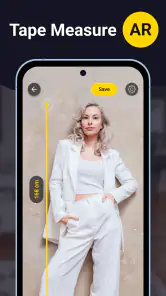
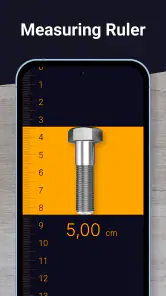
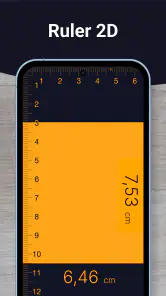
Tape Measure: Measuring Ruler is designed to help you estimate the length, height, or distance of everyday objects using your smartphone. Depending on the device and available features, it may use the camera, augmented reality, or on-screen ruler tools. It is useful for quick household measurements, furniture planning, and checking approximate dimensions, but it should not replace professional measuring equipment when exact accuracy is required.
How accurate is Tape Measure: Measuring Ruler?
The app can provide convenient measurements, but its accuracy depends on your phone’s sensors, camera quality, lighting, surface visibility, and the way you position the device. Before measuring, follow the instructions carefully and keep the camera steady. Results are generally suitable for estimates and casual tasks, while construction, engineering, tailoring, or other precision work should always be verified with a physical tape measure or specialized instrument.
Pros
- Quickly estimates length using the phone’s camera and AR.
- Useful for measuring objects when a physical ruler is unavailable.
- Simple interface makes basic measurements easy to start.
- Supports convenient on-screen measurement markers and guides.
- Handy for occasional home
- office
- or DIY measuring tasks.
Cons
- Accuracy can vary with lighting
- angles
- and camera quality.
- Requires camera access and compatible AR features on some devices.
- Small objects may be difficult to measure precisely on screen.
- Measurements may need calibration before producing reliable results.
- Some features or tools may be restricted behind ads or purchases.
- Category
- Tools
- Version
- 6.5.3









