Subway®
- 131.12K
- 4.2
- Installs
- 10.00M
- Price
- Free

Screenshots
Analysis by Reviewed
For a quick lunch routine, I find the Subway® app most useful when I already know what I want and would rather sort out the order before reaching the counter. It is a free food-and-drink app from SUBWAY Restaurants, and its appeal is less about discovering a new way to eat than making a familiar sandwich order easier to repeat. That distinction matters: if you visit only once in a while, the convenience may feel modest; if Subway is already part of your week, the saved effort can add up.
When the first week feels useful
In the first few uses, the strongest draw is being able to build an order at your own pace instead of making every choice while a queue forms behind you. I can think through the bread, fillings, vegetables, and sauces before checkout, which is handy when I want to adjust a usual order or make one small change. Saving a favorite can make a return visit quicker, though I would still review it before placing the order rather than assume an old combination suits today’s appetite.
A practical example: I’m leaving work hungry, know which Subway I’m heading toward, and want lunch ready with less counter-side deliberation. I can use the app to prepare the order while I’m still deciding, then check the details before committing. That is a better fit for a planned stop than for a spontaneous visit where I want to browse the menu in person or ask staff about choices.
Making a first order less error-prone
For a new user, the most useful habit is to treat customization as a checklist rather than a race to checkout. Read the sandwich from the base outward: bread, fillings, vegetables, sauces, then any extras. That sequence makes it easier to notice an omission or catch a combination that looked appealing on screen but is not what you meant to order. It also gives you a natural point to pause before payment instead of discovering a mistake when the food arrives.
If I’m ordering for another person, I’d ask them to confirm their choices before I submit. A saved favorite is convenient, but it can hide small assumptions: someone may want a different sauce today, or may have changed their mind about a topping. For a group, I’d handle one meal at a time and check each finished item separately. The extra minute is worth it when the alternative is trying to remember whose sandwich was meant to have which change.
Value that depends on your routine
The app has a 4.2 average from around 490,000 ratings and has been installed over 10 million times, so it is clearly used by a large range of customers. I would not treat popularity as proof that it will suit every ordering habit, though. Its lasting value depends on whether its ordering and rewards tools match how often you actually go to Subway, and whether the offers you see are useful for the food you would have bought anyway.
The rewards area can give regular customers a reason to keep using the app, but I would think of points as a bonus rather than a reason to buy extra food. Before choosing a deal, compare it with your normal order and check that it works for the visit you have in mind. That small pause helps keep a discount from nudging you into spending more than planned.
More From Our News Desk

Weather by Xiaomi Review: Clear at a Glance, Less Clear Up Close

X Under Pressure: Can It Recover When Posting Goes Wrong?

Clash of Clans Is Won Between the Battles

Android Auto Makes the Case for Quieter Car Software

MobiOffice: Transforming Mobile Productivity with Seamless Integration

EA SPORTS FC™ Mobile Soccer: Redefining Mobile Sports Gaming
Keeping rewards in perspective
I’d judge a promotion against the meal I was already planning, not against the full value advertised in the app. If a deal encourages me to add food I did not want, it is not really saving me money. For someone who orders Subway regularly, rewards can make repeat visits feel a little more worthwhile; for someone who goes rarely, the promise of points is unlikely to change the basic calculation. I would let the program follow my routine rather than build a routine around it.
It is also sensible to check the offer details before relying on a discount at checkout. A promotion can look attractive at a glance but may not suit the particular order or visit I have in mind. I’d confirm what applies while I’m still reviewing the basket, so I can decide calmly whether to continue, change the order, or simply place the usual meal without the offer.
What it asks of you over time
Maintenance is fairly light: keep the app available, check that your saved order still reflects what you want, and look over the payment and order details before checkout. The current version is 30.18.1 and it supports iOS 7.0 or later. Subway® is rated for Everyone, which makes it suitable for a broad audience, although anyone ordering for a group still needs to double-check each person’s choices rather than rely on one saved favorite.
One trade-off is that a phone order can make a familiar visit feel more efficient but less flexible. If I’m unsure what sounds good, want to ask a question, or prefer to make changes while speaking to someone, ordering in person is the better choice. The app is also less compelling if I rarely eat at Subway: a saved order and loyalty tracking have little room to become habits when visits are infrequent.
Where the app fits among ordering options
Compared with ordering at the counter, the app gives me more time to think through a familiar combination without holding up the people behind me. The counter still has a clear advantage when I want to ask about a choice, change direction mid-order, or decide after seeing what I feel like eating. I see the app as another way to place a Subway order, not a replacement for the more conversational option.
A general-purpose food delivery service has a different strength: it can help when I want to compare restaurants or put different meals into one order. Subway’s own app is the more focused choice when I already want Subway and prefer to build that order directly. Neither route is universally better. I’d choose based on whether I value a broader restaurant selection or a more direct path to a familiar Subway meal.
The Order-Up Experience
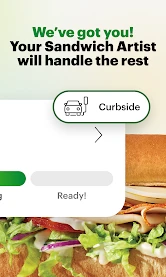
First things first, the Subway® app is all about making your sandwich cravings easy to handle. Once you open the app, you’re greeted with a clean and intuitive interface that practically smells like fresh bread. It’s like walking into a Subway restaurant, only with less waiting in line and more sitting back on your couch.
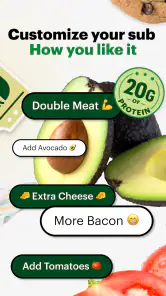
The app lets you customize your sub to your heart's content. Want extra pickles or a little more mustard? No problem! It’s as if the app knows that sometimes, you just need that extra zing in your sandwich. Plus, you can save your favorite orders for those days when decision-making feels like too much work.
Rewards and Deals
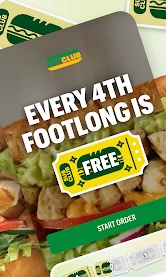
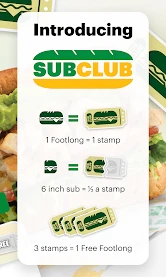
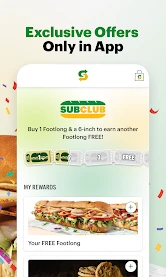
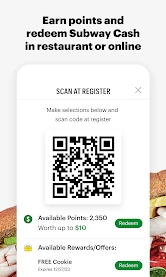
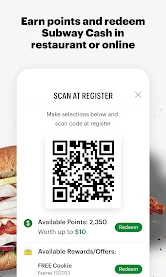
Who doesn’t love a good deal, am I right? The Subway MyWay Rewards program is seamlessly integrated into the app, making it super easy to earn points with every purchase. These points rack up faster than you can say “footlong,” and before you know it, you’re scoring free cookies or even a full meal. The app keeps track of your points, letting you know just how close you are to your next reward. It’s like having a little cheerleader in your pocket, rooting for you to get that free sub!
And let’s talk about the deals. The app often features exclusive discounts and promotions, making it feel like you’ve got access to a secret menu of savings. For someone who frequents Subway as much as I do, this is an absolute game-changer.
Ease of Use and Navigation
Navigating the Subway® app is smoother than the avocado spread on a six-inch sub. Everything is laid out in a way that makes sense, from finding your nearest location to customizing your order. The app’s performance is snappy, with minimal load times, which means you can get from craving to checkout without any hiccups.
The payment process is also straightforward. You can save your preferred payment method, making future orders a breeze. It’s the kind of efficiency that makes you wonder how you ever managed without it.
When familiarity turns into fatigue
The main risk of using a saved order is not a technical problem; it is ordering on autopilot. The same lunch can be comforting, but repeating it without checking can make the app feel like a shortcut that narrows rather than improves the choice. I’d use saved meals as a prompt, then make a deliberate pass through the ingredients. That keeps the time-saving benefit without treating yesterday’s preference as a permanent instruction.
There is also a useful boundary to set around deals. Frequent notifications or promotions can make a routine feel more engaging at first, but they are only valuable when they match what I want to eat. If I notice myself visiting just to use an offer, I’d step back and compare that habit with simply choosing a lunch I genuinely want. The app earns its space through practical convenience, not through the pressure to keep checking it.
Keeping the habit from getting stale
Over time, I’d use saved orders as a starting point, not a substitute for checking the meal. A small change in appetite or who I’m ordering for can make yesterday’s favorite less useful today. I also wouldn’t assume every offer is worth chasing; the best recurring value comes from ordering what I already wanted and letting rewards accumulate naturally.
Compared with a restaurant’s general-purpose delivery service, this app is more focused on Subway’s own menu and repeat ordering. That focus is helpful when I want a familiar sub and a direct route through its customization options. The alternative can be more convenient if I’m comparing several restaurants or placing one combined order, while going to the counter wins when I want a conversation or spontaneous menu advice.
Subway® has been available since July 31, 2014, and the catalog shows around 131,000 written reviews alongside its rating history. Those figures suggest an established app, but they do not remove the ordinary practical checks: select the location carefully, read the finished order, and verify the total before paying. I especially recommend that routine when ordering for someone else, because a saved favorite can make checkout faster without guaranteeing that every ingredient still suits them.
My long-term verdict is simple: I’d keep it installed if Subway is a regular stop and I value preparing a familiar order ahead of time. If I only visit occasionally, prefer choosing face to face, or mainly want to compare restaurants, I’d skip making it part of my routine. The app is free, so trying it has little downside; its real test is whether it saves enough thought on an ordinary lunch to earn a place on my phone.
Final Thoughts
All in all, the Subway® app is a must-have for anyone who loves convenience as much as they love a good sandwich. It takes the stress out of ordering, rewards you for your loyalty, and keeps you coming back for more with its exclusive deals. Whether you’re a regular Subway visitor or an occasional sub enthusiast, this app makes the experience a whole lot tastier. So go ahead, give it a try, and let your taste buds thank you!
Subway® Frequently Asked Questions
What can I use the Subway® app for?
Subway® is designed for customers who want Subway’s restaurant app on their phone. Its store summary says, “Eating fresh just got a whole lot better with the new Subway app.” It belongs to the Food & Drink category and is not a game, so it is relevant if you want an app connected with the Subway restaurant brand.
Is Subway® free to download, and what age group is it rated for?
The app is free to download and carries an Everyone age rating, making it accessible to a broad audience. Those details describe the app’s download price and content rating; they do not mean that food or other purchases made through a restaurant are free. Families can still decide what app use is appropriate for their children.
What kind of app is Subway®?
Subway® is a Food & Drink app from SUBWAY Restaurants, designed to make eating fresh a whole lot better. If you are looking for Subway on your phone, this is the restaurant’s app rather than a game. It is free to download, and its Everyone age rating makes it suitable for a broad audience.
What devices and operating systems can run Subway®?
Subway® is available for Android and iOS. On Android, the current version is 30.18.1 and the minimum operating system requirement is Android 7.0, so it is worth checking your device’s software before downloading. The app has been available since July 31, 2014, and its broad install base suggests it is used by many customers.
What is Subway® Surfers and how do you play it?
Subway® Surfers is an endless runner mobile game where players take on the role of teenage hooligans who, upon being caught in the act of applying graffiti to a metro railway site, run through the railroad tracks to escape from an inspector and his dog. Players must dodge oncoming trains and other obstacles, collect coins, and use power-ups to achieve high scores.
Pros
- User-friendly interface and gameplay.
- Vibrant and engaging graphics.
- Regular updates with new content.
- Global leaderboard for competitive play.
- Free to download and play.
Cons
- Contains in-app purchases.
- Requires constant internet connection.
- Can become repetitive over time.
- Ads can be intrusive.
- High battery consumption.
- Category
- Food & Drink
- Version
- 30.18.1











