My Straight Talk: Mobile App
- 41.94K
- 4.5
- Installs
- 10.00M
- Price
- Free

Screenshots
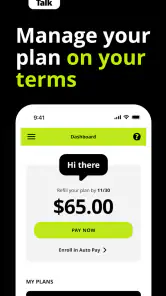
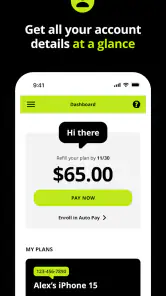
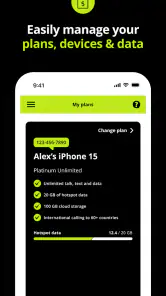
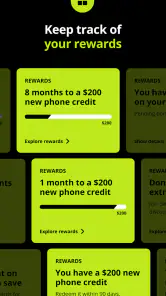
Analysis by Reviewed
I think the key question with My Straight Talk: Mobile App is whether you want one place to handle the practical side of a Straight Talk phone plan. I’d judge it less like a general messaging app and more like a self-service account tool: useful when you need to check your plan, keep an eye on data, or deal with a refill without turning a small task into a support call.
Who gets the most from it
If Straight Talk is already your carrier, the app is most appealing when you manage your service yourself. A quick glance before a video call, a trip, or a long day away from Wi-Fi can help you decide whether to conserve data or carry on as usual. The app is free, and the Everyone age rating makes it accessible to a broad range of users, though account holders will still need to manage their own plan details carefully.
For example, imagine you’re heading out for the weekend and aren’t sure how much mobile data you’ve used. Checking the account before you leave can help you make a sensible choice about streaming or downloading over Wi-Fi first. That’s a modest convenience, but it can prevent the more annoying surprise of discovering you need to sort out your service while you’re away from home.
Choosing it over other account tools
Compared with a carrier’s website, a dedicated phone app is handy when you want to check account information from the device you use every day. Compared with general budgeting or data-monitoring tools, this one is focused on Straight Talk service rather than all of your household spending or every connection on your phone. That focus is its advantage, but it also defines its limit: it won’t be the right hub for someone managing a different carrier or looking for a universal mobile-data dashboard.
A useful habit is to check your account before a refill becomes urgent, then keep a record of when you last took action. That gives you a personal reference point if you’re comparing plan choices later. I wouldn’t treat an app notification as a substitute for checking the account when a renewal matters; for anything time-sensitive, opening the app and confirming the current details is the safer routine.
Where I’d be cautious
This is a companion to Straight Talk service, not a reason on its own to choose a carrier. If you’re shopping around, compare the plans and coverage that matter where you live before deciding; an account-management app cannot make a weak fit into a good one. And if you rarely need to check usage or handle refills on your phone, the website or another way of managing your account may be enough.
My Straight Talk: Mobile App is listed in Communication and is developed by Straight Talk. It has a 4.5 average from around 275,000 ratings, with over 10 million installs, so it is clearly used by a large audience. It first appeared on July 26, 2013, and the current version is R27.16.0; it requires Android 7.0 or later. Those details make it a practical option for many existing customers, while the Android requirement is worth checking before installing it on an older device.
You May Like

Clash of Clans Is Won Between the Battles

Android Auto Makes the Case for Quieter Car Software

MobiOffice: Transforming Mobile Productivity with Seamless Integration

EA SPORTS FC™ Mobile Soccer: Redefining Mobile Sports Gaming

How Microsoft OneDrive Became a Mobile Productivity Giant

How Google Translate Breaks Language Barriers Effortlessly
Getting Started with Straight Talk My Account
Ever found yourself in a jam trying to keep track of your mobile data usage or your current plan? Well, I did, and that's when I stumbled upon the Straight Talk My Account app. Let me tell you, this nifty app is like having a personal assistant for your phone plan, minus the salary and coffee breaks.
The first thing I noticed after downloading the Straight Talk My Account app is how clean and intuitive the interface is. You know those apps that make you scratch your head trying to figure out where everything is? This isn’t one of them. Everything’s laid out right at your fingertips, and setting it up took me less time than brewing my morning coffee.
Features That Make Life Easier
Once you're in, the dashboard gives you a quick snapshot of your current plan details. Need to know how much data you’ve got left before the dreaded throttling kicks in? It's right there. You can also refill your account with just a few taps. No more running out of data at the worst possible moment. Trust me, it’s a lifesaver!
Another feature I love is the ability to track your order history. Ever wondered when you last refilled or what plan you were on two months ago? The app keeps a tidy record, so you don’t have to dig through old emails or, heaven forbid, paper bills.
Notifications & Alerts
One of the coolest things about this app is its notification system. You can set it up to alert you when your data is running low or when it’s time to renew your plan. It’s like having a little helper whispering reminders in your ear, ensuring you never run out of service when you need it most.
User Experience
The developers did a bang-up job with the app’s overall user experience. It’s designed to be straightforward and user-friendly. Whether you’re a tech whiz or someone who’s just getting by with their smartphone, navigating this app is as easy as pie. Plus, it’s stable – no annoying crashes or bugs, which is a huge relief!
And did I mention it's available for both Android and iOS? So, no matter what side of the smartphone debate you’re on, you’re covered. Just hit up the respective app store, and you’re good to go.
Final Thoughts
To wrap it up, if you’re a Straight Talk user, the Straight Talk My Account app is a must-have. It takes the hassle out of managing your phone plan, leaving you with more time to enjoy what really matters. So go ahead, give it a try, and thank me later!
Making account checks part of your routine
The app is most useful when I treat it as a quick checkpoint rather than something I open only after a problem appears. Before leaving home for a full day, I can check the plan and usage, then decide whether to download a podcast or map area on Wi-Fi instead of relying on mobile data. This small routine is more practical than trying to estimate usage from memory, especially if several people share the phone or it is used for video and navigation.
There is also a useful distinction between checking a balance and planning around it. A number on a screen is only helpful if it changes what I do: I might save a large download for later, use Wi-Fi for a video call, or simply continue normally if the remaining allowance looks comfortable. That makes the app a decision aid, not a tool that automatically controls how other apps use data.
Keeping refills and account history manageable
For a household that handles its own phone service, the order history can be more valuable than it first sounds. If you are trying to remember whether a refill was completed, or comparing what you used previously with what you need now, a record in the account gives you somewhere to start. I’d still make sure the current plan details are correct before taking action; history is useful context, not a guarantee that an old choice is still the right one.
A practical approach is to check the account, decide what needs doing, and then confirm that the action appears in the account afterward. That last check matters if you are making a change close to a renewal or setting up service for someone else. It reduces the chance of relying on a half-remembered tap or assuming a task went through when you have not verified the result.
What to expect when something needs attention
The app can help with routine self-service, but I would not make it my only plan for an urgent service problem. A phone account tool is best for checking information and handling ordinary account tasks; if a device has no connection or an account issue needs personal help, a website or customer-support route may be the more useful next step. I like having the app available, but I would keep another way to reach account information in mind for the moments when the phone itself is the problem.
That is also why I would not rely on alerts alone. Notifications can serve as reminders, but a reminder is not the same as confirming the live account status. If the timing matters, open the account and review the details before assuming a renewal or refill is settled. This is a sensible habit with any carrier-management app, and it is particularly helpful when your phone service is important for work, travel, or keeping in touch with family.
Which alternatives make sense
If you are already with Straight Talk, its own account app is the natural place to begin because its purpose is tied to that service. A carrier website may suit someone who prefers a larger screen, needs to work from a computer, or simply does not want another app on the phone. A general data monitor, meanwhile, can be useful for observing device-wide usage, but it does not replace an account view when the question is about the plan or refill.
People comparing carriers should make the decision in the opposite order: first compare coverage and service options for the places they actually use their phones, then consider which account tools feel convenient. My Straight Talk: Mobile App cannot tell you whether another provider would serve your commute or home better. It is a useful reason to feel more organized as a customer, not a meaningful substitute for evaluating the service itself.
Who may want to skip it
I would skip installing it if I were not a Straight Talk customer, since its core value is connected to managing that account. It may also be unnecessary for someone who rarely checks usage, prefers to handle everything on a computer, or has another household member who already manages refills and plan details. In those cases, the app could become one more icon without changing how the service is handled.
It is a better fit for people who like having account information close at hand and are comfortable taking responsibility for their own plan. That includes someone who travels away from home, a parent helping a family member keep track of service, or a customer who wants to check a refill record without searching through messages. The convenience depends on the habit: if you do not expect to check or manage the account from your phone, the app has less to offer.
My recommendation
For an existing Straight Talk customer, I see this as a practical companion rather than an essential reason to choose the carrier. Its strongest case is straightforward: account and usage checks, refill tasks, and reminders are easier to keep together when the phone is already in your hand. The trade-off is that you are using a service-specific tool, so it will not replace a universal data tracker, a full household budget app, or a computer-based account workflow for people who prefer those options.
I would install it if I handled my own Straight Talk plan and wanted a convenient way to check details before data runs low or a refill becomes pressing. I would keep the website or another support route in mind for unusual account problems, and I would verify important changes rather than trusting a reminder by itself. Used with those realistic expectations, it earns its place as a focused account tool: helpful for the right customer, but not something every phone owner needs.
My Straight Talk: Mobile App Frequently Asked Questions
Does My Straight Talk: Mobile App require an account to use?
My Straight Talk: Mobile App is intended for managing a Straight Talk mobile account, so you will need account details to sign in and access personal plan information. It is most useful if you already have Straight Talk service and want to check or manage account activity from your phone. You can download the app before signing in, but account-specific tools depend on access to a Straight Talk account.
Can I manage my Straight Talk service while away from home?
The app puts mobile account-management tools on your phone, which can be convenient when you want to review plan information without using a computer. After signing in, you can check usage and handle supported account tasks from the app. Keep in mind that you need an internet connection to access online account features, and the app does not replace your mobile service or change the terms of your plan.
Is My Straight Talk: Mobile App suitable for new Straight Talk customers?
The app is designed for managing a Straight Talk mobile account, so it is most useful once you have service with the carrier and account details to sign in. Before downloading, consider whether you want to handle routine plan tasks from your phone, such as checking usage or keeping track of service. The app is free to download, but mobile service and plan charges are separate.
What features does the Straight Talk My Account app offer?
The Straight Talk My Account app provides users with a comprehensive suite of features designed to manage their mobile service efficiently. Users can check their data usage, refill their account, view transaction history, and update their profile information. Additionally, the app offers a convenient way to enroll in auto-refill and track service end dates, ensuring uninterrupted service.
Is the Straight Talk My Account app free to use?
Yes, the Straight Talk My Account app is free to download and use. However, to access its features, you need to be a current Straight Talk customer. While the app itself doesn't require payment, any actions like adding a service plan will incur costs as per your chosen plan. Ensure you have an active Straight Talk account to utilize its full capabilities.
Pros
- Easy account management on-the-go.
- User-friendly and intuitive interface.
- Quick access to account balance.
- Seamless payment options.
- Real-time data usage tracking.
Cons
- Limited features compared to competitors.
- Occasional app crashes reported.
- Slow customer support response.
- No dark mode available.
- Requires stable internet connection.

- Category
- Communication
- Version
- R27.16.0











