Spond - Sports Team Management
- 130.00
- 4.8
- Installs
- 1.00M
- Price
- Free

Screenshots

Analysis by Reviewed
My first useful impression of Spond - Sports Team Management is that it makes sense when a sports group has recurring plans to coordinate, not just a single date to share. It gives events and team communication a more orderly home than a long-running chat, while still asking the group to build a habit of checking it. For someone setting it up for the first time, the best approach is modest: get one upcoming activity in front of the right people, see how they respond, and expand only when the group is ready.
What to expect from a team-focused app
Spond is a free sports app developed by Spond AS. Its appeal is practical: organizers can bring event invitations and the related team routine together instead of relying entirely on messages that are easy to miss. It has a 4.8 average from around 10,000 ratings and more than a million installs, which points to broad use, although popularity alone cannot tell you whether it matches the habits of your particular team.
I see the strongest fit for a coach, team volunteer, or parent who repeatedly has to answer the same practical questions: when is the next activity, who is coming, and has everyone seen the update? Its focus is narrower and more useful than a general social network: it brings team-related events and communication into one place. The value grows when people need to coordinate week after week, since each event gives the group a shared reference point rather than another message thread to search.
It is less compelling if you only arrange a one-off game with a few friends. A group chat and a shared calendar may be quicker when there is no recurring schedule, attendance follow-up, or team administration to manage. I would also avoid making the whole group switch tools unless the people who organize events are ready to keep the information current; a tidy app cannot help much if key updates continue to be scattered across several chats.
Getting started with Spond
The first thing that caught my attention was how Spond simplifies the entire management process. From creating events to tracking attendance, everything is just a tap away. Setting up was a breeze; a few taps here, some info filled there, and my team was ready to roll. The app's user-friendly interface made navigation feel like a walk in the park.
Set up only what you need first
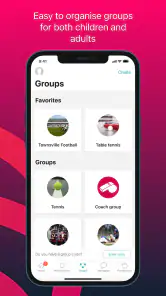
For a new organizer, I would resist the temptation to enter every possible detail before anyone has used the app. Start with the group and the upcoming activity that matters most. That gives you a straightforward way to check whether invitations reach the intended people and whether members understand where to find the date and reply. If your team has several squads or age groups, think through who needs which event before sending invitations; a smaller, relevant audience makes responses easier to interpret.
It also helps to explain the switch in plain language. Tell members that the event is where they should check the time and any changes, and that replies help the organizer plan. This is not an app-only problem: people may keep answering in the old chat out of habit. A short transition period, with one clearly designated place for the official details, is more realistic than expecting everyone to change routines immediately.
More From Our News Desk

Weather by Xiaomi Review: Clear at a Glance, Less Clear Up Close

X Under Pressure: Can It Recover When Posting Goes Wrong?

Clash of Clans Is Won Between the Battles

Android Auto Makes the Case for Quieter Car Software

MobiOffice: Transforming Mobile Productivity with Seamless Integration

EA SPORTS FC™ Mobile Soccer: Redefining Mobile Sports Gaming
Make the first event useful
For a first-time organizer, I would start with one real upcoming practice or match rather than trying to build out every team detail at once. Give the event a clear name and time, invite the people who need to respond, then check attendance before relying on that count for planning. This creates a small, visible success: the group has one shared source for the next date, and the organizer can see who has replied instead of piecing answers together from separate messages.
A realistic example is a youth team with a midweek practice and a weekend game. A parent volunteer can post each activity, invite the relevant group, and use the replies to spot who may need a reminder. If the venue or plan changes, putting the update where the event lives is more dependable than sending a message that disappears beneath unrelated chat. I would still keep an eye on whether families are actually checking the app during the first few weeks; the habit takes time to establish.
Events, invitations, and attendance
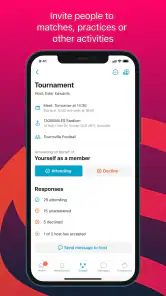
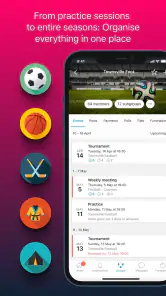
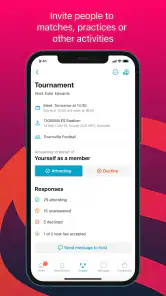
One of my favorite features is the event scheduling tool. It allows you to create events and send invites effortlessly. I could easily set up a match, send out invites, and get instant RSVPs. No more endless WhatsApp messages or email chains! Plus, the integrated calendar syncs events seamlessly with personal calendars, ensuring no one misses out on the action.
The useful trade-off is that an RSVP is an organizational signal, not a guarantee that someone will arrive. I treat replies as a planning aid and confirm important changes in the event details, especially when a coach needs an accurate headcount. For teams with several age groups or overlapping activities, inviting only the people who need a particular event can also make responses easier to interpret than sending every update to everyone.
Compared with a basic shared calendar, the event invitations and replies give an organizer a more direct way to see who has acknowledged an activity. A calendar can be enough when the only goal is publishing dates, and some teams may prefer its familiar simplicity. Spond is more useful when the organizer needs to prompt a response as well as announce a time. The trade-off is that members have to engage with another tool rather than relying on a calendar they already check.
Keep conversations attached to the plan
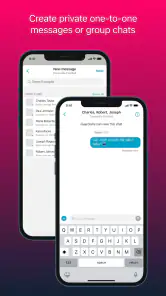
Communication is at the heart of any successful team, and Spond nails it with its messaging feature. Whether it’s sharing last-minute updates or strategizing for the next big game, the app lets you do it all in one place. I found the ability to create group chats extremely handy for keeping everyone in the loop.
Compared with using a general-purpose messenger, the advantage is having team conversations alongside the activity they relate to; the drawback is asking members to follow another channel. I would reserve chat for decisions and timely reminders, while keeping the event itself as the place to check the essential details. That simple division reduces the chance that a useful date or change gets buried in a busy conversation.
One small but useful habit is to repeat the final decision in the event details after a discussion settles a question. A chat can be good for working out whether plans need to change, but a later reader should not have to scroll through the whole exchange to find the outcome. This is especially helpful when a parent or player joins the conversation late, or when someone checks the schedule between other commitments.
Shared costs need clear ownership
Another standout feature is the finance management tool. Keeping track of fees, expenses, and payments can be a nightmare, but with Spond, it’s all under control. I could easily set up payment requests and track who’s paid, all from within the app. It’s like having a personal accountant at your fingertips!
For a group that handles shared costs, keeping requests and payment status near team activity can make follow-up less awkward than repeatedly asking in a chat. I would still agree on what a fee covers and who is responsible for checking payments before using it as the team’s record. The app can organize the task, but a treasurer or organizer still needs to keep the underlying amounts and expectations clear.
That distinction matters for a new user deciding whether the finance tools are enough for their club. They can help keep routine requests visible, but they do not replace the judgment involved in budgeting or explaining a charge. If several people share financial responsibility, agree who will maintain the information and answer questions; otherwise, members may see a request without knowing whom to ask about it.
Sharing moments with care
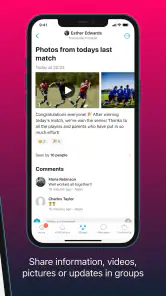
And let’s not forget the social aspect of Spond. The ability to share photos and videos from matches and events adds a fun, community-driven element to the app. It’s a great way to relive those winning moments and foster team spirit. Plus, parents can stay connected with their kids’ sports activities, making it a win-win situation.
That sharing can be a nice fit for a team that enjoys looking back on events, but I would set a clear expectation about what is appropriate to post, particularly when children are involved. Parents should also make sure the group understands who can see shared material. That small conversation helps the social side feel welcoming rather than assumed.
Check the practical fit before inviting everyone
The app is rated for Everyone and supports Android 7.0 or later; its current version is 4.49.1. It has been available since June 15, 2017, and has 130 written reviews alongside its broader rating count. Those details make it a practical option for many households, but before asking a whole team to join, I would check that members can use it on their devices and are comfortable adding another app to their routine.
For a first-time user, the most common confusion is not how to create an event but where the group should treat the final information as authoritative. An invitation, a reply, and a conversation each serve a different purpose: the event carries the plan, the reply helps the organizer estimate attendance, and chat handles questions or changes in progress. Keeping those roles distinct makes the app feel less like another inbox and more like a team workspace.
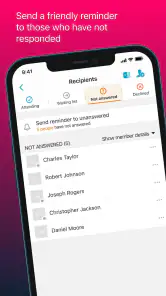
A common source of confusion is expecting an invitation or event reply to replace every other conversation. I would make the first event the team’s clear reference point, then tell members where to look for changes and where to ask questions. If someone does not respond, a direct reminder may still be needed; moving coordination into an app reduces scattered messages, but it does not remove the human follow-up that keeps a team running.
Know when a simpler option is better
If your group already has a reliable process built around a messenger and a shared calendar, switching may create more friction than it removes. A chat is often the easiest choice for a small, informal group that makes plans occasionally and does not need a clear attendance overview. A calendar suits a group that mainly wants dates visible. Spond becomes more persuasive when recurring events, invitations, replies, and team communication are all part of the same organizer’s workload.
I would also think about who is expected to maintain the routine. If no coach or volunteer is willing to enter changes and check replies, the app will not magically keep a team coordinated. The strongest use case is a group with one or more people who already carry that responsibility and want a better place to do it. For a player who only needs occasional updates, the organizer’s choice may matter more than the player’s personal preference.
Build a routine one step at a time
Once the first event is working, I would add only the next recurring activity or practical task the group genuinely needs. This keeps the setup manageable and gives members a reason to return without overwhelming them with old information. Coaches who coordinate regular fixtures, volunteers handling attendance, and families who want a clearer view of team activity are the people I would most readily recommend it to. A tiny informal group that already manages perfectly well in a chat may prefer to stay there.
After the group has responded to a few activities, look for the particular bottleneck Spond is solving. If it is unclear attendance, make replies part of the organizer’s planning routine. If the problem is missed schedule changes, keep the event details current and direct members back to them. If coordination is already smooth, there is no need to add extra processes just because the app offers more ways to organize team life.
In conclusion, Spond - Sports Team Management is more than just an app; it’s a comprehensive solution for sports teams looking to streamline operations and enhance communication. Whether you’re a coach managing a youth soccer team or a player organizing a casual weekend game, Spond has got you covered. Trust me, once you try it, you’ll wonder how you ever managed without it!
Spond - Sports Team Management Frequently Asked Questions
Who is Spond designed for, and can parents use it alongside coaches and players?
Spond is designed to help sports groups coordinate their activities, bringing coaches, players, and parents into a shared organizational space. Parents can use it to stay connected with team plans, while coaches can manage practical arrangements and players can keep up with updates. Its focus on communication and event organization makes it useful for the people involved in running and participating in a group.
What is Spond and how can it benefit sports teams?
Spond is a comprehensive sports team management app designed to facilitate easy communication and organization for sports teams of any size. It offers features like event scheduling, RSVP tracking, and seamless communication channels, which help coaches, players, and parents stay connected. By using Spond, sports teams can streamline logistical aspects, reducing administrative burdens and allowing more focus on the game itself.
Is Spond free to use for all users?
Yes, Spond is free for all users. It offers a wide range of features without any cost, making it accessible for sports teams, coaches, and parents. While the core functionalities are available at no charge, there might be optional in-app purchases or premium features that users can choose to buy for enhanced capabilities.
How secure is the data stored in Spond?
Spond prioritizes user data security by implementing robust encryption protocols to protect information. The app ensures that personal and team data is securely stored and only accessible to authorized users. Spond's privacy policy is transparent about how data is used and shared, giving users peace of mind regarding their personal information.
Can Spond be used for sports other than traditional team sports?
Absolutely, Spond is versatile and can be used for a variety of sports, not just traditional team sports. Whether you're managing a running club, a dance group, or a cycling team, Spond's organizational tools are adaptable to different group activities. This flexibility makes it a valuable tool for any organized sporting activity.
Pros
- Streamlined team communication
- Easy event scheduling
- Centralized document storage
- User-friendly interface
- Multi-sport support
Cons
- Limited free version features
- Occasional app crashes
- Inconsistent notifications
- No desktop version
- Limited customization options
- Category
- Sports
- Version
- 4.49.1





