Spectrum TV
- 56.85K
- 4.7
- Installs
- 10.00M
- Price
- Free
Screenshots
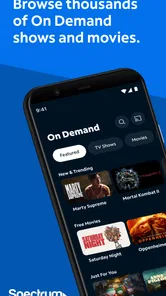
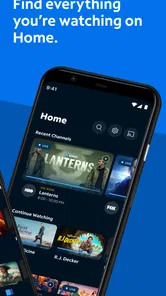
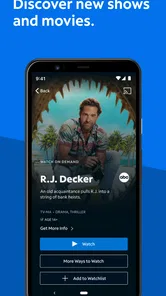

Analysis by Reviewed
I judge TV apps less by a long list of channels than by what happens when I want to watch something right now. Spectrum TV is an entertainment app from Charter/Spectrum, and its appeal is straightforward: it brings live television and on-demand viewing into a mobile app. That can be handy when I’m away from the living-room screen, but it also means the experience depends on having a usable internet connection.
When the connection is part of the experience
Live viewing is especially sensitive to a weak or inconsistent connection: pauses or buffering can interrupt the moment, which matters more during a close game or a live event than when I’m casually browsing. I’d open the app before settling in, rather than waiting until the start of a program to troubleshoot. If a stream stutters, checking whether the connection is stable and moving to a stronger network, when one is available, is a sensible first step.
For a planned viewing session, I find it useful to check the network before pressing play instead of treating buffering as an app-only problem. A video stream puts more demand on a connection than browsing a guide, so a page that loads normally doesn’t necessarily tell me how smoothly a program will play. If I’m on shared Wi-Fi, I’ll keep expectations modest when other people are using it heavily. A short test before an important live moment is a small habit that can save frustration, even though it can’t guarantee the connection will stay steady.
The app is free to install, but that doesn’t mean every viewer can use it in the same way. Spectrum TV makes the most sense for someone already using Spectrum’s TV service and wanting a mobile way to watch. If you’re looking for a standalone replacement for a cable or streaming subscription, check that it fits your existing setup before making it part of your routine. That distinction is more important than the download price.
Mobile viewing that suits short gaps
A realistic use is catching a few minutes of a program while waiting for an appointment, then returning to it later at home through your usual viewing setup. The app can make those small stretches of free time more useful, but I wouldn’t rely on mobile viewing when reception is poor or uninterrupted playback is essential. A larger screen is still the more comfortable choice for a movie night, while a phone is better for convenience than immersion.
That makes it particularly useful for an existing Spectrum household with people who don’t always want the television in the living room. I can picture checking a live program while dinner is in the oven, then putting the phone away when it is time to eat. In a waiting room, I’d choose something I can stop watching without feeling I’ve lost the whole experience. Those brief sessions suit a phone better than settling in for a feature-length film, where the small display and changing surroundings are more noticeable.
Compared with standalone streaming apps, Spectrum TV is aimed at people who want access to live television as well as on-demand choices in one place. It isn’t automatically the better pick for someone who only watches a narrow set of shows or prefers choosing a separate subscription for each service. I’d think of it as a companion to a Spectrum TV setup, not a universal hub for every streaming platform.
More From Our News Desk

Weather by Xiaomi Review: Clear at a Glance, Less Clear Up Close

X Under Pressure: Can It Recover When Posting Goes Wrong?

Clash of Clans Is Won Between the Battles

Android Auto Makes the Case for Quieter Car Software

MobiOffice: Transforming Mobile Productivity with Seamless Integration

EA SPORTS FC™ Mobile Soccer: Redefining Mobile Sports Gaming
The alternative depends on what I’m trying to solve. A service focused on a handful of on-demand shows may suit someone who wants to watch those titles at a chosen time, while a conventional television setup is more comfortable for a shared evening on a large screen. Spectrum TV occupies a different middle ground: it can extend an existing television routine to a phone, rather than replacing every viewing service or device. I’d choose it for flexibility around live viewing, not simply because I want another catalogue to browse.
Practical choices for data and recovery
When I’m watching away from a trusted Wi-Fi connection, I keep the length of a viewing session in mind: video can use a noticeable amount of mobile data, so a quick check-in is a different commitment from watching a full program. I’d also avoid assuming that a program will be available without a connection; the app’s value here is tied to live and on-demand access, not to treating a phone as a guaranteed offline library.
A practical way to be cautious is to use mobile viewing for a short stretch when I’m unsure about my data allowance, then save a longer session for a connection I trust. I’d also avoid leaving a live stream running while I’m distracted or no longer watching. That isn’t a special setting; it is simply a useful habit with any video app. If I regularly need entertainment in places where reception drops out, I’d choose an option that explicitly fits that situation rather than counting on a mobile stream to remain available.
If playback fails, I’d first distinguish an app problem from a connection problem: see whether other internet tasks are working, then try reopening the stream. If the issue continues, switching networks or trying again later may help. That basic approach is useful, but it can’t overcome a weak signal or a service interruption, so I wouldn’t choose this as my only plan for a time-sensitive viewing moment.
When troubleshooting, I’d change one thing at a time: check the connection, reopen the stream, and then try another network if that is practical. Doing so makes it easier to tell whether the difficulty follows the network or the particular viewing attempt. If other internet use is also failing, repeatedly searching through the app is unlikely to help. If only one stream is affected, trying again later may be more sensible than assuming the whole service is unavailable. For something I absolutely don’t want to miss, I’d arrange a dependable alternative rather than relying on last-minute recovery over mobile reception.
All Your Channels in One Place
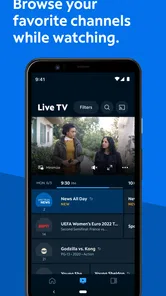
Imagine having all your favorite channels and on-demand content right at your fingertips, without the hassle of switching between different apps. That’s precisely what Spectrum TV offers. Whether you’re a fan of sports, movies, or reality TV, this app has got you covered. I was particularly impressed with the variety it offers. It’s like having a mini cable box right in your pocket!
Easy Navigation and User-Friendly Interface
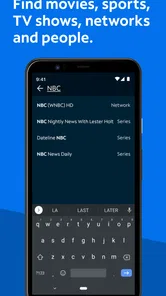
One of the first things I noticed was how intuitive and user-friendly the interface is. Navigating through the app is a breeze, even for the not-so-tech-savvy users out there. The layout is clean and organized, making it super easy to find what you’re looking for. Plus, the search function works like a charm, so you can quickly locate your favorite shows or discover new ones.
For me, search is most useful when I have a title in mind and only a short break to watch; it keeps the decision from turning into a long browse. If I’m not sure what I want, I’d rather scan the guide at home, where I can take my time and use a larger screen. That difference matters on a phone: getting to a known program quickly is a stronger mobile use case than expecting the app to solve indecision.
On-the-Go Entertainment
Gone are the days when we had to be glued to our couches to catch the latest episodes. With Spectrum TV, you can watch live TV and on-demand content anywhere, anytime. Whether you’re commuting, waiting in line, or just chilling in a coffee shop, your entertainment is just a tap away. It’s like carrying a little piece of home wherever you go.
I’d be selective about when I use it in public. A coffee shop or waiting area can be convenient when its Wi-Fi is reliable, but a crowded network can be unpredictable, and mobile data may be a better choice only if I’m comfortable using it. On a commute, reception can change from one place to another, so I would not make the app my plan for continuous viewing if the route is known for poor coverage. For those situations, a book, downloaded entertainment from a service that supports it, or simply waiting until I’m home may be a better fit.
Customizable Viewing Experience
One feature that truly sets Spectrum TV apart is the ability to customize your viewing experience. You can create a personalized guide by selecting your favorite channels, making it easier to access what you love. Plus, the parental controls give peace of mind to parents, ensuring that kids only see what’s appropriate for them.
That flexibility is most useful when I know what I want to watch but don’t want to spend a break searching through a long channel lineup. I’d select the channels I actually follow and use the search for a specific show, rather than browsing at random. Parents may also appreciate being able to shape what younger viewers can access, though I’d still check the settings myself before handing over a device.
A small but useful routine is to make the guide reflect what I genuinely watch, then revisit it when my habits change. A personalized set of channels can reduce scrolling, but it is only helpful if I keep it current; otherwise, it can become another list to work around. For a shared device, I’d check the selected channels and parental controls before a child uses it, rather than assuming the setup is automatically right for every family. This is a place where taking a moment to configure the app can matter more than trying to navigate faster later.
Who will get the most from it
Spectrum TV is a better fit for households that already watch television through Spectrum and want a second screen for everyday gaps: checking a live program while dinner is cooking, or keeping up with a show in a waiting room. The app is rated Teen, and its average rating is 4.7 from around 339,000 ratings, with more than 10 million installs. Those figures suggest a widely used app, but they don’t guarantee that it will suit every account, device, or network.
It is also a reasonable option for someone who shares a home television and wants occasional viewing on their own phone without turning the living room into a negotiation over what to watch. On the other hand, I’d pass if I mainly use unrelated streaming services, need viewing to continue where there is no dependable connection, or expect the phone app to replace a full television setup for everyone in the household. The key question is whether mobile access complements the way I already watch through Spectrum. If it does, the app has a clear job; if it doesn’t, a service built around my existing subscriptions is likely to be more useful.
I’d also treat account fit as something to settle before building a routine around the app. Since it is designed to accompany Spectrum TV, a person who is not already using that service should first check whether it works with their arrangement. That is more important than the attractive fact that installing the app costs nothing. A free download is not the same thing as a standalone television package, and confusing those two ideas can lead to disappointment.
I’d skip it if I mainly watch through other streaming subscriptions, need a dependable offline option, or have limited mobile data and expect to stream for long stretches. The minimum Android requirement is 5.1, and the current release is version 9.91.0.226567303.release, so it’s worth checking that your device is compatible and that the app is current before troubleshooting. For an existing Spectrum TV viewer, though, it can be a convenient extra screen rather than another service to manage.
For a household deciding who should use it, I’d start with the person who already knows which channels or programs they want and will watch in short, flexible sessions. That is where the app’s mobile convenience is most obvious. Someone who wants a large-screen experience, has a strict mobile-data limit, or regularly watches where connectivity is unreliable may be happier with the usual television setup or another option suited to those needs. The Teen content rating is also a reminder for parents to review the viewing environment and settings rather than handing the phone over without checking.
My connectivity verdict
For quick access to live and on-demand television, I find the idea practical, particularly when I already have Spectrum TV as part of my routine. The main trade-off is clear: viewing on a phone gives me flexibility, but it relies on a working connection and can use mobile data. Spectrum TV has been available since November 29, 2011, and remains free to download; I’d try it if I’m an existing customer, then judge it by how reliably it works on the networks and devices I use most. If I want a screen-free commute or guaranteed playback where reception is uncertain, I’d choose something better suited to that situation.
That is why I’d judge it in the places I actually expect to watch, not just by whether it opens at home. A brief check on my usual Wi-Fi and, if I’m comfortable with the data use, a short mobile session would tell me more about its practical fit than a long evening of testing. If it behaves well in those ordinary situations, it can be a helpful extension of my existing TV habits. If connection trouble repeatedly interrupts the moments I care about, I would keep the phone app as an occasional extra and use another screen or service for dependable viewing.
In conclusion, if you’re looking for a convenient and comprehensive way to manage your TV viewing, Spectrum TV is definitely worth checking out. It combines the best of live TV and on-demand content in a seamless manner. So, why not give it a try and see how it fits into your entertainment routine? Happy watching!
Spectrum TV Frequently Asked Questions
Can I use Spectrum TV on an older Android phone or tablet?
Before downloading, check your device’s Android version: Spectrum TV requires Android 5.1 or later. If your phone or tablet meets that requirement, it may be able to install the app, though you’ll also need a Spectrum TV subscription to access subscription-based viewing. The app is intended for teen audiences, which is worth considering when deciding whether it is right for your household.
What kind of content does Spectrum TV offer?
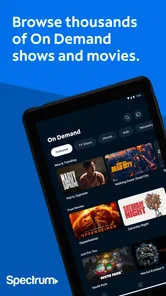
Spectrum TV is an entertainment app for watching television, with live shows and On Demand content. It may suit viewers who want to watch on a mobile device rather than only through a traditional TV setup. The programs and channels available to you depend on your Spectrum TV subscription, so it’s helpful to check your plan before relying on the app for particular viewing.
Can I watch Spectrum TV while traveling or away from home?
The app is designed to let you watch live TV and On Demand programming on a compatible device, which can be useful when you’re away from your usual television setup. What you can watch may depend on your subscription and the device you’re using. Before traveling, make sure you can sign in to your account and that your device is ready for viewing.
Is Spectrum TV free to download?
Spectrum TV is a free Entertainment app from Charter/Spectrum, so you can download it without paying for the app itself. Keep in mind that using its viewing features is a separate matter: access to live TV, On Demand programming, and other subscription-based content requires a Spectrum TV subscription. Check that your account and device are ready before downloading.
What is Spectrum TV, and what can I watch with it?
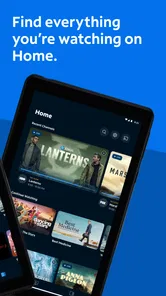
Spectrum TV is designed for watching television on a compatible device, with access to live shows and On Demand content. The app is useful if you want to take your viewing beyond a traditional TV setup and watch through a phone, tablet, or supported streaming device. What you can access depends on your Spectrum TV subscription and the device you use.
Pros
- Extensive channel selection available.
- User-friendly interface and navigation.
- Supports multiple devices and platforms.
- On-demand content and live TV options.
- Parental controls for content safety.
Cons
- Requires a Spectrum subscription.
- Limited features without internet.
- Occasional streaming quality issues.
- Not available internationally.
- Ads may interrupt viewing experience.













