SONIC Drive-In - Order Online
- 89.71K
- 4.6
- Installs
- 10.00M
- Price
- Free

Screenshots



Analysis by Reviewed
Choosing food through a phone can be a relief when the drive-in speaker is hard to hear, the car is full of hungry people, or I simply want a moment to check everyone’s choices. That is where SONIC Drive-In - Order Online makes sense: it gives me a focused way to plan a SONIC meal and arrange pickup without making the whole decision at the speaker. I like that it can make a familiar stop feel more considered, though it works best when I already know which location I want and have a fairly clear idea of the order.
Who benefits most from ordering ahead?
I find this app most useful when I already know I want SONIC and would rather sort out the order before arriving. Picture a busy afternoon when a family is hungry and everyone wants a different drink or side: choosing items on a phone gives you a chance to review the order instead of trying to remember every detail while speaking at a speaker. It is also handy for a regular who tends to choose the same meal, since a familiar order can take less effort to put together again.
That convenience has a clear boundary: this is a way to order from SONIC, not a general restaurant finder or a substitute for a delivery service covering many cuisines. If I want to compare lots of nearby restaurants, or I am not sure what kind of food I want, a broader food-ordering app is the better place to start. Here, the benefit is keeping a SONIC order in one focused place.
Easy Navigation at Your Fingertips
First things first, the app interface is as friendly as that carhop who always gets your order just right. Once you open the app, you’re greeted with a clean, intuitive layout that makes it a breeze to find what you’re looking for. Whether you’re a regular who knows exactly what you want or a first-timer trying to figure out the menu, the SONIC Drive-In - Order Online app has got you covered. The categories are neatly organized, and the search bar is a lifesaver when you’re trying to locate those delicious mozzarella sticks.
Making the menu easier to scan
When I am choosing for more than one person, I would build the order one person at a time and pause to check the whole basket before paying. That small habit helps catch a missed drink or side, and it is especially useful when different people want different changes. Searching for a particular item can also be quicker than browsing every category, while browsing is better when I am still deciding and want to see what goes with the main item.
That said, no phone menu removes every decision. If someone in the group needs ingredient details before choosing, I would not rely on a quick scan of item names alone; it is worth checking the information shown for the specific menu item and asking the restaurant when an answer matters. The app makes ordering more orderly, but it does not make careful checking unnecessary.
Order Customization
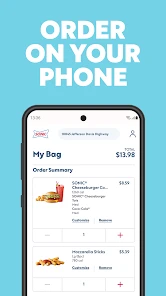
Now, let’s talk about customization. Because let’s be real, sometimes you want an extra squirt of that special sauce or maybe you want to hold the onions. The app lets you modify your order just the way you like it. You can add, remove, or swap ingredients without any hassle. It’s like having your own personal chef who knows exactly how you like your burger! Plus, the app remembers your past orders, making reordering your favorites a total breeze.
More From Our News Desk

Weather by Xiaomi Review: Clear at a Glance, Less Clear Up Close

X Under Pressure: Can It Recover When Posting Goes Wrong?

Clash of Clans Is Won Between the Battles

Android Auto Makes the Case for Quieter Car Software

MobiOffice: Transforming Mobile Productivity with Seamless Integration

EA SPORTS FC™ Mobile Soccer: Redefining Mobile Sports Gaming
For a practical check, I would review each customized item in the basket rather than assuming a change carried across to every similar item. Reordering is most helpful when the saved choice still suits the occasion; if I am ordering for someone with different preferences, starting fresh makes it easier to catch unwanted ingredients. Customization is convenient, but the more changes I make, the more valuable that final review becomes.
Deals and Offers
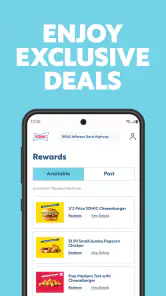
Who doesn’t love a good deal? The app is packed with exclusive offers and discounts that are sure to make your wallet happy. From happy hour specials to limited-time offers, there’s always something to look forward to. Make sure you check out the "Deals" section before you place your order. Trust me, snagging a deal on your favorite milkshake makes it taste even better!
I would treat offers as a bonus rather than a reason to order something I did not want. Checking the deals before settling on the basket can help you decide whether an offer fits the meal, but it is still sensible to read the conditions shown in the app and confirm the total before submitting. A promotion only feels useful when it works with the order I was already planning.
Motor and sensory considerations
Ordering on a phone can be a more comfortable option for someone who prefers to avoid speaking over a drive-in speaker or making choices under time pressure. Being able to pause and revisit a basket may also help when a group order has several separate items. On the other hand, tapping through a menu still calls for screen interaction, and the experience may be less comfortable for someone who finds small touch targets, scrolling, or bright screens tiring. I would test the app in a calm setting before depending on it during a rushed stop.
For sensory needs, the ability to review choices at your own pace can reduce some of the pressure of ordering aloud, but it cannot answer every question about ingredients, preparation, or the restaurant environment. If a particular detail is essential, checking it directly with the location is a safer approach than guessing from a menu label.
Hassle-Free Payment and Pickup
Once you’ve picked out your order and applied those sweet deals, paying is as simple as a few taps. The app supports multiple payment options, including credit cards and mobile wallets, ensuring a smooth checkout process. After that, just choose your preferred pickup method, whether it’s in your car, at the drive-thru, or even curbside. No more waiting in long lines or dealing with cash at the window. Just order, pay, and enjoy!
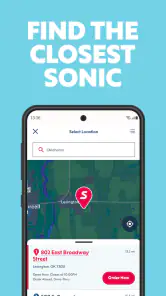
Ordering ahead is especially useful when I know where I am going and want to make the stop more predictable. Before placing an order, I would double-check the selected location and pickup choice; that is a worthwhile pause when traveling or ordering for someone else. A phone order is less helpful if plans are changing rapidly, the connection is unreliable, or I need to ask several questions before deciding. In those cases, speaking with the restaurant may be simpler than correcting a submitted order.
Access in everyday situations—and where it falls short
For someone who is already at a SONIC location, placing an order from the car can make the process feel more manageable than approaching a counter, particularly when coordinating a group. For a passenger ordering during a trip, it can also be a way to settle choices before the stop rather than while everyone is waiting. I would avoid making menu selections while driving; the useful workflow is to decide before setting off or have a passenger handle the phone.
The app is not the right choice for every situation. If I need broad restaurant comparisons, have an urgent question about a menu item, or cannot comfortably use a touchscreen, another ordering method may be more practical. It also depends on having access to a compatible phone and a workable connection. These are ordinary but real limits: convenience is strongest when the order is straightforward and the pickup plan is clear.
Choosing between the app and other ways to order
Compared with ordering at the speaker, using the app gives me more room to review a multi-item meal and make choices without holding up the line. Compared with a general delivery platform, it is narrower: I am choosing SONIC rather than weighing restaurants, cuisines, and delivery options across a wider area. That focus is useful for a planned visit, but it is not a reason to install it if I only order from SONIC once in a while and prefer deciding in person.
There is also a practical trade-off between ordering ahead and keeping plans flexible. A settled order is easier to check and can make the stop feel more organized; a last-minute change may be easier to handle by speaking with the location. When I am ordering for a group, I would collect everyone’s choices first, then enter them in one pass and review the basket together. That avoids a common source of confusion: submitting while someone is still deciding, then needing to revise the order.
What to know before installing
SONIC Drive-In - Order Online is a free food and drink app from Sonic Industries Services, Inc. It is rated for Everyone, has a 4.6 average from around 733,000 ratings, and has been installed over 10 million times. It first appeared in 2014, and version 5.67.2 requires Android 11 or later. Those details make it a familiar option for many Android users, though the minimum system requirement is worth checking before installing on an older phone.
My main tip is to use the app for the parts it handles well: choosing items at your own pace, applying a relevant offer, and reviewing a planned pickup. Keep an eye on the final basket, especially after substitutions or customizations, and confirm the location before checkout. If your needs depend on details that a menu cannot settle, contact the restaurant instead of treating an online order screen as a complete answer.
Who should use it—and who may prefer another route
I would recommend it to people who visit SONIC often enough to value a saved routine, families coordinating different drinks and sides, and anyone who finds it easier to decide on a screen than through a speaker. It can also help someone who wants to check the order calmly before setting off. For a one-off visit, a customer who enjoys browsing face to face, or a person who needs detailed answers before choosing, the app may add an unnecessary step rather than remove one.
Accessibility is personal, so I would not assume that a phone order suits everyone simply because it avoids speaking at the speaker. Someone who uses a screen reader, has difficulty with touch controls, or finds prolonged scrolling uncomfortable should try the ordering flow at a relaxed time and see whether it works for them. If it does not, asking another person to place the order or using a direct conversation with the restaurant may be more comfortable. The useful point is having a choice, not treating the app as a universal solution.
In conclusion, the SONIC Drive-In - Order Online app is a game-changer for anyone who loves convenience, customization, and, of course, delicious food. It’s like having a SONIC carhop in your pocket, ready to serve up your favorite treats whenever the mood strikes. So next time you’re hankering for some fast-food goodness, do yourself a favor and give the app a whirl. You won’t regret it!
SONIC Drive-In - Order Online Frequently Asked Questions
Is the SONIC Drive-In app available for both iPhone and Android?
SONIC Drive-In is a mobile app for ordering online and earning rewards when you order for delivery or pickup. It is available for iOS devices running version 11 or later, and it is also offered for Android. The app is free to download and is rated for everyone, so it may suit customers looking for a straightforward way to place SONIC orders from a phone.
Who makes the SONIC Drive-In app?
The app is developed by Sonic Industries Services, Inc. It focuses on online ordering from SONIC Drive-In, with delivery and pickup options as well as a rewards experience. If you already visit SONIC or expect to order there regularly, having the official app can make it easier to place an order and keep your ordering activity in one place.
Is the SONIC Drive-In app free to download, and what devices can run it?
The SONIC Drive-In app is free and is listed for users of all ages. It is a Food & Drink app from Sonic Industries Services, Inc., and its current version is 5.67.2. The app requires iOS 11 or later, so check your device’s operating system before downloading. Once installed, you can explore online ordering and the rewards experience.
Can I use the SONIC Drive-In app for delivery as well as pickup?
Yes. The app supports online ordering for delivery or pickup, giving you a choice based on what is available for your order. It is designed to help you place an order through SONIC rather than simply browse restaurant information. Delivery and pickup options can make it easier to plan a meal around your needs, while ordering online also connects with the app’s rewards features.
What is the SONIC Drive-In app used for?
The SONIC Drive-In app allows users to conveniently order food and drinks online from their local SONIC Drive-In locations. Users can customize their orders, choose pick-up times, and even pay directly through the app. This makes it easy to enjoy your favorite SONIC meals without the hassle of waiting in line at the restaurant.
Pros
- User-friendly interface for easy navigation.
- Offers exclusive deals and promotions.
- Customizable orders for personal preferences.
- Real-time order tracking feature.
- Multiple payment options accepted.
Cons
- Limited delivery area coverage.
- Slow customer service response.
- App occasionally crashes during use.
- High data usage for app functionality.
- Inconsistent order accuracy reported.
- Category
- Food & Drink
- Version
- 5.67.2











