Smart TV Remote Control
- 218.00
- 4.4
- Installs
- 1.00M
- Price
- Free
Screenshots
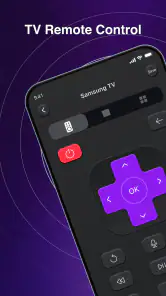
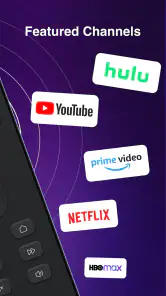
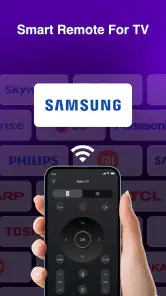
Analysis by Reviewed
I would decide whether Smart TV Remote Control belongs on my phone by testing one ordinary moment: can I change something on the TV without getting up to find the physical remote? That sounds like a small convenience, but it is also a useful way to judge a remote app. If opening it and connecting takes longer than reaching for the real controller, the phone has not made the evening easier.
My expectation is modest: a handy second way to adjust the television, not a magic replacement for every remote in the room. That distinction matters because the best choice depends on the TV, the home network, and how the household actually watches. I would try it as a backup first, then let its reliability decide whether it becomes part of my routine.
Smart TV Remote Control is aimed at a familiar annoyance: you sit down to watch something, reach for the TV remote, and find it missing, out of reach, or short on battery. I like the idea of using a phone that is already in my hand instead, but a remote-control app is only useful when it can connect to the television I own and handle the everyday adjustments without adding a new hassle. That practical test matters more than a long feature list.
This is a free tools app from Larry Brooks, with an Everyone age rating. Its current version is 1.2.5, and it has reached over a million installs, with an average rating of 4.4 from around eleven thousand ratings. Those figures suggest that plenty of people are willing to try it, but my recommendation would still depend on whether your TV and home setup suit phone-based control.
From reaching for the phone to getting the TV under control
Start with the problem you actually have
A phone remote is most appealing when the original controller is inconvenient rather than completely broken. If I am already holding my phone, switching to it can be easier than searching under cushions or interrupting a film to retrieve a remote from another room. It can also be a handy backup when several people share a living room and the physical remote has wandered off.
There is a useful distinction here: this app is a tool for controlling a TV, not a replacement for the television’s own streaming apps or a universal fix for every device in the room. The TV still needs to be controllable through the setup the app supports. I would treat compatibility as the first checkpoint, not assume that any television described as “smart” will work just because the phone and TV are in the same home.
Before relying on it for a planned movie night, I would test it while the original remote is still nearby. That simple precaution avoids the worst version of the experience: putting the hardware remote away, then discovering that the phone cannot reach the television or that the connection requires another step. A few minutes of checking at a calm time are more useful than troubleshooting after everyone is ready to watch.
More From Our News Desk

Clash of Clans Is Won Between the Battles

Android Auto Makes the Case for Quieter Car Software

MobiOffice: Transforming Mobile Productivity with Seamless Integration

EA SPORTS FC™ Mobile Soccer: Redefining Mobile Sports Gaming

How Microsoft OneDrive Became a Mobile Productivity Giant

How Google Translate Breaks Language Barriers Effortlessly
Make the first connection a deliberate test
My sensible starting workflow would be to open the app near the TV, follow the connection prompts, and confirm that the television responds before depending on it. If a device-selection or pairing prompt appears, I would make sure I am choosing the intended screen rather than a nearby TV. In a home with more than one television, naming or otherwise identifying the right device during setup can save repeated guesswork later.
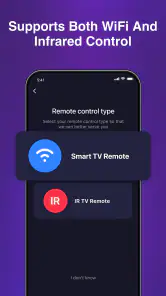
Connection is the handoff that determines whether the app feels effortless or frustrating. Phone remotes commonly rely on the phone and television being able to communicate over the home network, while some TV control methods use different hardware or connection arrangements. I would follow the app’s own instructions rather than assume that a working internet connection alone proves the devices can see each other. A guest network, a changed router setup, or a phone connected somewhere different from the TV can complicate discovery.
Once connected, I would try the essential actions first: waking or addressing the TV if available, changing the volume, and moving through menus. That small test tells me whether the app is useful for my routine rather than merely installed. If a control responds slowly, I would check whether the phone is on the same home network and whether the TV is powered into a state that accepts remote commands before blaming the app itself.
Use it for the ordinary living-room handoffs
The value of a phone remote often shows up between tasks. I might use the phone to lower the volume during a call, navigate a menu while someone else is holding the snacks, or make a quick adjustment without getting up. These are modest conveniences, but they fit the way people already use phones: the device is nearby, personal, and easy to pick up without searching for a shared controller.
A realistic example is settling in to watch a show after dinner. I start with the TV’s normal controls, then want to turn the volume down while another person is speaking. If the app is already connected, the phone can bridge that small interruption: adjust the sound, hand the phone back to its owner, and continue watching. It is particularly useful when the remote is across the room or temporarily misplaced. It is less compelling if the physical remote is always within reach and already works reliably.
There is also a social trade-off. A physical remote is shared and usually obvious to everyone; a phone is private and may be locked, busy, or in another person’s hands. In a household where different people frequently change channels or settings, keeping the original remote accessible may remain the smoother arrangement. I see the phone version as a convenient second control point, not automatically the best shared household remote.
Where it sits beside the usual alternatives
Compared with the manufacturer’s own TV app, a general remote tool can be attractive when I want to try controlling the TV without first committing to a broader companion app. The manufacturer’s option may be a better fit for device-specific extras or a television that expects its own software. By contrast, the physical remote remains the dependable choice when the TV is off, the network is acting up, or a control method depends on hardware the phone does not have.
Universal remotes occupy a different niche. A dedicated universal controller can be more practical for people who want one physical device for several pieces of equipment, especially if their routine includes devices beyond the TV. A phone app wins on convenience when the phone is already close by, but it cannot be assumed to control every sound system, set-top box, or other component just because it controls a television. I would keep the scope of the job clear before making it the only controller in the room.
Another alternative is voice control, where supported by the devices in a home. That can be faster for a simple request when hands are occupied, but it is not always the quietest or most precise way to navigate a menu. A phone remote gives me a more direct way to make a small adjustment, while a voice assistant may suit someone who prioritizes hands-free commands. Neither removes the need to check which equipment actually works together.
What the install and ongoing use ask of you
The app is free, so trying it does not require an upfront purchase. That lowers the risk of testing whether it fits a particular TV, although the time spent setting it up still matters. I would not install it expecting the word “remote” to guarantee an instant connection; the practical value depends on the television, the phone, and the local setup cooperating.
For ongoing use, the best habit is to keep the phone’s connection predictable. If the app stops finding the TV, I would first check whether the phone has switched networks or whether the television has been restarted or disconnected. Then I would reopen the app and follow its connection process again. This is more useful than repeatedly tapping controls when the underlying handoff between devices has failed.
One non-obvious benefit of testing before a problem occurs is that it reveals the app’s role in your household. If it works reliably from the sofa, it can become a backup for missing-remote moments. If it only works after repeated reconnecting, it may still be helpful in a pinch but is not something I would depend on for every evening. That is a better decision rule than judging it from installation alone.
Where the flow can break
The main friction point is compatibility and connection, not the idea of tapping a control on a screen. If the app cannot locate the TV, if the devices are separated by network settings, or if the TV does not accept the connection method available to the phone, the workflow stops before the first adjustment. In that situation, the television’s original remote or its maker’s own app is the more sensible fallback.
Phone controls can also be awkward for people who want tactile buttons without looking down. A physical remote is easier to use by feel in a dark room, and its dedicated buttons can make familiar actions quicker. A phone screen may require unlocking and opening an app, which adds steps just when all I want is to pause or lower the sound. I would skip this as a primary controller if those extra steps outweigh the convenience of having the remote on my phone.
It is also not an ideal answer for someone who wants one controller for an entire entertainment system. The app’s purpose is TV control, so I would not assume it replaces the controls for every connected device. If a routine depends on switching among a TV, receiver, and other equipment, a physical universal remote or a setup designed for those components may be more complete.
Who I would recommend it to
I would suggest giving Smart TV Remote Control a try if you often have your phone nearby, occasionally misplace the TV remote, and are comfortable checking whether your television can connect to it. Its appeal is straightforward: it can turn a familiar personal device into a convenient way to make TV adjustments, without the cost of buying another controller. Its 4.4 average and broad adoption are reassuring context, but they do not replace a compatibility test in your own home.
I would be more cautious if you need guaranteed control when the TV is disconnected, prefer physical buttons, or want a single controller for multiple pieces of equipment. In those cases, keeping the original remote close or choosing a manufacturer-specific or universal alternative is likely to be less frustrating. The app is best viewed as a practical extra, not a promise that every remote-related problem disappears.
Released on June 26, 2025, and rated for Everyone, it is an easy candidate for a low-commitment trial. I would install it, connect it while the regular remote is available, and test the few actions I use most. If those work smoothly, the phone can be a genuinely handy backup; if connection or device compatibility interrupts that simple routine, I would keep the traditional remote as the main option. That is the honest measure of whether this tool earns a place on your phone.
A quick way to judge whether it earns a place
I would also test the app in the exact moments when I am most likely to reach for it, rather than only checking that it connects once. Try a volume change from the sofa, then a menu movement, and later repeat one after the phone has been used for something else. This checks the practical handoff back into control: does the app remain easy to return to, or does getting to the TV controls feel like a detour?
That distinction helps set expectations. For a person living alone who mainly wants a backup after misplacing the remote, occasional use may be enough to justify keeping it. For a family that passes control among several people, a phone-based option can be less convenient because it depends on whose phone is available and ready. I would decide based on the household pattern, not simply on whether the app can perform a command during setup.
My recommendation is to treat it as a tested backup, not as the only way to operate the TV. If connection is straightforward and the controls cover your usual adjustments, it can save a small but real annoyance. If you need a tactile, always-available controller or want to manage several entertainment devices together, the physical remote or a more comprehensive alternative is the better fit.
Smart TV Remote Control Frequently Asked Questions
What is Smart TV Remote Control, and what can it do?
Smart TV Remote Control is a mobile app designed to let you control a compatible television from your phone or tablet. Depending on the app version and your TV, its controls may include channel and volume buttons, navigation, playback controls, a keyboard for text entry, and shortcuts to apps or other functions. The available features vary by device, so check the app listing and compatibility details before downloading.
Which TVs and phones are compatible with Smart TV Remote Control?
Compatibility depends on the specific Smart TV Remote Control app and the television’s make, model, and network capabilities. Many phone-based remotes require a smart TV and mobile device to be connected to the same Wi-Fi network; some apps support only selected brands or models. Review the app’s current store listing and setup instructions, and make sure your phone’s operating system meets its requirements before installing.
How do I connect the app to my television?
In most cases, you install the app, connect your phone and television to the same Wi-Fi network, then select the TV from a device list or follow an on-screen pairing prompt. Your television may need to be switched on and configured to allow remote connections. The exact steps differ between app versions and TV brands, so use the in-app guidance and check network settings if the television does not appear.
Does Smart TV Remote Control work without Wi-Fi or an internet connection?
Usually, a phone remote app communicates with a television over a local Wi-Fi network, which may work even when that network has no internet access. However, the phone and TV generally still need to be connected to the same router, and some features may require an internet connection. Infrared control is available only if the phone has an IR blaster and the app supports it; check the app details before relying on offline use.
Is Smart TV Remote Control free, and what privacy or permissions should I consider?
The app may be free to download, but pricing, advertisements, subscriptions, or optional purchases can vary by developer and app version. Before installing, review the store listing for costs and the privacy policy for details about data handling. Connection-related permissions, such as access to nearby devices or the local network, may be needed to find and control a TV. Grant only permissions you understand and are comfortable with.
Pros
- Works with many TV brands and compatible smart TV models.
- Puts essential remote functions in one convenient place.
- Useful when the physical remote is lost or out of reach.
- On-screen controls can be easier to navigate than tiny buttons.
- Can reduce the need to keep spare batteries on hand.
Cons
- Compatibility may depend on your TV model and network setup.
- Some features may require the phone and TV to share a Wi-Fi network.
- Ads or in-app purchases may interrupt the experience.
- Touch controls lack the tactile feedback of a physical remote.
- A phone with low battery is less reliable as a remote.
- Category
- Tools
- Version
- 1.2.5