Smart TV Remote Control APP
- 852.00
- 3.9
- Installs
- 5.00M
- Price
- Free
Screenshots
Analysis by Reviewed
When the physical remote disappears between the sofa cushions, a phone can be a surprisingly practical replacement. I tried Smart TV Remote Control APP in that exact kind of everyday situation: the television was ready to use, the original controller was nowhere nearby, and I wanted to reach the home screen without turning the room upside down. This is a free tools app from Vsray Technology, aimed at turning a compatible phone into a television remote rather than adding a complicated entertainment platform.
My overall impression is useful but conditional. The app can make basic television control much easier, especially when the phone and TV are already prepared to communicate. It is also more convenient than keeping a second physical remote on the coffee table. However, it is not a universal cure for every remote-control problem. Compatibility, connection setup, and the way a particular television handles network control matter more than the simple promise of controlling a TV from a phone.
From a missing remote to a working television
The most important thing to understand before installing it is the starting condition. This app is best suited to someone with a compatible smart television and an Android phone running a recent enough system for the application. It supports Android five or later, so it is accessible on many older devices, although the age of the phone alone does not guarantee that the television will cooperate.
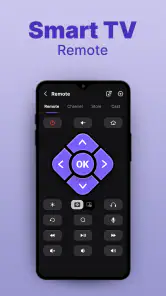
I would not approach it as a replacement for every button on every television. I see it more as a convenient network-based controller for common actions: getting the TV running, moving through menus, changing channels or volume, and avoiding the hunt for a misplaced remote. That distinction makes the experience easier to judge. If you need a highly specialized controller for an unusual device, a manufacturer-made remote app may still be the safer choice.
The app is free to install, which makes testing the connection relatively low-risk. It includes optional purchases priced from $3.99 to $29.99 per item, so I would pay attention to what is available before treating it as a permanent solution. The free starting point is helpful because compatibility is the first question, not an extra feature.
Preparing the two devices
My first practical tip is to prepare the television before touching the app. If the TV is switched off at the wall, disconnected from the home network, or waiting for a first-time setup, a phone remote cannot magically solve that initial barrier. The television needs to be in a state where it can receive control commands, and the phone needs to be on the same home network when the app relies on local communication.
This is also where many users may misread the experience. A remote application is not automatically an infrared blaster. A phone without the necessary hardware cannot simply imitate every old-style controller by pointing at the screen. In practice, this kind of app is most useful with smart-TV workflows, not with a basic television that has no way to communicate with the phone.
Once the TV is ready, I open the app and look for the device-selection process. The useful handoff here is from the phone to the television: the phone discovers or asks me to choose a TV, and the television becomes the target for the next command. If several compatible devices are active in the home, I would slow down at this stage and confirm the correct screen before trying to change anything.
Making the first connection
The first connection is the part I would not rush. A phone remote feels effortless after pairing, but the initial handoff can involve selecting the television and accepting a prompt on the TV. If a confirmation appears on the large screen, I would use the physical buttons on the TV or the original remote to approve it. This is one reason I recommend keeping the old controller nearby during setup, even if the entire point of installing the app is to use the phone instead.
After the connection succeeds, I test simple commands before relying on the app for a full evening. Volume is a good first check because the result is obvious. Navigation is another useful test: move across a row of icons, open a menu, and return. If those actions respond promptly, the basic workflow is probably sound. If they do not, repeatedly tapping the same control usually will not help; I would check the selected device and the network connection first.
There is a small but important habit that improves the experience: keep the phone awake while learning the layout. When the screen locks between commands, it adds an unnecessary interruption and makes the app feel slower than it really is. Once I know where the main controls are, the process becomes much more natural, but the first few minutes are about learning the app’s control surface rather than watching TV.
Using the phone during an ordinary evening
Imagine a realistic scenario. I am cooking, the television is playing in the next room, and the volume suddenly becomes too loud. The physical remote is under a pile of laundry, while my phone is already in my hand. I open the app, select the television if necessary, lower the volume, and return to what I was doing. That is the kind of small interruption this tool handles well.
A second scenario is useful when guests arrive and the TV is showing the wrong input or menu. Instead of passing around a tiny remote with unfamiliar buttons, I can use the phone to navigate while standing near the screen. The phone’s familiar touch interface can be easier for someone who struggles with a conventional controller, although the usefulness depends on how clearly the app presents the controls and how quickly the TV responds.
The app also makes sense as a backup in a household where the remote is regularly misplaced. I would not install it only for a one-time emergency and expect it to work without preparation. The better workflow is to connect it while everything is functioning, then leave it available for those moments when the physical controller vanishes. That turns the phone into a practical spare rather than a last-minute experiment.
Where the handoffs feel smooth
The strongest part of the experience is the handoff from intention to a familiar action. I think “lower the volume,” tap the control, and see the result on the TV. When the connection is stable, the phone becomes a compact control center and removes the need to aim a physical remote at the screen.
It is also convenient to have one device in my hand for more than television control. If I am already checking a message or setting a timer, I do not have to search for another object just to pause or adjust the sound. That does not make the app revolutionary, but it does make it useful in the small moments that create most of the value for a remote tool.
Another positive is the low entry barrier. The app is rated for Everyone, and its purpose is immediately understandable. It is not a game with systems to learn or a productivity suite that requires a long setup. The current version is 2.1.3, and the app has attracted over five million installs, which suggests that the phone-as-remote idea has broad appeal even though individual results still depend on the television and network.
What happens after the command is sent
The result I care about is not whether the phone displays a remote-shaped interface. It is whether the TV reacts reliably. In my experience, the app is most satisfying when I use it for short, direct tasks: adjust the sound, move through a menu, pause something, or return to a previous screen. These actions have immediate feedback, so I can quickly tell whether the connection is working.
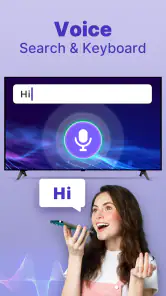
Longer navigation sessions are a different matter. Searching for a film or entering text can be more tiring on a phone remote than using a dedicated keyboard, a manufacturer interface, or voice input where available. I would use the app to reach the search screen, but I would not automatically assume it is the fastest way to enter a long title. The phone’s advantage is always convenience, not necessarily speed for every task.
This distinction helps explain the average rating of 3.9 from around twelve thousand ratings. That figure does not make me dismiss the app, but it does encourage realistic expectations. A remote-control app can work very well in one home and be frustrating in another because televisions, routers, sleep settings, and network arrangements vary. The rating feels consistent with a useful tool that is not universally effortless.
How it compares with the usual alternatives
The original physical remote still wins for instant access when it is available. It does not need an unlocked phone, a network connection, or an app to be found in a crowded home screen. It also usually offers dedicated buttons for inputs, playback, and navigation. For someone who watches television every day and dislikes using a touchscreen, keeping the original controller is the better primary option.
A television manufacturer’s own remote app may be preferable when the brand offers one with deeper integration. Such an app may fit a particular TV more closely, while a general tool like this is attractive when I want one straightforward option instead of installing a separate controller for every screen. The trade-off is breadth versus certainty: a general app can be convenient, but a first-party alternative may handle specialized functions more predictably.
Universal physical remotes are another sensible alternative. They are inexpensive in many households, remain usable when the phone battery is low, and do not compete with calls or other phone activity. I would choose one for a guest room, a shared family television, or a home where network setup is frequently changed. I would choose this app when my phone is always nearby and the TV is already part of a stable smart-home setup.
Voice assistants can be faster for a few commands, especially volume or playback, but they are not a complete substitute for visual navigation. The app gives me direct control rather than asking a voice system to interpret a phrase. That can be better in a noisy room or when I do not want to speak aloud, while voice control may be better for a quick command from across the room.
Where the workflow breaks
The biggest weakness is the dependency chain. The phone must be available, charged, and connected in the right way. The TV must be reachable and ready to accept control. If any link breaks, the app may appear unhelpful even though the interface itself is fine. This is why I would not throw away the physical remote after installing it.
Network changes are another likely source of friction. Moving the television to a guest network, replacing the router, or changing the phone’s connection can interrupt the handoff. When that happens, I would reconnect both devices to the same home network before reinstalling anything. Reinstalling is a dramatic first response; checking the basic connection is usually more sensible.
Sleep behavior can also affect expectations. Some televisions stop responding to network controls in deeper standby, while others remain reachable. If the app works perfectly when the TV is on but not after a long period of inactivity, that may be a limitation of the television’s power state rather than a problem with every command. In that situation, the original remote or the TV’s physical power button remains important.
There is also the question of privacy and attention in ordinary use. I prefer not to grant a remote app more importance than it needs, and I would review the phone’s permission prompts carefully instead of tapping through them automatically. I also find a phone remote less comfortable when I want to watch television for several hours and repeatedly reach for the device. A touchscreen is convenient for occasional commands, but a physical controller can be more relaxing for sustained use.
Who should install it, and who should skip it
I would recommend giving it a try if you frequently lose the remote, already use a compatible smart TV, and want a free way to test phone-based control. It is particularly useful for quick adjustments while cooking, for keeping a backup controller in a shared home, or for helping someone navigate a television without explaining every button on a traditional remote.
I would be more cautious if the television is old, disconnected from the internet, or located on a network that the phone cannot join. I would also skip it as a primary solution if I need reliable control of advanced functions every day, prefer tactile buttons, or regularly watch in places where my phone is unavailable. In those cases, the original or a universal physical remote is a better fit.
The optional purchase range, from $3.99 to $29.99 per item, is another reason to test the basic workflow first. I would not spend money simply because the app connected once. I would use it over several ordinary situations, including opening the TV, changing volume, navigating menus, and recovering from a connection interruption. If it consistently saves time, an optional upgrade may make sense; if the connection is unreliable, paying more will not solve the underlying compatibility issue.
My practical setup advice
I would set up the app while the original remote is still available. Confirm the television on the phone, approve any on-screen connection request, and test the most important commands. Then I would place the app somewhere easy to reach rather than burying it in a folder. These steps turn a possible emergency tool into a dependable backup.
I would also avoid judging it after only one failed tap. Check that the correct TV is selected, confirm that the phone and television are using the same home connection, and look at the TV itself to see whether it is awake. If the app suddenly stops responding after the router or network changes, repeat the connection process before deciding that the application is unusable.
Finally, I would decide which tasks belong to the app and which belong to another controller. Use the phone for quick adjustments and occasional navigation. Use the physical remote for long searches, deep settings, or moments when the TV is in a standby state that does not accept network commands. That division gives the app a realistic role and avoids expecting it to replace every part of the television ecosystem.
My final take after using it
Smart TV Remote Control APP is a sensible convenience tool, not a guaranteed universal remote. Vsray Technology has focused it on a simple need: control the television from a phone when the phone is the device I can actually find. The free installation and Everyone age rating make it easy to try, while its support for Android five and later keeps it accessible to many users.
I like it most as a prepared backup and for quick household moments. The workflow is smooth once the TV is reachable, the correct device is selected, and the connection is accepted. I like it less when I need tactile buttons, advanced television functions, or control during a network or standby problem.
With over five million installs and 852 reviews, it has clearly found an audience, but I would still treat compatibility as the deciding factor. My recommendation is straightforward: install it, test it before you need it, and keep the original remote nearby until it proves dependable in your home. Its real strength is not replacing every remote; it is removing the small daily hassle of finding one.
Pros
- Works with many popular Smart TV brands and models.
- Quick pairing makes setup simple for most users.
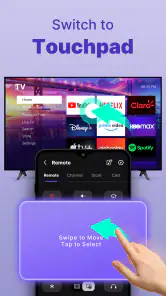
- Useful touchpad and keyboard for faster navigation.
- Can replace a misplaced or damaged physical remote.
- Clean interface is easy to understand and use.
Cons
- Requires the phone and TV to share the same Wi-Fi network.
- Some older TVs may not support all remote features.
- Free version may include ads or limited functionality.
- Typing response can feel slow on certain TV models.
- Advanced controls may require an in-app purchase.
- Category
- Tools
- Version
- 2.1.3











