Smart Printer: Print Documents
- 1.23K
- 4.0
- Installs
- 5.00M
- Price
- Free

Screenshots


Analysis by Reviewed
For a first-time user, the real question is not whether printing from a phone sounds convenient; it is whether you can get from an install to a clean, usable page without turning a small errand into a troubleshooting session. Smart Printer: Print Documents is a free tools app from DIGITALOOM INC. The app is rated for Everyone, and its current version is 1.3.1. I’d approach it as a phone-based route to printing when a compatible printer is already within reach, rather than as a replacement for every printer’s own software.
Before you install, set a realistic expectation
A phone-printing app can make the trip from a file on your phone to a nearby printer shorter, but it cannot solve every part of the printing chain. The printer still needs to be ready, the phone needs a route to reach it, and the document needs to be suitable for printing. I find it helpful to think of this app as a bridge between the file and the printer, not as a way to turn any printer into a wireless one.
That distinction matters if you are choosing between this and the usual alternatives. A printer maker’s own app may be the more dependable choice for maintenance or model-specific options, while a computer is often easier for long documents that need careful page-by-page inspection. Smart Printer: Print Documents is most appealing when the file is already on your phone or in cloud storage and you want a straightforward way to get a practical print without returning to a desk.
Start with the printer you actually have
Before opening a file, check that your printer is available to your phone and that both are set up to communicate in a way they share. The practical first step is to identify the printer model and connection method, then follow the printer’s own setup instructions if it is not already ready. This avoids a common false start: assuming a phone app can make an offline or incompatible printer appear automatically.
Once the printer is ready, begin with a document that is easy to recognize and not urgently needed. A one-page PDF is a sensible test because it lets you check whether the printer is found, the page is oriented correctly, and the text is legible before committing to a longer job. For a first attempt, I’d keep the settings simple and print one copy; extra choices are easier to judge after you know the basic connection works.
Make the first print a small, useful test
For a reassuring first run, choose a file you can easily replace, such as a simple note or an ordinary page you already have saved. Check the preview and look at the result before moving on to anything time-sensitive. If the page is cropped or rotated, you have discovered that early, when the cost is a little paper and time rather than a missed appointment or an unusable form.
I would also separate connection problems from document problems. If the printer does not appear, confirm that it is powered and ready and revisit the setup instructions for the printer before changing several app settings at once. If it appears but the print looks wrong, inspect the file and its layout first. Changing one thing at a time makes it easier to identify what actually fixed the issue.
More From Our News Desk

Weather by Xiaomi Review: Clear at a Glance, Less Clear Up Close

X Under Pressure: Can It Recover When Posting Goes Wrong?

Clash of Clans Is Won Between the Battles

Android Auto Makes the Case for Quieter Car Software

MobiOffice: Transforming Mobile Productivity with Seamless Integration

EA SPORTS FC™ Mobile Soccer: Redefining Mobile Sports Gaming
Seamless Printing on the Go
Ever found yourself in a pinch needing to print something important, but you're nowhere near a computer? Welcome to the modern solution: Smart Printer: Print Documents. This app promises to be your ultimate printing companion, right from your smartphone. So, let's dive into what makes this app tick and why it might just be your new best friend.
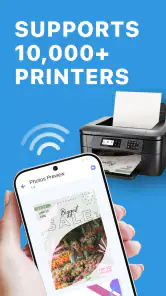
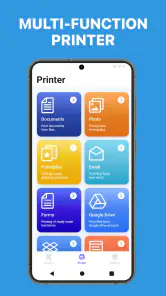
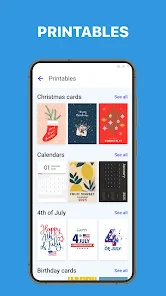
With Smart Printer: Print Documents, the days of rushing back to your computer to print are long gone. The app offers a hassle-free experience by connecting directly to all compatible printers via Wi-Fi, Bluetooth, or even USB. It’s like having a mini printing station right in your pocket. Whether you're at a coffee shop or waiting for a meeting, you can print documents, photos, webpages, and even emails directly from your phone.
User-Friendly Interface
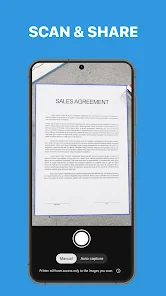
One of the standout features of this app is its intuitive interface. I mean, let's be real, nobody wants to spend hours learning how to use an app, right? With its clean design and straightforward navigation, even the least tech-savvy of us can get the hang of it in no time. The app supports a wide array of file types including PDFs, Word documents, and JPEGs, making it incredibly versatile.
Choose the right job for a phone workflow
Where I see the practical benefit is in small, deadline-driven jobs: a form that needs a signature, a short agenda for a meeting, or a copy of a document you have just received while away from your laptop. A phone is already where the file may have arrived, so skipping the extra step of transferring it to a computer can save hassle. For a handful of pages, that convenience can matter more than having a full desktop workspace.
There are trade-offs, though. A phone screen is not ideal for checking a dense spreadsheet, a multi-page contract, or a document with intricate formatting. If the exact page breaks matter, I’d rather review the file on a larger screen before printing. The app’s convenience is strongest when the document is familiar and the print has a clear purpose, not when you need to proofread a complex layout from scratch.
Customizable Print Settings
Printing isn’t just about hitting the print button anymore. With this app, you have a range of customizable options at your fingertips. Adjust the size, orientation, and even the quality of your prints. You can choose between color or black and white, and decide on the number of copies you need. It’s like having a professional printing service right in your hand.
For a first test, avoid changing several settings at once. Start with one copy and the layout that matches the file; if it comes out correctly, then consider color, quality, or extra copies on the next job. This is especially useful for a document that contains both text and images. A quick black-and-white test can show whether the information is readable before you spend color ink on a full set.
Copy count is another small choice worth treating carefully. When I am unsure about the result, printing one copy first is safer than sending several and discovering that the pages are scaled unexpectedly. For handouts, check the first copy for orientation and legibility before deciding whether to print the rest. That simple pause can prevent waste without adding much effort.
Cloud Integration
In today’s digital age, cloud storage is king. This app seamlessly integrates with popular cloud services like Google Drive, Dropbox, and iCloud. This means you can access and print your documents from virtually anywhere, without the need to download them onto your phone first. Talk about convenience!
A useful habit is to open a cloud document and check its final page count or layout before sending it to paper. A file that looks fine in a phone preview can still contain a blank page, a wide table, or an image that changes how it prints. For forms and work documents, I’d also double-check whether color is necessary; choosing black and white when it is not can be a practical way to avoid using color ink unnecessarily.
Cloud access is particularly handy when you are moving between devices: a file saved earlier can be ready on your phone when you reach the printer. Still, I would not treat that as a reason to skip checking the correct version. If a document has been edited recently, make sure you are opening the final copy rather than an older draft with a similar name. That is an easy mistake to make when you are in a hurry, and the printed page will not reveal which version you meant to use.
Security Features
In a world where data security is paramount, this app doesn’t disappoint. It offers secure connections to ensure that your documents are safe during the printing process. You can rest easy knowing that your sensitive information is protected.
Even with a secure connection, I’d be thoughtful about where I print private paperwork. A shared or public printer can leave pages where someone else might see them, so stay nearby and collect the output promptly. For highly sensitive material, consider whether the location and printer are appropriate before sending anything. Good printing habits still matter alongside the app’s connection safeguards.
When a different printing route makes more sense
The most useful everyday case is a last-minute handout: a meeting agenda arrives while you are away from your desk, and a printer you can use is already nearby. You can retrieve the file from cloud storage, check its layout, and send a single copy rather than waiting to get back to a computer. It is also handy for a boarding document, a signed form, or a photo you want on paper, provided the printer and phone can connect.
Compared with relying only on a printer maker’s app, a general-purpose tool can feel more convenient when your files come from different places and include more than one common document type. The trade-off is that printer-specific apps may be a better choice when you need model-specific maintenance or troubleshooting. If you print rarely and the printer’s built-in phone support already handles your files, using that existing option may be simpler than adding another app.
For a large batch, repeated office printing, or work where exact formatting is essential, I would compare the phone route with printing from a computer before committing. A desktop gives you more room to inspect pages and catch awkward breaks. On the other hand, if you are printing a short PDF from a phone and the printer is already set up, opening another device may be unnecessary. The best option depends less on which app has the longest feature list and more on the document, printer, and urgency in front of you.
Costs, expectations, and who should use it
The app is free to install, though it offers in-app purchases priced from $3.99 to $49.99 per item. I’d check the purchase details in the app before paying and decide whether the features you need justify the cost; occasional printing does not automatically make a paid option worthwhile. It has more than five million installs and an average rating of 4.0 from around 97,000 ratings, which gives a useful sense of its reach without guaranteeing that it will work with every individual printer.
I’d recommend giving it a try if you often receive documents on your phone and have access to a compatible printer, especially when you need a quick single-page print. It is less compelling if your printer is not phone-ready, if you need specialized printer controls, or if you mainly print large, carefully formatted jobs where a desktop preview is easier to inspect. Its release was on May 1, 2024, and the app has around 1,200 written reviews. The best first test is still modest: pick a non-sensitive, one-page file, confirm the printer connection, and check the result before depending on it for an important document.
For someone deciding whether to keep it installed, I’d judge it by how often the phone-to-printer shortcut actually saves a step. A student printing occasional notes, a family member handling forms, or a worker who sometimes needs a single page away from a desk may find that convenience worthwhile. Someone who prints only from one well-supported printer and already has a reliable manufacturer app may see little reason to switch. The app is a tool for a particular gap in the workflow, not a requirement for every phone owner.
One practical question is whether you need to pay before you can find out if the basic workflow suits you. Since installation is free and purchases are optional, I’d first try a simple document and only consider an in-app purchase after checking exactly what it unlocks and whether that solves a recurring need. The listed purchase range runs from $3.99 to $49.99 per item, so I would not tap through a purchase screen casually. Decide based on your own printing pattern rather than assuming that paid means necessary.
Another question is whether it is the right choice for a printer that is difficult to connect. I would start with the printer’s setup guidance and verify that the device is ready before blaming the app. If the printer requires a model-specific setup or you need to diagnose an error, its maker’s software or support route is more appropriate. A general printing app can be convenient once the printer is reachable, but it is not a substitute for fixing the printer itself.
All things considered, Smart Printer: Print Documents is a game-changer for anyone who needs to print on the go. Its combination of ease-of-use, customizable options, and security features make it a top choice for professionals and casual users alike. So, next time you find yourself needing to print that last-minute report or cherished photo, give this app a whirl. Who knew printing could be this easy?
Smart Printer: Print Documents Frequently Asked Questions
Is Smart Printer: Print Documents free to download?
Yes, Smart Printer: Print Documents is free to install. Some optional features may involve in-app purchases, so it is worth checking the available options before paying. The app is intended as a mobile printing tool, and whether the free experience is enough for you will depend on which features you plan to use.
What should I check before installing Smart Printer: Print Documents?
Before downloading, make sure your mobile device meets the app’s minimum operating-system requirement and that you have a printer setup you want to use it with. It is also helpful to consider whether you need any paid features, since the app offers in-app purchases. Checking recent user feedback can help you decide whether the app is a good fit for your intended use.
Is Smart Printer: Print Documents available for Android and iOS?
Smart Printer: Print Documents is described as a mobile app for Android and iOS users who want printing tools on a phone or tablet. Before installing, check that your device meets the minimum operating-system requirement: version 10. The app is free to install, though some purchases are available within it, so consider those costs if you expect to use paid features.
What devices can I use Smart Printer: Print Documents on?
Smart Printer: Print Documents is a mobile app for Android and iOS users who want printing tools on their phones or tablets. Before downloading, check that your device meets the minimum operating-system requirement: version 10. The app is free to install, though some purchases are available within it, so consider those costs if you expect to use paid features.
Who makes Smart Printer: Print Documents, and is it suitable for general use?
Smart Printer: Print Documents is developed by DIGITALOOM INC. and is categorized as a Tools app, with a content rating of Everyone. Its store summary presents it as a destination for printing solutions, making it relevant to people looking for mobile printing support. The app has an average rating of 4.0 from around 97 thousand ratings, which may help you decide whether it suits your needs.
Pros
- Easy connection with various printers
- Supports multiple file formats
- High-quality print output
- User-friendly interface
- Fast printing speed
Cons
- Limited free features
- Requires internet for cloud printing
- Occasional app crashes
- Ads in the free version
- Subscription required for premium features
- Category
- Tools
- Version
- 1.3.1








