Samsung Food: Meal Planner
- 4.09K
- 4.5
- Installs
- 1.00M
- Price
- Free

Screenshots


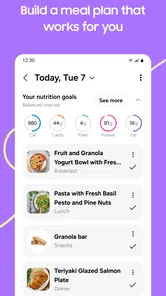
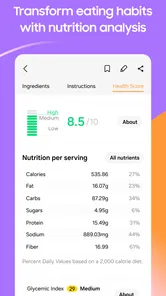
Analysis by Reviewed
My take is that Samsung Food: Meal Planning is most useful when dinner decisions, recipes and shopping have become separate jobs you keep putting off. It brings those tasks into one place, which can make a busy week feel more manageable. I wouldn’t call it a substitute for cooking knowledge or a perfectly tailored nutrition plan, but I can see it helping people turn “what should we eat?” into a practical next step.
Where it earns a place in the kitchen
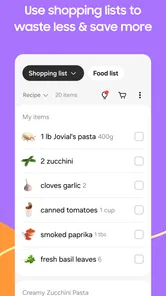
The real value is the chain from choosing a recipe to preparing for it. A grocery list tied to planned dishes is more useful than a generic checklist: before shopping, I can scan what I intend to cook, check the ingredients and avoid buying for meals I never make. I’d still review the list against what’s already in the pantry, since a generated list can’t replace a quick look in the cupboard.
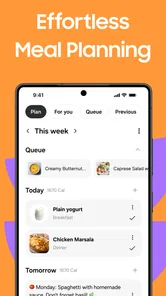
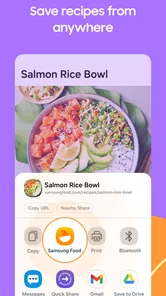
For example, if I’m planning a few dinners after work, I can choose recipes ahead of time, collect the ingredients in one list and use reminders as a prompt to get started. That’s a modest workflow, not magic, but it targets the points where weeknight plans often fall apart: forgetting an ingredient or leaving the decision until everyone is hungry. Saving recipes also gives me a place to return to dishes that worked instead of searching from scratch every time.
Get to Know Samsung Food
So, what's the deal with Samsung Food: Meal Planning? Essentially, it's a sleek app that helps you plan meals like a pro. It’s designed with a user-friendly interface, making it easy to navigate even if you’re not a tech guru. Trust me, you don’t need a degree in culinary arts to whip up something tasty using this app.
Features That Stand Out
First off, Samsung Food offers a variety of recipes from different cuisines. Whether you’re craving Italian pasta or Asian stir-fry, you’ll find a recipe that tickles your taste buds. The best part? The app lets you customize these recipes based on dietary preferences. Going keto or vegan? No problem, Samsung Food has got your back.
Another cool feature is the shopping list generator. You know that moment when you’re halfway through cooking and realize you’re out of olive oil? Yeah, it’s the worst. The app helps prevent these mishaps by generating a list of ingredients for your chosen recipes, ensuring you have everything you need before you start cooking.
Turning a plan into a routine
There’s a practical trade-off in recipe customization: a dietary preference can help narrow down ideas, but I would still read each recipe carefully rather than assume every ingredient or serving suits my needs. That matters especially if I’m cooking for someone with allergies or strict restrictions. I’d treat the app as a planning aid, not as a guarantee that a dish meets a medical or nutritional requirement.
More From Our News Desk

Weather by Xiaomi Review: Clear at a Glance, Less Clear Up Close

X Under Pressure: Can It Recover When Posting Goes Wrong?

Clash of Clans Is Won Between the Battles

Android Auto Makes the Case for Quieter Car Software

MobiOffice: Transforming Mobile Productivity with Seamless Integration

EA SPORTS FC™ Mobile Soccer: Redefining Mobile Sports Gaming
Compared with keeping recipes in bookmarks and writing a separate shopping list, the advantage here is having the planning steps connected. A plain notes app may be quicker for someone who already has a fixed rotation of meals, while a dedicated recipe collection can suit cooks who mainly want inspiration. Samsung Food makes more sense to me when I want to move from discovering a dish to organizing the ingredients and timing around it.
Planning for real life, not an ideal week
A useful way to test the workflow is to plan only a few dinners at first, rather than trying to schedule every meal. I’d pick recipes that share a couple of ingredients, then check the combined list before leaving for the shop. That small bit of editing matters: buying one versatile ingredient for more than one dinner can reduce waste, while a plan full of unrelated recipes can create a long list and leave leftover odds and ends.
On a typical workday, I might look at the plan in the morning, notice that a recipe needs an ingredient I don’t have, and add it before shopping or change the meal. Later, a reminder can bring dinner back to mind, but I still decide whether the day’s timing makes the recipe realistic. I find this more useful than treating the schedule as a commitment. The plan should absorb changes, not make me feel behind when a meeting runs late.
One non-obvious habit that helps is reviewing recipes before adding them to the week, not just choosing based on the photo or title. Check preparation steps, ingredient overlap and whether the cooking time fits the evening you have in mind. A recipe that looks appealing may require more attention than you can spare after work. Making that check early is a better safeguard than discovering the mismatch when everyone is waiting for dinner.
What it does better than a pile of separate tools
The main comparison is not with a professional nutrition service; it is with the scattered system many people already use: saved web pages, a notes app, a calendar and a handwritten grocery list. That collection can work well, but information gets duplicated. Here, recipes, meal planning and ingredient gathering are connected, so a change to the menu is easier to account for than when each task lives in a different place.
There are still cases where the simpler tools win. If I cook the same handful of meals every week, a short recurring list may take less effort than browsing and planning. If I enjoy deciding in the grocery aisle based on what looks good, advance planning can feel restrictive. And if my priority is detailed nutritional tracking, I would compare the available tools carefully rather than assume a meal organizer can replace a specialist tracker. The best choice depends on which part of cooking feels difficult.
For recipe inspiration alone, a general search or a recipe-focused collection may be enough. For household coordination, a shared calendar or list could be more convenient if everyone already uses it. The appeal here is the middle ground: Samsung Food can connect choosing a dish with getting its ingredients ready, without requiring me to build that workflow from scratch. That convenience is strongest when I actually use the planning and list functions together.
Why You’ll Love It
What makes Samsung Food a standout is its integration with smart devices. Imagine planning your meals from your smartphone and sending instructions directly to your Samsung appliances. It’s like living in the future, where your fridge knows what you’re about to cook.
Also, for those of us who are a bit forgetful, the app’s meal reminders are a lifesaver. It nudges you when it’s time to start prepping, so you never miss out on your planned meals. Plus, the ability to save and categorize your favorite recipes means you can easily revisit any culinary masterpiece you’ve created.
Where the convenience has limits
I would treat device integration as an optional extra, not the reason to install it. It is useful only when the appliances and phone setup I already have fit the connection. If I cook with ordinary equipment, the recipe and planning workflow still has to justify the app on its own. Before building a routine around appliance controls, I’d check that my particular setup supports what I want to do.
Another limit is the ongoing attention a planner needs. Recipes do not automatically account for what is already in the fridge, a sudden invitation to eat out or a family member changing their mind. The grocery list is a starting point, not a live inventory of the kitchen. I’d keep the plan deliberately loose, check the pantry before shopping, and avoid buying everything for a week of meals if I know my schedule often shifts.
It also may not be the right fit for cooks who prefer improvisation. If I usually decide what to make by looking at leftovers, an organized recipe-and-list routine could add steps rather than remove them. The same applies if I need strict control over allergens or nutrition: preferences can help with discovery, but I’d verify every ingredient and preparation detail independently. In those situations, a carefully maintained personal list or a specialist tool may be a safer, simpler choice.
Who should give it a try
I’d recommend it most to people who cook at home several times a week, struggle to decide what to make, or regularly forget one ingredient and end up changing plans. It can also help someone who wants to save successful recipes and turn them into a more repeatable routine. Newer cooks may appreciate having dishes to explore and a list to prepare from, while experienced cooks may value the organization more than the recipes themselves.
For a household, the most realistic benefit is reducing the small coordination questions: what are we making, what needs buying, and when should we get started? It won’t settle everyone’s preferences, but choosing a few meals before the week gets busy can make the shopping trip more purposeful. If different people handle planning and cooking, I’d make sure the person using the list checks it against the actual kitchen and the household’s needs.
Samsung Food is a free Food & Drink app from SamsungFood, with optional in-app purchases ranging from $6.99 to $59.99 per item. It has a 4.6 average from around 22,000 ratings, and more than a million installs. The app is rated Teen, runs on Android 7.0 or later, and its current version is 2.51.0; it was released on December 16, 2019. Those details place it as an established option, though I’d still check the current purchase screen and device compatibility before relying on a paid feature or appliance connection.
The core planning idea is accessible without making a purchase, while optional purchases mean I’d inspect what is included before paying for anything. I would start with the free workflow and see whether recipes, lists and reminders actually fit my habits. A paid option only makes sense if it solves a specific problem for me; a price by itself does not tell me whether it is worthwhile for my household.
Final Thoughts
If meal planning has always felt like a chore, Samsung Food: Meal Planning might just change your mind. It’s not just an app; it’s your new kitchen companion. With its smart features and seamless integration with Samsung devices, it turns meal prep into an enjoyable experience rather than a dreaded task.
So, whether you’re a seasoned cook or someone who frequently burns toast, give Samsung Food a try. It’s designed to make your life easier, one meal at a time. Happy cooking!
My recommendation is for people who want recipe discovery, shopping preparation and meal prompts to work together, especially if they cook at home often enough to benefit from planning ahead. If you already have a reliable system—or want a simple, no-frills list—the usual calendar or notes app may be less demanding. For me, Samsung Food is worth considering as a practical organizer, provided I stay flexible and verify the details that matter before cooking.
Samsung Food: Meal Planner Frequently Asked Questions
Can I use Samsung Food on an iPhone or only on Android?
Samsung Food is a meal-planning app from SamsungFood, but its name does not mean it is limited to Samsung-branded phones. Availability and compatibility depend on the version offered for your device and its operating system. Before downloading, check the relevant app store and make sure your device meets the listed requirements. The Android version requires Android 7.0 or later.
Can I create grocery lists from recipes and meal plans?
Yes. Samsung Food brings recipes, meal planning, and grocery lists together, and you can use it to turn the ingredients needed for recipes into a shopping list. That can make it easier to keep track of what to buy while organizing meals. If you prefer managing cooking ideas and shopping tasks in one place instead of separate notes, this is one of the app’s central conveniences.
What can I expect from Samsung Food before I install it?
Samsung Food is a food and drink app for organizing recipes, meal planning, grocery lists, and nutrition in one place. It is free to download, with optional in-app purchases, and is rated for Teen audiences. If you want one app to help bring cooking ideas and shopping tasks together, its focus is practical meal organization rather than restaurant ordering.
What is Samsung Food and how does it work?
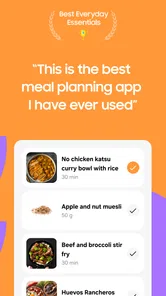
Samsung Food is a comprehensive meal planning app designed to streamline your cooking and grocery shopping experience. It offers curated recipes, customizable meal plans, and shopping lists. Users can browse a vast collection of recipes, save their favorites, and create personalized meal plans. The app also allows you to generate a shopping list based on the ingredients needed, making grocery shopping more efficient.
Is Samsung Food compatible with all Samsung devices?
Samsung Food is designed to be compatible with most Samsung smartphones and tablets running on Android. However, it is always recommended to check the specific app requirements in the Google Play Store to ensure compatibility with your device model and Android version. The app may also be available on other Android devices, but optimal performance is guaranteed on Samsung hardware. Its minimum Android requirement is version 7.0, so check your device’s software before downloading.
Pros
- User-friendly interface for easy navigation.
- Extensive recipe library with diverse cuisines.
- Customizable meal plans to suit dietary needs.
- Integration with Samsung Health for tracking.
- Offline access to saved recipes and plans.
Cons
- Limited free features
- premium needed for full access.
- Occasional syncing issues with Samsung Health.
- Ads can be intrusive in the free version.
- No support for third-party fitness apps.
- Limited offline functionality for new content.











