Safeway Deals & Delivery
- 49.80K
- 4.7
- Installs
- 10.00M
- Price
- Free

Screenshots

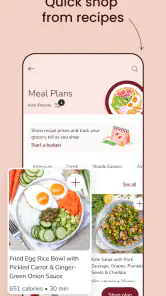
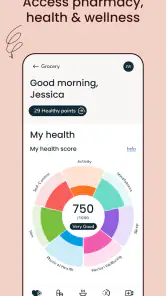
Analysis by Reviewed
When I use Safeway Deals & Delivery, I get the most out of it by treating it as part of my grocery routine rather than expecting it to plan everything for me. I check what I need at home, browse the app before shopping, and decide whether a store trip, delivery, or pickup fits the day. That small bit of preparation makes the offers more useful and helps me avoid adding things to my basket just because they look like a bargain.
Start with the shop you actually need
My practical baseline is to make a short list before opening the deals. I search for the essentials first, then look through offers for items I already buy. This is a better way to judge savings than browsing promotions without a plan: a discount only helps if the product suits your household and you will use it. For a quick top-up, searching for a few specific items is less distracting than exploring every section.
Choose the fulfilment option around your day
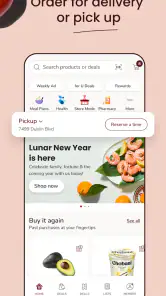
Delivery and pickup solve different problems. I would lean toward delivery when carrying groceries home is the main hassle, while pickup makes more sense when I am already passing a store and want to collect an order. If timing matters, I check the available choices while building the order instead of assuming my preferred arrangement will fit. For a larger shop, I also review the basket before checkout so substitutions or missed items do not catch me by surprise.
Build repeatable habits, not a bigger basket
A useful habit is to keep a running list of the products that regularly run out, then check it against current deals before placing an order. That makes it easier to compare the real cost of a planned shop with the convenience of delivery or pickup. I also pause before adding an unfamiliar sale item: trying one can be worthwhile, but stocking up on something new simply because it is promoted is a poor way to control a grocery budget.
Where it may not be the best fit
This is a store-focused shopping app, so I would not choose it as my only option if I want to compare every nearby grocery chain in one place. A retailer-neutral shopping or price-comparison service may suit that job better. Likewise, if I prefer selecting produce and checking every item in person, an app order trades that hands-on choice for convenience. The right balance depends on what matters more for that trip.
Ever found yourself standing in a grocery aisle, totally clueless about the best deals around? Well, I’ve been there, and that's when I stumbled upon the Safeway Deals & Delivery app. This little app is like having a savvy shopping buddy in your pocket, always ready to save you a buck or two. Let's dive into how it can transform your shopping experience.
The Ultimate Shopping Companion
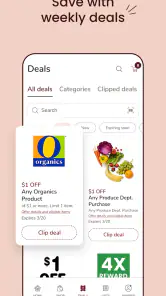
Imagine walking into a store, and instead of aimlessly wandering, you have a list of deals tailored just for you. That's exactly what the Safeway Deals & Delivery app offers. With a simple interface, you're greeted with a plethora of deals that are hard to resist. The app's smart algorithm learns your shopping habits over time, ensuring that the deals you see are the ones you'll actually use. It's like the app knows what you're thinking!
More From Our News Desk

Weather by Xiaomi Review: Clear at a Glance, Less Clear Up Close

X Under Pressure: Can It Recover When Posting Goes Wrong?

Clash of Clans Is Won Between the Battles

Android Auto Makes the Case for Quieter Car Software

MobiOffice: Transforming Mobile Productivity with Seamless Integration

EA SPORTS FC™ Mobile Soccer: Redefining Mobile Sports Gaming
Effortless Navigation and Features
One thing I absolutely love about this app is how intuitive it is. The navigation is smooth, and everything is where you’d expect it to be. Need to find a deal on your favorite snacks? Just a few taps and you’re there. The search function is robust, making it easy to find specific items or browse by category. Plus, they’ve added a neat little feature where you can create your shopping list within the app, and it syncs with the deals available. Talk about efficiency!
Delivery at Your Doorstep
Now, let's talk about one of my favorite features: delivery. Gone are the days of lugging heavy grocery bags from the store to your car and then into your home. With the app's delivery option, you can have your groceries brought right to your doorstep. You can even schedule deliveries at your convenience, which is a game-changer for those of us with hectic schedules. And if you’re feeling a bit adventurous, you can opt for curbside pickup, which is just as seamless.
Making the app work for your household
For a realistic weekday use, I would check the fridge before leaving work, add the missing dinner ingredients to the list, and look at the available offers before choosing how to shop. If I have time to stop nearby, pickup can save carrying bags through the store; if the evening is packed, delivery may be the more useful trade-off. Either way, I would confirm the order details and timing rather than assuming every item or slot will work exactly as expected.
Settings and small checks worth the effort
Before relying on the app for a routine shop, I would check that the selected store and account details match the way I intend to shop. Those basics matter because deals and fulfilment choices are only useful when they line up with the order I am building. I also review the basket before placing it: quantities, sizes, and the final mix of essentials are easy to overlook when adding items from several deal screens.
A calmer way to handle substitutions and quantities
For items where the exact brand or size matters, I treat the order review as a chance to make a deliberate choice rather than just a last tap before checkout. Pantry staples are usually easier to swap than an ingredient needed for a particular recipe, so I would prioritize checking those recipe items and any quantities that could leave me short. If produce selection is important for the meal, shopping in person may be worth the extra time. The app is most convenient when I am comfortable trading some direct selection for a more streamlined errand.
Use offers as a planning prompt, not a shopping plan
One practical way to keep promotions from taking over is to separate the list into essentials and optional extras. I can look at offers for the essentials first, then consider an extra only if it suits a meal or household need I already had in mind. That small distinction makes the deal browsing useful without turning a basic restock into an unplanned haul. It also makes it easier to compare the basket against my original list before choosing delivery, pickup, or an in-store visit.
As a shopping app, it sits between a paper list and a general grocery marketplace. A paper list is simpler and works anywhere, but it cannot bring Safeway offers and ordering into the same workflow. A broad marketplace may help compare retailers, while this app makes more sense when I already plan to shop with Safeway. Its convenience is strongest when store loyalty is already part of the routine, not when I am searching for the widest possible selection of shops.
Who should give it a try
I can see it working especially well for people who shop at Safeway regularly, want to check promotions before setting out, or need delivery and pickup as alternatives to a full in-store trip. It is less compelling for someone who shops across several chains and mainly wants a single cross-store comparison, or for a shopper who prefers to browse every aisle and choose every item personally. In those cases, a regular store visit or a more retailer-neutral tool may be a better match.
What to expect from a first order
If I were setting it up for the first time, I would begin with a modest order rather than making it responsible for every meal of the week. A smaller shop gives me a chance to see how searching, offers, basket review, and the chosen fulfilment option fit together. I would also make a note of anything that felt inconvenient, such as a product being difficult to locate, so the next list can be organized around the way I actually shop. That is a more useful test than judging the app from browsing promotions alone.
When convenience is worth the compromise
The choice between an app order and a store visit is not simply about saving time. If I need only a couple of familiar items and will pass a Safeway anyway, going in may be the simpler option. If I have a larger list, limited time, or heavy groceries, ordering can make the whole errand easier, provided the available fulfilment choice suits my schedule. I would not assume digital shopping is automatically better; I would use it selectively for the trips where it removes a real inconvenience.
Safeway Deals & Delivery is a free shopping app from Albertsons Companies, Inc., with an Everyone age rating. It has a 4.7 average from around 392,000 ratings and has passed 10 million installs, which gives it a substantial user base. The current version is 2025.37.0, and it runs on Android 7.0 or later. Those details make it easy to judge whether it fits your device and expectations, but the real deciding factor is whether Safeway is already a useful stop for your household.
Final Thoughts
All in all, the Safeway Deals & Delivery app has genuinely changed the way I shop. It’s efficient, user-friendly, and truly understands what a customer needs. From personalized deals to the convenience of home delivery, it takes the stress out of shopping and makes it, dare I say, fun. If you haven’t tried it yet, I highly recommend giving it a go. You might just find yourself looking forward to grocery shopping for once!
My verdict after building a routine
I would recommend it to a friend whose regular grocery stop is Safeway and who wants deals, a list, and ordering options in one place. The strongest approach is not to chase every promotion, but to use the app as a practical layer around a list you already trust. Search for the items you need, check offers with a clear purpose, choose the way of getting the order that suits the day, and review the basket with care. Those habits make its convenience more dependable.
I would steer a friend toward another approach if their priority is comparing several grocery chains, personally inspecting every item, or making an unplanned browse through a store. A paper list still wins for simplicity, while a retailer-neutral service can be more useful for comparing options across shops. For shoppers who already return to Safeway, though, this app offers a focused alternative to keeping deals, lists, and the decision to shop in person or order separately. It is at its best when it supports an existing routine instead of trying to replace every part of it.
Safeway Deals & Delivery Frequently Asked Questions
Can I browse Safeway Deals & Delivery before placing an order?
Yes. The app is designed for grocery shopping, so you can explore available products and deals as part of planning an order. You can also use shopping lists to keep track of what you want to buy. If you intend to place an order, the app supports delivery and pickup options, making it useful both for preparing a shop and arranging how to receive it.
Does Safeway Deals & Delivery include deals and a weekly ad?
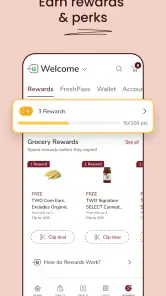
The app provides access to deals and discounts, and you can browse the weekly ad for special promotions. It also includes personalized offers intended to help users find savings connected with their shopping habits. These tools can make it easier to plan purchases, but it is still worth checking the details of each offer in the app before relying on it for a particular item or order.
Can I make a shopping list and check product prices in the app?
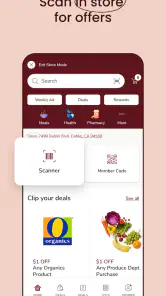
Yes. Safeway Deals & Delivery includes tools for creating and managing shopping lists, which can help you organize items before shopping. It also offers a barcode scanner for checking prices and product details. Together, these features are useful whether you are preparing to shop in a store or building an online order, and they make the app more than just a place to view delivery options.
Is Safeway Deals & Delivery compatible with my device?
Safeway Deals & Delivery is a shopping app for Android and iOS, and its listed minimum operating system is version 7.0. Before downloading, check that your device meets this requirement and has enough available space for the app. Keeping your operating system and the app up to date can also help support a smoother shopping experience.
Who develops Safeway Deals & Delivery, and is it suitable for all ages?
Safeway Deals & Delivery is developed by Albertsons Companies, Inc. It is a grocery-shopping app intended for browsing deals and arranging shopping, delivery, or pickup. Its content rating is Everyone, so it is classified as suitable for a general audience. That rating does not change the practical need to check that the app supports your device before installing it.
Pros
- Easy-to-navigate interface enhances user experience.
- Comprehensive coupon selection for savings.
- Quickly locate nearest store with in-app map.
- Seamless integration with delivery services.
- Personalized deals based on shopping habits.
Cons
- Limited availability in certain regions.
- Occasional app crashes during use.
- Requires account for full feature access.
- Notifications can be overwhelming.
- Some deals have strict redemption rules.
- Category
- Shopping
- Version
- 2025.37.0













