ACME Markets Deals & Delivery
- 2.89K
- 4.8
- Installs
- 1.00M
- Price
- Free

Screenshots

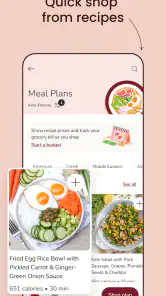

Analysis by Reviewed
I find ACME Markets Deals & Delivery most useful when I treat it as a way to plan an ACME shop, rather than as a promise that every grocery errand will happen effortlessly. It brings shopping, deals, delivery, and pickup together in one place, which can make a routine trip easier to organize. If you’re trying it for the first time, the best approach is to start with a small list and one clear goal: find an item, check what offers are available, and decide whether ordering or shopping in person suits you better.
What to expect from the app
This is a free shopping app from Albertsons Companies, Inc., built around ACME Markets. It is rated for Everyone, runs on Android 7.0 or later, and its current version is 2025.37.0. The app has a 4.8 average from around 37,000 ratings, with about 2,900 written reviews and over 1 million installs. Those figures suggest many shoppers find it useful, though they don’t guarantee that every order or store visit will go smoothly.
Compared with a general grocery delivery service, the main reason to choose this app is its connection to ACME Markets and the deals available there. If ACME is already where you shop, having offers and your shopping plan alongside ordering can be more convenient than switching between a store app and a separate list. If you mainly want to compare prices across several retailers, or your preferred store is not ACME, a broader shopping option may fit better.
Your Personal Shopping Assistant
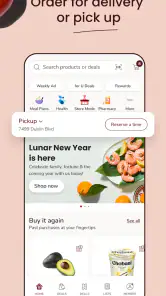
From the moment you open the ACME Markets Deals & Delivery app, you’re greeted with an intuitive and user-friendly interface. It’s like having a personal shopping assistant right in your pocket! The app is designed to help you find the best deals and discounts available at your local ACME store. You can easily browse through various categories, from fresh produce to household essentials, ensuring you never miss out on a bargain.
Easy Navigation and Seamless Experience
One of the standout features of this app is its seamless navigation. With just a few taps, you can add items to your cart, view current promotions, and even create customized shopping lists. The search function is robust, allowing you to quickly find specific products or explore new ones. Trust me, even if you’re not tech-savvy, you’ll find this app incredibly easy to use.
For a first shop, I’d avoid building a huge basket before learning how the app handles your local store. Start by searching for a few regular items, then browse the relevant categories and promotions. That small trial helps you get familiar with the layout and see whether the products and offers you care about appear as expected. It’s also a practical way to decide whether the app suits your normal routine before relying on it for a full weekly shop.
Convenience at Your Fingertips
Imagine this: You’re sitting on your couch, sipping your morning coffee, and suddenly realize you’re out of eggs. No problem! With the ACME Markets app, you can place an order and have it delivered to your doorstep without ever having to step foot outside. The app offers multiple delivery options, including same-day delivery, which is perfect for those last-minute grocery needs.
More From Our News Desk

Weather by Xiaomi Review: Clear at a Glance, Less Clear Up Close

X Under Pressure: Can It Recover When Posting Goes Wrong?

Clash of Clans Is Won Between the Battles

Android Auto Makes the Case for Quieter Car Software

MobiOffice: Transforming Mobile Productivity with Seamless Integration

EA SPORTS FC™ Mobile Soccer: Redefining Mobile Sports Gaming
Delivery is especially handy when you’re juggling work or household responsibilities, but it is not automatically the best choice for every basket. If you need to pick the ripest produce yourself, want to make substitutions on the spot, or prefer to browse in person, a store visit may give you more control. Pickup can be a useful middle ground when available: you can plan the order digitally while avoiding a full aisle-by-aisle trip. Before building a time-sensitive order, check the options shown for your location and choose a window that works for your day.
Saving Money Has Never Been Easier
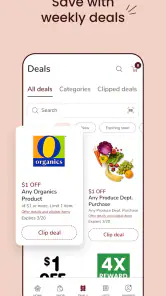
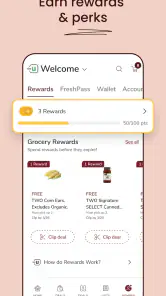
Who doesn’t love saving a few bucks? The ACME Markets app is packed with features designed to help you save money. From digital coupons to exclusive app-only discounts, you’ll find plenty of ways to keep your grocery bill in check. Plus, the app’s loyalty program rewards you with points for every purchase, which can be redeemed for discounts on future orders. It’s like getting paid to shop!
For a more useful deal check, I’d compare offers with what you already planned to buy instead of adding items just because they look discounted. A coupon only helps if the product fits your needs, and a low price on an extra item can still make the overall basket more expensive. I’d also review the cart before checkout so the quantities and chosen products match your list. This simple habit keeps browsing from turning into an impulse shop and makes it easier to judge whether the app is genuinely helping your budget.
Room for Improvement
While the ACME Markets app is a fantastic tool for simplifying grocery shopping, it’s not without its quirks. Sometimes, the app can be a bit slow to load, especially during peak shopping hours. Additionally, while the delivery service is generally reliable, there have been instances where orders arrived later than expected. However, these minor hiccups don’t overshadow the overall convenience and value the app provides.
That friction matters most when you’re planning around a tight schedule. I wouldn’t leave a critical last-minute purchase until the final moment if arriving on time is essential; keep a backup plan for anything you cannot do without. If the app feels sluggish, it may be easier to pause and try again later than to repeatedly tap through screens. For a routine order, that inconvenience is manageable. For a highly specific shop where you need to inspect every item or make quick substitutions, going to the store may be the calmer option.
Who will get the most from it
I’d recommend giving it a try if ACME is already your regular supermarket, you like checking digital offers, or you want to prepare a list before heading out. It can also suit households that split shopping duties: one person can organize the basket while another checks what is needed at home. The app is less compelling if you rarely shop at ACME, prefer comparing several stores in one place, or simply enjoy choosing every product from the shelf. In those cases, your usual store’s own service or an in-person trip may be more practical.
A realistic first success does not need to be a complete delivery order. Make a short list for the next shop, search for a few staples, and check whether any relevant promotions appear. Once that feels comfortable, decide whether to complete the purchase for delivery or pickup, or use the list during a regular store visit. This low-commitment workflow lets you learn the app without changing your whole shopping routine.
A sensible way to build your first basket
When you move from browsing to ordering, I’d use the list as the anchor rather than treating the cart as a place to explore. Add the essentials you already know you need first, then check offers for those items. This order matters: it reduces the chance that a promotion or appealing category page steers you toward extras before the practical parts of the shop are covered. If you are buying for more than one person, checking the list with everyone before checkout can also prevent duplicate purchases.
For a mixed basket, consider separating items that are easy to substitute from those where your preference is specific. A familiar pantry staple may be straightforward to select, while produce or a particular brand may be a choice you would rather make yourself. That distinction can help you decide whether to order the whole shop, use pickup for the convenient items, or keep the more personal selections for an in-store visit. It is a useful compromise for people who want to save time without giving up control over everything.
Offers are useful, but the list should lead
Digital deals are most valuable when they match your actual shopping habits. I would check an offer while searching for a planned product, rather than browse promotions without a purpose. That makes it easier to see whether the saving applies to something you intended to buy and helps keep the final cart focused. For someone who shops regularly at ACME, this can turn checking deals into a quick part of planning instead of a separate task that takes over the shop.
One practical trade-off is that shopping digitally changes how you notice products. In a store, you can compare shelves and spot alternatives as you walk. In the app, you need to search or browse, so a particular item may be easier to find if you know its name or category. I’d use search for known staples and categories when I’m open to alternatives. If choosing between several similar products is important to you, a physical visit may still be quicker and clearer.
Choosing between delivery, pickup, and the aisle
The choice is less about which method is universally best and more about what the day allows. Delivery is appealing when leaving home is inconvenient, while pickup can reduce the time spent inside the store without requiring you to build your schedule around a doorstep arrival. Shopping in person remains the strongest option when you want to inspect fresh items, make immediate changes, or combine the grocery trip with other errands nearby. The app is useful precisely because it lets you plan around those differences rather than forcing every shop into one format.
For a busy weekday, I might use the app to prepare a short order of predictable household staples and leave anything I want to select personally for a later store visit. If I’m planning a larger shop, I’d start earlier, review the basket carefully, and avoid assuming that digital convenience removes the need to check the final details. This split approach is often more realistic than expecting one order to suit every shopping need.
Questions worth settling before checkout
If you are wondering whether you need to commit to delivery on your first visit, you don’t: browsing items, checking offers, and preparing a list can help you learn the app before deciding how to shop. If you are unsure whether the app is useful outside delivery, the shopping list and deal browsing can still support an ordinary visit to ACME. That makes it easier to try the parts that matter to you without immediately changing how you get groceries.
For a first order, I’d also check the store and fulfillment choices displayed for your location before spending time filling a large cart. Options can depend on where you are shopping, so the sensible move is to confirm what the app presents and then plan around it. If a particular product is essential, search for it early and make sure the selection in your cart is the one you intend to buy. Those small checks are more helpful than assuming every location, item, and shopping method will behave identically.
People who are comparing it with a general delivery marketplace should think about their priorities. A multi-store service is a better fit when comparing retailers is the main goal; ACME’s own app makes more sense when you already shop there and want the store’s shopping tools and offers together. Neither approach is automatically cheaper or easier for every household. Your usual store, the items you buy, and whether you value browsing across retailers or staying with ACME should guide the choice.
In conclusion, the ACME Markets Deals & Delivery app is a must-have for anyone looking to save time and money on their grocery shopping. With its user-friendly interface, fantastic deals, and convenient delivery options, it’s no wonder so many people are making the switch to digital grocery shopping. So why not give it a try? It might just become your new favorite shopping companion!
ACME Markets Deals & Delivery Frequently Asked Questions
Can I choose between grocery delivery and pickup when ordering through the app?
Yes. ACME Markets Deals & Delivery is built around shopping options that include delivery and pickup. You can browse products and arrange an order in the app, then select the option that suits your plans. Pickup can be useful if you prefer to collect groceries yourself, while delivery lets you have them brought to your home. The app’s store summary highlights shopping, delivery, and pickup.
Can I browse ACME Markets deals before making a shopping list?
Yes. The app lets you browse weekly ads and see deals before organizing what you want to buy. You can create a shopping list to keep items together, which can make it easier to plan a visit or an online order. Digital coupons are also available for in-store use, so checking offers as you prepare can help you keep track of the savings you want to use.
Is ACME Markets Deals & Delivery free to download, and which devices can run it?
ACME Markets Deals & Delivery is a free shopping app from Albertsons Companies, Inc. It is rated for Everyone and runs on Android devices with version 7.0 or later. Before downloading, check that your device meets this requirement and that you have enough storage for the installation. The app is also available for iOS, so you can choose the version that fits your device.
What features does the ACME Markets Deals & Delivery app offer?
The ACME Markets Deals & Delivery app offers a range of features designed to enhance your shopping experience. You can browse weekly ads to find the latest deals, create a shopping list to stay organized, and use the delivery service to have groceries sent directly to your home. Additionally, the app allows you to earn and redeem rewards points, providing you with further savings opportunities.
Can I use the ACME Markets app for both in-store and online shopping?
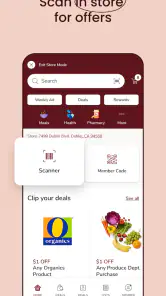
Yes, the ACME Markets Deals & Delivery app is versatile, catering to both in-store and online shoppers. You can use the app to locate the nearest store, access digital coupons for in-store use, and even check store hours and services. For online shoppers, the app provides options for delivery or curbside pickup, making it convenient regardless of your shopping preference.
Pros
- User-friendly interface makes navigation easy.
- Wide variety of grocery items available.
- Regular updates with new deals and offers.
- Fast and reliable delivery service.
- Loyalty program offers great rewards.
Cons
- Limited delivery areas restrict accessibility.
- Occasional app crashes reported by users.
- Some items may be out of stock.
- Customer support response can be slow.
- In-app ads can be intrusive at times.
- Category
- Shopping
- Version
- 2025.37.0













