Roy VPN - Fast & Secure Proxy
- 126.00
- 4.6
- Installs
- 100.00K
- Price
- Free

Screenshots


Analysis by Reviewed
I look at Roy VPN as a simple tool for people who want to add a VPN connection to everyday browsing without turning setup into a project. Its appeal is easy to understand: open the app, connect, and get on with checking messages, reading news, or using public Wi-Fi. That straightforward role matters more to me than grand claims. A VPN can change how your traffic is routed, but it is not a substitute for careful account security or sensible browsing habits.
What to expect from everyday speed
Speed is the first thing many people worry about, and my practical advice is to judge it by the task you actually need to do. Reading pages or checking email puts less pressure on a connection than a video call or a large download. Even a VPN that feels quick in one situation can behave differently when the network is busy or the route is longer, so I would test Roy VPN with ordinary tasks before relying on it for something time-sensitive.
The app is free and sits in the tools category, which makes it approachable for a quick trial rather than a major commitment. My useful tip is to compare the same site or service with the VPN connected and disconnected, using the same Wi-Fi or mobile connection. That gives you a clearer sense of whether any delay comes from the VPN route or from the underlying network. I would avoid judging performance from one brief test alone.
Busy moments and practical trade-offs
For a realistic day, imagine opening a café’s public Wi-Fi to check a travel booking, then switching to mobile data on the way out. That is the sort of short, ordinary session where a VPN may be convenient. If a page stalls, I would first check whether the Wi-Fi itself is weak, then reconnect and retry before assuming the app is the cause. A VPN cannot make a poor internet connection reliable, and an extra network hop can sometimes make an already slow connection feel slower.
For video, voice calls, gaming, or downloads, I would be more cautious. These activities are sensitive to interruption and delay, and a fast result on one network is not a promise of the same experience elsewhere. If the connection becomes frustrating, compare the app’s behavior with your normal connection and decide whether privacy for that particular task is worth the performance trade-off. For a call where every second counts, the regular connection may be the more practical choice.
Stability, reconnecting, and privacy judgment
Reliability is not just about whether a VPN connects once; it is about whether you notice when the connection changes and what you do next. I would make a habit of checking the app before entering passwords or sending sensitive information on unfamiliar Wi-Fi, especially after moving between networks. If access drops, pause the sensitive task until the VPN is connected again rather than assuming protection resumes automatically. That small routine is more useful than treating any VPN as invisible background insurance.
I also separate the idea of a VPN from a complete privacy guarantee. It can help protect traffic on some networks, but it does not make suspicious links safe, hide information you willingly share with a website, or replace strong passwords and two-step sign-in. Anyone choosing a VPN for confidential work should look closely at the service’s privacy terms and decide whether those assurances match their needs. For casual browsing, my bar is different; for high-stakes work, I would choose a service with clearly documented practices and controls I can evaluate.
More From Our News Desk

Weather by Xiaomi Review: Clear at a Glance, Less Clear Up Close

X Under Pressure: Can It Recover When Posting Goes Wrong?

Clash of Clans Is Won Between the Battles

Android Auto Makes the Case for Quieter Car Software

MobiOffice: Transforming Mobile Productivity with Seamless Integration

EA SPORTS FC™ Mobile Soccer: Redefining Mobile Sports Gaming
First Impressions and User Interface
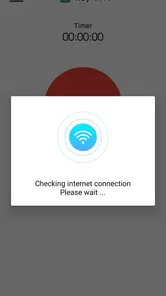
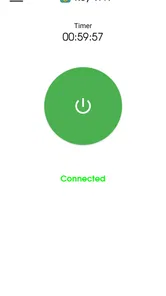
From the moment I downloaded Roy VPN, I was impressed by its sleek and user-friendly interface. Navigating through the app felt intuitive, even for someone not particularly tech-savvy like myself. The bright colors and straightforward icons made it easy to understand what each feature was meant to do. Kudos to the developers for designing an app that's visually appealing without sacrificing functionality.
Performance and Speed
One of the critical aspects of any VPN is its speed, and thankfully, Roy VPN didn't disappoint. Connecting to the server was a breeze, and the internet speed remained impressively fast. I tested it on various websites and streaming platforms, and there was no noticeable lag or buffering. Streaming my favorite shows felt seamless, as if I weren't using a VPN at all! It’s like having a secret passage through the internet that no one else knows about.
Security Features
Let's talk security because, let's face it, that's what we're all here for. Roy VPN offers robust encryption, ensuring that my data remained private and secure. I appreciated the kill switch feature, which automatically blocks internet traffic if the VPN connection drops unexpectedly, a feature that adds an extra layer of security. It’s comforting to know that my online presence is shielded from potential threats. In today's digital age, having a reliable VPN is almost as essential as having a good Wi-Fi connection.
Additional Features
Beyond the basics, Roy VPN offers some neat extras. For instance, the app includes a server recommendation feature that suggests the best server based on your location and needs. During my travels, I found this especially handy when trying to access location-specific content. Another noteworthy feature is the app's compatibility across multiple devices, ensuring that my phone, tablet, and laptop are all protected under one account. It's like having a Swiss Army knife for digital security.
What's more, the app supports a wide range of platforms, from Android to iOS, ensuring that no matter your device, you can stay protected. It’s as if Roy VPN is telling you, "Don't worry, I've got your back!"
Device fit and day-to-day use
On Android, Roy VPN is listed for devices running version 6.0 or later, so I would check that requirement before downloading it onto an older phone. The current version is 3.5, and the app is developed by Mycroft developer. Its Everyone age rating makes it suitable for a broad audience, though younger users should still understand that a VPN does not make every online choice safe.
Because VPN traffic is routed through an additional service, a connection can use more of a phone’s network and battery resources than browsing without one. I would switch it on when I have a clear reason—such as using an unfamiliar hotspot—and turn it off when I no longer need it if conserving battery or data is a priority. If you rely on a VPN all day, check how your own phone behaves over a normal day rather than assuming the impact will be identical on every device.
Who will find it useful
Roy VPN may suit someone who wants a low-friction way to try a VPN for everyday browsing and is comfortable judging it on their own network. It has a 4.6 average from around 1.9 thousand ratings, with roughly 126 written reviews and over 100 thousand installs. Those figures suggest it has attracted a real user base, but they cannot tell you whether its connection will be fast in your neighborhood or whether its privacy practices fit your personal needs.
Compared with manually configuring a VPN, an app is generally the easier route for someone who wants a familiar interface rather than dealing with connection details themselves. Compared with a paid VPN service, free access can be appealing for occasional use, but I would not assume it offers the same choice of controls or the same level of documented privacy. If you need a dependable connection for work, sensitive accounts, or frequent travel, compare providers’ privacy explanations and support options before settling on one.
A sensible way to decide
Before making Roy VPN part of your routine, try it in the exact situation you care about: connect on your usual Wi-Fi, open the sites you regularly use, and see whether they remain responsive. Then repeat the test on mobile data if that is part of your day. This simple comparison can answer the practical questions that a rating cannot: does it connect comfortably for you, do essential services still work, and is the trade-off acceptable?
Roy VPN is free, and it was released on February 2, 2024. I see it as an accessible starting point for ordinary use rather than an automatic answer for every privacy need. If you mainly want a straightforward tool for casual browsing, it may be worth trying; if you require independently assessable privacy assurances, detailed controls, or consistently low latency for demanding tasks, a more transparent or specialized alternative may be a better fit.
Conclusion
In a world where digital privacy is increasingly under threat, having a reliable VPN is crucial. Roy VPN - Fast & Secure Proxy stands out with its impressive speed, robust security features, and user-friendly interface. Whether you're a casual browser or a streaming enthusiast, this app offers the peace of mind you need when surfing the web. So, if you're in the market for a dependable VPN, give Roy VPN a go. You might just find it to be your new favorite app for online security!
A practical routine for switching networks
When I move between home Wi-Fi, a public hotspot, and mobile data, I treat the change itself as a cue to check the connection rather than assuming the app has handled everything. A quick glance before opening a banking or travel account can prevent the common mistake of continuing with a sensitive task during a reconnect. For ordinary reading, I am less concerned; for a login or payment, I would wait until the VPN is visibly connected.
That habit also helps separate a VPN problem from an access problem. If a particular site stops loading, I would try it once with the VPN off and once with it on, then note whether the issue follows the route. Some services may behave differently when traffic appears to come through a VPN, so repeatedly refreshing the same page is not always useful. If access matters more than the extra routing for that moment, switching back to a direct connection can be the sensible choice.
Choosing the right tool for the job
For someone who only wants an easy way to try VPN browsing on a phone, Roy’s app-based approach is less intimidating than manually entering connection details. That simplicity is useful when the goal is a short session on public Wi-Fi, not managing a network setup. I would still avoid assuming that a convenient interface means the service is suitable for every kind of privacy need. The important distinction is between ease of getting connected and the level of assurance you need from the provider.
People who want extensive settings, a clearly documented privacy framework, or a service they can assess in detail may be better served by comparing specialized VPN providers. A phone’s built-in network settings can also be a better fit for someone who already has VPN credentials from work or another provider and wants to configure that specific connection. Roy is most appealing when quick access matters more than fine-grained control, and less compelling when you need evidence and options to satisfy a strict work or privacy requirement.
How to make a fair first test
I would keep the first test simple and repeatable. Choose a familiar page, check how long it takes to load on your normal connection, then connect the VPN and try again under the same network conditions. Use a few everyday tasks rather than one dramatic speed test: open a news page, check an account, and play a short clip if streaming is part of your routine. This gives a more useful impression of whether the app suits your actual habits.
If results vary, do not immediately conclude that the phone or app is faulty. Wi-Fi signal, congestion, and the service you are visiting can all affect what you experience. Try again later or from a stronger connection before deciding. For a fair comparison, change one thing at a time; toggling between Wi-Fi and mobile data while also changing VPN status makes it hard to identify what caused a slowdown.
Who should pass, and who can start here
I would recommend trying Roy VPN to a casual phone user who wants a straightforward VPN option and is willing to check how it performs on their own networks. It may also suit someone who travels occasionally and wants a convenient tool for routine browsing on unfamiliar Wi-Fi. The practical value is greatest when the connection is easy to use and the task is not so demanding that even a small slowdown becomes disruptive.
I would steer away from relying on it as the sole answer for confidential work, time-critical calls, or a home setup that needs detailed network controls. It is also not the right fix if the underlying connection is already unreliable: a VPN cannot repair weak reception or a congested hotspot. If you are mainly looking for access to a specific service, check whether that service works with the VPN before building your routine around it.
What to keep in mind after installing
My bottom line is to use it deliberately rather than leave it on out of habit. Choose the moments when an extra VPN route is useful, keep an eye on whether the connection remains active after a network change, and turn it off when it interferes with an important task. That approach makes the trade-off easier to manage, particularly on a phone where battery and mobile data matter over a full day.
With its approachable setup and free access, Roy VPN can be a reasonable starting point for everyday experimentation. I would judge it by the connection quality and access you see on your own device, while keeping expectations modest about what any VPN can guarantee. For casual browsing, that is a fair way to decide whether it earns a place in your routine; for demanding or sensitive use, I would choose a provider whose practices and controls I can evaluate with confidence.
Roy VPN - Fast & Secure Proxy Frequently Asked Questions
What is Roy VPN and how does it work?
Roy VPN is a virtual private network application designed to provide users with a fast and secure connection to the internet. It works by encrypting your internet traffic and routing it through a remote server, masking your IP address and ensuring privacy and security online. This allows you to access geo-restricted content and browse the web anonymously.
What should I check before installing Roy VPN?
Roy VPN is a Tools app from Mycroft developer, with an Everyone content rating. It is free to download and requires Android 6.0 or later. Check that your device meets this minimum requirement before installing. The app is described as Roy VPN, with a store summary highlighting secure and reliable internet browsing.
Is Roy VPN free to use?
Roy VPN offers a free tier with limited features. Users can access basic VPN services without any cost, but for a more comprehensive experience, including faster speeds and more server locations, a premium subscription is available. The subscription can be purchased monthly or annually, and it includes a free trial period for new users.
How secure is Roy VPN?
Roy VPN employs industry-standard encryption protocols to ensure user data is kept private and secure. It uses AES-256 bit encryption, which is considered one of the most secure standards available. Additionally, Roy VPN has a strict no-logs policy, meaning it does not track or store any user activity or connection logs, providing peace of mind for privacy-conscious users.
On what devices can I use Roy VPN?
Roy VPN is compatible with a wide range of devices and operating systems. It supports Android and iOS for mobile devices, as well as Windows and Mac for desktop computers. The app is designed to be user-friendly, ensuring a seamless experience across all platforms. Users can connect multiple devices simultaneously with a single account.
Pros
- High-speed connections for seamless browsing.
- User-friendly interface for easy navigation.
- Strong security features ensure data privacy.
- Supports multiple servers globally.
- Compatible with both Android and iOS.
Cons
- Limited free version features.
- Occasional connectivity drops.
- Ads in the free version can be intrusive.
- Premium subscription is relatively expensive.
- Requires stable internet for optimal performance.








