Rewatch LIVE: Save Live Stream
- 55.00
- 3.6
- Installs
- 100.00K
- Price
- Free

Screenshots

Analysis by Reviewed
I spent time with Rewatch LIVE: Save Live Stream as a practical tool for people who regularly miss live broadcasts but still want to watch them later. Its purpose is easy to understand: it helps you keep access to live content from friends and revisit it when the original broadcast no longer fits your schedule. That makes it more useful as a personal viewing aid than as a general video platform.
The app sits in the Tools category and comes from Reactish, LLC. It is free to install, with optional in-app purchases listed from $8.99 to $44.99 per item. That distinction matters. You can try the basic experience without paying upfront, but anyone considering regular use should treat the paid options as part of the value question rather than assuming every capability is included at no cost.
My overall impression is that the idea is appealing for a very specific habit: following live content that disappears from your attention quickly. It is not the right answer for every kind of video saving, and it should not be judged like a full editing suite or a conventional streaming service. Its usefulness depends on how often you watch live broadcasts, how much you care about catching up later, and whether the supported viewing workflow matches the way you already use your phone.
How the free access and paid value fit together
The clearest starting point is cost. The app is free, so there is no purchase barrier when you want to see whether it fits your routine. That is valuable because the concept is highly personal: a person who follows several live creators may find it immediately practical, while someone who only watches occasional broadcasts may have little reason to keep it installed.
Optional purchases range from $8.99 to $44.99 per item. I would not interpret the presence of those purchases as a reason to pay immediately. Instead, I would first test the free experience with the broadcasts that matter most to you. The important question is not simply whether the app can save live content, but whether it does so reliably enough, with a workflow simple enough, to justify spending money on it.
That approach also keeps expectations realistic. A free download gives you a low-risk way to understand the app, while the paid tier may make more sense for someone who uses it as a regular archive rather than an occasional convenience. The sensible value test is repeated usefulness, not the size of the feature list. If you only need to recover one missed live session every few weeks, paying may be difficult to justify. If missing a broadcast is a regular frustration, the calculation changes.
The app is rated for Everyone, which makes the intended audience broad from an age perspective. That does not mean every live broadcast available through a connected service is suitable for every viewer; it simply makes the app itself approachable for general use. I would still pay attention to the content sources you choose and to how you manage saved material on a shared device.
A focused tool rather than a complete media library
What I found most useful about the concept is its narrow focus. Many people already have a crowded camera roll, a streaming app with its own history, and perhaps a screen-recording function built into the phone. Those alternatives can work, but they do not necessarily make following live broadcasts feel organized. A dedicated tool gives the activity its own purpose: save now, return later, and avoid relying entirely on memory.
That focus also defines the limits. This is not something I would choose when my main goal is trimming clips, adding captions, mixing audio, or publishing edited highlights. A conventional video editor is better for transforming saved footage. A platform’s native replay feature is usually better when the broadcaster already keeps recordings available. Rewatch LIVE makes the most sense in the gap between those options: when the content is live, time-sensitive, and worth returning to.
There is a useful mental shift here. Instead of asking whether the app replaces every other way to record video, ask whether it reduces the chance of missing a live moment. That is where its value becomes concrete. A tool built around this single problem can be more convenient than a general recorder, even if it offers fewer creative controls.
A realistic evening workflow
Imagine that a friend starts a live broadcast while you are commuting home. You notice the notification, but you cannot watch without interrupting your trip. With a normal live-streaming routine, you might hope the creator leaves a replay available, search later, or simply accept that the moment is gone. With this app in your routine, the intended workflow is to arrange the recording or saving before the broadcast slips past your schedule, then return to it when you have time.
The practical lesson is to prepare around predictable broadcasts rather than treating the app as a rescue button after everything has already finished. If you know a friend often goes live at a particular time, check the app beforehand and make sure the desired session is the one you intend to keep. That small habit is more important than it sounds: recording tools are most useful when the setup happens before distraction, poor timing, or a missed notification gets in the way.
I also recommend deciding in advance why you are saving a broadcast. If it is for a quick catch-up, you may watch it once and remove it. If it contains advice, a performance, or a personal moment you want to revisit, you may want a more deliberate place for it. This prevents the common problem of collecting recordings without a plan and then losing the useful one among everything else on the phone.
What the app delivers well in everyday use
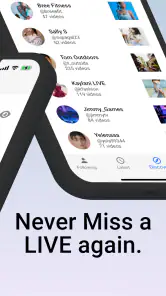
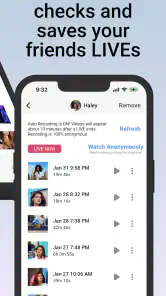
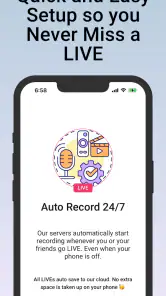
The main benefit is convenience for viewers who value live content but cannot always be present. The store summary describes automatic recording of friends’ live broadcasts, while the short description centers on rewatching live content. Together, those ideas point to a simple use case: convert an easy-to-miss live moment into something you can view on your own schedule.
That is especially relevant for close social circles. A friend’s live session may not be important enough to rearrange your day around, yet still be something you would enjoy seeing later. The app targets that middle ground better than a service designed around public video discovery. It is less about finding the biggest broadcast and more about preserving the broadcasts connected to your own interests and relationships.
Another strength is the reduced dependence on perfect timing. Live video normally rewards people who are free at the exact moment it starts. A saving tool changes that pressure. You can treat the broadcast as something to catch up on rather than an appointment you must never miss. For people with irregular work, school, family responsibilities, or different time zones, that flexibility can be the difference between following a creator casually and giving up altogether.
There is also a subtle advantage in separating watching from attending. Live chat and real-time reactions can be part of the appeal, but not every viewer needs them every time. Rewatching later lets you concentrate on what was actually said or shown, without multitasking or rushing. The trade-off is that you may lose the social energy of being present, but for informative or longer sessions, delayed viewing can be calmer and more efficient.
Three practical habits that improve the experience
Use it for recurring broadcasts, not every video you encounter. A selective list keeps the tool meaningful and limits the clutter that comes from saving content simply because it is available.
Set a review point after recording. Once you have watched a saved live session, decide whether it deserves to stay. This makes the app function like a temporary catch-up queue instead of an uncontrolled archive.
Keep the original purpose in mind when choosing alternatives. If you need editing, publishing, or permanent creator-hosted replays, move to a video editor or the platform’s own tools rather than forcing this app to do a broader job.
These habits reveal a non-obvious trade-off: automation can save attention at the moment of recording, but it can create more decisions later. The app is most helpful when it removes the stress of being available live without turning every broadcast into something you feel obligated to store forever.
Where the trade-offs become important
The first limitation is that the app’s value depends heavily on the behavior of the live-content source. If a platform, creator, or friend already provides dependable replays, the extra layer may not be necessary. In that situation, the native replay option is usually simpler because it keeps the video within the service where you already watch it.
The opposite problem can also occur. If you need a dependable personal record of something important, you should not assume that a specialized live-saving app automatically replaces a deliberate backup workflow. Important material deserves a clear storage plan and a way to locate it later. A casual recording tool can be convenient without being the same thing as a long-term archive.
There is also a timing trade-off. Automatic behavior sounds effortless, but it requires you to think ahead about what should be captured. A person who only decides after seeing a notification may still miss the beginning of a broadcast or fail to arrange the desired session. The best results come from treating the app as part of a routine, not as a magical recovery system for every missed moment.
Storage and attention are practical concerns too. Saved live streams can be longer than ordinary clips, and a collection can grow before you notice. Even without turning this into a technical exercise, I would review saved material regularly and avoid keeping recordings that no longer serve a purpose. That is particularly important if your phone already holds many photos and videos.
The paid options introduce another judgment call. Because purchases sit between $8.99 and $44.99 per item, the upper end represents a meaningful commitment for a tool with a narrow purpose. I would only consider the more expensive option after confirming that the free experience fits your sources and that you repeatedly use the saved broadcasts. Someone who is curious should experiment first; someone who already has a dependable daily need can evaluate whether the convenience offsets the cost.
The average rating is 3.6 from around 700 ratings, with 55 written reviews. I read that as a reason to approach the app with measured expectations rather than treating it as universally reliable for every user. A rating in that range suggests an experience that may work well for some routines while leaving other people dissatisfied. Your own test should focus on the exact live broadcasts you care about, not on a generic demonstration.
Questions I would answer before installing
If you are wondering whether the app is free, the answer is yes for installation, but optional in-app purchases are available. I would not budget for a purchase until you have tested the no-cost experience and understood whether it covers your normal viewing habit. The free entry point is useful precisely because this is a specialized need.
If you are asking whether it is better than your phone’s built-in screen recorder, the answer depends on convenience rather than raw capability. A built-in recorder may be enough for a one-off capture, especially if you already know how to use it. This app is more appealing when your goal is a repeatable workflow centered on friends’ live broadcasts rather than occasional manual recording.
If you are asking whether it replaces a platform’s replay system, I would usually keep the native option when it is available and easy to access. Native replays are often the least complicated route for ordinary viewing. Rewatch LIVE becomes more interesting when the broadcast is easy to miss, when you want a more personal catch-up habit, or when the normal replay path does not match how you want to revisit the content.
If you are asking who should skip it, I would say people who rarely watch live video, people who mainly want editing tools, and people who already have a reliable replay library. The app’s focused purpose is a benefit only when that purpose matches your routine. Otherwise it adds another step and another place to manage video.
Finally, if you are asking whether it works for an important one-time event, I would be cautious about relying on any single convenience tool without checking the setup beforehand. Test the workflow with a low-stakes broadcast, confirm that you can find the saved result, and make sure the process suits your device and viewing source. That is good practice for any recording app, but it matters especially when the event cannot be repeated.
Who will get the strongest value
I think the best audience is made up of people who follow friends or familiar creators and frequently miss their live sessions. The app is also a reasonable fit for viewers whose schedules change from day to day. If you want to stay connected without promising that you will always be online at the right moment, the ability to revisit a broadcast later addresses a real problem.
It can also help people who prefer focused viewing. Some live sessions are difficult to follow while working, traveling, or handling household tasks. Saving them for a quieter period lets you watch with more attention. That does not recreate the live atmosphere, but it can improve comprehension and reduce the feeling that you are constantly choosing between being present and keeping up.
I would be more hesitant for professional archiving, serious content production, or anyone who needs advanced control over files. Those users generally need editing, labeling, export, backups, or publishing workflows that go beyond this app’s central promise. A dedicated recorder, platform archive, or production tool may be a better investment even if it feels less convenient at first.
The app is available for devices running Android 8.0 or later, so compatibility should be checked before planning around it. Its current version is 1.0.28, and it was released on October 26, 2024. Those details place it in a relatively early stage of its product life, which makes it sensible to judge the present experience directly and avoid assuming that it has the maturity of a long-established media utility.
Its reach is already substantial, with over 100,000 installs, so it is not an obscure experiment that nobody has tried. Still, popularity alone does not settle the question of fit. A tool built around saving friends’ live streams will naturally serve a narrower audience than a general video app, and that is fine as long as your own use case is the right one.
My buy-or-skip verdict
I would recommend trying Rewatch LIVE: Save Live Stream if missed live broadcasts are a recurring annoyance and you want a dedicated way to catch up later. The free installation makes that trial relatively easy, and the concept is specific enough that you can judge it quickly with real broadcasts from people you already follow. I like it most as a lightweight bridge between live viewing and ordinary on-demand watching.
I would not recommend paying immediately. Start with the free experience, test a predictable broadcast, locate the saved result, and see whether you actually return to it. Only then should you compare the convenience against the available purchase range of $8.99 to $44.99 per item. The higher-priced option needs to earn its place through repeated use, not through curiosity or fear of missing out.
My final view is positive but deliberately narrow. This is not a universal answer for recording, editing, or archiving video. It is a focused Tools app for turning selected live moments into later viewing, particularly when those moments come from friends or familiar creators. If that describes your week, it is worth a careful trial. If your needs are broader, the phone’s recorder, a platform’s own replay feature, or a full video utility will probably serve you better.
In short, the strongest reason to use it is control over your time. You do not have to be available at the exact moment a friend goes live, but you still need to be selective, prepare when possible, and manage what you save afterward. For the right viewer, that balance can be genuinely useful. For everyone else, the free download is easy to skip after a brief test, and paying would be difficult to justify without a regular live-stream habit.
Pros
- Saves live streams for later viewing when you miss the original broadcast.
- Useful for keeping personal archives of important streams and events.
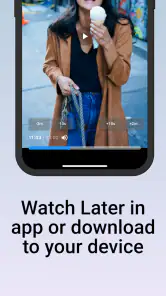
- Simple replay access makes previously watched broadcasts easy to revisit.
- Can help reduce the pressure to watch long streams in real time.
- Convenient for viewers with changing schedules or limited free time.
Cons
- Saved streams may use considerable storage space on your device.
- Availability can depend on the original stream remaining accessible.
- Long recordings may take time to load or process before playback.
- Privacy may be a concern when saving streams involving other people.
- Some features may require account access or platform-specific permissions.

- Category
- Tools
- Version
- 1.0.28











