Remote Control for Rоku & TCL
- 5.49K
- 4.1
- Installs
- 1.00M
- Price
- Free
Screenshots
Analysis by Reviewed
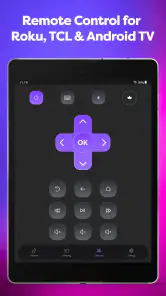
I usually install a TV remote app for one of two reasons: the physical remote has disappeared, or I want a faster way to control the television from the phone already in my hand. Remote Control for Rоku & TCL, developed by SensusTech LLC, is built around that simple need. It is a free tools app for Roku, TCL, Hisense, and Insignia smart TVs, with screen mirroring included as part of its broader purpose.
My first impression was positive because the idea is immediately practical. I could keep the phone beside me, open the remote, and avoid searching between sofa cushions every time I wanted to change the volume or move through a menu. The app has a 4.1 average from about 57,000 ratings, and its reach is substantial, with more than 1 million installs. Those figures do not make it automatically right for everyone, but they do suggest that the basic problem it addresses is common.
Does Remote Control for Roku & TCL stay useful after the first week?
The first-week appeal is convenience, not novelty
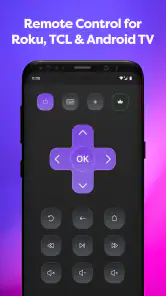
The strongest part of the experience is how quickly a phone can become a backup remote. If a household has several people using the television, the app removes the need to negotiate over one physical controller. I found that especially useful when the remote was charging, misplaced, or sitting on the other side of the room. The phone is already familiar, and tapping a control feels less disruptive than stopping what I am doing to hunt for another device.
This is also a sensible option for visitors. A guest may not know where the physical remote is, while a phone-based controller can be set up without handing over the household’s main remote. That makes it useful in shared living rooms, guest spaces, or short-term situations where the television is used casually rather than managed through a dedicated entertainment system.
The app’s compatibility focus is important. It is not presented as a universal controller for every television brand; it targets Roku, TCL, Hisense, and Insignia smart TVs. Before relying on it, I would check the television brand and make sure the phone and TV are connected in a way that allows them to find each other. A remote app is only valuable when the initial connection is dependable, so this is the first practical test rather than a detail to postpone.
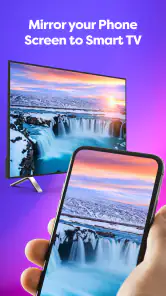
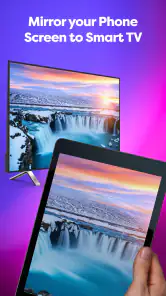
Screen mirroring adds another reason to try it during the first week. A remote alone solves control problems, but mirroring can make the phone part of the viewing setup. I can imagine using it to show a photo, demonstrate something on a larger screen, or share content with people in the same room. The useful distinction is that mirroring is occasional for many people, while remote control can become a daily habit. I would judge the app mainly by the latter and treat mirroring as an extra benefit.
A realistic evening use case
Consider a normal evening: I am watching television, the physical remote has slipped under a cushion, and I want to lower the volume without getting up. Opening the app is faster than searching if the phone is already nearby. Later, I may need to navigate a menu or return to a previous screen, and the same controller remains available. That small reduction in friction is the app’s real appeal. It does not transform television viewing, but it can remove several irritating interruptions from an ordinary routine.
There is a second scenario that is less obvious. In a household where the physical remote is frequently left in another room, each person can use the app when needed instead of making the remote a shared bottleneck. That does not mean every family member will want it installed, but it changes the remote from a single household object into an optional personal tool. For people who already keep their phone nearby, that can be more convenient than buying another physical controller.
What I would test before depending on it
I would not wait until a movie is starting to discover whether the television is visible to the app. My approach would be to install it at a quiet time, open the remote, select the television if prompted, and test basic actions such as navigation and volume. Then I would close and reopen the app to see whether reconnecting feels manageable. This simple check matters because a tool used in a hurry is judged less by its feature list than by how little troubleshooting it demands.
The app is free to install, which makes that trial easy. It is rated for Everyone, so it fits a broad household audience, including people who want a straightforward television accessory rather than a complicated home-entertainment system. Optional in-app purchases cost $4.99 per item, so I would pay attention to which parts of the experience are available without payment before deciding whether the free version is enough for my routine.
Where it compares well with the usual alternatives
The usual alternative is the original physical remote. That remains better when I need tactile buttons, instant access without unlocking a phone, or reliable control from a distance without thinking about a mobile device. A physical remote also works well for people who dislike touch controls or who find it easier to operate buttons by feel while watching the screen.
Remote Control for Roku & TCL is more attractive when the physical remote is lost, shared, or inconveniently located. It also has an advantage over buying a replacement immediately: I can try the phone-based approach at no upfront cost. Compared with a general universal-remote app, its appeal comes from being aimed at a defined group of Roku, TCL, Hisense, and Insignia televisions rather than promising an abstract solution for everything.
On the other hand, the manufacturer’s own remote solution may be preferable for someone who wants the most direct brand-specific experience. A dedicated physical replacement may also be the better long-term purchase for an older family member, a child, or anyone who values large tactile controls. I see this app as a practical companion and fallback, not an automatic replacement for every remote in every home.
The month-to-month value depends on habit
After the novelty fades, the app earns space only if it becomes part of a repeatable routine. I would keep it installed if I regularly watch television with my phone beside me, often misplace the physical remote, or use the TV in more than one room. In those situations, the benefit is recurring: the same app is available whenever the small inconvenience appears.
It is less compelling if I always sit beside the physical remote and never use mirroring. In that case, the app may become another icon that I rarely open. The fact that it is free reduces the cost of leaving it installed, but unused apps still add clutter and can be forgotten when they are actually needed. My rule would be simple: use it several times during the first couple of weeks, then decide whether it has solved a repeated problem rather than merely creating an interesting first impression.
One of the more useful habits is to keep the app in an easy-to-reach place on the phone, especially if the television is used every day. That may sound minor, but remote apps lose much of their advantage when I have to search through several screens to find them. I would also avoid treating it as the only control method until I know the connection routine is dependable in my home.
Screen mirroring can improve the long-term case for people who use it repeatedly. Someone who occasionally presents photos or shares phone content may value having remote control and mirroring in one tool. For everyone else, it should not be the reason to keep the app forever. A feature that is used once and forgotten does not compensate for a remote experience that feels inconvenient on ordinary viewing days.
Maintenance is light, but not completely invisible
The app itself is currently at version 1.8.5 and supports devices running Android 7.0 or later. That makes it accessible to many Android phones, including some older ones, but compatibility is not the same as a guaranteed connection to every television setup. The television model, network arrangement, and phone all influence whether the experience feels smooth. I would check those basics before blaming the app for a problem that may come from the home network.
Maintenance mainly means keeping the app available, checking that the phone is on the right network when control is needed, and repeating the connection process if the TV is not immediately found. That is more effort than picking up a physical remote, but less effort than replacing a lost controller every time it disappears. The trade-off is worthwhile for a person who already keeps a phone nearby and is comfortable with occasional setup checks.
A practical tip is to test the app after changing routers, reorganizing the home network, or moving the television. Those changes can affect device discovery even when the TV itself is working normally. I would also test it before guests arrive if I plan to use mirroring or hand control of the TV to someone else. A few seconds of preparation can prevent the awkward experience of trying to troubleshoot while everyone is waiting to watch something.
Another maintenance issue is expectation management. A phone remote is not magic simply because it has a familiar touchscreen. If the phone battery is nearly empty, notifications interrupt the screen, or the device is being used for another task, the physical remote may be faster. I prefer keeping both options available. The app is strongest as a dependable second route, not as a reason to throw away the original controller.
Where fatigue begins
The first source of fatigue is the extra step of handling a phone. I need to wake the device, open the app, and look at a screen instead of reaching for a button by touch. That may be acceptable during a relaxed evening, but it can feel excessive when I only want to mute the television quickly. People who prefer physical feedback may find the phone interface tiring even when it works correctly.
The second is connection uncertainty. A physical remote usually communicates with the television without asking me to think about network conditions. With a mobile controller, I am more aware of whether the phone and TV can see each other. Even a short delay or failed discovery can weaken trust, because the whole point is to remove friction. This is why my recommendation is conditional: test it in the exact room and household setup where it will be used.
Screen mirroring can introduce its own kind of fatigue if I expected a simple remote and instead spend time deciding what to display, how to start it, or whether the phone should remain active. I would use that feature for deliberate sharing rather than casual channel changes. It has a clear purpose, but it should not be confused with a replacement for every kind of casting or media workflow.
There is also the question of payments. The app is free, but optional purchases are listed at $4.99 per item. That does not make it poor value by itself, yet I would avoid paying until the basic controller has proved useful and I understand what the purchase adds. For someone who only needs an emergency remote once or twice, paying may not make sense. For a daily user who finds the app reliable and wants the paid options, the decision becomes easier.
Who should install it, and who should skip it?
I would recommend trying it to Roku, TCL, Hisense, or Insignia TV owners who frequently lose the physical remote, share a living room, or want a backup that is usually close at hand. It is also a reasonable choice for people interested in occasional screen mirroring without installing a separate tool for that purpose. The free entry point makes experimentation straightforward, and the Everyone rating suits a broad range of users.
I would be more cautious for anyone who needs guaranteed instant control, depends on tactile buttons, or has a television setup that is difficult to connect to mobile devices. A person who never keeps a phone near the sofa will not gain much from a phone remote. Likewise, someone buying a television mainly for older relatives may be better served by a simple physical replacement with large, familiar buttons.
For households with several compatible televisions, I would also test each one separately rather than assuming that success with one means identical behavior everywhere. The app’s brand focus is useful, but brands can still have different models and room arrangements. That small amount of preparation is part of getting an honest answer about whether it belongs in the household’s regular toolkit.
My long-term verdict
After the initial novelty, Remote Control for Roku & TCL earns its place when it solves a recurring annoyance: the missing remote, the shared controller, or the need to control a compatible TV from the phone already in my hand. Its value is modest but repeatable, which is exactly what I want from a tools app. The inclusion of screen mirroring gives it a wider role, though the remote function is the reason I would keep returning.
I like that SensusTech LLC offers a free way to test the idea, and the broad adoption reflected in its rating and install figures makes it a credible option to consider. Still, I would not describe it as a universal replacement for a physical remote. Connection checks, phone handling, and occasional setup friction remain real trade-offs. Those limitations matter most for users who want instant tactile control and least for people who already use their phone as the center of everyday tasks.
My final recommendation is to install it, test the exact TV connection, and give it a fair trial through ordinary viewing rather than judging it during a single novelty session. If I find myself opening it several times a week, it has earned permanent space. If the physical remote remains faster every time, uninstalling it is the sensible choice. The lasting value comes from repeated convenience, not from having another remote-shaped icon on the phone.
Pros
- Quickly pairs with compatible Roku and TCL devices.
- Clean layout makes navigation simple for most users.
- Includes convenient playback and volume controls.
- Useful replacement when the original remote is lost.
- Works well for basic TV control over a home network.
Cons
- Requires the phone and TV to use the same Wi-Fi network.
- Compatibility may vary across older Roku and TCL models.
- Contains ads that can interrupt the remote-control experience.
- Some advanced TV functions may be missing from the app.
- Connection can become unreliable with weak Wi-Fi signals.
- Category
- Tools
- Version
- 1.8.5











