Real Estate Master IIIx Calc
- 40.00
- 4.7
- Installs
- 10.00K
- Price
- Free

Screenshots



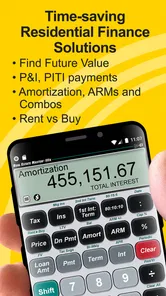




Analysis by Reviewed
I approached Real Estate Master IIIx Calc as a working tool rather than a casual finance app. Its purpose is clear: help residential real estate and loan professionals work through property-finance calculations without reaching for a separate calculator, spreadsheet, or desktop program every time a client asks a practical question. After using it in that context, I see its main value in quick, focused decision support rather than in replacing a full loan-origination system.
The app sits in the Business category and comes from Calculated Industries, a developer known for specialized calculators. It is free to install, rated for Everyone, and has built a respectable reputation with a 4.7 average from roughly two hundred ratings. That combination makes it easy to try, but the in-app purchases matter because the free entry point does not necessarily represent the complete professional toolkit.
What I like most is the narrow focus. This is not a general budgeting app dressed up for agents. It is designed around residential real estate finance, so the useful question is not whether it can do everything, but whether its calculation workflow matches the questions you actually handle during a showing, consultation, listing appointment, or loan discussion.
How it feels during real estate work
I find the app most useful when a real estate conversation turns into a quick comparison: instead of relying on mental arithmetic, I can focus on how one changed assumption affects the discussion. That practical rhythm also makes its limits easier to spot, especially when a calculation needs to become a documented recommendation rather than an estimate.
Quick answers matter more than visual polish
In a real conversation, speed means more than opening quickly. I need to enter a purchase price, financing detail, term, or rate and understand the result without losing the thread of the conversation. A specialist calculator has an advantage here because it keeps the task centered on real estate finance instead of making me build formulas from scratch.
The interface is best understood as a professional instrument. I would not choose it for colorful presentation or guided personal-finance coaching. I would choose it when I already know what I want to calculate and need a repeatable way to reach the answer. That distinction affects perceived speed: experienced users can move quickly, while first-time users may need time to learn the calculator’s terminology and input flow.
A useful habit is to prepare the figures before opening the app. Have the property price, down payment, interest assumption, loan length, and any recurring costs in front of you. That avoids using the calculator as a place to search for information and lets it serve its stronger role: testing scenarios. In my experience, this makes the process feel much faster than entering figures one by one while someone waits.
More From Our News Desk

Weather by Xiaomi Review: Clear at a Glance, Less Clear Up Close

X Under Pressure: Can It Recover When Posting Goes Wrong?

Clash of Clans Is Won Between the Battles

Android Auto Makes the Case for Quieter Car Software

MobiOffice: Transforming Mobile Productivity with Seamless Integration

EA SPORTS FC™ Mobile Soccer: Redefining Mobile Sports Gaming
The app is particularly suitable for “what if” conversations. A buyer may ask what happens if the down payment changes, if the term is longer, or if the price moves slightly. Rather than offering a rough mental estimate, I can adjust one assumption at a time and compare the effect. The important discipline is to change only one variable per pass; otherwise, the result becomes difficult to explain and easy to misread.
Where heavier use can expose friction
Light use is straightforward in concept, but a busy day can feel different. An agent or loan professional may move from one property to another, repeat calculations for several clients, and revisit earlier assumptions. In that setting, the biggest burden is not likely raw processing power. It is human accuracy: remembering which value is active, checking units, and making sure a previous scenario has not influenced the next one.
I recommend treating each scenario as a small worksheet in your notes. Record the purchase price and the assumptions beside the result, especially when comparing several properties. A calculator can produce a precise-looking answer from the wrong input, and the professional appearance of a finance tool can make that mistake harder to notice.
Another practical trade-off appears when you need to explain the result to someone who is not comfortable with financial terminology. The app may help me reach an answer, but it does not automatically turn that answer into a plain-language recommendation. I still need to explain what the figure represents, which assumptions shaped it, and why an estimate is not the same as a final loan quote.
For repeated use, I would build a consistent sequence: enter the property figure, enter the financing assumptions, review the output, then reset or deliberately replace every changed value before starting another case. That routine is more valuable than trying to operate quickly. It reduces the chance of carrying a previous client’s numbers into a new conversation.
Reliability is also about confidence in the workflow
The app’s long presence on the platform is reassuring for someone looking for a mature specialist rather than a brand-new experiment. It was released in August 2012 and currently appears as version 10.4.13, which suggests ongoing maintenance across a substantial period. I would still judge reliability in two layers: whether the app remains usable on the phone, and whether I can verify the assumptions behind each result.
For professional work, I would not rely on a single screen as the only record of an important calculation. The sensible approach is to save the relevant figures in the client file or another approved workflow, then use the calculator as the calculation engine. That protects against confusion later and makes it possible to explain how an estimate was reached.
Recovery matters when a session is interrupted. A phone call, meeting, notification, or accidental navigation can break concentration. My advice is to keep the source figures written down before experimenting with alternatives. If I have to reopen the app or repeat the calculation, the recovery process is quick because the assumptions are already visible in my notes rather than existing only in memory.
I also see a trust issue that applies to every financial calculator: a result can be mathematically consistent while still being unsuitable for a final decision. Taxes, insurance, fees, lender rules, local conditions, and changing terms can affect the real cost of a property. I would use this app to explore and communicate scenarios, not to present an estimate as a binding offer.
Device demands and everyday practicality
Real Estate Master IIIx Calc is the kind of app I would expect to place modest demands on a modern phone because its job is calculation rather than media playback or visual rendering. The minimum operating-system requirement is Android 6.0, so compatibility reaches back to older Android devices. That is helpful for users who keep a dedicated work phone, although an older device may still make text entry and navigation feel less comfortable than on a newer screen.
Its practical resource demand is more likely to come from the user’s workflow than from the calculation itself. If I am standing outside a property in bright light, entering figures with one hand, or switching between messages and the calculator, usability can matter more than processing speed. A larger display and a responsive keyboard make repeated financial input less tiring.
I would also avoid judging the app solely by whether it opens instantly. The more important test is whether I can identify the relevant calculation, enter values without ambiguity, and read the result under pressure. Specialist calculators sometimes reward familiarity rather than first impressions. A new user should spend a quiet few minutes learning the layout before relying on it in front of a client.
The Everyone content rating makes the app broadly suitable from an age perspective, but suitability for a person depends on experience. A teenager can technically use a calculator, yet the professional context and financial consequences mean that adults should interpret the outputs responsibly. The rating does not turn the app into financial advice, and I would not treat it as a substitute for a qualified lender or adviser.
What the free download really means
The free price is a strong reason to test the app before committing. It lowers the risk for an occasional agent who wants to see whether a dedicated real estate calculator fits an existing routine. At the same time, in-app purchases range from forty-nine cents to $24.99 per item, so users should expect that some deeper capability or expanded use may sit behind optional purchases.
That pricing structure changes my recommendation depending on the user. Someone who only needs an occasional rough comparison may find the free installation sufficient, or may decide that paying for a specialized tool is unnecessary. A professional who uses the calculator every day may see the purchase differently: a small expense can be reasonable if it removes repeated spreadsheet work and supports faster client conversations.
I would not buy anything immediately. First, I would run the exact calculations I commonly perform, check whether the input flow feels natural, and determine whether the available functions match my work. The right question is not “Is the upgrade cheap?” but “Does it save enough time and reduce enough manual effort to justify itself in my particular workflow?”
Where it beats ordinary alternatives
The usual alternative is a phone calculator paired with a spreadsheet. That combination can be more flexible, especially for users who need custom formulas, shared records, charts, or detailed reporting. A spreadsheet is also better when several people must review the same assumptions or when the calculation becomes part of a larger financial model.
The specialist advantage is focus. I do not have to remember every formula before starting, and I can work in a context designed for residential real estate finance rather than assembling a model from blank cells. For a quick discussion with a buyer or seller, that can be more practical than opening a spreadsheet and navigating a template.
A general mortgage app may be easier for a first-time buyer who only wants a simple monthly estimate. A full desktop finance platform is more appropriate for formal loan processing, documentation, compliance, and team operations. This app occupies the middle ground: more specialized than a basic calculator, but not something I would confuse with a complete professional transaction system.
That middle position is its strength and its limitation. It gives a focused professional tool to someone who understands the question being asked. It is less compelling for a user who wants explanations, financial education, automatic data collection, or a polished client-facing report.
Three workflows where it earns its place
My first useful scenario is a property tour. A buyer likes a home but is unsure whether a different down payment or loan term would make the purchase more comfortable. I can use the app to compare controlled alternatives while the conversation is still fresh. The key is to label each result immediately, because several similar figures can otherwise blur together.
The second is a listing appointment. An owner may want to understand how a price adjustment could affect a prospective buyer’s financing picture. I would use the calculator to discuss scenarios, then clearly separate the calculation from the broader market advice. The app helps with the numerical side of the conversation; it does not decide what the property is worth or whether a buyer will qualify.
The third is internal preparation before a client meeting. I can test a few likely combinations in advance and arrive with a better sense of how sensitive the result is to a changed assumption. This is more useful than memorizing one figure because it prepares me for follow-up questions. It also reveals when a small input change creates a meaningful difference, which is exactly the kind of nuance clients often ask about.
A less obvious but important tip is to use it for comparison discipline rather than prediction. If I compare two properties, I should hold the financing assumptions constant before changing the property price. Only after that should I test different terms or down payments. This keeps the comparison fair and prevents the calculator from becoming a source of accidental storytelling.
Who should use it, and who should skip it
I would recommend it to real estate agents, loan agents, property investors who understand residential financing, and experienced buyers who want a dedicated calculation aid. It makes the most sense for someone who frequently answers financing questions and prefers a focused mobile tool over building formulas manually.
I would be more cautious recommending it to a first-time buyer who wants a guided explanation of every mortgage concept. That person may benefit more from an educational mortgage app, a lender’s calculator, or direct professional advice. The same applies to anyone who needs document storage, team collaboration, formal applications, or a complete record of a transaction.
I would also skip it if my work depends on highly customized spreadsheets or complicated financial models. The app’s specialist focus is valuable only when its way of organizing the problem matches the user’s needs. Flexibility matters more than speed for analysts who must combine property finance with taxes, cash-flow forecasting, renovation budgets, or portfolio reporting.
My performance verdict
After weighing speed, repeated-use friction, device practicality, and recovery habits, I see Real Estate Master IIIx Calc as a dependable specialist companion rather than an all-purpose finance platform. Its perceived performance should be strongest when I use it for a defined question with prepared figures. It becomes less convenient when I expect it to teach me the subject, manage the client record, or replace a full spreadsheet.
The 10K-plus install level and strong 4.7 average indicate that it has found a real audience, while the long-running release history adds confidence for users who prefer an established tool. I would still test it on the device I intend to use and confirm that its workflow feels comfortable before making it part of a high-pressure routine.
My final recommendation is practical: download the free version, run several familiar residential-finance scenarios, and judge the app by how quickly you can repeat them without confusion. If you regularly need focused calculations during property or loan conversations, it can earn a place on your phone. If you need records, collaboration, education, or a complete lending process, keep a spreadsheet or professional finance system alongside it rather than expecting this calculator to do everything.
For me, the real strength is controlled scenario testing: it helps turn an immediate real estate question into a clearer numerical comparison, provided I remain responsible for checking the assumptions and explaining the limits of the result.
Real Estate Master IIIx Calc Frequently Asked Questions
Who is the developer of Real Estate Master IIIx Calc, and what does the app cost?
Real Estate Master IIIx Calc is a business app from Calculated Industries, focused on professional residential real estate finance calculations. It is free to download, with in-app purchases available for users who want additional options. The app is rated for Everyone, so its content is intended for a broad audience. Check the purchase details shown in your app store before buying anything.
Will Real Estate Master IIIx Calc work on my phone or tablet?
The app supports Android devices running version 6.0 or later. It is worth checking your device’s operating-system version before downloading, particularly if you use an older phone or tablet. Real Estate Master IIIx Calc is also available as a mobile app, but the exact experience may differ depending on the device and platform. Make sure you select the correct store version for your device.
What is Real Estate Master IIIx Calc used for?
Real Estate Master IIIx Calc is a specialized financial calculator designed for real estate professionals, investors, students, and anyone analyzing property deals. It can help with common calculations such as mortgage payments, loan terms, cash flow, investment returns, property valuation, and other real-estate-related scenarios. It is more useful for structured analysis than for casual everyday calculations, so users should understand the financial terms involved.
Is Real Estate Master IIIx Calc suitable for beginners?
The app can be useful for beginners, but it is not necessarily a simple, general-purpose calculator. Its real-estate functions may require some familiarity with concepts such as interest rates, amortization, present value, net operating income, capitalization rates, and investment returns. New users may need to consult the built-in instructions, a finance textbook, or an experienced professional to confirm that each input is being entered correctly.
What types of real estate calculations can I perform with the app?
Real Estate Master IIIx Calc is intended for a broad range of property and financing calculations, including loan amortization, monthly payments, interest analysis, cash flow evaluation, investment comparisons, and selected valuation formulas. The exact tools and layout may depend on the version installed and the platform. Before relying on a result, users should review the app’s available menus and verify important figures with an independent calculator or spreadsheet.
Pros
- Quickly calculates mortgage payments
- yields
- and property investment figures.
- Useful for comparing multiple real estate financing scenarios.
- Compact tool that works well for agents
- investors
- and landlords.
- Supports practical calculations without requiring an internet connection.
- Saves time compared with performing formulas manually.
Cons
- The interface may feel dated compared with newer finance apps.
- Advanced users may miss detailed reports or export options.
- Results depend entirely on entering accurate property and loan data.
- Some calculations may require understanding real estate terminology.
- Limited appeal for users who only need basic mortgage estimates.













