Construction Master Pro Calc
- 1.68K
- 4.7
- Installs
- 100.00K
- Price
- Free

Screenshots
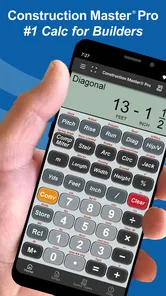
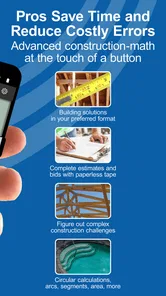

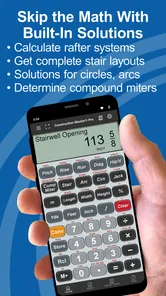
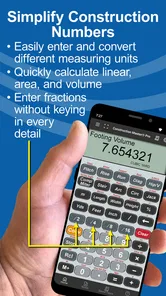
Analysis by Reviewed
Construction Master Pro Calc is the kind of tool that can look specialized until you are standing in a hardware aisle, checking a material estimate, or trying to make sense of a measurement written in feet, inches, and fractions. I found its appeal quickly because it behaves less like a general phone calculator and more like a pocket reference for practical building work. It is made by Calculated Industries, sits in the Tools category, and focuses on the calculations that tend to slow people down when ordinary decimal arithmetic is not enough.
My first impression was that this is not designed to entertain or guide a complete beginner through a renovation. Its value comes from reducing repeated conversion and layout work. The app is free to install, rated for Everyone, and has a 4.7 average from around 10 thousand ratings, which suggests that its focused approach has connected with a substantial group of users. In my experience, the important question is not whether it feels impressive on the first day, but whether I would still open it several weeks later instead of returning to a standard calculator.
What feels useful during the first week
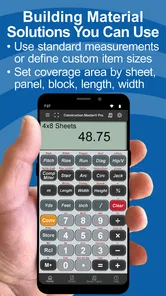
The strongest early benefit is the way the calculator treats construction measurements as construction measurements. If I am working with a wall length, a board dimension, a roof pitch, or a concrete quantity, entering feet-inch-fraction values directly is more natural than converting everything into decimals first. That removes one of the small but persistent sources of mistakes in everyday estimating.
That matters in a realistic situation such as planning a small framing job. I might measure several wall sections, subtract an opening, and then estimate how much material is needed. With a normal calculator, I would be switching between decimal feet, inches, and fractions while trying to remember which format each result uses. Here, the workflow is much closer to the way the measurements are written on a tape measure. The app does not replace checking the site, but it makes the arithmetic between those checks less awkward.
I also liked that the app is aimed at several related jobs rather than only one trade. Its focus includes framing, roofing, slope, and concrete work, so it can remain useful when a project moves from one stage to another. A person calculating a roof angle in the morning and estimating a slab later does not need to change to a completely different calculator. That breadth gives it more staying power than a single-purpose fraction converter.
The first-week learning curve is reasonable if you already understand what you are trying to calculate. The harder part is not basic arithmetic; it is knowing which construction operation matches the problem in front of you. Someone familiar with job-site terminology will probably get productive faster than a homeowner who has never dealt with pitch, rise, run, or material quantities.
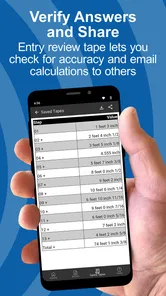
One practical habit helped me more than simply tapping numbers into the display: I treated each calculation as a small documented step. For example, I would calculate a usable length, check the result, and only then use it in the next operation. That approach is especially important when a result feeds into an area or volume estimate. A specialized calculator can reduce conversion errors, but it cannot detect a wrong measurement or an incorrect assumption about waste.
More From Our News Desk

Weather by Xiaomi Review: Clear at a Glance, Less Clear Up Close

X Under Pressure: Can It Recover When Posting Goes Wrong?

Clash of Clans Is Won Between the Battles

Android Auto Makes the Case for Quieter Car Software

MobiOffice: Transforming Mobile Productivity with Seamless Integration

EA SPORTS FC™ Mobile Soccer: Redefining Mobile Sports Gaming
The app is also more useful when I decide on a consistent input style before starting. Mixing rough tape-measure readings with rounded estimates can make a result look more precise than the original information deserves. I found that entering the actual fractional measurement first, then rounding only when ordering material, produces a more honest estimate. This is a small workflow choice, but it is one of the reasons a construction calculator can be better than a generic calculator even when both can technically perform multiplication.
Where it beats ordinary calculator apps
A regular calculator is excellent for quick totals, percentages, and simple multiplication. It becomes less comfortable when the job involves repeated feet-and-inches arithmetic. The usual workaround is to convert every value into inches or decimal feet, perform the operation, and convert the answer back. That is manageable for one calculation and tiring across a full project.
Construction Master Pro Calc earns its place by keeping the measurement language closer to the work itself. I do not have to mentally translate every tape-measure reading before using it. That is a meaningful advantage for carpenters, roofers, concrete workers, estimators, and serious DIY users who repeatedly deal with fractional dimensions.
It also has a different purpose from a spreadsheet. A spreadsheet is better when I need a detailed estimate with item names, quantities, supplier notes, labor, and revisions. This app is better for the calculation happening in the moment: checking a dimension, working out a slope-related value, or testing whether a proposed measurement makes sense. I would use both together rather than expecting one to replace the other.
Compared with a web search, the benefit is speed and continuity. Searching for a formula can explain a concept, but it interrupts the calculation and leaves room for choosing the wrong method. The app is more useful once I already know the kind of result I need. If I am unsure whether a roof problem requires a particular rise-and-run relationship, I would still verify the method through a trusted building reference or an experienced professional before relying on the answer.
Useful details that become clearer with practice
The app’s real strength is not just that it displays a result. It encourages a repeatable way of handling measurements that are inconvenient on a phone. I found it particularly helpful to use it as a bridge between field measurements and a more organized project estimate. I could check a dimension on site, calculate the immediate quantity, and later transfer the confirmed figures into a spreadsheet or written material list.
Another useful trade-off is speed versus explanation. The calculator is efficient for someone who knows the construction formula, but it is not a substitute for learning why the formula works. That means it can make an experienced user faster while leaving a beginner dependent on outside instruction. I see that as a limitation worth understanding, not a flaw that makes the app unsuitable.
For concrete planning, I would use it to test volume calculations and compare different dimensions before contacting a supplier. I would not treat the displayed result as the final order quantity without adding a sensible allowance and confirming the actual site shape. Irregular edges, changing depth, reinforcement, access, and delivery requirements are project decisions, not calculator decisions. The app handles arithmetic; it does not inspect the ground or judge the quality of a pour.
For roofing, a quick calculation can help me understand the relationship between slope and dimensions, but I would be careful with safety-critical work. A numerical answer does not tell me whether a roof is safe to walk on, whether a structure meets local requirements, or whether an existing surface can support a new layer. This is a tool for calculation, not approval or engineering certification.
Why it can remain useful after the novelty fades
The first month is where I think this app separates itself from many narrowly useful tools. Once the initial curiosity about a specialized calculator disappears, recurring value depends on whether the same measurement problems come back. For anyone who regularly estimates materials, checks dimensions, or works across several construction tasks, they do. The app can become a familiar part of the workflow rather than something opened only once.
Its current version is 10.20.18, and the application requires a minimum operating system version of 12. That makes compatibility an important practical check before installing it on an older device. On a supported phone, the app’s value is easy to understand: it keeps a construction-oriented calculator available without requiring a separate handheld device.
I can see a month-to-month role for it in several routines. A contractor might use it while checking measurements between jobs. A property owner could use it during a renovation to sanity-check a contractor’s quantities without pretending to replace a professional estimate. A student learning construction math could use it to compare manual work with calculator results. A maintenance worker might keep it ready for recurring repair measurements where fractions are more natural than decimals.
The recurring benefit is strongest when the user has a stable set of tasks. If I only need to calculate a room’s area once, a standard calculator is enough. If I repeatedly move between dimensions, slopes, and material quantities, the specialized format saves small amounts of effort every time. Those small savings are exactly what make an app worth keeping installed.
There is also a useful confidence benefit, although I would not confuse it with proof of correctness. Seeing a result in a familiar measurement format makes it easier to compare the answer with a tape measure, plan, or written specification. A decimal answer can be mathematically correct and still feel detached from the physical work. A feet-inch-fraction result is easier to discuss with someone standing beside the project.
That said, long-term usefulness depends on remembering how to use the app. If I open it only every few months, I may need a moment to recall the right operation or sequence. This is not unusual for a specialized tool, but it means the app rewards regular use more than occasional browsing. Keeping a short personal note about the calculations I use most often can make it faster to return to after a break.
The maintenance burden is small, but not zero
There is no large content library to organize, no social profile to maintain, and no project database that needs constant attention. That gives the app a relatively light maintenance burden. I can open it, perform a calculation, and leave. For a utility, that simplicity is a genuine advantage.
The main maintenance task is personal rather than technical: keeping my measurement habits disciplined. I need to label what each number represents, avoid carrying an unverified result into the next calculation, and remember whether a figure is an inside dimension, outside dimension, finished dimension, or rough estimate. The app cannot preserve the context that exists in my notebook or project plan.
It is also worth understanding the pricing model before making it part of a long-term routine. The app is free, while in-app purchases range from forty-nine cents to just under forty dollars per item. I would begin with the free experience and decide whether the available workflow meets my needs before paying for anything. For a professional, an optional purchase may be reasonable if it supports regular work; for a casual user, the free access may already be sufficient.
Because the app is rated Everyone, it is accessible from an age-rating perspective, but that should not be confused with suitability for unsupervised construction work. A young learner can use it to study measurement, yet real work involving heights, power tools, structural changes, or concrete still requires appropriate supervision and knowledge.
Updates and operating-system compatibility are also part of maintenance in a less visible way. I would keep an eye on whether my phone continues to meet the minimum requirement, especially if I use an older device as a dedicated project phone. The app has been available since December 2010, which gives it a long presence as a construction calculation tool, but longevity alone does not remove the need to check how it fits a current device and workflow.
What creates fatigue over repeated use
The biggest source of fatigue is the app’s specialization. It is excellent when the problem matches its construction focus and less compelling when I need general household arithmetic, budgeting, unit conversion outside the building context, or a written record of an entire project. Keeping several tools available may be more practical than asking this one to handle every calculation.
Another point of friction is the gap between knowing a measurement and knowing the correct operation. A user can enter a value accurately and still choose an unsuitable calculation. This is especially relevant to roofing and slope work, where a result may look plausible even when the underlying interpretation is wrong. I would use the app confidently for arithmetic I understand and cautiously for unfamiliar formulas.
Phone interaction can also be less comfortable than a dedicated physical calculator when wearing gloves, working in bright conditions, or handling dusty materials. A phone is convenient because it is already in my pocket, but it is not automatically the best device for every job-site environment. A dedicated construction calculator may be preferable for someone who performs these calculations all day and wants physical keys, immediate tactile feedback, and a tool that can stay with the equipment.
There is a mental fatigue issue too. Specialized calculators can encourage me to trust the display because it looks authoritative. I found it useful to pause before accepting a surprising result and estimate the answer roughly in my head. If the app says a quantity is dramatically larger or smaller than expected, that is a reason to inspect the units and inputs, not a reason to assume the project is unusual.
For a new DIY user, the interface may feel more technical than a simple calculator. That is a fair trade-off for the construction functions, but it affects who should skip it. If someone wants a guided renovation planner, shopping list, visual room tool, or step-by-step building education, this is not the right choice. A project-management app or instructional resource would serve that person better.
I would also skip it if nearly all my work is metric. The app’s defining advantage is its handling of construction measurements expressed in feet, inches, and fractions. Someone working primarily in metric units may find a metric-focused calculator or spreadsheet more natural and less mentally taxing. The best calculator is the one that matches the notation used in the plans, tools, and conversations around the project.
Who gets the most lasting value
I would recommend it most strongly to people who repeatedly work with residential construction measurements and want faster arithmetic without carrying a separate device. Carpenters, roofers, concrete workers, estimators, maintenance staff, and experienced DIY renovators are the clearest audience. It is also useful for learners who already have access to instruction and want a practical way to check their calculations.
For homeowners, the decision depends on the project. If I am measuring for shelves, checking a small framing change, or comparing concrete dimensions, the app can be genuinely helpful. If I am making structural decisions, planning a major roof alteration, or ordering expensive materials based only on my own estimate, I would use it as one part of the process and involve a qualified professional where appropriate.
The app has over 100 thousand installs, which fits its position as a focused tool rather than a general-purpose phone essential. Its audience does not need everyone to use it. It needs the right users to return whenever fractional construction math appears. That is a healthier measure of value than broad popularity alone.
In my own long-term test, the strongest reason to keep it would be recurring friction removed from ordinary work. It saves me from translating every measurement into a different number system, and that benefit does not disappear after the first week. The weaker reason would be novelty: simply owning a specialized calculator is not useful unless my projects actually produce the kind of calculations it handles.
My long-term verdict
Construction Master Pro Calc earns lasting space on my phone when I am doing regular construction-related work. Its focused handling of feet, inches, fractions, framing, roofing, slope, and concrete makes it more practical than a basic calculator for those situations. I appreciate that it can sit between a tape measure and a full estimate, handling the quick calculations that otherwise create unnecessary conversion work.
I would not describe it as a complete construction planning system, a substitute for technical judgment, or the best option for every unit system. Its value depends on knowing what I am calculating, checking the inputs, and keeping the results connected to a broader project record. Those limits are important, but they do not cancel out the central strength.
For me, the lasting test is simple: after the first-week appeal fades, will the app still solve a recurring problem faster than the alternatives? For a user who regularly works in feet-and-inches construction measurements, my answer is yes. The free starting point makes it easy to try, while the optional purchases deserve a deliberate decision based on professional frequency rather than impulse. If your work is mostly metric, mostly general arithmetic, or mostly project organization, I would choose another tool. If fractional building calculations are part of your normal routine, this is a practical utility I would recommend keeping close at hand.
Construction Master Pro Calc Frequently Asked Questions
Is Construction Master Pro Calc free to download?
Construction Master Pro Calc is free to download, so you can try its construction-focused calculator tools without an upfront purchase. The app also offers in-app purchases, which are listed at varying prices. If you plan to use it regularly, check the purchase options shown for your device before buying anything, and make sure the features you need fit your budget.
What kinds of construction tasks can I use Construction Master Pro Calc for?
The app is designed for practical calculations involving framing, roofing, slopes, and concrete, along with other common construction measurements. It is a specialized tool rather than a general-purpose calculator, which can make it useful when a project involves construction units and dimensions. It may help with planning and checking figures, while measurements and decisions on site still deserve careful review.
What is Construction Master Pro Calc used for?
Construction Master Pro Calc is a specialized calculator designed for builders, contractors, carpenters, architects, and DIY users. It helps with common construction calculations such as feet and inches, areas, volumes, right triangles, roof pitches, stair layouts, and material estimates. Its main advantage is that it handles construction measurements more naturally than a standard phone calculator.
Is Construction Master Pro Calc suitable for beginners?
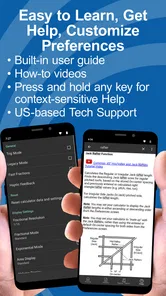
Yes, although beginners may need some time to become familiar with the construction-specific keys and terminology. The app is most useful when you already understand basic measurements, but its organized functions can make practical calculations easier to follow. New users should review the included instructions or examples before relying on the app for important building measurements.
Can the app calculate feet, inches, fractions, and metric measurements?
Construction Master Pro Calc is built around construction measurement formats, making it useful for working with feet, inches, and fractional inches without manually converting every value. Depending on the version and settings available on your device, it may also support metric calculations and conversions. Users should check the selected unit mode carefully before beginning a project.
Pros
- Handles advanced construction calculations with reliable accuracy.
- Includes useful geometry
- area
- volume
- and material formulas.
- Saves time compared with performing calculations manually.
- Works well for contractors
- builders
- and trade professionals.
- Compact tool that is convenient to keep on a mobile device.
Cons
- The interface may feel dated compared with newer calculator apps.
- Some formulas require construction knowledge to use correctly.
- The large number of functions can overwhelm first-time users.
- It may be excessive for people needing only basic calculations.
- A small screen can make entering detailed measurements less convenient.









