Qualifier Plus IIIx
- 83.00
- 4.8
- Installs
- 10.00K
- Price
- Free

Screenshots
Analysis by Reviewed
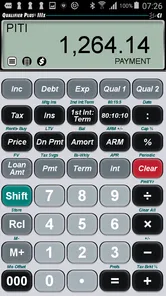
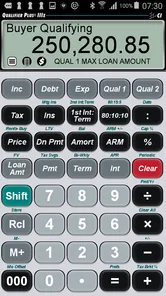
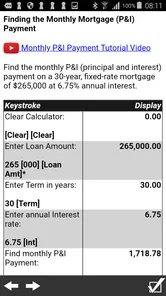
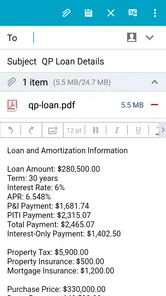
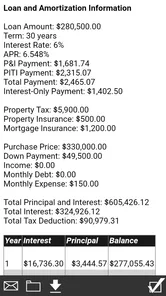
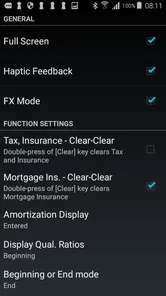
When I look at a mortgage, I do not want to begin by guessing what a monthly payment “feels like.” I want to test the numbers, change one assumption at a time, and understand which part of the loan is actually driving the result. That is where Qualifier Plus IIIx fits into my workflow. It is a focused business app from Calculated Industries, built around mortgage payment calculations rather than broad personal-finance management.
My first impression is that it works best as a decision tool between conversations, not as a complete home-buying system. I can use it to explore a loan scenario, compare alternatives, and prepare better questions for a lender or broker. I would not treat any calculator as a replacement for official loan documents, but I find this one useful when I need a quick, reusable way to examine the structure of a mortgage without opening a spreadsheet.
The app is free to install and is rated for Everyone, which makes it easy to try without committing money up front. Optional in-app purchases range from forty-nine cents to just under thirty dollars per item, so I would still check the purchase screen carefully before unlocking anything. Its current version is 10.4.11, and it requires Android 6.0 or later. The app has been available since August 6, 2012, and its long presence helps explain why it feels more like a specialized calculator than a modern lifestyle dashboard.
Building a mortgage workflow before opening the calculator
The most useful way I found to approach this app is to prepare the question first. If I simply enter a loan amount and start tapping, I can produce a payment figure, but I may not know what decision that figure is supposed to support. Before opening Qualifier Plus IIIx, I write down the purchase price, the planned down payment, the interest assumption, the loan term, and any recurring costs I want to consider separately.
This small preparation step makes the app more valuable. Instead of asking, “What is my mortgage payment?” I can ask, “How much does the payment change if I increase the down payment?” or “What happens if the rate rises?” Those are practical questions that help me judge affordability. A calculator is only as useful as the scenario I give it, and mortgage decisions become confusing when several variables change at once.
I also keep two different goals separate. The first is qualification: whether a payment appears compatible with my income and obligations. The second is planning: whether the loan fits comfortably into my monthly life after utilities, insurance, maintenance, savings, and other expenses. Qualifier Plus IIIx can support the numerical side of both conversations, but it cannot decide what is comfortable for me. That distinction prevents a calculated maximum from becoming a personal budget target.
For a first pass, I use round numbers and deliberately simple assumptions. This makes it easier to see the effect of the loan itself. Once I understand the baseline, I add the less obvious costs and compare the result with my real monthly budget. I prefer this staged approach to entering every possible detail immediately because it shows me which assumptions matter most.
More From Our News Desk

Weather by Xiaomi Review: Clear at a Glance, Less Clear Up Close

X Under Pressure: Can It Recover When Posting Goes Wrong?

Clash of Clans Is Won Between the Battles

Android Auto Makes the Case for Quieter Car Software

MobiOffice: Transforming Mobile Productivity with Seamless Integration

EA SPORTS FC™ Mobile Soccer: Redefining Mobile Sports Gaming
Capturing scenarios instead of chasing one “correct” answer
Mortgage planning rarely produces one final number on the first attempt. I may be comparing two properties, considering a different down payment, or deciding whether a shorter term is worth the higher monthly commitment. I use the calculator as a scratchpad for these questions, but I record the assumptions outside the app as well. A note with the loan amount, rate, term, and purpose of each scenario keeps the results understandable later.
This is one of the less obvious habits that improves the experience: I label each scenario by its decision, not just by a number. “Lower payment with larger down payment” is more useful than “test two.” If I return to the figures after a conversation with a lender, I can quickly see what I was testing and avoid mixing an old assumption with a new one.
The app is particularly handy when I am sitting with someone and need to answer a focused “what if?” question. I can change the relevant input, observe the new payment, and then restore the original scenario. That is faster than rebuilding a spreadsheet for every small variation. It also keeps the discussion centered on the mortgage rather than on spreadsheet formatting.
At the same time, I do not use a single displayed payment as proof that two loans are equivalent. A lower monthly amount may come with a longer repayment period or a larger total interest cost. A higher payment may reduce the time spent repaying the balance, but it can also leave less room for emergencies. The app helps expose these trade-offs; I still need to interpret them in the context of my life.
A repeatable routine for comparing loan choices
My preferred routine has four passes. First, I establish the baseline using the same property and borrowing assumptions each time. Second, I change only one variable, such as the loan term or down payment. Third, I write down the result and what it means for my budget. Finally, I verify the promising scenarios against lender estimates and the costs that sit outside the basic payment.
Keeping one variable fixed is important. If I change the loan amount, interest rate, term, and down payment together, the result may look better or worse without revealing why. With Qualifier Plus IIIx, I can use short tests to isolate the impact of each choice. That makes the calculator more educational than simply entering a final set of numbers and accepting the output.
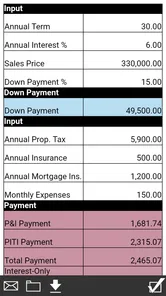
A realistic example is a buyer who has found a home but is unsure whether to preserve more cash or make a larger down payment. I would calculate the payment with the smaller down payment, then repeat the calculation with the larger one while keeping the other assumptions unchanged. The difference becomes a starting point for a broader question: is the monthly saving worth tying up that cash, especially if repairs or moving costs are likely?
Another useful routine is a rate-sensitivity check. Rather than testing only the rate quoted today, I examine a slightly higher assumption and ask whether the resulting payment would still be manageable. This is not a prediction of future rates. It is a resilience test. If a small change would make the budget uncomfortable, I take that as a warning to reduce the loan amount or increase the cash reserve.
I also like using the app before speaking with a lender. It gives me enough familiarity with the loan mechanics to recognize when a quote deserves a follow-up question. I can ask whether the quoted payment includes the same costs I included, whether the term is identical, and whether the interest assumption is fixed for the same period. The calculator does not replace that conversation; it makes me better prepared for it.
Where the workflow can break down
The main failure point is false precision. A payment calculated to the cent can look authoritative even when the inputs are rough. If I am estimating the interest rate, taxes, insurance, or other costs, the result is still an estimate. I treat the displayed figure as a comparison tool, not as a promise of what a lender will approve or what a final statement will show.
Another weakness is the risk of forgetting expenses that do not belong in a simple mortgage calculation. Property taxes, insurance, association charges, maintenance, utilities, and irregular repairs can change the affordability picture substantially. I keep a separate household budget and combine it with the mortgage result. Anyone who looks only at principal and interest may underestimate the cash needed each month.
Input mistakes are also easy to make when I am testing several scenarios quickly. A misplaced digit, an unchanged term, or a rate left over from the previous calculation can produce a believable but irrelevant answer. My safeguard is to read the inputs aloud or check them against my written scenario label before recording the result. This takes a few seconds and is more reliable than trusting memory.
The focused design can feel less welcoming than a guided financial app. Someone who wants explanations, goal tracking, document storage, and a complete home-buying checklist may find this calculator too narrow. I would choose a broader budgeting or mortgage-planning service for that job, then use Qualifier Plus IIIx when I need direct numerical experimentation.
There is also a learning curve for people who rarely use financial calculators. The app is more useful once I understand what each input represents and why changing it matters. A beginner who expects a conversational guide may need to learn through trial and error. I see that as a trade-off of specialization: fewer distractions, but less hand-holding.
How it compares with spreadsheets and ordinary mortgage tools
A spreadsheet is more flexible. I can build a full household model, add irregular expenses, create charts, and preserve a detailed history of every assumption. For long-term planning, that flexibility can be important. However, a spreadsheet takes time to design and can introduce its own errors. When I need a quick mortgage calculation while discussing a property, a dedicated tool is less cumbersome.
Basic mortgage calculators on websites are convenient for a single estimate, especially when I am browsing properties. Their weakness is that I often lose the context when I close the page or move to another scenario. Qualifier Plus IIIx feels more suitable for repeated personal use because I can return to the same focused calculation workflow instead of starting from a generic page each time.
Full-featured finance apps are better when I want the mortgage connected to accounts, spending categories, savings goals, or net-worth tracking. I would not select this app for those tasks. Its strength is concentration. It gives me a practical place to test mortgage assumptions without turning the exercise into a larger financial-management project.
That focus also makes it useful alongside, rather than instead of, other tools. I might use a spreadsheet for the annual household budget, a lender’s estimate for official figures, and Qualifier Plus IIIx for quick payment comparisons. The best sustainable system is not always one app doing everything. In my experience, assigning each tool a clear job reduces confusion and makes it easier to notice when two calculations are based on different assumptions.
Who will benefit from adopting it
I think this app is a good fit for home buyers who want to understand mortgage scenarios before making a commitment. It is also useful for people who regularly discuss property financing, including professionals who need a fast calculation during a conversation. The average rating of 4.8 from over three hundred ratings suggests that many users appreciate its focused purpose, while more than ten thousand installs show that it has found a practical audience without being a mainstream budgeting platform.
I would especially recommend it to someone who likes checking decisions independently. If a lender gives me a payment estimate, I can recreate the basic scenario and see whether the result makes sense. That does not mean I distrust the lender; it means I want enough understanding to ask clear questions. The app rewards that kind of active use more than passive reliance.
I would be more cautious recommending it to someone who wants a guided first-time-buyer experience. If the main need is an explanation of mortgage terminology, a complete affordability assessment, or an integrated budget, another option will probably feel easier. The same is true for anyone who needs formal documentation or lender-specific calculations. A specialized calculator is not the right final authority for those purposes.
People using older Android devices should also check compatibility before planning around it, since the app requires Android 6.0 or later. On supported devices, the free entry point makes experimentation straightforward, but I would review any optional purchase before confirming it. The paid items may be worthwhile for a frequent user, yet a casual buyer may only need the basic experience.
My practical verdict after making it part of a system
What I like most about Qualifier Plus IIIx is not a flashy feature; it is the way a focused calculator encourages better questions. I can take a vague concern about affordability, turn it into a controlled comparison, and carry the result into a conversation with a lender or partner. That is a modest role, but it is a genuinely useful one.
Its limitations are equally clear. It does not replace a complete budget, official loan disclosures, or professional advice. It can also feel too specialized if I want a broader financial dashboard or a guided explanation of every mortgage term. The app works best when I already know what I am testing and use a separate system to record assumptions and account for the rest of household life.
For me, the deciding question is whether I need a fast mortgage calculator I can return to repeatedly. If the answer is yes, this free Business app from Calculated Industries is easy to justify trying. I would keep my scenario notes, change one variable at a time, verify the promising results with official figures, and never confuse a calculated payment with a complete affordability decision. Used that way, Qualifier Plus IIIx is a practical part of a sustainable mortgage-planning routine, not a substitute for the routine itself.
Qualifier Plus IIIx Frequently Asked Questions
Who develops Qualifier Plus IIIx, and what kind of app is it?
Qualifier Plus IIIx is a business app from Calculated Industries, built around financial and calculator-style tasks. Its store summary describes it as a mortgage payment calculator, while the app’s name and interface may also appeal to people seeking a familiar calculator experience. It is free to download, with in-app purchases available, so check the purchase details on your device before deciding whether it suits your needs.
What is Qualifier Plus IIIx used for?
Qualifier Plus IIIx is a calculator app designed primarily for students and professionals working with algebra, statistics, finance, and other advanced mathematical problems. It is intended to reproduce the functions of the Texas Instruments TI-83 Plus graphing calculator, making it useful for checking calculations, practicing formulas, and carrying a digital calculator instead of a separate handheld device.
Does Qualifier Plus IIIx work like a TI-83 Plus calculator?
The app is designed to closely imitate the layout, menus, and behavior of a TI-83 Plus, so users familiar with that calculator should find the interface recognizable. However, it is still a mobile application, and navigation depends on touchscreen controls. Before relying on it for coursework or an exam, you should confirm that your school or testing organization allows calculator apps and that the available functions meet your specific requirements.
Is Qualifier Plus IIIx suitable for exams and standardized tests?
Qualifier Plus IIIx may be helpful for studying and completing homework, but its use during examinations depends entirely on the rules of the institution or testing provider. Many tests permit only approved physical calculators and prohibit phones or tablets altogether. Check the official calculator policy before downloading it for exam preparation, and do not assume that an app with similar functions will automatically be accepted.
Is Qualifier Plus IIIx easy to use on a phone or tablet?
The app can be convenient once you understand the calculator-style interface, especially if you already know how to operate a TI-83 Plus. New users may need time to learn the menus, secondary functions, graphing options, and key combinations. A larger screen can make graphing and entering expressions more comfortable, while a phone may feel crowded during longer calculations or when using several menus.
Pros
- Supports advanced scientific and financial calculations in one app.
- Includes programmable functions for customized calculation workflows.
- Large
- clear display makes long expressions easier to review.
- Useful unit conversions reduce the need for separate reference tools.
- Works offline
- making it reliable for classes
- travel
- or fieldwork.
Cons
- Its many functions can feel overwhelming for first-time scientific calculator users.
- The interface may look dated compared with newer calculator apps.
- Some advanced features require learning the correct input syntax.
- Small buttons can make complex expressions awkward on compact screens.
- It may be excessive for users who only need basic arithmetic.













