Construction Master 5 Calc
- 526.00
- 4.7
- Installs
- 100.00K
- Price
- Free

Screenshots
Analysis by Reviewed
I use Construction Master 5 Calc when a normal phone calculator starts feeling too limited for a building task. It is a free tools app from Calculated Industries, designed around construction-focused calculations rather than everyday arithmetic. That distinction matters: the value is not in replacing the calculator already on your phone, but in reducing the mental work involved in measurements, dimensions, and job-site estimates.
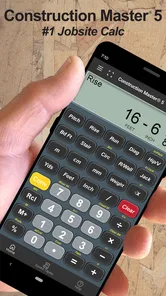
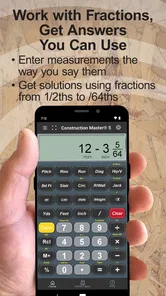
My first impression is that it feels purpose-built rather than decorative. The interface is centered on entering values and getting practical results, so I can move from a measurement to an answer without opening a spreadsheet or translating everything into decimal form first. For someone who regularly works with feet, inches, fractions, areas, volumes, or material estimates, that focused approach is much more useful than a general calculator.
The app has been available since Aug 8, 2011, and its current version is 10.20.18. That long presence gives it a more established feel than a recently released utility, while the 4.7 average from around 3.5 thousand ratings suggests that many users find its specialized workflow worthwhile. It is rated for Everyone, runs on devices using OS 12 or later, and has passed the mark of over 100 thousand installs.
How Construction Master 5 Calc feels in real construction work
I find the app most convincing when a measurement needs to become a usable job figure without detouring through decimal conversions. In this section, I’ll look at how that focused workflow holds up across real tasks, then turn to the habits that help keep results clear and dependable.
Fast answers when ordinary calculator entry becomes awkward
The strongest part of the experience is perceived speed. I am not talking about flashy animation or benchmark numbers; I mean the time saved because the calculation matches the way a construction measurement is usually written down. Entering a dimension in a familiar format is less mentally expensive than converting it first, calculating with decimals, and converting the result back into something useful on site.
A realistic example is estimating flooring for a small room. I can take the room’s length and width, calculate the area, and then account for an additional allowance before deciding how much material to buy. With a basic calculator, the arithmetic is simple, but the measurement format and repeated conversions create opportunities for mistakes. This app is more valuable in that sequence because it keeps the calculation close to the original job information.
That makes it particularly helpful when I am checking a quote, comparing two measurements, or working from notes taken quickly at a property. The benefit is subtle: I spend less attention on calculator mechanics and more on checking whether the dimensions themselves make sense. The real speed advantage is fewer conversion steps, not faster button animation.
More From Our News Desk

Weather by Xiaomi Review: Clear at a Glance, Less Clear Up Close

X Under Pressure: Can It Recover When Posting Goes Wrong?

Clash of Clans Is Won Between the Battles

Android Auto Makes the Case for Quieter Car Software

MobiOffice: Transforming Mobile Productivity with Seamless Integration

EA SPORTS FC™ Mobile Soccer: Redefining Mobile Sports Gaming
I would still take a moment to verify the input before trusting the result. A specialized calculator can make a correct answer from an incorrect measurement just as efficiently as any other calculator. The app improves the arithmetic workflow; it does not replace careful measuring, sensible allowances, or a second look at unusual dimensions.
Where repeated calculations expose its strengths
Construction work rarely involves one isolated calculation. A person may measure several rooms, compare wall sections, estimate a run of material, or revise a quantity after changing one dimension. This is where a dedicated tool makes more sense than repeatedly reaching for a general calculator.
For example, when preparing a rough renovation estimate, I might record several wall lengths and heights, calculate surface areas, and then separate doors or windows from the total. The useful habit is to treat the app as part of a checking routine: enter one section, read the result, write it beside the corresponding measurement, and only then move to the next section. That approach makes it easier to spot a number that does not fit the room instead of producing one large, opaque total.
It also suits people who switch between practical units during the same job. A tape measure, supplier quote, and handwritten plan do not always present information in the same format. A construction calculator can reduce the friction between those sources. I find that especially useful when a calculation starts with a mixed measurement and ends as a quantity I need to discuss with someone else.
There is a trade-off during heavy use. The more values I enter in a row, the more important it becomes to keep a written or digital record outside the calculator. The app can help produce answers, but a long estimating session still benefits from a clear worksheet. I would not use it as the only place where a complete project calculation lives.
Useful workflows beyond a quick one-off sum
One non-obvious strength is its role as a bridge between field measurements and purchasing decisions. Instead of asking, “What is this decimal?” I can ask, “What quantity does this measurement represent for the job?” That change in viewpoint is important for trim, flooring, concrete, framing, and other work where the result needs to be understandable to a person ordering materials.
A second useful workflow is comparing alternatives before committing. If a wall layout changes, I can recalculate the affected dimensions and see how the total shifts. This is more practical than trying to preserve a complicated chain of arithmetic in a standard calculator, particularly when the original measurements mix whole units and fractions.
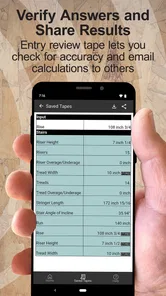
A third tip is to use it as a verification tool even when the main estimate was created elsewhere. If I receive a quantity from a spreadsheet, a colleague, or a supplier, I can independently check the key dimensions in the app. That does not make the result automatically correct, but it creates a quick second route to the answer and may reveal a misplaced decimal or an overlooked conversion.
These workflows show why the app is not simply a general calculator with a construction label. Its usefulness depends on the kind of numbers I handle and on whether I want the calculation process to follow construction conventions rather than office arithmetic.
Stability during ordinary and extended sessions
In normal use, I expect a calculator like this to feel stable because the core task is focused: enter measurements, perform calculations, and inspect results. My experience with that kind of focused design is that it is less distracting than a multipurpose productivity app. There are fewer unrelated screens competing for attention, which helps when I am standing in a room or checking a figure between tasks.
For a short calculation, the app feels appropriately direct. During a longer estimating session, stability is less about dramatic performance and more about maintaining a predictable rhythm. I want the keypad, current values, and result to remain easy to understand while I move through several calculations. Construction Master 5 Calc is at its best when I use it as a disciplined calculator rather than trying to turn it into a full project-management system.
I would not describe it as a replacement for a detailed estimating package. A calculator can be responsive and dependable while still being the wrong tool for storing plans, assigning labor, tracking purchases, or collaborating on a project. If those are the tasks occupying most of my time, I would use this alongside a spreadsheet or estimating application rather than expecting one utility to cover everything.
What happens when the phone or session interrupts the work?
Recovery matters more than people often expect from a calculator. A call, locked screen, accidental app switch, or simple pause can interrupt a measurement session. My practical advice is to record important intermediate results as I go, especially when the calculation affects an order or a quote. That is not a criticism unique to this app; it is a sensible safeguard for any tool that is not being used as a formal project record.
I also prefer to divide a complicated estimate into named sections in my notes: one area for each room, wall, run, or material. If I need to reopen the app after an interruption, I can resume from a clear point instead of trying to reconstruct one long chain of entries. This workflow makes recovery easier and reduces the chance that an old value will be mistaken for a new one.
The app is therefore most reliable when paired with good habits. I would trust it for repeated calculations, but I would not let a single unsaved screen be the only record of a costly decision. The distinction is important: calculation reliability and project-record reliability are not the same thing.
Device requirements and everyday practicality
The minimum operating-system requirement is OS 12, so compatibility should be checked before installation on an older phone or tablet. For a tool used on a job site, device condition matters too. A small screen, gloves, bright sunlight, or a protective case can make precise entry more difficult than it is at a desk. I would test the keypad with the device I actually plan to carry, not assume that every screen size will feel equally comfortable.
Because the app is a focused calculation utility, I would expect modest demands during ordinary use rather than the resource profile of a media-heavy or graphics-intensive application. Still, I would avoid making assumptions about battery use or background behavior. My practical experience is that a calculator is easiest on the phone when I open it for a calculation, check the answer, and return to my notes instead of leaving a long work session scattered across multiple apps.
The age rating of Everyone makes it suitable from a content perspective for a broad audience, including students learning measurement and adults handling home projects. That does not mean every user will find it equally approachable. Someone unfamiliar with construction notation may need a little practice before the specialized layout feels natural. A basic calculator can seem easier for the first minute, even though this app becomes more useful once the measurement workflow clicks.
Who should use it, and who should choose something else?
I would recommend it to builders, remodelers, tradespeople, estimators, DIY users, and students who regularly calculate from real-world dimensions. It is also a good fit for a homeowner preparing a material estimate, provided the person is comfortable checking measurements and treating the results as an estimate rather than a guarantee of what a supplier will require.
I would skip it if I only need percentages, tips, simple addition, or occasional household arithmetic. The calculator already included with a phone is likely quicker for those jobs because there is no reason to use construction-oriented entry for a simple sum. I would also look elsewhere if I need shared project files, a visual plan, inventory tracking, or a complete quotation workflow.
There is another important exception: users who mainly work in a different measurement system or follow a specialized professional standard should first make sure the app’s approach fits their routine. A construction calculator is most effective when its conventions match the way the user measures, records, and communicates. If I constantly have to reinterpret every result for another system, the convenience disappears.
Cost, version, and the value of the specialized approach
The app is free to install, which makes it easy to test against a phone’s built-in calculator before deciding whether the dedicated workflow earns a permanent place on the device. In-app purchases range from $0.49 to $34.99 per item, so I would pay attention to any purchase prompt and decide whether the extra value is relevant to my own use rather than assuming every user needs to spend money.
That pricing structure also changes how I judge the app. A free starting point lowers the risk for a DIY user who only occasionally needs construction calculations. A professional who depends on the tool more often may consider an optional purchase differently, but the decision should be based on the functions actually needed. I would not buy anything simply because the app is specialized; I would first use the free experience on a real measurement task.
Calculated Industries has kept the product current through version 10.20.18, which is reassuring for people who prefer an established utility over an abandoned calculator. The important question is still practical: does it reduce errors and save enough attention in my workflow? For me, the answer is yes when dimensions and conversions appear repeatedly, and no when the task is ordinary arithmetic.
My performance verdict after using it as a working tool
Construction Master 5 Calc feels fast because it removes unnecessary translation between a construction measurement and the calculation I want. It is stable in the kind of focused sessions a calculator is meant to handle, and its resource demands should be less concerning than those of more elaborate apps, although I would still use it sensibly on an older device. Its biggest limitation is not sluggishness; it is scope. It calculates well, but it is not a complete record-keeping or project-management solution.
The app earns my recommendation for anyone who regularly works with building dimensions and wants a more natural alternative to a standard phone calculator. The strongest results come from combining it with written notes, a spreadsheet, or an estimating process that preserves the assumptions behind each number. That combination gives me quick answers without pretending that a calculator alone can manage an entire job.
For occasional home arithmetic, I would keep using the built-in calculator. For repeated construction measurements, I would choose Construction Master 5 Calc because the specialized workflow is the point, not a cosmetic extra. Its 4.7 average and broad install base make it an easy app to try, but my final recommendation is more specific: install it if your daily numbers look like measurements from a tape measure, not just sums from a receipt.
After testing it in that context, my view is straightforward. Construction Master 5 Calc is most valuable when it prevents conversion mistakes and keeps field calculations understandable. It will not replace careful measuring or a proper estimate, but it can make the arithmetic stage quicker, clearer, and less tiring for the people who actually need a construction calculator.
Construction Master 5 Calc Frequently Asked Questions
Who develops Construction Master 5 Calc, and what kind of app is it?
Construction Master 5 Calc is a tools app developed by Calculated Industries. It is centered on construction calculations rather than general productivity or project planning, so it is most relevant to people who regularly work with building measurements. The app’s focus is reflected in its construction-specific calculator functions, which are intended to make common dimensional calculations more convenient.
What is Construction Master 5 Calc used for?
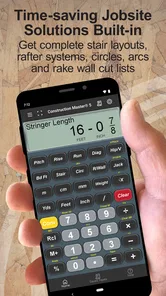
Construction Master 5 Calc is a specialized construction calculator designed for builders, contractors, carpenters, remodelers, and DIY users. It helps with practical job-site calculations such as feet-and-inch arithmetic, fractions, areas, volumes, right triangles, stair layouts, roof pitches, and dimensional conversions. It is more focused than a standard calculator and can save time when working with measurements and construction formulas.
Does Construction Master 5 Calc support feet, inches, and fractional measurements?
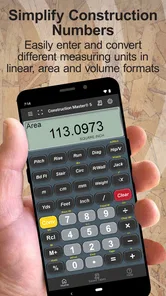
Yes. One of the app’s main advantages is its ability to work with common construction measurements, including feet, inches, and fractional inches. Instead of converting every value into decimals manually, users can enter dimensions in a format that feels natural on a job site. The calculator can also perform operations with mixed units and convert between different measurement formats, which helps reduce calculation errors.
Can Construction Master 5 Calc calculate stairs, roofs, and right triangles?
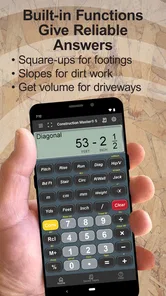
The app is built to handle several calculations commonly required in construction work. Depending on the selected function, it can assist with right-triangle problems, rise and run, pitch, diagonal measurements, stair-related dimensions, and other layout tasks. These tools are useful for getting quick estimates in the field, although results should still be checked against local building codes, project plans, and professional requirements.
Is Construction Master 5 Calc suitable for beginners and DIY projects?
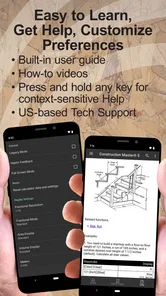
Beginners can use Construction Master 5 Calc, but it is primarily designed for people who already understand basic construction measurements. The interface includes many dedicated functions, so it may take some time to learn where each feature is located and how the calculator expects values to be entered. For DIY flooring, framing, decking, roofing, or remodeling projects, it can be very helpful once the basic controls are understood.
Pros
- Handles advanced construction and surveying calculations accurately.
- Includes dedicated modules for angles
- slopes
- areas
- and material estimates.
- Supports imperial and metric units for flexible job-site use.
- Clear button layout makes frequent calculations quick to access.
- Works offline
- which is useful on remote construction sites.
Cons
- Its many specialized functions may overwhelm first-time users.
- The interface looks dated compared with newer calculator apps.
- Some calculations require knowing the correct input sequence.
- Limited visual guidance can make complex results harder to interpret.
- Paid features may be necessary for the complete toolset.









