RBX Count Pro - Calc Rbux
- 235.00
- 3.1
- Installs
- 5.00M
- Price
- Free

Screenshots


Analysis by Reviewed
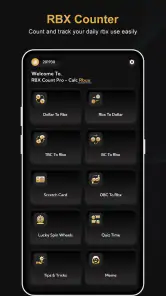
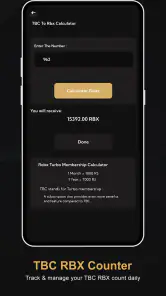
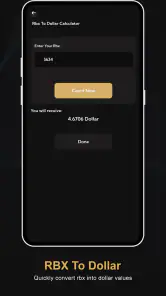
I approached RBX Count Pro - Calc Rbux as a small utility rather than as a game companion packed with extras. Its purpose is straightforward: help me keep track of a virtual currency count, work through RBX conversions, and record daily amounts in one place. That narrow focus is both its appeal and its main limitation. If you want a quick counting and calculation tool, it can be useful. If you expect account syncing, official balance access, or a full companion dashboard, you should set your expectations much lower.
The app sits in the tools category and is free to use. It was developed by KYADA JAYDIP, carries an Everyone age rating, and is available for devices running Android 7.0 or later. The current release is version 1.0, so I would treat it as a simple utility whose value depends more on whether its particular workflow suits you than on a long list of advanced functions.
How I decided whether the counter was worth keeping
When I test an app like this, I first ask what problem it solves better than the alternatives. A calculator already handles arithmetic, a note-taking app can store daily figures, and an account page may show an official balance when one is available. RBX Count Pro - Calc Rbux needs to earn its place by making the repeated task of counting, converting, or logging RBX less awkward than those separate options.
That makes speed and clarity more important than visual complexity. I want to open the tool, enter a figure, check the result, and leave without navigating through unrelated screens. I also want to know which number is my starting amount, which number is the converted result, and which value belongs to a daily record. For a utility with this narrow purpose, confusing labels would be more damaging than a lack of decorative features.
My second decision point is trust. A calculator can produce an answer, but the answer is only useful if I understand what conversion rule is being applied. I would not use any third-party counter as proof of an official account balance, and I would not treat a manually entered daily total as an automatically verified transaction. That distinction matters especially for younger users who may assume that a tool showing a number has access to their account.
The third point is routine. A one-time conversion is easy to perform anywhere, but daily counting is different. The useful question is whether the app makes repeated entries easier to remember and review. A dedicated counter has a practical advantage over a blank note because the task is already framed around RBX, yet it still requires disciplined input from the user. It cannot make an entry accurate if the starting figure was copied incorrectly.
I also considered who should avoid it. Anyone looking for an official wallet, purchases, account security tools, or automatic synchronization should choose the relevant first-party service instead. This app is better understood as a personal calculation and tracking aid. That is a meaningful distinction, not a minor technical detail.
A focused tool for manual tracking
The most convincing use case is a player who checks a figure regularly and wants a dedicated place to calculate changes. Instead of opening a general calculator, typing a conversion manually, then writing the result somewhere else, the user can keep the task inside one focused utility. That reduces small bits of friction, particularly when the same type of calculation comes up repeatedly.
I also see value for someone comparing several planned amounts. For example, I might write down a starting RBX figure, calculate an equivalent amount, and then compare it with a later daily count. The app is useful here because it encourages me to treat the figures as part of one workflow rather than scattered numbers across a calculator and a notes page.
A less obvious benefit is error awareness. When I use a general calculator, I can easily forget what a result represents five minutes later. A dedicated counter gives the number context. That does not guarantee correctness, but it makes it easier to notice when I have entered the wrong kind of value or mixed a daily count with a conversion result.
There is also a practical habit-building angle. If I choose a consistent time to record a daily amount, the app can serve as a prompt to follow the same process. I would still keep a separate personal record for anything important, but the dedicated format can make casual tracking less cumbersome than repeatedly creating new notes.
Where it has an advantage over ordinary alternatives
Compared with a blank calculator, this app wins through context. A calculator is flexible, but that flexibility means I must remember the formula, label the result, and decide where to store it. RBX Count Pro - Calc Rbux is more direct for the specific RBX-related task described by its purpose.
Compared with a notes app, it wins through structure. Notes are better when I need explanations, screenshots, dates, or a detailed history, but they are slower for repeated arithmetic. If my goal is simply to count and convert, a dedicated tool is less cluttered.
Compared with a spreadsheet, it wins for casual use. A spreadsheet offers stronger history, custom formulas, and sorting, but setting one up is unnecessary for a quick personal count. I would choose the spreadsheet only when I needed a long record, multiple categories, or calculations that go beyond the app’s focused role.
Compared with an official account page, however, it does not replace the source of truth. An official page is the better choice for checking an actual balance or transaction status. This app can help me calculate or organize figures, but I would verify anything involving purchases, transfers, or account access through the appropriate official channel.
Three practical workflows that make the app more useful
My first recommended workflow is a “check, calculate, verify” routine. I would begin by checking the original figure from the trusted source I normally use, enter that value into the counter or calculator, and then compare the result with my intended amount. Only after that would I record the daily figure. This prevents a manually entered mistake from becoming the basis for several later calculations.
The second is to separate conversion from tracking. I would avoid treating every converted result as a daily count. Instead, I would use the calculation function for planning and the counting function for recording what I actually observed. Keeping those two purposes mentally separate is a small step, but it prevents misleading comparisons when I review the numbers later.
The third is to use a short naming convention outside the app when a history matters. A note such as “morning count,” “after activity,” or “end-of-day count” gives context that a bare number may not provide. The app can handle the focused calculation, while a simple external record preserves the reason behind the entry. This combined workflow is more dependable than expecting a lightweight counter to become a complete journal.
These workflows also reveal the trade-off. The app can reduce repetitive effort, but it does not remove the need for careful habits. Its strength is convenience at the point of entry, not deep record management.
What everyday use feels like
Imagine I am checking my figures after school and want to know how a current amount compares with a planned target. With a general calculator, I would open the calculator, remember which conversion I need, perform the operation, and perhaps copy the answer into a note. With this utility, I can keep the activity centered on RBX counting and conversion, then return later for another daily entry.
That scenario is deliberately ordinary because this app is not something I would open for entertainment. Its best moment is a brief task that would otherwise be spread across several tools. The benefit is measured in fewer decisions, not in a dramatic new capability.
I would still pause before acting on the result. If the number affects a purchase or an account decision, I would compare it with the official information and check the calculation again. A convenient interface should make the process faster, not encourage me to skip verification.
Where another type of app may fit better
The biggest alternative is a general calculator. I would choose that instead if I only needed occasional arithmetic and did not care about a dedicated RBX context. A general calculator is familiar, broadly useful, and already installed on many phones. Installing a separate utility makes sense only when the repeated task justifies the extra app.
A notes app is better for users who care about explanations and history. If I need to record why a number changed, attach a date, or keep several observations beside screenshots, notes provide more freedom. The trade-off is that I must perform the calculations myself and keep the entries organized.
A spreadsheet is the stronger choice for detailed tracking. It can support a personal ledger, comparisons across many days, and custom formulas. I would not recommend building a spreadsheet for a single quick conversion, but I would switch to one if my tracking became analytical or involved several kinds of figures.
An official service is the clear choice for account truth. I would never use a third-party counter as a substitute for secure account management, purchase confirmation, or balance verification. The app’s role is narrower, and understanding that boundary is essential to using it responsibly.
Small limitations that affect the decision
The current version is 1.0, which makes me approach it as an early, focused release rather than a mature platform. That does not make it unusable, but it does make simplicity more noticeable. Users who expect a polished history system, extensive customization, or a broad set of companion tools may find the experience too limited.
Manual entry is another source of friction. Every counter depends on what I type, so a misplaced digit or an outdated starting figure can lead to a convincing but incorrect result. I would not blame the app for arithmetic based on bad input, but I would build a verification step into my routine.
The app also has a narrow audience. Its store summary centers on an RBX counter, a conversion calculator, and daily counting, so there is little reason for someone uninterested in those tasks to install it. Even within that audience, people who already have a reliable calculator and a well-organized note may not gain enough to justify changing habits.
Privacy and safety should shape expectations too. I would use it for figures I am comfortable entering manually, but I would not share account passwords, payment details, or sensitive login information with a counting utility. For children, the Everyone rating makes the app broadly approachable, yet an adult should still explain that a displayed calculation is not the same as an official account confirmation.
Popularity, price, and device fit
The app is free, which lowers the cost of trying it. It has passed five million installs and holds a 3.1 average from roughly 3,100 ratings, with 235 written reviews. Those figures suggest that many people have tried it, while the middling average is a useful reminder not to assume that the focused concept works equally well for everyone.
Because it supports Android 7.0 and newer, it can suit older compatible phones as well as more recent devices. I would still judge it by the experience on my own phone rather than by compatibility alone. A tool can install successfully and still be a poor fit if its workflow does not match how I track numbers.
My recommendation after weighing the alternatives
I recommend trying RBX Count Pro - Calc Rbux if you regularly need a dedicated place to count daily RBX figures or perform related conversions and you prefer a focused utility over a general calculator. Its free price makes that trial easy, and its narrow purpose can save time when the same task comes up repeatedly.
I would skip it if you want automatic account data, official transaction handling, a detailed historical journal, or a full-featured spreadsheet. In those situations, the usual alternatives are more appropriate, even if they require more setup. I would also skip it if you only calculate an amount once in a while; the phone’s existing calculator may already be enough.
My final view is cautiously positive. The app makes sense as a lightweight companion for manual counting and conversion, not as an authority on balances or a replacement for account services. Use it to organize your own figures, then verify important numbers at the official source. That simple rule captures both its genuine usefulness and the boundary that keeps its convenience from becoming misleading.
Pros
- Simple interface makes Robux calculations quick and easy.
- Useful for comparing different Robux amounts and package values.
- Lightweight app with minimal storage requirements.
- Results are displayed clearly for fast reference.
- Helpful for planning Robux purchases before spending money.
Cons
- It does not generate or provide free Robux.
- Calculations may not reflect current regional package prices.
- Contains advertising that can interrupt the user experience.
- Requires users to verify results against official Roblox prices.
- Unofficial app with no direct connection to Roblox accounts.

- Category
- Tools
- Version
- 1.0











