QR Scanner & Barcode Reader
- 484.00
- 3.1
- Installs
- 1.00M
- Price
- Free

Screenshots
Analysis by Reviewed
When I need to check a QR code on a label, open a link from a printed notice, or identify a barcode while shopping, I want the scan to be quick and the result easy to judge. QR Scanner & Barcode Reader is a straightforward tools app built around that small but useful job: point a phone at a code, see what it contains, and decide what to do next. It also lets me generate QR codes, which makes it more versatile than a reader alone.
My overall impression is practical rather than polished or ambitious. This is the sort of utility I’d keep for occasional scans, especially if I want QR and barcode reading in one place. It is free to install, though in-app purchases range from $4.99 to $49.99 per item, so I’d check the purchase screen carefully before paying for anything. The core idea is easy to understand; the main question is whether its scanning and follow-up steps fit your routine.
From a code in front of you to a useful result
Start with the code, not the app menu
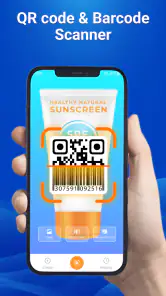
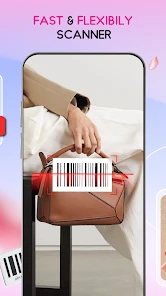
The most natural way to use a scanner is to begin with something physical: a package, a ticket, a menu, or a sign. Open the app, aim the camera at the code, and let the phone do the reading. For a casual user, that direct path matters more than a long feature list. I don’t want to hunt through several screens simply to find out whether a barcode belongs to a product or whether a QR code contains a web address.
QR Scanner & Barcode Reader is aimed at that everyday moment. Its short description is simply “QR Scanner,” while its broader purpose includes barcode reading and QR creation. That mix is useful when the task changes: one minute you may be checking a code someone printed, and later you may want to make a code of your own. I’d treat it as a compact utility, not as a full inventory or product research system.
A good first habit is to hold the phone steady and frame the code cleanly rather than moving the camera rapidly across it. Glossy packaging, tiny print, damaged labels, and dim surroundings can make any camera-based scan harder. If a scan does not register immediately, I’d first improve the angle and lighting before assuming the app has failed. That simple adjustment saves time and avoids repeatedly opening and closing the scanner.
Read the result before acting on it
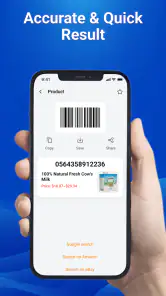
Scanning is only the first half of the job. The next step is understanding what the code leads to. A QR code may contain a web destination or other encoded information, while a barcode is commonly used to identify a product. I recommend pausing on the result and checking that it matches what you expected before following it or using it elsewhere. A code on a familiar package is different from one on an unexpected poster or an unsolicited message.
This is a particularly useful distinction for people who scan codes in public. A camera can read what is encoded; that does not by itself make the destination trustworthy. If the result looks unrelated to the sign, product, or person who presented it, I would back out rather than proceed automatically. The app’s role is to make the information accessible, while the user still needs to make the safety decision.
More From Our News Desk

Clash of Clans Is Won Between the Battles

Android Auto Makes the Case for Quieter Car Software

MobiOffice: Transforming Mobile Productivity with Seamless Integration

EA SPORTS FC™ Mobile Soccer: Redefining Mobile Sports Gaming

How Microsoft OneDrive Became a Mobile Productivity Giant

How Google Translate Breaks Language Barriers Effortlessly
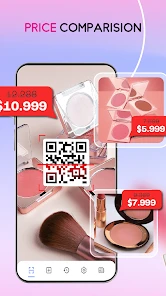
For a shopping trip, the practical workflow is simple: scan the barcode on an item, inspect the result, and then decide whether you need another source to compare details. A scanner can help identify a code, but it should not be mistaken for a complete price-comparison service or a guarantee that a product description is current. If your decision depends on stock, seller reputation, or detailed specifications, a dedicated retailer or research app may be the better next stop.
Use QR creation as a separate task
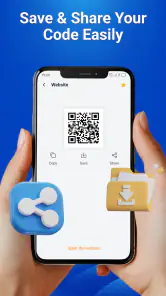
The ability to generate a QR code gives the app a second role. I can imagine using it when I need to turn information into something another person can scan, rather than merely reading a code someone else has made. That can be handy for sharing a destination or a piece of text in a face-to-face setting. The useful discipline is to decide exactly what information you want to share before creating anything, then check the finished code with a separate scan if accuracy matters.
That last check is a small but worthwhile workflow tip: generate the code, scan it, and confirm that the decoded result is the intended one before printing or sending it. It catches simple mistakes such as choosing the wrong text or copying an incomplete destination. For a one-off personal task, that extra verification may be enough. For business materials, bulk code creation, tracking, or branded layouts, I would look for a specialist tool designed around those needs rather than assume this scanner covers them.
Where the result goes next
A scan often leads into another app or a real-world decision. You might read a code on a restaurant notice, then open the relevant page; scan a parcel label, then use the result to identify it; or create a code and show it to someone nearby. These handoffs are where a simple scanner either feels helpful or becomes frustrating. Before moving on, I’d make sure the decoded content is legible and relevant, then choose the appropriate next action instead of treating every result as something to open immediately.
For a shared phone or a quick handoff to a family member, I’d explain what the scan showed rather than just passing over the device with an unfamiliar page open. For work, I’d also avoid using a basic scanner as the only record of a code when the task requires a dependable audit trail. The app is best understood as a bridge from a physical code to information on your phone, not as a complete workflow manager.
What its scale and version suggest
The app comes from Start Up and has passed one million installs, which suggests it has found an audience for this simple utility. Its average rating is 3.1 from around 5,100 ratings, with 484 written reviews. I’d read that as a reason to keep expectations measured: a useful basic concept does not guarantee that every person will find the experience smooth. Ratings can reflect different devices and expectations, so I would judge it by whether it handles your ordinary codes reliably.
It is free to install and is rated for Everyone. The current version is 1.3.4, and it requires Android 8.0 or later. Those details make it easy to assess whether it fits an Android phone, but the purchase range deserves attention if you are considering paid extras. I would start with the free experience and only consider an in-app purchase after confirming that the specific feature you want is available and worth its cost.
The release date is October 21, 2025, so this is a relatively recent app rather than a long-established name with years of visible history. That is not automatically a drawback, but it does make a cautious first run sensible. Try it with a few ordinary codes before relying on it for something time-sensitive, such as a ticket or a workplace process. A quick test tells you more about its fit on your phone than assumptions based on the category alone.
How it compares with the usual alternatives
Many phones can scan QR codes through a built-in camera or a system-level shortcut. If you only scan a QR code once in a while, that existing option may be enough and saves you from installing another app. The case for a dedicated tool is stronger when you want barcode reading as well as QR scanning, or when you also want a single place to create QR codes. That combination is the clearest reason to try this app instead of relying only on the camera.
On the other hand, people who frequently compare products may prefer a shopping app with richer product details, while event staff or business teams may need a scanner with batch handling and record-keeping. Those are different jobs from simply reading a code. I would not choose this app expecting a product database, professional inventory controls, or advanced campaign reporting. Its practical value lies in handling the basic scan-and-check task without turning it into a larger system.
When the workflow gets awkward
Every camera scanner has limits in difficult conditions. A code that is scratched, folded, very small, reflective, or poorly lit may take extra effort to read. The best response is to adjust the phone position, reduce glare, and give the camera a clear view. If a code remains unreadable, try another device or ask for a fresh copy rather than spending too long repeating the same attempt.
There is also a difference between reading a code and knowing what its contents mean. A barcode may not answer the question you actually have, and a QR code can send you somewhere you did not expect. If you need to compare prices, validate a ticket, or confirm the authenticity of a product, use the service responsible for that task. A scanner is a convenient starting point, not independent proof.
Paid extras are another possible point of friction. Since the app is free to install but offers purchases from $4.99 to $49.99 per item, I would pay attention to what is included before confirming a transaction. If all you need is occasional scanning, there may be no reason to spend anything. If you are considering a purchase, make the decision based on a clearly useful feature rather than the assumption that payment is required for basic code reading.
A couple of useful checks before a handoff
If I’m scanning a code for someone else, I first ask what they need from it: the page it opens, the text it contains, or simply a product identifier. That keeps the scan from becoming a dead end when the person expects a price lookup or an official confirmation. For a printed code I plan to share, I also test it from the same kind of surface and distance where another person is likely to use it. A code that works on my bright phone screen may be less convenient once printed small or placed under glare.
Another practical question is whether the next step needs to happen immediately. If I’m in a shop, I can scan and compare information while the item is in front of me; if I’m handling a ticket or a workplace task, I would not assume that a successful scan alone completes the process. I’d keep the relevant official app or service ready for the confirmation that follows. This is where the scanner’s modest role is a strength: it helps reveal the code’s contents without pretending to replace the service behind them.
When the workflow gets awkward
Every camera scanner has limits in difficult conditions. A code that is scratched, folded, very small, reflective, or poorly lit may take extra effort to read. The best response is to adjust the phone position, reduce glare, and give the camera a clear view. If a code remains unreadable, try another device or ask for a fresh copy rather than spending too long repeating the same attempt.
There is also a difference between reading a code and knowing what its contents mean. A barcode may not answer the question you actually have, and a QR code can send you somewhere you did not expect. If you need to compare prices, validate a ticket, or confirm the authenticity of a product, use the service responsible for that task. A scanner is a convenient starting point, not independent proof.
Paid extras are another possible point of friction. Since the app is free to install but offers purchases from $4.99 to $49.99 per item, I would pay attention to what is included before confirming a transaction. If all you need is occasional scanning, there may be no reason to spend anything. If you are considering a purchase, make the decision based on a clearly useful feature rather than the assumption that payment is required for basic code reading.
Who I’d recommend it to
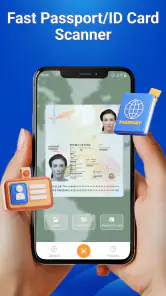
I’d suggest giving it a try if you want a dedicated Android utility that brings QR reading, barcode reading, and QR creation together. It makes particular sense for someone who scans packages now and then, encounters printed QR codes regularly, or wants to prepare a code for a simple personal handoff. The app’s focus is easy to grasp, and that is a welcome quality in a tool you may open only briefly.
I’d skip it if your phone’s built-in scanner already covers your needs, if you rarely encounter barcodes, or if you require advanced business features. I’d also avoid relying on it alone when the outcome has higher stakes than a quick lookup. For ordinary use, its appeal is convenience; for specialized work, a purpose-built alternative is likely to offer a better fit.
In my view, QR Scanner & Barcode Reader is most useful when you treat it as one step in a sensible process: scan, inspect, verify, and then hand the result to the right app or person. It brings together a few related tasks without asking the user to learn a complicated system. Its modest rating and paid extras make me cautious about expecting a flawless, all-purpose solution, but for casual code reading and occasional QR creation, it is a reasonable option to try.
QR Scanner & Barcode Reader Frequently Asked Questions
What can QR Scanner & Barcode Reader scan?
QR Scanner & Barcode Reader is designed to read QR codes and common product barcodes using your device’s camera. Depending on the app version, it may recognize links, contact details, Wi-Fi information, text, and product codes. Results can vary with the code format and image quality, so make sure the code is clearly visible and well lit. Check the app listing for the exact formats supported by the version you plan to install.
How do I scan a code, and do I need to take a photo?
In most cases, you can open the scanner, allow camera access, and point your phone at the code within the on-screen frame. The app typically reads it automatically, so taking a separate photo should not be necessary. Hold your device steady and avoid glare or excessive distance. If scanning does not work, adjust the angle, improve the lighting, or use an image-import option if your installed version offers one.
Is QR Scanner & Barcode Reader free to use?
The app may be available to download without an upfront payment, but its pricing and features can depend on the platform, region, and current app version. Some versions may include advertising, optional purchases, or subscription features. Before installing, review the store listing for the latest price and in-app purchase details. If you are considering a paid feature, check its terms and renewal conditions so you know what charges to expect.
Is it safe to open links scanned with the app?
A scanner can display the contents of a QR code, but that does not guarantee that a link or file is trustworthy. Treat unfamiliar codes with caution: check the displayed web address before opening it, and do not enter passwords or payment details on pages you cannot verify. Avoid downloading unexpected files or granting permissions prompted by a suspicious site. The app’s scanning feature should not be treated as a substitute for security checks.
What permissions does the app need, and is an internet connection required?
Camera access is generally needed to scan codes in real time. Whether the app requests additional permissions, such as access to photos for scanning saved images, depends on the version and the features you use. Basic code recognition may work without an internet connection, while opening web links or using online product lookups requires connectivity. Review the permission prompts and the app’s privacy information before granting access.
Pros
- Scans both QR codes and standard product barcodes in one app.
- Automatically recognizes codes without requiring a separate capture button.
- Keeps a scan history for revisiting previously scanned results.
- Can open web links directly from scanned QR codes.
- Useful for checking product details from barcode scans.
Cons
- Scans may fail when codes are blurry
- damaged
- or poorly lit.
- Opening a scanned link can expose you to unsafe or misleading websites.
- Product information may be limited or unavailable for some barcodes.
- Scan history may include sensitive links unless you clear it regularly.
- Requires camera access to scan physical codes.

- Category
- Tools
- Version
- 1.3.4