Pro Emulator for Game Consoles
- 1.08K
- 4.4
- Installs
- 100.00K
- Price
- $2.99

Screenshots
Analysis by Reviewed
Before paying for any phone emulator, I’d decide what I actually want to play and how I want to control it. Do I already have game files I’m entitled to use? Am I comfortable with touch controls, or do I prefer a physical controller? Am I looking for a quick nostalgia break or a setup I’ll return to regularly? Pro Emulator for Game Consoles is a paid Android tools app from Browser by Fulldive Co. that costs $2.99, so it makes more sense if you expect to use it more than once or twice.
Check your games and play style first
The broad console focus may appeal if your collection spans multiple systems. Before buying, I’d check that the particular consoles and games I care about are supported, then think through how I’ll control them on a phone. Touch input is handy on a commute, but games that depend on precise timing or several simultaneous buttons can feel cramped. A controller-friendly setup may be more comfortable for longer sessions, if it suits your device and preferred games.
A practical test is to start with one familiar game and play for a few minutes. That tells you more than browsing a long list of possibilities: you can judge whether the on-screen controls feel natural, whether the display is comfortable, and whether the experience is worth keeping on your phone. I wouldn’t buy an emulator on the assumption that every old game will run perfectly; compatibility and feel can vary between titles and devices.
Where a multi-console setup can help
If you want to explore several kinds of retro gaming in one place, the appeal is simple: less switching between separate apps and one setup to learn. The app is described as supporting a range of consoles, but I’d treat that as a starting point rather than a guarantee that every system or title will suit every Android phone. Its 4.4 average from around 4,200 ratings and over 50,000 installs show that many people have tried it, but those figures can’t tell you whether your favorite game will be a good match.
One useful habit with any emulator is to make a small, organized test library rather than loading everything at once. Keep a note of which games launch and which control layout feels best; that makes it easier to tell whether a problem belongs to one title or your general setup. If you play in short bursts, check how the app handles progress before relying on it for a long run. The developer is Browser by Fulldive Co., and the current version is 1.8.4.
Bringing Retro to Your Fingertips
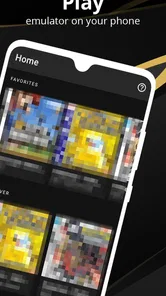
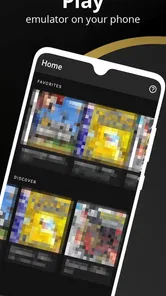
With Pro Emulator for Game Consoles, you’re not just installing an app; you’re opening a portal to the past. Setting it up is as easy as pie. Once you’ve got it running, you’ll be greeted by a sleek interface that’s both intuitive and nostalgic. The app supports an impressive array of consoles, so whether you were a fan of the Nintendo era or the Sega supremacy, there’s something here for everyone.
Performance That Packs a Punch
Now, let’s talk about performance. I’ve tried my fair share of emulators, and let me tell you, not all of them live up to the hype. But this one? It’s a game-changer. The graphics are smooth, the sound is crisp, and the controls are surprisingly responsive. It’s almost as if you’re holding the original controller in your hand. Plus, the app is regularly updated, ensuring compatibility with the latest devices and operating systems. That’s something I genuinely appreciate.
More From Our News Desk

Weather by Xiaomi Review: Clear at a Glance, Less Clear Up Close

X Under Pressure: Can It Recover When Posting Goes Wrong?

Clash of Clans Is Won Between the Battles

Android Auto Makes the Case for Quieter Car Software

MobiOffice: Transforming Mobile Productivity with Seamless Integration

EA SPORTS FC™ Mobile Soccer: Redefining Mobile Sports Gaming
Customization at Its Best
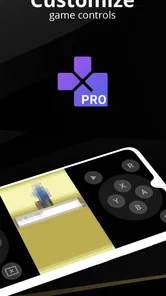
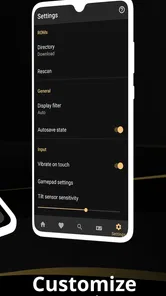
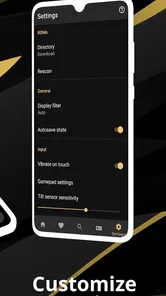
If you’re anything like me, you’ll love tinkering with settings until you get that perfect setup. Fortunately, this emulator lets you customize controls, adjust graphics settings, and even save your progress wherever you want. It’s like having a Swiss army knife for gaming right in your pocket.
Sharing the Fun
One feature that really stood out to me was the ability to share your gaming experience with friends. Whether it’s through screenshots or joining multiplayer sessions, the app makes it incredibly easy to connect with your fellow gamers. It’s these small touches that make the gaming experience feel complete.
When another route makes more sense
If you only want to play games from one console, a focused emulator may be easier to understand and configure than an app aimed at multiple systems. If your priority is accurate physical controls, a handheld device or original console can be a better fit than any phone-based setup. And if you want a free trial-and-error experience, the $2.99 price may be a reason to compare other options first rather than assume this is the right purchase.
There is also a practical trade-off between portability and comfort. A phone is handy for a few minutes of play while waiting for an appointment, but its touchscreen shares space with the game and can obscure the action. I’d use a short, forgiving title to get comfortable before attempting a session that depends on exact button timing. That small check can prevent a frustrating first impression.
Making the purchase decision
Pro Emulator is rated for Everyone, and it requires Android 6.0 or later. That makes the age rating broadly accessible, but it doesn’t mean every device will deliver the same results. Before committing, I’d confirm the phone meets the system requirement and think about whether I’m willing to spend time arranging a comfortable control layout. The app has 767 written reviews, but individual experiences are more useful when they mention the exact game and device you plan to use.
For an everyday scenario, imagine you have a few spare minutes on a train and want to continue a familiar game without carrying a separate console. A phone emulator can make that convenient, especially if you’ve already tested the controls and know how your progress is saved. If you’re setting it up for a trip, do that at home first: launch a game, check the input layout, and make sure you can resume where you left off. Don’t leave that test until you’re offline or in a hurry.
The same preparation helps answer a common concern: whether moving from another emulator is worth the effort. Your existing game files and preferred control habits matter more than the novelty of switching. Try one title first, keep your old setup until the new one feels dependable, and avoid changing several settings at once. That way, if something feels wrong, you can identify the cause instead of starting over.
Who I’d recommend it to
I’d consider it if I wanted a convenient place to explore several kinds of classic console gaming and was happy to spend a little time testing controls and compatibility. I’d skip it if I expected console-perfect performance across every title, disliked touch controls, or only needed a single system-specific solution. The app’s listed release date is July 15, 2022, while its current version is 1.8.4; I’d judge it by how it works on my own phone rather than treating version details as a guarantee about any particular game.
A sensible way to test it
Before building a large library around the app, I’d use a single game to answer three practical questions: can I get it running, can I control it comfortably, and can I return to my progress as expected? Testing those separately is more useful than changing several settings at once. If the game launches but feels awkward, adjust the controls before deciding the emulator itself is a poor fit. If the same issue follows you across different titles, then the setup or device may be the bigger factor.
It also helps to think about where you’ll play. At home, you can take time to position a phone or pair a controller if that is part of your usual routine. In a crowded public space, fewer buttons and a forgiving game are easier to manage than a title that demands fast, accurate input. That’s a meaningful distinction: an emulator can make old games portable, but it can’t make every kind of play equally comfortable on a small screen.
Choosing between convenience and certainty
Compared with separate, console-specific emulator apps, a multi-console option can reduce the number of apps you keep track of, but it may not be the best route for someone who wants to tune one particular system in depth. Compared with a dedicated handheld or original hardware, a phone is easier to carry alongside everyday essentials, yet physical controls and a purpose-built screen can make longer play more comfortable. I’d choose based on which compromise bothers me least, rather than assuming one format is universally better.
There’s a similar trade-off when deciding whether to switch from an emulator that already works. A new app has to earn the time involved in moving through setup and checking familiar games. I’d compare one or two titles I know well, rather than judging by a first launch or by how many systems are mentioned. Keep the old app available until the new arrangement proves dependable; that gives you a practical fallback without turning the test into a full migration.
Who may want to pass
This is less suitable if you want a plug-and-play experience with no time spent checking compatibility, or if touch controls are a deal-breaker for the games you enjoy. It may also be the wrong purchase if your needs are narrow: someone focused on one console might prefer an option built around that system, while a player who values authentic physical controls may be happier with dedicated hardware. The convenience of combining retro play with a phone is real, but it doesn’t erase those preferences.
For a first-time emulator user, I’d also set expectations around game files. The emulator is the tool for running games; you should only use files you’re entitled to use and understand where your own collection comes from. Keeping a modest, clearly organized set makes troubleshooting easier and avoids the confusion of trying several unknown files at once. That’s a simple preparation step, but it can save time when you’re working out whether a launch problem is about a particular game or the general setup.
My recommendation
In conclusion, Pro Emulator for Game Consoles is a must-have for any retro gaming enthusiast. It brings the joy of classic gaming to your fingertips, offering a seamless experience that’s both fun and functional. If you’re looking to dive back into the world of old-school gaming, this app is definitely worth a try. So, what are you waiting for? Grab your virtual controller and start playing!
Pro Emulator for Game Consoles Frequently Asked Questions
Is Pro Emulator for Game Consoles available for my device?
Pro Emulator for Game Consoles is an Android app, and it requires Android 6.0 or later. Check your device’s software version before downloading to make sure it meets that requirement. The app is listed in the Tools category, and its content rating is Everyone, so it is presented as suitable for a broad audience.
How much does Pro Emulator for Game Consoles cost, and is it widely used?
Pro Emulator for Game Consoles costs $2.99. It has received an average rating of 4.4 from around 4,200 ratings, with 767 written reviews and over 50,000 installs. Those figures can offer a quick sense of its audience, though they do not guarantee that the app will meet every user’s expectations or work equally well on every device.
What is Pro Emulator for Game Consoles?
Pro Emulator for Game Consoles is a versatile application designed to emulate popular gaming consoles on your Android or iOS device. It allows users to play classic games from consoles like PlayStation, Nintendo, and more. With this emulator, you can enjoy your favorite retro games directly on your smartphone or tablet, providing a seamless gaming experience. It is presented as an easy-to-use emulator for a range of consoles.
Is Pro Emulator for Game Consoles legal to use?
Yes, Pro Emulator for Game Consoles is legal to use. However, it's important to note that while the emulator itself is legal, downloading ROMs of games you do not own is illegal in many regions. Users should only play games for which they possess a physical copy. Always check your local laws regarding emulation and ROM usage to ensure compliance.
What features does Pro Emulator for Game Consoles offer?
Pro Emulator for Game Consoles offers a range of features to enhance your gaming experience. It supports multiple console emulations, customizable controls, save states, and high-definition graphics. Additionally, it provides support for external controllers, allowing for a more authentic gaming experience. The app also offers frequent updates to improve performance and add new features.
Pros
- Supports multiple console platforms.
- Customizable control settings.
- High compatibility with games.
- Regular updates and fixes.
- User-friendly interface.
Cons
- Requires high device specs.
- Some features need in-app purchases.
- Occasional performance issues.
- Limited online multiplayer support.
- Can drain battery quickly.