PrivaClean — Phone Cleaner
- 6.00
- 4.3
- Installs
- 500.00K
- Price
- Free

Screenshots
Analysis by Reviewed
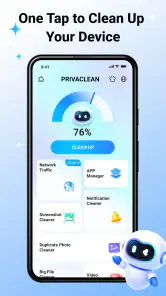
My first impression of PrivaClean was that it is aimed at a very ordinary phone problem: a device gradually fills with screenshots, duplicate-looking images, old downloads, and videos I no longer need. Instead of treating cleanup as a dramatic maintenance job, this free tools app presents it as a more deliberate organizing task. That distinction matters because deleting personal files is not the same as clearing harmless temporary clutter.
Developed by Ahmed Abou Zamil, PrivaClean is available for everyone and works on devices running Android 7.0 or later. Its store summary focuses on removing junk and organizing photos, videos, and files with confidence, while the short description simply identifies it as a phone-cleaning tool. I found that narrow purpose useful: the app is easier to judge when viewed as a cleanup assistant rather than as an all-purpose phone booster.
The app has reached over 500 thousand installs and holds a 4.3 average from around 428 ratings. Those figures suggest that it has found an audience, but they do not replace a careful look at the actual workflow. My main question was simple: can it help me decide what should go, without turning a personal photo library into a risky one-tap cleanup?
From a crowded phone to a more manageable library
The starting condition matters more than the button
A realistic cleanup session usually begins with a phone that is not completely unusable. It is simply inconvenient. The gallery contains several versions of the same receipt, a group chat has left behind a trail of images, and the Downloads folder includes documents whose purpose I no longer remember. That is the kind of starting point where PrivaClean makes sense.
I would not open it expecting a magical performance transformation. A cleaner can help me locate unwanted material, but it cannot decide whether a blurry family photo is worthless or irreplaceable. The most important preparation is therefore mental: I need to be ready to review suggestions instead of treating every detected item as disposable.
This is also where the app’s privacy-oriented name sets a useful expectation, even though I would still make my own decisions about sensitive files. Personal documents, screenshots containing account details, and private videos deserve the same attention as photographs. A cleanup tool is helpful only when it respects the difference between clutter and evidence I may need later.
Beginning with photos and videos
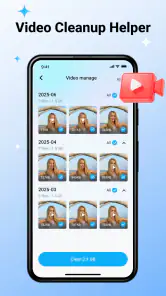
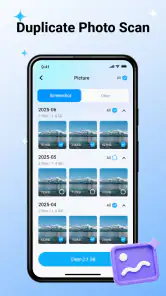
For me, visual media is the natural first handoff. Photos and videos are easier to recognize than unfamiliar file names, so they provide a safer way to learn how the app presents cleanup candidates. I would start with obvious items: repeated screenshots, accidental shots, long-forgotten memes, and videos captured by mistake.
The useful habit is to inspect groups rather than judging a single thumbnail in isolation. Two pictures may look similar but differ in focus, framing, or the people visible in the background. A short video may seem unimportant until I remember why it was recorded. PrivaClean can make the review stage more organized, but the final decision still belongs to me.
One practical workflow is to remove only the clearly unwanted material during the first pass, then leave uncertain items alone. This creates a cleaner result without forcing a rushed decision. I also prefer separating sentimental photos from routine clutter before deleting anything, because a visual resemblance is not proof that two files have the same value.
Moving from media to ordinary files
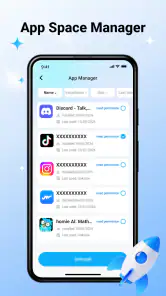
After photos and videos, I would move to general files. This is where cleanup becomes less visual and more interpretive. A file named with an unfamiliar abbreviation may be important, while a plainly named download may be obsolete. The safest approach is to open or identify anything connected to work, travel, health, taxes, school, or a purchase before removing it.
This is one of the app’s strongest practical roles: it gives the cleanup process a sequence. I can deal with easy visual clutter first and reserve ambiguous files for a slower pass. That reduces the chance that the desire for a tidy phone turns into an accidental loss of something useful.
I would also avoid combining a major file review with other phone maintenance. If I am already sorting hundreds of items, adding unrelated changes makes it harder to remember what happened. A focused session is easier to check afterward, especially when the phone contains files shared between several apps.
The handoff between detection and deletion
The most important handoff is the moment when PrivaClean identifies possible junk and I decide whether the suggestion is safe. That handoff should never be treated as automatic approval. The app can organize the candidates, but it cannot know the personal context behind every screenshot, recording, or downloaded document.
I find this distinction especially important for people who use their phones as working archives. A screenshot may be the only record of a confirmation number. A downloaded image may be needed for a listing or a presentation. A video may be a private memory rather than disposable media. In those cases, the app is better used as a visual index than as an unquestioned delete command.
A good rule is to ask three questions before confirming a group: do I recognize the files, can I recreate or retrieve them, and would losing them create a problem this week? If the answer to any of those is unclear, I would leave the group for later. That small pause is more valuable than chasing the largest possible cleanup.
A realistic everyday scenario
Imagine I am preparing for a trip. My phone has accumulated screenshots of booking details, several nearly identical photos of a passport page, offline documents, and a collection of short clips from previous outings. I open PrivaClean not to erase everything, but to separate obvious clutter from travel material.
I would begin with accidental screenshots and duplicate-looking images that are unrelated to the trip. Next, I would review videos, keeping anything personal or useful for reference. Finally, I would inspect files by name and location, leaving booking documents and identification-related material untouched unless I had already stored them safely elsewhere.
The outcome I want is not simply more free space. I want a phone that is easier to search when I am standing in an airport or trying to show someone a particular image. That is a less obvious benefit of cleanup: reducing visual noise can make important files easier to find, even when the app’s direct job is removal.
Where the flow becomes slower
The same caution that makes cleanup safer also makes it slower. If my phone contains years of mixed media, I cannot expect PrivaClean to turn every decision into a quick confirmation. Similar files may require close inspection, and general documents often need more context than a thumbnail can provide.
There is also a trade-off between broad scanning and personal control. A broad review is convenient when I have neglected the phone for a long time, but it can produce a large decision queue. A narrower session is less overwhelming, although it may leave some clutter behind. I prefer the second approach because a partial cleanup that I understand is better than an aggressive cleanup I later regret.
Users who want a single tap to reclaim space may find this friction disappointing. In my view, that is not necessarily a defect; it is a consequence of handling personal files responsibly. Still, anyone expecting the app to replace regular organization should adjust those expectations.
How it compares with the usual alternatives
The usual alternative is to open the phone’s built-in gallery and file manager, sort by date or size, and delete items manually. That approach gives me direct control and does not require learning another interface, but it can scatter the work across several places. PrivaClean’s value is the attempt to bring photos, videos, and files into one cleanup-oriented flow.
Another alternative is a storage-focused utility that emphasizes large files or technical categories. That can be better when my only goal is to find the biggest space consumers. PrivaClean is more appealing when the problem is mixed clutter and I want a guided review of personal media as well as ordinary files.
Cloud photo services offer yet another route, particularly for people who mainly need backup and device-space management. They may be the better choice when preserving originals and accessing them across devices is the priority. PrivaClean is more direct for someone who wants to decide what remains on the phone, but I would not confuse local cleanup with backup.
For advanced users who already understand folders, storage analysis, and backup routines, a traditional file manager may remain faster. For less technical users, the advantage here is the focused purpose. The app does not require me to become a storage administrator before I can begin sorting everyday clutter.
Who will get the most from it
I think PrivaClean suits people whose phones feel crowded because of accumulated visual and miscellaneous files rather than one single enormous item. It is also a good fit for someone who wants a guided starting point and is willing to review recommendations carefully. The Everyone content rating makes it approachable for a broad audience, although responsible file decisions are still necessary at any age.
It can be particularly useful before a trip, after a busy event, or when preparing a phone for a family member. In each case, the workflow is similar: identify the mess, separate obvious clutter from meaningful material, review the handoff, and check the result by using the phone normally afterward.
I would skip it if I already maintain a precise folder system and prefer manual control. I would also look elsewhere if I need a specialized backup service, a technical storage analyzer, or a tool whose main purpose is device diagnostics. PrivaClean’s strength is narrower and more practical: it helps turn an unorganized collection of photos, videos, and files into a reviewable cleanup task.
What the version and adoption tell me
The current release is V1.0.4, so I approach it as a relatively early product rather than a mature platform with a long history of refinements. That does not make it unsuitable, but it does make careful use more important. I would keep the first cleanup conservative and pay attention to how clearly the app presents categories and confirmation steps.
Its free price lowers the barrier to trying that workflow. I can test whether its organization matches my habits without committing to a purchase. The important question is not whether it promises to remove the most material, but whether it helps me make decisions I understand.
The developer, Ahmed Abou Zamil, has created something with a clear everyday purpose. The app’s rating of 4.3 from its existing audience is encouraging, while the broader install count shows that the idea is reaching many Android users. I still judge it by the quality of the handoff between finding clutter and approving its removal, because that is where a cleaner either earns trust or loses it.
My final workflow recommendation
If I were recommending PrivaClean to a friend, I would suggest starting with a small session rather than attempting a complete digital spring-clean. Review obvious screenshots first, then move to videos, and leave ambiguous documents until the end. Before confirming deletion, check anything connected to travel, work, finances, health, or personal memories.
Afterward, I would use the phone normally for a while and notice whether searches, gallery browsing, and file selection feel easier. That is a more meaningful result than a dramatic-looking cleanup screen. If the phone still feels crowded, I would repeat the process in another focused session instead of making increasingly broad selections.
My overall opinion is positive but measured. PrivaClean is a useful free tool for bringing order to mixed photo, video, and file clutter, especially when I need help establishing a sensible sequence. Its real strength is controlled organization, not blind deletion. People who value careful review should find that approach reassuring, while users seeking automatic optimization or specialized backup tools may be better served by alternatives designed for those jobs.
Pros
- Quickly identifies junk files and unnecessary cache.
- Simple interface makes cleaning tasks easy to understand.
- Helps free storage space without complicated setup.
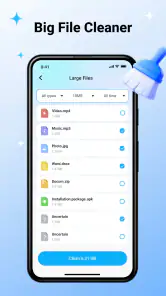
- Useful tools for reviewing large and redundant files.
- Can improve device organization by grouping removable items.
Cons
- Some cleaning features may require a premium subscription.
- Results can vary depending on device model and Android version.
- Users should review suggested files before deleting them.
- Scanning may take longer when the phone has extensive storage.
- Ads or upgrade prompts may interrupt the free experience.

- Category
- Tools
- Version
- V1.0.4











