Popeyes®
- 40.46K
- 4.9
- Installs
- 10.00M
- Price
- Free

Screenshots
Analysis by Reviewed
When I want Popeyes, the usual choice is simple: join the counter line, use a delivery service, or place an order through the Popeyes® App. I find the app most useful when I already know I want a Popeyes meal and would rather sort out the order before reaching the restaurant. It is a free Food & Drink app from Popeyes Louisiana Kitchen, Inc., and its focus is straightforward: help me browse, make choices, and place an order from my phone.
The best time to open it is before hunger turns every choice into a rushed one. If I have a destination in mind, I can decide what I want and how I will get it before setting off. That makes this a practical tool for repeat customers more than a discovery app: it helps me act on a Popeyes craving, rather than compare every possible dinner in town.
Start with the meal and the location
A practical way to use it is to check the menu and offers before deciding what to eat. That small pause can help me compare a sandwich or combo with whatever promotion is available, instead of settling on the first item I see at the counter. If I am choosing for more than one person, I can also build the order at my own pace and review the selections before checkout, which is less rushed than trying to remember everyone’s preferences in a queue.
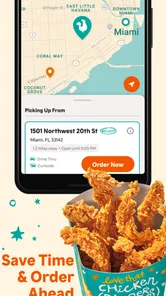
Location matters just as much as the food. When I am away from home, using the app to find a nearby restaurant gives me a starting point for deciding whether pickup makes sense. I would check that the selected location suits my route before placing the order: the closest pin is not automatically the most convenient stop if I am already driving in another direction. That is a useful distinction when “nearby” and “on the way” are not the same thing.
A small but useful habit is to settle the handoff plan before building a complicated basket. If I am passing a restaurant on my way home, pickup may fit naturally; if I am staying in, delivery may be the more comfortable choice. Thinking about that first helps me avoid treating the restaurant selection as a minor detail, especially when more than one location is within reach.
Ordering Made Easy
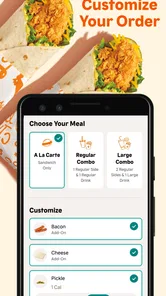
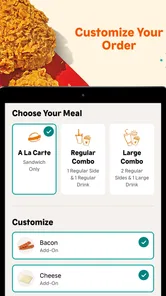
First things first, let’s talk about the app’s primary function: ordering food. The Popeyes® App makes it super simple to satisfy your cravings for their famous chicken. With just a few taps, you can customize your order to your heart's content. Whether you're in the mood for a spicy chicken sandwich or a classic combo meal, the app makes it easy to add and remove items, choose your preferred spice level, and even save your favorite orders for next time.
Smooth and User-Friendly Interface
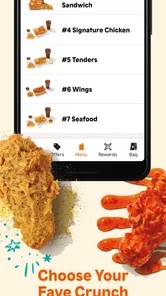
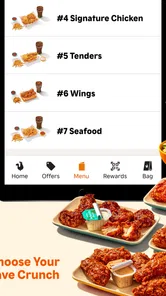
Navigating through the app feels like a breeze. The interface is smooth and intuitive, making it easy for even the least tech-savvy among us to place an order. The menu is neatly organized, with high-quality images that practically make you drool. Plus, the app’s color scheme is vibrant, reflecting Popeyes’ lively brand personality. Overall, the user experience is seamless, and I found myself appreciating how quickly I could navigate from the home screen to checkout.
More From Our News Desk

Weather by Xiaomi Review: Clear at a Glance, Less Clear Up Close

X Under Pressure: Can It Recover When Posting Goes Wrong?

Clash of Clans Is Won Between the Battles

Android Auto Makes the Case for Quieter Car Software

MobiOffice: Transforming Mobile Productivity with Seamless Integration

EA SPORTS FC™ Mobile Soccer: Redefining Mobile Sports Gaming
That quick path is most helpful when I already have a rough order in mind. For a first visit, I would slow down rather than tap through based only on photos: the basket is where I can pause, reconsider the mix, and make sure I have not added something just because it looked appealing. The app reduces the pressure of choosing in a line, but it does not make the decision for me.
Making a useful order, not just a quick one
Saving a favorite order is most valuable when it reflects a dependable routine, such as the same lunch on a busy workday. I would still review it before submitting: a saved choice is a shortcut, not a reason to skip checking the items or the selected restaurant. For a mixed group, building the basket item by item is usually the safer approach, since different spice preferences can be handled deliberately instead of being guessed at.
For a family or a group of coworkers, I find it useful to collect everyone’s choices before opening checkout. One person can confirm the items and preferences while another checks where the order should go; that simple handoff avoids the familiar last-minute question of whether someone wanted a different option. It also makes the app’s saved-order convenience less tempting when the group’s needs have changed since the last visit.
That is where the app differs from ordering at the counter. I can take a moment to inspect the menu and change my mind without holding up the person behind me. Compared with a general delivery service, a restaurant’s own app is a more direct route when I specifically want Popeyes, while a multi-restaurant app is more useful if I am still comparing different cuisines or businesses. I would choose based on that first decision rather than assuming one channel is always better.
Exclusive Deals and Offers
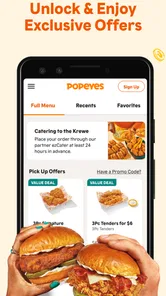
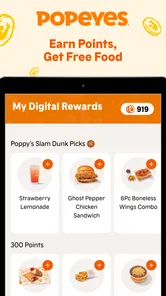
One of the standout features of the app is the exclusive deals and offers. Who doesn’t love a good bargain, right? The app regularly updates with special promotions, providing you with discounts and combo deals that you won’t find anywhere else. Just by checking the app, you can sometimes snag a deal that makes your meal even more satisfying. It’s like being in a secret club that only app users know about!
Checking the offer before checkout
I treat a promotion as a reason to compare, not as an automatic saving. Before ordering, I would look at what the offer includes and whether it fits the meal I actually want; a deal is less useful if it nudges me into adding food I did not plan to buy. Checking the basket after applying an offer is a sensible final step, especially when ordering for a group, because it lets me make sure the finished order still matches everyone’s choices.
For someone who orders occasionally, it is worth checking the offers each time rather than assuming a familiar promotion is still the best fit. I would compare the deal with the meal I planned to buy, then decide whether changing the order is genuinely worthwhile. This keeps the app useful as a planning aid without turning a discount into a reason to spend on extras I did not want.
Location Services and Delivery Options
The Popeyes® App also makes it incredibly convenient to find the nearest location. By enabling location services, the app automatically pinpoints the closest Popeyes to your current whereabouts. This is especially handy when you’re out and about, and a sudden craving hits. Plus, if you’re not in the mood to go out, the app offers delivery options straight to your doorstep. It’s like having a mini Popeyes right in your pocket!
If I am unfamiliar with the area, I would use the nearby location as a starting point, then think about the direction I am actually travelling. A restaurant that is close on a map may still make the trip awkward if it sends me away from my route. That little check is especially useful when I am fitting a meal into a commute or a short break rather than making a separate trip.
Choosing the right handoff
Pickup and delivery solve different problems. For a lunch break or a stop already built into my trip, pickup can keep the plan simple; for an evening when leaving home is the bigger inconvenience, delivery is the more appealing option. Either way, I would check the chosen handoff carefully before finishing the order. A meal intended for pickup is not useful if I meant to have it brought to me, and delivery is not the best fit when I need to control the route or timing myself.
There is a useful division of labor here: I use the app to organize the order, while the restaurant or delivery handoff is where the plan becomes a meal. I would not treat a completed screen as the end of the process. Before I head out or settle in, I want to be clear about which location and handoff I selected, so I do not arrive at the wrong place or expect a different kind of delivery than the one I chose.
For example, if I am finishing work and want dinner without making a long decision at the last minute, I can check the menu and available offer, build the order, confirm the restaurant, then choose the handoff that fits the evening. The app can make that sequence calmer, but it cannot remove the need to verify the details. I would place the order only after checking that the items, location, and pickup or delivery choice all line up with the plan.
A realistic use case: the rushed evening
Imagine I am leaving work and have a short window before heading home. I already know Popeyes is what I want, so I open the app while I am not driving, check the menu and any offer, then put together the meal. I choose a restaurant that makes sense for my route instead of blindly taking the nearest result, review the basket, and confirm whether I will collect it or have it delivered. Each step is small, but deciding them in that order prevents a rushed choice from becoming an inconvenient one.
This workflow suits people who return to the same restaurant and value a little advance planning. It is less compelling if I am simply browsing for inspiration, want to compare lots of nearby restaurants, or need to talk through a question before deciding. In those situations, a broader ordering service or a conversation with restaurant staff can be more useful than starting with a single-chain app.
Where the convenience has limits
The app is not the right choice for every meal. If I am undecided and want to compare Popeyes with several nearby restaurants, a broader food-ordering service may be more convenient. If I am already inside a restaurant and need to ask a question before choosing, talking to staff is the better route. And if I do not want to use a phone to organize a simple meal, ordering in person remains perfectly reasonable.
It is also worth separating the convenience of placing an order from the convenience of receiving it. The app can help me make choices on-screen, but I still have to select a location and handoff that suit the day. If my plans are changing quickly, ordering in person may be less hassle than revising a digital order. If I need to compare delivery options across several restaurants, a multi-restaurant service is the more natural place to start.
There is also a practical trade-off in relying on digital ordering: the app can organize the choices, but I still have to make sure the selected restaurant and order suit my situation. A quick review before submitting is worth the few seconds, particularly when I am ordering for other people or switching between pickup and delivery. That habit is more useful than tapping through quickly and hoping every choice carried over as intended.
Who will get the most from it
I would keep this app handy if Popeyes is already part of my regular rotation, especially when I tend to order familiar meals or want to check current offers before deciding. It can also help when a group needs a calmer way to agree on a basket than calling out choices while waiting in line. The biggest benefit is not that it removes every step, but that it gives me room to make those choices before I reach the counter or settle on a delivery plan.
Someone who visits only now and then can still use it for a specific meal, but may not get much value from making it a daily habit. A person who wants the widest choice of restaurants, prefers to ask questions face to face, or does not want to arrange food on a phone should skip it and use the channel that fits better. I see it as a focused ordering option, not an all-purpose food guide.
Final Thoughts
All in all, the Popeyes® App is a fantastic companion for anyone who loves a quick and delicious meal. It offers a user-friendly interface, exclusive deals, and convenient options for both pickup and delivery. Whether you’re a die-hard Popeyes fan or just someone looking to streamline your fast-food experience, this app is definitely worth a download. So, next time you’re in the mood for some crispy, spicy goodness, remember there’s an app for that!
Its broad appeal is reflected in a 4.9 average from around 154,000 ratings, and it has passed five million installs. It is free, rated for Everyone, and was released on June 18, 2018; the current version is 7.37.8, with Android 7.0 as the minimum operating system. Those details make it an easy app to try for a regular Popeyes customer, though the practical value still depends on whether you prefer planning an order on your phone.
I would recommend it most to people who return to Popeyes often, like to check for offers, or want to settle meal choices before arriving. Someone who only visits occasionally can still use it, but may not need to keep it on their home screen. My final check is simple: confirm the restaurant, read through the basket, and make sure the handoff matches the plan. Done that way, the app is a convenient ordering tool rather than a substitute for choosing carefully.
Popeyes® Frequently Asked Questions
Is the Popeyes® App free, and what does it cost to use?
The Popeyes® App is free to download, so you can install it and explore its menu and ordering features without paying for the app itself. Any food you order is a separate purchase. If you are considering a particular order or offer, review the details shown in the app before completing it, so you know what you are selecting.
Who develops the Popeyes® App, and what is its age rating?
The Popeyes® App is developed by Popeyes Louisiana Kitchen, Inc. It is rated Everyone, making it suitable for a general audience. The app is in the Food & Drink category and carries the brand’s promise of bringing a piece of Louisiana to your fingertips. These details can help you decide whether it is the kind of branded food app you want on your device.
What should I know about the Popeyes® App before downloading it?
The Popeyes® App is a free Food & Drink app from Popeyes Louisiana Kitchen, Inc., described as bringing a piece of Louisiana to your fingertips. It is rated for Everyone and has a 4.9 average from around 154,000 ratings. Its main appeal is having Popeyes menu browsing and ordering features on your phone, so it may suit you if you want to explore options or place orders through the app.
Will the Popeyes® App work on my device?
The app requires Android 7.0 or later, so check your device’s operating system before downloading if you use Android. The listed current version is 7.37.8. The app has been available since June 18, 2018, and has over 5 million installs. If you use an iPhone or another Apple device, check its App Store compatibility details before installing.
What features does the Popeyes® App offer to enhance my ordering experience?
The Popeyes® App offers a range of features designed to make ordering more convenient and rewarding. Users can easily browse the menu, customize their orders, and save favorite items for future purchases. The app also includes a store locator to find the nearest Popeyes location, exclusive deals and promotions, and a secure payment system that supports various payment methods, ensuring a seamless and efficient ordering process.
Pros
- Easy to navigate menu.
- Fast order processing.
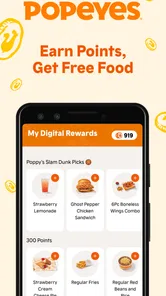
- Loyalty rewards program.
- Multiple payment options.
- Quick access to deals.
Cons
- Limited customization options.
- Occasional app crashes.
- Slow customer support.
- Requires constant updates.
- Limited delivery areas.











