Pizza Hut - Delivery & Takeout
- 391.77K
- 3.8
- Installs
- 10.00M
- Price
- Free

Screenshots

Analysis by Reviewed
I find the most useful idea behind Pizza Hut - Delivery & Takeout simple: it brings the order and the wait into one place. When I’m choosing dinner, I can browse Pizza Hut’s menu, place an order, and then check its progress rather than switching between a menu and a separate tracking experience. That makes the app most appealing when I already know I want Pizza Hut, not when I’m still deciding among several restaurants.
Why tracking changes the waiting experience
Tracking is more than a small convenience when timing matters. If I’m ordering for a group, I can use the progress updates to get ready to serve food without repeatedly checking the door or guessing whether the order has left the restaurant. It does not make the delivery faster, but it can make the uncertain part of ordering feel easier to manage.
The same capability is useful for pickup, though the practical question changes: instead of watching a driver’s progress, I can plan around the pickup time I choose. For a busy evening, that can help me fit dinner around errands. I’d still leave a little flexibility in my plans; an in-app estimate is a guide, not a promise that every order will arrive at an exact minute.
Ordering and following a Pizza Hut meal
If you're anything like me, food cravings often hit at the most inconvenient times. Whether it's a late-night snack or a lazy Sunday afternoon, the Pizza Hut - Food Delivery & Takeout app has got your back. Let's dive into how this app satisfies those cheesy cravings without a hitch.
Getting Started: User-Friendly Interface
The first thing you’ll notice about the Pizza Hut - Food Delivery & Takeout app is its seamless and intuitive interface. From the moment you open it, everything from the menu to the checkout process is straightforward. It’s like having a digital waiter who knows exactly what you want, minus the awkward small talk. The app is designed to make your pizza ordering experience quick and hassle-free.
Exploring the Menu
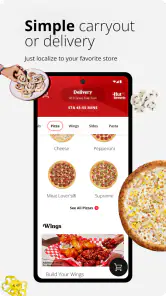
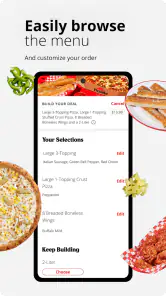
Browsing through the menu is a breeze. You can find all your favorites, from classic pepperoni to the more adventurous BBQ chicken pizzas. The app also lets you customize your order to a remarkable degree—extra cheese? No problem. Want to remove the onions? Done. It's like having a pizza chef at your fingertips.
What I love most is the detailed descriptions and images of each menu item. It’s not just a list; it’s like flipping through a digital pizza magazine that leaves you drooling. Plus, the app highlights deals and offers, making it easy to snag a bargain.
More From Our News Desk

Weather by Xiaomi Review: Clear at a Glance, Less Clear Up Close

X Under Pressure: Can It Recover When Posting Goes Wrong?

Clash of Clans Is Won Between the Battles

Android Auto Makes the Case for Quieter Car Software

MobiOffice: Transforming Mobile Productivity with Seamless Integration

EA SPORTS FC™ Mobile Soccer: Redefining Mobile Sports Gaming
Making a smoother order
When I’m ordering for several people, I find it helpful to settle the choices before reaching checkout. I can compare the menu descriptions, note customizations, and check any displayed offers while everyone is still deciding. That small bit of preparation reduces last-minute changes and makes the final review of the basket more useful: I can confirm each item and its requested changes before submitting the order.
Deals are worth checking while you browse, but I wouldn’t assume the most prominent offer is automatically the best fit. A discount only helps if it suits the meal I actually want. I’d compare the offer with the items already in my order and avoid adding food just to chase a saving. That is a practical way to keep the convenience from turning into an unnecessary larger order.
Order Tracking and Delivery
Once you’ve placed your order, the app provides real-time tracking so you can follow your pizza’s journey from the oven to your door. It’s a feature that adds excitement to the waiting time, as you watch your delivery inch closer. The notifications keep you updated, ensuring you’re not left wondering where your pizza is.
The delivery itself is usually prompt, aligning with the estimated time given by the app. And if you prefer picking up your order, the app allows you to schedule a pickup time that suits your convenience.
A realistic dinner plan
Imagine getting home after work with friends already on the way. I’d use the app to choose the meal, check the basket carefully, and place the order before turning to other preparations. While it is in progress, tracking gives me a reason to check once rather than keep reopening the app to guess. If the group’s arrival time is uncertain, pickup may be less convenient than delivery; if I’m passing a nearby restaurant anyway, a scheduled collection could fit better into the evening.
For a delivery that seems delayed, the useful first step is to look at the order’s current status and the notifications rather than placing a second order in a hurry. Tracking helps me understand where things stand, though it cannot remove every uncertainty from a busy meal period. If precise timing is essential, I’d plan a buffer or choose an option that gives me more control over when I collect dinner.
Payment and Rewards
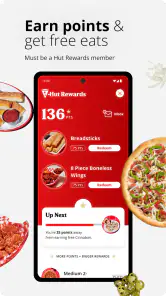
Paying for your order is as easy as pie, with multiple payment options including credit cards and digital wallets. The app also integrates Pizza Hut’s loyalty program, so every order brings you closer to earning rewards. It’s a sweet deal for pizza lovers who frequent Pizza Hut.
One of the highlights is the reward system, which is simple yet rewarding. It encourages you to keep coming back, as every purchase adds up to points that can be redeemed for free items. Who doesn’t love a free pizza once in a while?
Where it fits among food-ordering options
Compared with a broad restaurant-delivery app, this one has a narrower purpose: it is built around ordering from Pizza Hut rather than comparing a range of restaurants in one place. That focus is handy if the group has already settled on Pizza Hut and you want its menu and rewards together. If you want to compare cuisines, restaurant fees, or delivery choices across different businesses, a general food-ordering service is likely the better starting point.
I would also choose a direct Pizza Hut order when the loyalty program matters to me, since the app brings those rewards into the same ordering routine. For someone who rarely orders from the chain, that benefit may carry less weight; the best choice then depends on which service has the restaurant and ordering arrangement they prefer. Either way, checking the final basket before submitting is a sensible habit, especially when several people have requested custom changes.
Who will get the most from it
The app makes the most sense for people who already enjoy Pizza Hut and want a straightforward way to order delivery or arrange pickup. Families and groups can benefit from browsing together and confirming customizations, while regular customers have a reason to keep their orders and rewards in the same place. It is less compelling if you prefer cooking, want a marketplace that covers many restaurants, or only choose a meal after comparing options across the neighborhood.
Pizza Hut Inc. develops this free Food & Drink app. It has an average rating of 3.8 from around 985,000 ratings, and has been installed over 10 million times. It is rated for Everyone, launched on May 17, 2011, and version 6.0.33 supports Android 7.0 and later. Those figures suggest a widely used app, but an average rating also reminds me that ordering experiences can vary; I’d judge it by whether its menu, tracking, pickup, and rewards match the way I like to order.
Useful habits for a less stressful order
I’d treat the app as a planning tool as much as a menu. Before a shared meal, I would gather everyone’s choices first, then use the basket as a final checklist: confirm the pizza selections, review each requested change, and make sure the order still fits the group. This is especially useful when people are calling out preferences from different rooms or messaging while I browse. It cuts down on the kind of small omission that can matter more than a few minutes of delivery time.
For a solo order, the same careful approach helps in a different way. I’d check the available offers before settling on a meal, then compare the final basket with what I intended to buy rather than letting a promotion dictate dinner. That keeps the app’s convenience on my side. A displayed deal can be useful, but the better value is the order I actually want, not an expanded one assembled to make an offer feel worthwhile.
When direct ordering is not the best fit
The app’s focus is also its main boundary. If I’m hungry but undecided, I would start with a service that lets me weigh different restaurants and cuisines in one search. That broader view is more useful when the group has conflicting cravings or when I’m choosing based on delivery options from several businesses. Once Pizza Hut is the clear choice, switching to its own app makes more sense because the menu, order progress, and rewards sit together.
There is a similar trade-off with timing. Tracking can reduce the urge to keep checking, but it cannot make an estimate exact or remove the uncertainty of a busy evening. If I have a strict break or need food at a very particular moment, I would avoid planning right up to the estimated arrival. Pickup can offer a more deliberate plan when I’m already nearby, while delivery is more convenient when leaving home would create a bigger hassle.
I would also avoid treating the app as a substitute for checking the order details. Customizing food is helpful, but the more people contribute changes, the easier it is to misread a choice or overlook a request. Before submitting, I’d pause long enough to review the whole basket and make sure the selected items reflect what the group agreed on. That quick check is a more reliable safeguard than assuming a smooth interface will catch every mistake for me.
Questions worth settling before checkout
Can I use it for pickup as well as delivery? The app supports both, so I’d choose based on the evening rather than assuming delivery is the only route. Pickup is sensible if I am already passing the restaurant and can plan around a selected collection time. Delivery is the more comfortable choice when coordinating a group at home or when going out would interrupt the evening.
Is it useful if I order only occasionally? It can still be a practical way to browse the Pizza Hut menu and arrange a meal, but the rewards are naturally more relevant to people who return regularly. If I order from the chain rarely, I’d compare the final ordering experience with the alternatives available to me instead of expecting loyalty benefits to be a major reason to install it.
Does tracking guarantee that dinner arrives at a precise time? I would not plan on that. Its value is visibility into progress, not a promise that every order will follow an exact schedule. For a gathering, I’d leave some breathing room and prepare the rest of the meal around a reasonable window. If timing matters more than convenience, collecting the order may suit the plan better.
Is this the right app for comparing dinner options? Not really. Its strength is making a Pizza Hut order easier to manage, not presenting a neighborhood-wide selection. I’d use a general food-ordering service when restaurant choice is still open, then use this app when I have decided on Pizza Hut and want a direct route to its menu, order updates, and rewards.
Final Thoughts
In a world where convenience is key, the Pizza Hut - Food Delivery & Takeout app delivers on all fronts. It combines ease of use with exciting features that cater to pizza lovers everywhere. From its user-friendly interface to the rewarding loyalty program, it’s an app that makes pizza ordering not just convenient, but also fun.
So next time you’re hit with a pizza craving, you know where to turn. The app is available for both Android and iOS, making it accessible to almost everyone. Happy ordering, and may your pizza always be hot and cheesy!
Pizza Hut - Delivery & Takeout Frequently Asked Questions
Is the Pizza Hut app free to download, and what devices can run it?
Pizza Hut - Delivery & Takeout is free to download and is available for Android and iOS devices. The Android version requires Android 7.0 or later, so it is worth checking your device’s operating system before installing. The app is listed for everyone and focuses on ordering food, tracking orders, and earning rewards.
What platforms is the Pizza Hut app available on?
The Pizza Hut app is available for both Android and iOS devices. It can be downloaded from the Google Play Store for Android users and the Apple App Store for iOS users. Ensure your device meets the minimum system requirements for smooth operation.
Can I customize my pizza order through the app?
Yes, the Pizza Hut app allows users to fully customize their pizza orders. You can choose from a variety of crusts, sauces, and toppings to create your perfect pizza. The app also provides options for special dietary needs, such as gluten-free crusts and vegan toppings, making it versatile for all preferences.
Does the Pizza Hut app offer any exclusive deals or discounts?
The Pizza Hut app frequently features exclusive deals and discounts that are not available in-store or through other ordering methods. Users can take advantage of special promotions, combo deals, and loyalty rewards by ordering directly through the app. Make sure to enable notifications to stay updated on the latest offers.
Is contactless delivery available through the app?
Yes, the Pizza Hut app supports contactless delivery options for your convenience and safety. During the checkout process, you can select contactless delivery to have your order left at your doorstep, minimizing physical interaction. This feature is particularly useful during times when health and safety are a priority.
Pros
- User-friendly interface for easy navigation.
- Wide variety of menu options available.
- Real-time order tracking feature.
- Exclusive app-only discounts and offers.
- Easy payment options including digital wallets.
Cons
- Limited customization for some menu items.
- Occasional app crashes reported.
- Delivery times can sometimes vary.
- Lack of vegan options in the menu.
- Requires stable internet connection.
- Category
- Food & Drink
- Version
- 6.0.33











