PhotoRescue-Recover Files
- 240.00
- 3.9
- Installs
- 5.00M
- Price
- Free

Screenshots




Analysis by Reviewed
When a file disappears, the first useful move is often not to install another tool but to stop creating new data on the phone. I treat recovery as a time-sensitive attempt, not a guaranteed undo button: continued use can make deleted material harder to retrieve. That practical mindset is important with PhotoRescue-Recover Files, a free Android tools app from SunnyTech Limited. It has a 3.9 average from around 6,600 ratings, and more than 5 million installs suggest plenty of people are looking for a straightforward recovery option.
A sensible first move after deletion
I would begin by asking what happened and how important the missing item is. If I removed a photo by mistake while clearing storage, I would stop taking pictures and downloading files until I had checked the phone’s own recently deleted area and any backup I already use. That pause is a practical precaution, not a promise that recovery will work. New activity can complicate an attempt, so it makes sense to avoid unnecessary changes while deciding what to try.
For an everyday case, imagine deleting a picture from a family outing and noticing the mistake later that evening. I would first search the built-in photo app’s trash, then check whether the image exists in a cloud or computer copy. If neither helps, I would use PhotoRescue to look through local results, preview likely matches, and restore only the image I recognize. This order keeps a recovery scan from becoming the automatic first response to every deletion.
Rescue Mission: How It Works
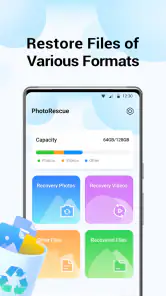
So, here's the lowdown. Once you install PhotoRescue-Recover Files, the app gets straight to business with a friendly interface that even my grandma could navigate. It scans your device for any deleted files - we’re talking photos, videos, documents, you name it. The app supports a wide array of file formats, making it pretty versatile. It’s like having a Swiss Army knife for data recovery right there in your pocket.
The scanning process is surprisingly fast, and it offers both a quick scan for recent deletions and a deep scan for those files you thought were long gone. I ran both scans on my device, and believe me, the results were impressive. Files I had deleted months ago popped up like ghosts from the past. It’s almost eerie how effective it is!
User Experience and Interface
Now, let's talk about the user experience because, honestly, who wants to wrestle with a complicated app when you're already stressed about lost data? Thankfully, this app keeps things simple. The layout is intuitive, with clear options and a straightforward recovery process. It's like the app is holding your hand through the whole ordeal, saying, "Don't worry, I've got this."
One thing I particularly appreciated was the preview feature. Before restoring a file, you can preview it to ensure it's the right one. This feature is a godsend, especially if you're trying to recover a specific photo from a batch of similar ones. No more guessing games!
You May Like

Clash of Clans Is Won Between the Battles

Android Auto Makes the Case for Quieter Car Software

MobiOffice: Transforming Mobile Productivity with Seamless Integration

EA SPORTS FC™ Mobile Soccer: Redefining Mobile Sports Gaming

How Microsoft OneDrive Became a Mobile Productivity Giant

How Google Translate Breaks Language Barriers Effortlessly
Make each scan deliberate
The most useful habit I would bring to a scan is to decide what I am trying to recover before opening the results. If I am after one picture, I would concentrate on photo candidates and use previews instead of restoring a broad batch. If the missing item is a video or document, I would keep that in mind while reviewing entries. A clear target makes it easier to notice a plausible match and less likely that I fill the phone with files I do not need.
I would also avoid treating a long result list as proof that every entry is intact. A thumbnail or filename can help identify something, but I would still open the restored copy to check that it is usable. This is especially worthwhile for a document needed for work or an image that looks similar to several others. The extra check takes little effort compared with discovering later that I restored the wrong item.
Settings and access worth considering
There is one permission decision that matters directly to the task: storage access. A recovery tool needs to inspect device files to search for deleted material, so I would read the access prompt and decide whether I am comfortable proceeding. If I only need to recover one item, I would use the app for that purpose rather than leaving an unfinished scan as a routine background habit. That is a straightforward way to keep the use intentional.
PhotoRescue is free, rated for Everyone, and its current version is 1.5.0.0 for Android 7.0 and newer. Those details make it accessible to a broad range of Android users, but they do not change the basic trade-off: scanning requires access to storage, and recovery depends on whether the sought material can still be found. I would not grant access casually if I had no recovery task in mind.
Performance and Reliability
Performance-wise, the app runs smoothly without any noticeable lag. It's lightweight, so it doesn't hog your phone's resources. I tested it on a couple of Android devices, and it performed consistently well across the board. The reliability of PhotoRescue-Recover Files is certainly a highlight, and it gives you peace of mind knowing that your data recovery is in good hands.
However, while the app is incredibly efficient, it does require access to your storage to perform its magic, which is pretty standard for data recovery apps. Just something to keep in mind if you're wary about privacy concerns.
Making Recovery Less of a Guessing Game
In an everyday situation, the preview step is more than a convenience. Say I delete a picture while clearing a crowded camera folder, then notice later that one image mattered: I would scan before taking more photos, inspect the candidate thumbnails, and restore only the match. That keeps the recovery attempt focused and avoids cluttering the phone with uncertain copies. For documents, I would check a few likely candidates rather than restoring everything in one sweep.
If a scan returns many results, a small habit helps: note what you remember about the file before starting, such as whether it was a photo or video and roughly when you last saw it. Then use the displayed results and previews to narrow the choices. Recovery apps can surface confusing or duplicate-looking entries, so careful selection is often more useful than simply running the longest scan available.
Choosing the Right Recovery Route
I would not make a recovery app the only safety net for important files. A cloud backup or a second copy on another device is usually a better first line of defense because it does not depend on a deleted file still being recoverable from local storage. PhotoRescue is more useful when the mistake has already happened and you need to search the phone itself. For something irreplaceable, I would check any existing backup first, then use the app as a separate attempt rather than assuming one method must work.
That distinction also answers a common practical question: should you keep scanning repeatedly? I would start with the scan that best fits the situation, review the results, and avoid needless repeat runs while continuing to use the device. A deeper search can be worth trying when a quick pass misses the item, but it is not a promise that older deletions will return. The longer you wait and the more the phone is used, the less predictable recovery can become.
When another route makes more sense
Compared with the usual choices, PhotoRescue fills a particular gap. A phone’s built-in deleted-items folder is easier to check and is often the most sensible first stop; a backup is more dependable when it already contains the file. This app is for the situation in between: the obvious trash check has not helped, and I want to try searching the device rather than giving up immediately. It is not a replacement for a backup, and I would not choose it over a known, clean copy.
For a work document that cannot be lost, or a photo that is the only copy of a major event, I would be cautious about experimenting on the phone that holds it. If the stakes are high, a professional recovery route may be a better choice than relying on a consumer app. For a casual deletion with no backup, though, a guided on-device attempt is a reasonable next step, provided I understand that results can vary.
Performance and Practical Limits
Photo recovery is the clearest everyday use case, but the app is also aimed at videos and files. That breadth is handy when the deleted item is not a picture, though it does not remove the need to verify what you are restoring. A file name or thumbnail may not tell the whole story; previewing first can prevent an unnecessary restore and help you distinguish similar items.
There are trade-offs. Storage access is necessary for scanning, and anyone uncomfortable with that should review the app’s access prompts and decide whether the task is worth it. The app is free and rated for Everyone, and version 1.5.0.0 is listed for Android 7.0 and newer. Its 240 written reviews add another perspective alongside the broader rating, but neither popularity nor a smooth interface can guarantee that a particular deleted file remains recoverable.
Another limit is expectation management. A quick scan, a deeper attempt, or a promising preview cannot make an item recoverable if it is no longer available to the app. I would treat every result as a candidate to inspect, not as proof that the file is restored until I have opened it. If the first attempt does not find what I need, repeating the same process while carrying on with normal phone use is unlikely to be a useful habit.
PhotoRescue is an Android app from SunnyTech Limited, and its 3.9 average comes from around 6,600 ratings. The 240 written reviews and more than 5 million installs show that it has reached a substantial audience, but those figures are context rather than a guarantee for an individual recovery. I would judge it by whether its simple scan-and-preview approach fits the urgency and importance of my own missing file.
Final Thoughts
All in all, PhotoRescue-Recover Files is a stellar app for anyone who wants to safeguard their digital memories and important files. Whether you're prone to accidental deletions or just want that safety net in place, it's a reliable choice that won't disappoint. So, next time you accidentally delete that photo of your dog doing something adorable, don't sweat it. Just let this app do its thing, and you'll have it back in no time.
In the world of data recovery, having a tool like this in your arsenal is just smart. So go ahead, give it a whirl and breathe easy knowing your files are just a rescue away!
Who I’d Recommend It To
I see PhotoRescue as a sensible option for someone who wants a simple on-device recovery attempt and is comfortable granting storage access to carry it out. Its approachable flow can be reassuring when stress makes complicated tools feel like too much. It is less suitable for anyone expecting guaranteed recovery, anyone who prefers not to let an app inspect device storage, or anyone who has already secured the file in a backup and has no reason to scan.
My repeatable approach would be to pause unnecessary phone use, check the phone’s own deleted-items area and backups, then try PhotoRescue if the file is still missing. I would preview before restoring, confirm the recovered copy opens, and make a separate backup once it is safe. That sequence makes the app a practical part of a recovery routine rather than a substitute for one. Used with realistic expectations, it is a useful tool to have available, but the best result is still preventing a single deletion from becoming the only copy of something important.
PhotoRescue-Recover Files Frequently Asked Questions
Is PhotoRescue-Recover Files free to download, and what should I know before installing it?
PhotoRescue-Recover Files is a free Tools app from SunnyTech Limited, with an Everyone content rating. Its store summary says it is designed to recover deleted photos, videos, and files. Before installing, check that your device meets the minimum operating-system requirement of version 7.0, and make sure you select the correct app from the official app store.
What is PhotoRescue-Recover Files and how does it work?
PhotoRescue-Recover Files is a powerful application designed to help users recover lost or deleted photos and files from various storage devices, such as smartphones, tablets, and memory cards. The app works by scanning the selected device for recoverable files and provides an easy-to-use interface to restore them. It supports multiple file formats, making it a versatile tool for data recovery.
Is PhotoRescue-Recover Files safe to use on my device?
Yes, PhotoRescue-Recover Files is safe to use on your device. The app is developed with user security in mind and does not modify or harm your existing data. It only scans and recovers files without overwriting the original data. However, it's always recommended to download such apps from official app stores to avoid any potential security risks.
What file formats does PhotoRescue-Recover Files support for recovery?
PhotoRescue-Recover Files supports a wide range of file formats, including JPEG, PNG, GIF, BMP for images, and various document formats like PDF, DOC, and TXT. This broad compatibility ensures that users can recover not just photos but also important documents and other file types that might have been accidentally deleted.
Can PhotoRescue-Recover Files recover files from all types of storage media?
PhotoRescue-Recover Files is designed to recover files from a variety of storage media, including internal device storage, SD cards, USB drives, and external hard drives. It scans these devices thoroughly to locate and restore lost files. However, the success of recovery might depend on whether the space has been overwritten by new data.
Pros
- Easy-to-use interface for quick navigation.
- Supports a wide range of file formats.
- Fast recovery process saves time.
- High recovery success rate.
- Includes preview feature before recovery.
Cons
- Limited free version capabilities.
- No real-time customer support.
- Can be resource-intensive on devices.
- Requires internet for full functionality.
- Occasional bugs in older device models.

- Category
- Tools
- Version
- 1.5.0.0












