Photo Recover Sweep
- 7.00
- 4.2
- Installs
- 1.00M
- Price
- Free

Screenshots

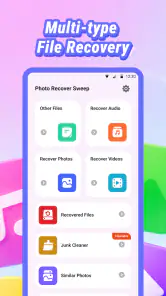





Analysis by Reviewed
Photo Recover Sweep is best approached as a first stop when an image, video, or other file has gone missing—not as a guarantee that every lost item can be brought back. I like the idea of having a focused recovery tool on a phone, where accidental deletions often happen in the middle of ordinary tasks. But recovery depends on whether the file is still available to find, so it pays to act promptly and keep expectations realistic.
Why timing and a simple plan matter
My clearest recommendation is to treat recovery as a short, deliberate task rather than a reason to keep tapping through different apps. If I notice a missing picture, I would stop taking new photos, avoid downloading large files, and check the places where the original might still exist. Then I would make one careful attempt with a recovery tool and verify anything it finds. Acting calmly and limiting new activity is a more useful approach than expecting any app to reverse every deletion.
This is especially relevant when the missing item is tied to a particular moment. Think of a traveler who deletes several images to free space at an airport, then realizes that one contains a booking detail or a photo they wanted to keep. They can first check the gallery’s deleted-items folder and any photo backup they already use. If neither helps, a phone-based recovery attempt is convenient while they still have the device in hand. The same workflow could suit a parent who accidentally removes a school-event photo or someone who clears a downloaded document before a meeting.
Those examples also show why the app is not a substitute for a backup. Recovery is a response to a problem; a backup is a way to reduce the chance that the problem becomes serious. For pictures or records that would be difficult to replace, I would keep a separate copy before relying on a recovery attempt. If the file is merely useful rather than irreplaceable, trying an on-device tool can be a reasonable, low-friction next step.
I would also distinguish between a file that has been deleted and one that is simply hard to find. Search the folder or app that originally held it, check whether it was moved, and consider whether another device received a copy. That quick detective work can save time and avoids treating every disappearance as a data-recovery problem. If the phone itself is damaged or cannot access its storage properly, a recovery app may not be the right tool for the underlying issue.
Where a phone-based recovery tool earns its place
Made by VBX ENTERPRISES LTD, this free Android utility is aimed at recovering personal media and files without turning the job into a desktop-computer project. Its current version is 1.3.0.0, and it runs on Android 7.0 or later. The basic appeal is practical: if I notice that a photo or document has disappeared while I’m using my phone, I can try a recovery app right there rather than first searching for a computer and cables.
That convenience matters most for small, recent mishaps. Imagine clearing space before a trip and realizing afterward that a useful image went with the unwanted files. A recovery tool can be worth trying before I make more changes to the phone. The key is to pause: avoid taking lots of new photos, downloading large files, or installing several utilities while looking for the missing item. New activity can make it harder for any recovery method to locate data that has been removed.
More From Our News Desk

Clash of Clans Is Won Between the Battles

Android Auto Makes the Case for Quieter Car Software

MobiOffice: Transforming Mobile Productivity with Seamless Integration

EA SPORTS FC™ Mobile Soccer: Redefining Mobile Sports Gaming

How Microsoft OneDrive Became a Mobile Productivity Giant

How Google Translate Breaks Language Barriers Effortlessly
The app’s focus is broad enough to cover photos, videos, and files, which makes it more useful than a tool that only addresses one kind of media. Still, I would treat those as possible recovery targets rather than a promise that every format, storage location, or deletion scenario will be handled equally well. The useful question is not simply “Can it recover files?” but “Is the missing item still recoverable from this phone?”
A focused alternative to searching everywhere
When something disappears, the usual first options are to check the phone’s recently deleted area, look through any backup or sync service I already use, and search other devices where I may have copied the file. Those routes are often preferable because they may restore the original without installing another tool. A dedicated recovery app becomes more relevant when those checks come up empty and I want one more on-device attempt.
That makes this app a complement to good file habits, not a replacement for them. If I regularly back up important photos and documents, I have a safer route than relying on recovery after deletion. If I do not, Photo Recover Sweep may provide a convenient next step, but I would still keep separate copies of anything important once it is restored.
There is also a useful distinction between accidental deletion and a file that has become inaccessible for another reason. A recovery tool may help with some missing-file situations, but it should not be treated as a repair service for a damaged device or as a way to recover content that was never stored locally. Knowing what happened before opening the app helps set a sensible expectation and keeps me from spending time on the wrong solution.
What I would do before scanning
My first move would be to stop using the phone for anything nonessential and check the places where the file might already be available. For a photo, I would look in the gallery’s deleted-items area and any photo service I normally use. For a document, I would check the app or folder where I created or downloaded it. If those checks fail, I would then try the recovery utility rather than installing several similar apps one after another.
This order is more than tidiness. It reduces unnecessary changes to the device and helps me tell whether the file was actually deleted or merely moved, hidden, or stored somewhere unexpected. It also avoids a common trap: seeing a recovery app as a reason to keep experimenting. If the missing item matters, fewer changes to the phone are generally a more careful approach.
After a scan or recovery attempt, I would verify the result immediately. Open the recovered image or video, check that it is complete, and make a separate copy if it is valuable. A file appearing in a result list is not the same as confirming that it opens correctly. For documents, I would also check that the contents are intact before relying on them for work or travel.
How it compares with the usual options
For a missing photo, the phone’s own recently deleted folder is usually the simplest place to start: it is already part of the gallery workflow and may let me restore the item without adding another app. A cloud photo service or an existing device backup can be a stronger option when the file was synced before it vanished, because that copy may be independent of the phone’s current storage. Those approaches depend on having used them beforehand, though; a recovery utility is more relevant when no convenient copy turns up.
Desktop recovery software is another alternative, but it asks for more setup and often means moving the task to a computer. That can make sense when the missing material is important, when a phone-based attempt does not help, or when I need a more deliberate recovery process. For a single recent deletion, the extra equipment and steps may feel disproportionate. The advantage of a mobile tool like this one is immediate access, not a guarantee that it can outperform every backup or desktop method.
I would avoid installing several recovery apps in succession just to compare their results. Each extra installation and scan adds activity to the phone, while overlapping tools can make it harder to judge what helped. A more disciplined comparison is to check built-in recovery and backups first, try one suitable mobile tool, and then decide whether the value of the missing file justifies seeking specialist help. That approach is particularly sensible for documents or images that cannot easily be replaced.
The trade-off: convenience is not certainty
The central limitation is inherent to phone recovery: deleted data may no longer be available to retrieve, especially after the storage has been used again or the file was removed from a place the app can reach. That means a failed result is possible even when I have followed sensible steps. I would not make this my only plan for recovering irreplaceable family photos, work records, or travel documents.
I also would not assume that a broad promise of handling different file types means every case is equally straightforward. A recently deleted image is a different problem from an old file on storage that has been heavily reused. For anything critical, a backup or professional recovery route may be more appropriate than repeated mobile scans. The app is most appealing when the stakes are modest enough for a convenient attempt, or when a quick recovery would be helpful but not essential.
There is a privacy consideration too. Files on a phone can be personal, so I would read the app’s permission prompts carefully and grant only what is needed for the task. I would be cautious about any recovery result that asks me to share private content elsewhere. This is sensible practice for any tool that works with personal media, not a claim about how this particular app handles data.
One practical trade-off is the time spent checking what a result actually contains. A thumbnail or filename can look promising without proving that the full-resolution image, complete video, or readable document has returned. I would open files one by one when the loss matters and copy successful recoveries to a separate location. If the app finds many possible items, that verification step can take longer than expected, so it is worth deciding in advance which files are priorities rather than treating every result as equally important.
Who is likely to find it useful
I would recommend trying Photo Recover Sweep if you use an Android phone, have just noticed a missing image or file, and want a straightforward on-device option before moving to a computer-based approach. It also suits people who are comfortable checking results themselves and understand that recovery can depend on timing and the file’s storage history.
It is less suitable for someone who expects a guaranteed restoration, needs to retrieve a large collection after a serious device failure, or has no tolerance for checking whether recovered items are complete. In those situations, an existing backup is the better first choice; for high-value data without a backup, a specialist may be a more responsible option. iPhone owners should also look for an option designed for their platform, since this app is for Android.
The app is free and rated for Everyone, so the barrier to trying it is low. It has an average rating of 4.2 from 623 ratings, with 1M+ installs. Those figures suggest that many Android users have tried it, but they do not tell me whether it will recover a particular person’s file. I would use them as context, not as evidence of a guaranteed result.
Its fit is strongest for someone who wants a quick, self-directed attempt and is willing to follow a careful sequence: check likely folders, review existing backups, try the app, and validate what comes back. It is a weaker match for someone who expects a one-tap answer to a complicated storage problem. If a file is tied to a deadline or has substantial personal value, I would not let convenience decide the whole recovery plan.
For a casual user, the most useful habit is to keep track of what happened just before the file disappeared. Did I delete it while clearing space, remove it inside a particular app, or stop seeing it after changing folders? That detail can point toward the right first step. If I cannot remember, I would still check the obvious locations before scanning, rather than assuming the app can search every place where a file might have been stored.
A sensible verdict for accidental losses
My overall view is that Photo Recover Sweep has a clear, useful role: it gives Android users a convenient recovery attempt for missing images, videos, and files, especially when the problem is recent and they want to act on the phone. Its strongest point is that focused, immediate workflow. Its most important weakness is the uncertainty that comes with trying to recover deleted data at all.
I would try it after checking the phone’s own deleted-items folders and any backups, then stop adding unnecessary data while I look for the missing item. If it finds something, I would inspect the file and save a separate copy. If it does not, I would avoid repeated experiments and move to a backup or more specialized option when the file is important.
Before starting, I would also decide what a successful outcome looks like. If I only need one particular image, I would concentrate on finding and validating that file rather than spending time reviewing unrelated results. If I am trying to locate a document, I would check that it opens in the app that normally handles it. This small step makes the process more useful because it turns “something appeared” into a clear decision about whether the recovery actually solved the problem.
For a casual, low-cost attempt on Android, that is a reasonable balance. I would keep the app in mind for an accidental deletion, but I would not let it replace regular backups or treat it as a promise that lost files can always come back. That distinction makes it a practical tool to try—and an easy one to recommend only to someone who understands what recovery can and cannot guarantee.
Photo Recover Sweep Frequently Asked Questions
What is Photo Recover Sweep, and what does it do?
Photo Recover Sweep is presented as a tool for finding and restoring deleted photos on a device. Its exact capabilities can depend on the app version, Android or iOS permissions, and where the images were stored. Before relying on it, check the store listing for supported file types and devices, and remember that an app cannot always recover files that have been overwritten or permanently removed.
Can Photo Recover Sweep recover every deleted photo?
No recovery app can guarantee that every deleted image will be restored. Success depends on factors such as how long ago the photo was deleted, whether new data has overwritten its storage space, and whether the image is still available in a trash folder, backup, or cache. Try recovery as soon as possible, avoid saving new files to the device, and check your cloud and gallery trash folders too.
Does Photo Recover Sweep require special permissions or access to my photos?
A photo recovery app generally needs permission to scan relevant media or storage locations, so Photo Recover Sweep may request access to photos, files, or device storage. Review each permission prompt and grant only access that makes sense for the feature you intend to use. You should also read the app’s privacy policy to understand whether scanned files or related information are collected, stored, or shared.
Is Photo Recover Sweep free, and are there in-app purchases or limits?
Pricing and feature limits can vary by platform, region, and app version. Check the Google Play or Apple App Store listing before installing to see whether Photo Recover Sweep includes ads, subscriptions, in-app purchases, or restrictions on scanning and restoring images. If a payment is required, confirm the price and renewal terms in the store, and avoid assuming that a free download means every recovery feature is free.
Is Photo Recover Sweep available for Android and iOS, and what should I check before downloading?
Availability and compatibility should be confirmed on the official store for your device, since an app may be offered on one platform but not the other, or may require a particular operating-system version. Check the developer name, recent update date, user reviews, requested permissions, and support information before downloading. For important images, also check device backups and recently deleted folders, which may offer a safer recovery route.
Pros
- Simple workflow makes it easy to scan for recoverable photos.
- Previewing found images helps verify files before restoring them.
- Can be useful for locating pictures accidentally deleted from a device.
- Recovery results are organized for easier browsing.
- A focused photo-recovery tool avoids the complexity of broader utilities.
Cons
- Recovery is not guaranteed
- especially after storage space is overwritten.
- Scans may take longer on devices with large photo libraries.
- Some features or recoveries may require an in-app purchase.
- Recovered images may have missing details or reduced quality.
- Results can include duplicates or photos that are not useful.

- Category
- Tools
- Version
- 1.3.0.0