Phone Junk Files Clear
- 15.00
- 3.9
- Installs
- 100.00K
- Price
- Free

Screenshots
Analysis by Reviewed
I judge a file-cleaning app by a simple question: does it help me make a sensible choice about unwanted files, or does it just make cleaning sound effortless? Phone Junk Files Clear is aimed at the first, everyday problem—getting a phone’s storage back under control—without asking users to pay to try it. My view is that it is worth considering if you want a straightforward cleaning tool, provided you treat its suggestions as something to review rather than a reason to delete carelessly.
Free to try, with a focused purpose
Phone Junk Files Clear is a free tools app from DingBAng. That makes the initial value proposition clear: you can try it without deciding whether a subscription or one-time purchase is worth it. The app is listed for Everyone and has a 3.9 average from around 120 ratings, with more than 100,000 installs. Those figures suggest it has attracted a real audience, but they are context, not proof that it will suit every phone or cleaning habit.
The app is at version 1.0.0, so I would approach it as a focused utility rather than a mature suite with a long list of established extras. Its release date is September 2, 2026, and it requires Android 10 or later. That operating-system requirement matters more than the low-friction price: if your device runs an older Android version, this is not the right option for it.
Free access is useful when you only need occasional help clearing clutter, but it does not automatically make the app valuable. The real test is whether it helps you identify files you are comfortable removing and whether the result is worth the time spent checking. I would not install it expecting a complete phone-maintenance package; its purpose is file cleaning, and I would assess it on that job alone.
What a cleaning tool can—and cannot—solve
Storage pressure often comes from a mix of things: downloads you no longer need, duplicate or forgotten media, and temporary files created while using apps. A cleaner can be a helpful starting point, but it is not a substitute for deciding what matters. Files that look disposable may include a document you saved for later or a media item you meant to keep.
My practical advice is to use any cleanup recommendation as a prompt to inspect, not as a command to accept. Before removing anything, consider whether it is easy to recreate or retrieve. If a file is personally important, keep a separate copy first. That cautious habit is especially useful when you are cleaning in a hurry or freeing space for a large download.
One useful workflow is to clean in short, intentional sessions rather than trying to purge everything at once. Start when the phone is low on space, deal with files you recognize, then check whether your storage problem has actually improved. This makes it easier to notice if an apparent cleanup would remove something you still use, and it avoids turning a routine task into a broad, indiscriminate deletion.
More From Our News Desk

Clash of Clans Is Won Between the Battles

Android Auto Makes the Case for Quieter Car Software

MobiOffice: Transforming Mobile Productivity with Seamless Integration

EA SPORTS FC™ Mobile Soccer: Redefining Mobile Sports Gaming

How Microsoft OneDrive Became a Mobile Productivity Giant

How Google Translate Breaks Language Barriers Effortlessly
Where its value is strongest
The clearest benefit is convenience for someone who wants a dedicated place to tackle phone clutter instead of hunting through folders without a plan. If you tend to leave downloads untouched or postpone checking stored files, a cleaning app can give the task a clear starting point. The value here is less about dramatic transformation and more about making a small maintenance job easier to remember and approach.
It can also be useful before a trip or a day when you expect to take many photos or videos. Rather than waiting until the camera cannot save another file, review what is already on the phone while you still have time to make careful choices. That is a realistic situation where a focused cleaner may be more convenient than opening several storage locations and deciding where to begin.
A less obvious trade-off is that freeing space is only temporary if the same habits keep filling it. If your phone repeatedly runs short because you save large media or keep extensive offline content, deleting incidental clutter may not address the underlying cause. In that case, reviewing downloads, moving files you want to preserve, or changing how you store media is likely to matter more than running a cleaner repeatedly.
How it compares with built-in storage tools
Android’s own storage controls are the natural alternative. They are often the better first stop if you want to inspect what is taking up room using the phone’s built-in settings. A dedicated app is more appealing when you prefer a separate, task-oriented cleaning experience, but it should earn that extra place on your phone by making the process clearer or more convenient for you.
Manual cleanup is another reasonable choice, especially if you already know where your unwanted files are. It gives you direct control, though it can take more effort and makes it easier to overlook clutter spread across different folders. Phone Junk Files Clear is best understood as a possible shortcut into that work, not a guarantee that every suggested deletion is safe or that storage will stay free afterward.
I would also resist comparing it with broad “optimizer” apps that promise to improve every aspect of a phone. This app’s stated purpose is narrower. If your real problem is battery life, sluggish performance, or managing backups, a file cleaner is unlikely to be the right answer simply because those issues can feel related to a full device.
Small habits that make cleanup safer
Before starting, decide what kind of space you need and what you are unwilling to lose. If you only need room for a temporary download, remove files you recognize as disposable rather than treating the session as a full reset. That distinction keeps the task proportionate and makes it less likely that convenience will override your judgment.
After cleaning, check the phone’s storage controls to see whether the change was meaningful. This is a useful reality check: a cleaner may make the process feel productive, but your device’s own storage view tells you whether the space situation changed enough for your needs. If the difference is small, look for large files or apps you no longer use instead of repeating the same cleanup.
For files you might need later, consider whether you can preserve them somewhere appropriate before removing a local copy. This is particularly relevant for travel documents, work materials, and personal media. A cleaner is most helpful when it reduces clutter without forcing you to recreate something important afterward.
Who should consider it, and who should pass
I would consider this app if I used Android 10 or newer, wanted a free tool focused on file cleanup, and was comfortable checking items before deleting them. It may suit people who prefer a dedicated utility over navigating storage menus, or those who need a reminder to review accumulated clutter now and then.
I would skip it if I already manage files comfortably through Android’s built-in tools, if I am looking for a wider device-tuning app, or if I expect a cleaner to permanently solve recurring storage shortages. It is also not an option for devices below its minimum Android requirement. For anyone uneasy about deleting files, the safer choice is to begin with manual review and keep important material backed up.
The 3.9 average and modest review count are worth keeping in perspective: they give a rough sense of how the app has been received, but they cannot predict how it will fit your own device or habits. I would use the app’s free availability as a reason to assess its usefulness for myself, not as a reason to grant automatic trust to every cleanup action.
My verdict on the trade-offs
Phone Junk Files Clear makes the most sense as a practical, no-cost starting point for people who want help approaching file clutter. Its strongest potential value is convenience; its central limitation is that cleanup still depends on your judgment and on whether unwanted files are actually the main reason your storage is tight. A dedicated cleaner cannot make every deletion risk-free or prevent new clutter from accumulating.
If I wanted a simple way to begin reviewing junk files and my phone met the Android requirement, I would be comfortable trying it while keeping control of what gets removed. If I already knew how to find the files I wanted to delete, I would stick with the built-in storage tools instead. In short, it is worth a try for a focused cleanup task—not a must-have for every phone, and not a replacement for thoughtful file management.
A realistic cleanup session without rushing
Imagine you are about to leave for a weekend away and want enough room for new photos. I would not begin by selecting everything a cleaner labels as unnecessary. I would first decide what needs to stay available offline, then use a short session to review low-risk clutter and check the result in Android’s storage controls. If space is still tight, that is a signal to investigate larger items rather than repeat the same sweep.
This order matters because familiar-looking file names can be misleading, especially when a folder contains saved work or media from a messaging conversation. A useful habit is to pause on anything you do not recognize and inspect it through a file manager before removing it. The extra step is slower, but it is a sensible trade when the cost of deleting something important is higher than the inconvenience of leaving a little clutter behind.
Questions to settle before installing
If you are wondering whether the app can replace Android’s own storage view, I would treat it as an alternative way to approach cleanup, not a substitute for checking what is using space. Built-in controls remain useful for understanding the broader storage picture; a dedicated cleaner is worth keeping only if its focused workflow is easier for you to act on.
You also do not need to run a cleaner on a fixed schedule just because the option is available. I would use it when storage pressure gives me a reason to review files, then stop once I have dealt with the items I can confidently remove. Repeated cleaning without checking the cause can waste time while large downloads, offline media, or unused apps continue to occupy the space that matters.
For someone deciding between this app and doing everything manually, the trade is straightforward: the app may help establish a starting point, while manual browsing offers direct control and avoids adding another utility. If you are comfortable navigating folders, manual review may be enough. If the hardest part is remembering to start, a dedicated tool may earn its place through convenience rather than through any promise of automatic results.
Who gets the most practical value
I see the strongest fit for people who want occasional help organizing a cleanup, not for users expecting a hands-off fix. It is more appealing when you have time to review choices and a clear reason to free space, such as preparing for a trip or making room for files you already intend to save. If you are in the middle of an urgent task and cannot afford to inspect suggestions, postponing cleanup is safer than tapping through it quickly.
There is also a useful distinction between a phone that feels cluttered and one that is genuinely short on storage. If the device has plenty of room but your folders are untidy, the app may offer a convenient maintenance routine. If storage is repeatedly consumed by content you actively use, changing what you keep locally is likely to have more lasting value than clearing incidental files. That is the point at which I would favor reviewing media and downloads directly over relying on a cleaner.
Overall, the free price makes experimentation low-commitment, but the app still has to justify the attention and space it takes on your device. I would try it only if its focused approach fits the way I handle files, and I would keep using it only if it makes cleanup clearer than the built-in alternative. That is a practical standard for a tool whose value comes from helping you make better choices—not from promising to make those choices for you.
Phone Junk Files Clear Frequently Asked Questions
What does Phone Junk Files Clear do?
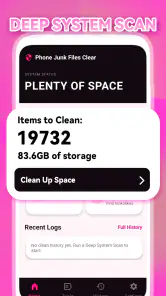
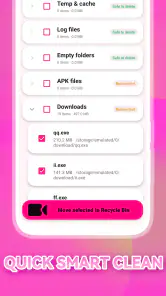
Phone Junk Files Clear is intended to help you identify and remove unnecessary files that may take up storage, such as temporary data, app caches, or leftover files. The exact cleanup options depend on the app version and the Android device. Review the items it proposes to delete before confirming, since some files that appear unnecessary may still be useful to an app or to you.
Can Phone Junk Files Clear speed up my phone?
Removing cached or temporary files can free storage, which may help when your device is running low on space. However, a cleaner app cannot reliably make every phone faster, and deleting cache may mean apps need to rebuild data or load content again. Performance also depends on factors such as available memory, background activity, device age, and the apps you use.
Is Phone Junk Files Clear safe to use, and could it delete important files?
Its safety depends on the permissions it requests and the cleanup choices you make. Check the file categories and locations shown before running a cleanup, and avoid deleting personal downloads, photos, documents, or files you do not recognize. For added peace of mind, keep backups of important data and review the app’s privacy information and permissions before installing.
Is Phone Junk Files Clear free, and does it contain ads or in-app purchases?
Pricing, advertising, and optional purchases can vary by release, region, and app store listing. Check the current Google Play or Apple App Store page for the latest details before downloading, including whether the app offers a subscription or paid features. Also review the developer information and recent user feedback so you know what to expect from the version available to you.
How do I download and use Phone Junk Files Clear?
Download the app only from an official store or a trusted source, and confirm that the listing matches the app you intend to install. After opening it, review any permission requests, scan the suggested categories, and select only items you are comfortable removing. Menu names and available features may differ across versions, so follow the on-screen guidance and check results before exiting.
Pros
- Quickly identifies common junk files for cleanup.
- Simple interface is easy for first-time users to navigate.
- Manual review helps avoid deleting files you want to keep.
- Can free up storage without uninstalling apps.
- Useful for occasional maintenance on phones with limited space.
Cons
- Some suggested files may be useful
- so check before deleting.
- Cleaning results can vary depending on your device and Android version.
- It cannot make a phone’s hardware faster or improve battery health.
- Cleanup may need to be repeated as apps create new temporary files.
- Ads or upgrade prompts may interrupt the cleanup experience.
- Category
- Tools
- Version
- 1.0.0








