Phone Call
- 803.00
- 4.2
- Installs
- 5.00M
- Price
- Free

Screenshots


Analysis by Reviewed
I spent time using Phone Call as a practical call-management tool rather than treating it as a replacement for every communication app on my phone. Its focus is clear: it brings caller identification, call blocking, and related smart call features into one place. That makes it most interesting for people who want more control over incoming calls without paying for the basic experience.
Phone Call is a free Tools app from Call Log Manager, available for users on Android 7.0 or later. It is aimed at an Everyone audience, so its purpose is straightforward enough for a broad range of phone users. The current release is version 1.19, and the app has already passed five million installs, with an average score of 4.2 from around twenty-two thousand ratings. Those figures suggest that it has found a substantial audience, although they do not remove the need to decide whether its particular approach suits your daily calling habits.
How Phone Call fits into everyday call management
The first thing I noticed is that Phone Call is built around the moments when an ordinary phone becomes irritating: an unknown number appears, a repeated nuisance caller gets through, or the call history becomes difficult to use. Instead of handling each problem separately, the app puts its attention on identifying callers, stopping unwanted calls, and making the calling experience feel more deliberate.
That sounds simple, but the distinction matters. A basic phone dialer is mainly concerned with placing and receiving calls. Phone Call is more useful when the question is not “Can I call this number?” but “Should I answer this number, and do I want it to reach me again?” In my experience, that makes it a better fit for people who receive frequent unfamiliar calls than for someone who only makes occasional calls to saved contacts.
The app’s short store description is simply “Phone Call,” while its broader summary points to caller ID, blocking, and smart call management. I would not judge it by the short label alone. Its practical value comes from the combination of those functions, especially when they are used as a routine rather than as emergency tools after a nuisance call has already caused trouble.
What the free access means in practice
Phone Call is free to use, which gives it an immediate advantage over paid call-management utilities. There is no purchase price to weigh against the features described here, so trying it is a relatively low-commitment decision. That is important in this category because caller identification and blocking are personal preferences: one user may appreciate extra screening, while another may prefer the quiet simplicity of the built-in phone app.
The free price should still be understood accurately. It tells me that access does not require a paid purchase; it does not automatically mean the app will be the best choice for every phone or every calling pattern. Value also depends on how well the app fits with the phone’s existing dialer, how often you need its tools, and whether you are comfortable making a third-party app part of your call routine.
For someone who wants to test caller ID and blocking without spending money first, that distinction makes Phone Call easy to consider. For a person who already has a dependable system built into the phone, the free cost may not be enough reason to change. The real question is whether the added organization and control are noticeable in daily use.
Caller identification is most useful before you answer
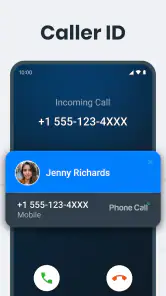
Caller ID has its greatest value before the call is picked up. When an unfamiliar number appears, having context can help me decide whether to interrupt what I am doing, let the call pass, or deal with it later. That small decision can make a meaningful difference for people who use their phone for work, deliveries, appointments, family matters, or any situation where important calls arrive from numbers that are not already saved.
A useful habit is to treat identification as a decision aid rather than an absolute guarantee. I would still avoid sharing sensitive information simply because a caller appears to be recognized. Caller ID can reduce uncertainty, but it should not replace ordinary caution. The strongest workflow is to use the information to choose how to respond, then verify anything important through a trusted channel.
This is also where Phone Call can be more convenient than relying on a separate lookup service. A separate tool may require copying a number, switching screens, and returning to the call history. Keeping the process close to the phone experience is more practical when a call is arriving at an inconvenient moment.
Blocking works best as a deliberate routine
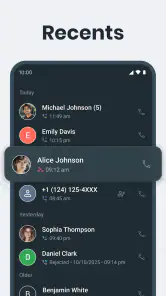
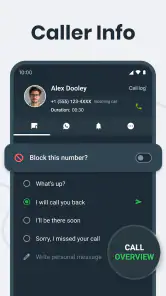
The blocking feature is not only for dramatic cases. I found the idea more useful when viewed as a small maintenance task: after deciding that a number is unwanted, block it promptly so I do not have to make the same decision repeatedly. That approach is especially helpful for persistent callers who keep returning to the recent-call list.
There is a trade-off here. Blocking is convenient when a number is clearly unwanted, but it deserves more care when calls might be legitimate. A number that is unfamiliar today could belong to a clinic, courier, school, workplace, or service provider. I would review the recent call context before blocking a number permanently, particularly if I am expecting an important call from an organization that may use different lines.
One practical workflow is to separate immediate reaction from later cleanup. Let an uncertain call go unanswered, check the information Phone Call provides, and then decide whether to return it, save it, or block it. This avoids making a rushed choice while still keeping nuisance numbers from becoming a recurring interruption.
Smart features are valuable when they reduce decisions
The phrase “smart features” can cover a lot of ground, so I would judge that part of Phone Call by the decisions it helps me make rather than by the label itself. The useful standard is simple: does the app help me spend less time sorting calls, and does it make the next action clearer? Caller ID and blocking already support that goal, while the surrounding call-management tools can make the history more useful than a bare list of numbers.
For me, the best use is not constant checking. It is setting up a consistent response to recurring situations. Unknown calls can be reviewed, familiar contacts can be handled normally, and clearly unwanted callers can be blocked once rather than reconsidered every time. That creates a calmer routine without requiring me to inspect every call in detail.
I would avoid expecting the app to make every call decision automatically. A phone-management tool is most helpful when it supports judgment, not when it encourages blind trust. The more sensitive the call, the more important it is to combine the app’s information with context from my own contacts and expectations.
A realistic day-to-day example
Imagine I am waiting for a delivery while working, and an unfamiliar number rings several times during the afternoon. I do not want to answer every unknown call, but I also do not want to miss the delivery driver. Phone Call can help me inspect the incoming call context, decide whether the number looks relevant, and keep a record of what happened. If another number repeatedly interrupts the day without being useful, I can block it after checking the history.
The benefit in that scenario is not that the app eliminates every unwanted call. The benefit is that it gives me a repeatable process: identify, decide, and block only when appropriate. That is more realistic than expecting a call tool to know my personal priorities perfectly.
Where it compares well with the usual alternatives
The most obvious alternative is the phone’s built-in dialer. That option usually wins for people who prefer fewer apps and already have enough caller information and blocking control. It is also the safer-feeling choice for users who want their calling experience to remain as close as possible to the operating system’s default behavior.
Phone Call becomes more appealing when the built-in experience feels too basic. Its purpose is to put caller ID and blocking at the center of the workflow instead of leaving those tasks scattered across call history, contact settings, and occasional manual searches. If I regularly deal with unknown callers, that focus can be more valuable than the simplicity of the default dialer.
Another alternative is a specialized caller-identification service. Such a service may suit people who want a large identification network or more specialized screening, but it may also be more than a casual user needs. Phone Call is easier to justify when I want a free, focused call tool rather than a broader service with a more involved setup or a different pricing model.
There is also the manual approach: ignore unknown calls, search numbers myself, and block them through the phone. That costs nothing, but it costs attention. Phone Call’s strongest value is for the person who is tired of repeating those steps. If unknown calls are rare, manual handling may remain perfectly adequate.
Small habits that make the app more useful
I would start by reviewing the call history at a calm moment rather than configuring everything while a call is ringing. That makes it easier to recognize patterns and decide which numbers deserve attention. A quick review after a busy day can reveal whether a caller was a one-time event or part of a repeated nuisance.
Second, I would avoid blocking based only on unfamiliarity. The better rule is repeated unwanted contact or a clear reason not to receive calls. This preserves the chance of hearing from legitimate numbers that are not yet in my contacts.
Third, I would use caller ID as a prompt to verify, not as permission to disclose information. If someone claims to represent a bank, delivery company, or public service, I would end the call and use a trusted number if the subject is sensitive. That habit protects against the risk of treating identification as proof of legitimacy.
Finally, I would keep the app’s role narrow. Phone Call is about managing phone calls, not replacing messaging, video calling, or a full contact-management system. Keeping that expectation clear makes it easier to notice whether the app is genuinely improving the part of the phone experience it targets.
Limitations and points of friction
The main limitation is that call management is highly dependent on personal tolerance. Some people want aggressive filtering, while others would rather see every call and make their own decision. Phone Call’s focus will feel helpful to the first group and unnecessary to the second. Installing it does not automatically improve a phone that already handles calls exactly as its owner prefers.
There is also a learning curve whenever a third-party call tool becomes part of a familiar phone routine. Even a focused app can require a short adjustment period while I learn where to review information, how to handle uncertain numbers, and when blocking is appropriate. That friction is modest, but it matters for users who value a completely invisible experience.
Blocking can create its own risk if used carelessly. A missed legitimate call may be more inconvenient than a nuisance call, so I would not treat the blocking function as something to apply broadly without review. The app is strongest when I remain selective.
Privacy-minded users may also prefer to keep call handling as close to the built-in phone system as possible. I would recommend reading the app’s permission and privacy screens carefully before making it part of a regular calling workflow. That is not a criticism unique to Phone Call; it is a sensible checkpoint for any tool that works around phone calls and caller information.
Who is likely to get the most value
Phone Call is a good match for people who receive many calls from numbers they do not recognize and want a clearer way to decide what deserves attention. It can also suit anyone who repeatedly blocks nuisance callers and wants that task to be more organized. Because it is free, it is particularly easy to test when the built-in dialer feels limited but paying for a larger service seems unnecessary.
It may be useful for a busy parent, freelancer, student, or small-business owner who cannot answer every call but still needs to distinguish potential work or service calls from distractions. The value comes from reducing interruptions and making follow-up decisions more consistent, not from adding entertainment or communication features outside the phone itself.
I would be less likely to recommend it to someone who almost always calls saved contacts, rarely receives unknown numbers, or strongly prefers the default phone interface. It is also not the right choice for a user seeking a complete communications platform. In those cases, the built-in dialer or a more specialized service may be a better fit.
My buy-or-skip verdict
Phone Call is worth trying when free access, caller identification, and practical blocking are exactly what you need. Since there is no purchase price to recover, the decision is mainly about usefulness and comfort. If unknown calls regularly interrupt your day, the app offers a focused way to make those moments easier to handle.
I would not install it simply because it has a large audience or a solid average rating. Those signs make it credible enough to investigate, but the deciding test is personal: does it make your call history easier to understand and your blocking decisions easier to manage? Give it a short trial during a normal week, especially if nuisance calls are a recurring problem.
My final view is favorable but measured. Phone Call delivers the most value as a focused call-management layer, not as a universal replacement for the phone experience. The free model removes the financial barrier, the tools address real everyday annoyances, and the app can create a sensible identify-and-decide routine. I would skip it if the default dialer already does everything I need or if I want a broader communications suite. For everyone else, especially users tired of sorting unfamiliar and unwanted calls manually, it is a practical option from Call Log Manager.
Pros
- Simple interface makes placing calls quick and straightforward.
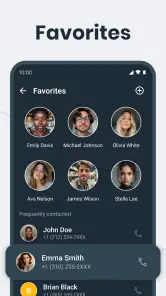
- Useful contact access helps you find people without extra navigation.
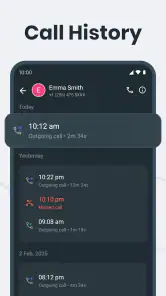
- Call history makes recent incoming and outgoing calls easy to review.
- Reliable basic calling features work well for everyday conversations.
- Familiar layout is easy for most Android users to understand.
Cons
- Call quality can depend heavily on your network coverage.
- Advanced calling tools may be limited compared with third-party dialers.
- The app may require phone and contact permissions to function fully.
- Spam protection may not identify every unwanted caller.
- Some features can vary depending on your device or mobile carrier.

- Category
- Tools
- Version
- 1.19











