PFP Maker: Cat Emoji
- 77.00
- 4.0
- Installs
- 1.00M
- Price
- Free
Screenshots
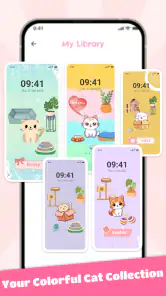
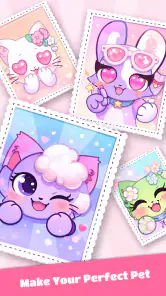
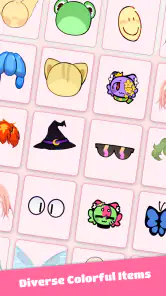
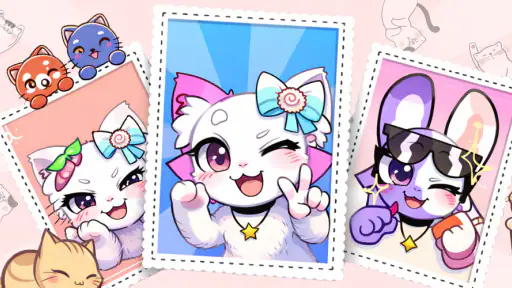
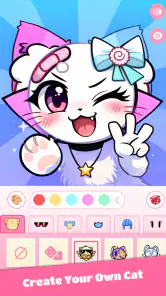
Analysis by Reviewed
I approached PFP Maker: Cat Emoji as a small creative tool rather than a full illustration studio, and that distinction matters. Its purpose is focused: helping me make cute cat-themed profile pictures and emoji-style images without opening a complicated design program. After spending time with it, I found the appeal easy to understand. It turns a familiar profile-picture task into something playful, quick, and personal, especially if you already enjoy cat characters, soft colors, and simple avatar design.
The app belongs to the art and design category and is developed by AthenaHotC. It is free to use, suitable for Everyone, and has reached over a million installs. Its average rating sits at 4.0 from around two thousand ratings, which suggests a generally positive reception while also leaving room for the kind of limitations I noticed during use. This is not an app I would choose for professional branding, but it can be a pleasant option when I want a friendly identity image for a social profile, messaging account, gaming handle, or casual community.
How PFP Maker: Cat Emoji feels in everyday use
A focused canvas for quick cat avatars
The strongest part of the experience is its narrow focus. I did not have to begin with a blank page, learn layers, or decide how to draw a face from scratch. The whole idea is built around making a cat-inspired avatar, so the creative process feels lighter than it would in a general-purpose editor. That makes the app approachable for someone who wants a result in a few minutes rather than a new hobby.
I found this especially useful when thinking about profile images. A good profile picture needs to remain recognizable when it is displayed very small, and a simple cat face can work better than a busy photograph or a detailed illustration. The format also gives the image a consistent personality. Instead of trying to look polished in a corporate way, I could make something warm, humorous, or deliberately cute.
The app’s store short description calls it a PFP Maker, and that is an accurate way to set expectations. I would not install it expecting a broad collection of drawing tools or a complete image-editing workflow. It is better understood as a character-customization utility for people who want a cat-based visual identity.
Who will get the most from it
I think the best audience is anyone who changes profile pictures often, enjoys cute digital art, or wants an avatar that feels more distinctive than a default icon. It also suits users who are not confident artists. The guided nature of a themed maker removes the pressure of drawing a convincing animal. You can concentrate on choosing a mood and appearance instead of worrying about anatomy, shading, or composition.
It can also be a fun choice for families and younger users because the content rating is Everyone. That does not automatically make every creative decision ideal for every child, so normal supervision still makes sense when a device is shared. Still, the accessible theme and simple goal make it easier to introduce than a professional art application with a dense interface.
More From Our News Desk

Clash of Clans Is Won Between the Battles

Android Auto Makes the Case for Quieter Car Software

MobiOffice: Transforming Mobile Productivity with Seamless Integration

EA SPORTS FC™ Mobile Soccer: Redefining Mobile Sports Gaming

How Microsoft OneDrive Became a Mobile Productivity Giant

How Google Translate Breaks Language Barriers Effortlessly
On the other hand, I would skip it if I needed a realistic portrait, a business logo, a complete social-media post, or an avatar that uses a non-cat character. The theme is the reason to download it, but it is also the main boundary. Someone looking for flexible photo retouching or unrestricted illustration would be better served by a general design editor.
A realistic profile-picture workflow
One practical situation is setting up a new account in a group chat. I might not want to use my real photo, but a generic colored circle feels forgettable. With this app, I can create a cat face that reflects my personality, save it, and use it consistently across services. I would first aim for a strong silhouette and a clear expression, then check the result at a small size before deciding whether it works as a profile image.
That last check is more important than it sounds. Details that look charming on the creation screen can disappear inside a tiny circular crop. I recommend making the eyes, ears, and main color contrast do most of the work. If the avatar is intended for a messaging app, I would also leave visual breathing room around the head so the platform’s crop does not cut off important features.
For a second use case, I could make several related images for a small online group: one with a cheerful expression, another with a sleepy mood, and another with a more mischievous look. They would not replace a professionally commissioned set of custom stickers, but they could give a casual group a shared visual language without requiring everyone to learn an art program.
Small decisions make a bigger difference than expected
My first useful lesson was to avoid choosing every cute element at once. A cat avatar can become visually crowded when too many decorative choices compete with the face. I got better results by selecting one main feature, such as a strong color or memorable accessory, and treating everything else as support. That approach makes the final image easier to recognize and less likely to look like a random collection of stickers.
A second tip is to design for the destination rather than for the editor. If the image will appear next to short messages, a bold expression may communicate more effectively than subtle decoration. If it will be used on a profile page with a larger display, I can afford to pay more attention to secondary details. The same creation can feel successful or disappointing depending on where it is viewed.
A third trade-off involves consistency. Making one avatar is quick, but making a matching set requires restraint. I would keep the same general color family and facial style while changing only one element at a time. That is useful for separating personal and community accounts without losing the sense that the images belong together.
What the current release tells me
The current version is 1.1.4, and the app was released on September 4, 2024. Those details place it in a relatively early stage compared with long-established design suites. I see that as a reason to judge it primarily on whether the central avatar-making task is pleasant and dependable, rather than expecting the depth of a mature illustration platform.
For existing users, the version number is also a practical reference point. If a previous installation behaves differently after updating, checking that the device is running the current release can help separate an app change from a device-specific problem. I would keep exported creations backed up independently instead of assuming that a future update will preserve every temporary project or setting exactly as I left it.
The minimum operating-system requirement is Android 7.0. That makes the app accessible on many older Android devices, which is helpful if you do not own a recent phone. At the same time, older hardware can make any visual editor feel less comfortable, particularly when switching between customization choices or previewing an image. I would keep expectations realistic on an aging device and close other demanding apps if the interface feels sluggish.
How it compares with the usual alternatives
Compared with a general drawing app, this tool is faster to understand and less intimidating. A drawing application gives me control over every line, but that control comes with a learning curve. I would choose the drawing app when I wanted a completely original cat, hand lettering, a detailed scene, or precise edits. I would choose this one when I wanted a ready-made visual direction and a quick result.
Compared with a photo editor, the difference is even clearer. Photo editors are better for cropping, lighting, background removal, and combining multiple images. They may also be more useful when my profile picture needs to represent a real person, pet, or product. PFP Maker: Cat Emoji is more suitable when I want the image to feel illustrated and intentionally playful rather than photographic.
There is also a difference between this kind of maker and a sticker platform. A sticker-focused app usually emphasizes sending expressive images in conversations, while a profile-picture maker has to work as a compact identity mark. I would use a sticker tool for a large range of reactions and this app for a consistent cat persona. They can complement each other, but they solve different problems.
Where the experience still feels limited
The focused design can become restrictive after the novelty wears off. If I want to move beyond cat avatars, the app is no longer the right workspace. Likewise, users who enjoy fine control over typography, backgrounds, color values, or complex composition may find the creative ceiling too low. The free price makes experimentation easy, but it does not turn a specialized maker into a full design suite.
I also think users should be prepared to judge the final image themselves rather than trusting the preview blindly. A profile service may crop the artwork into a circle, compress it, or display it against a different background. Before uploading, I would save the finished image and inspect it in the same approximate size and shape used by the destination service. That simple step prevents an attractive design from becoming an unclear thumbnail.
Another consideration is originality. A themed avatar maker can help me create something personal, but the overall visual language may still feel familiar because other people are using the same kind of tool. If standing out is essential, I would use the result as a starting point and add a distinctive personal touch in another editor, provided that workflow is allowed and practical for the intended platform.
Questions I would answer before installing
If you are wondering whether it costs anything to try, the app is free. That makes it easy to test without committing money first. I would still approach it as a focused creative experiment: install it when I want a cat profile picture, not because I expect a complete catalog of design functions.
If you are asking whether it is appropriate for a younger user, its age rating is Everyone. The theme is broadly accessible, and the main activity is creating cute visual avatars. As with any app used on a shared device, I would still check the finished images and device settings personally rather than treating an age label as a substitute for supervision.
If you want to know whether an older Android phone can run it, the minimum requirement is Android 7.0. That is reassuring for people who have not upgraded recently. Performance can still depend on the individual device, so I would make sure there is enough free storage for saved creations and avoid judging the app solely from a preview on a much newer phone.
If you are deciding whether it can replace a professional design application, my answer is no. It is useful for fast, friendly cat avatars, but it is not the tool I would pick for brand identity, detailed illustration, or a carefully controlled marketing asset. Its value comes from reducing the work needed for one specific kind of image.
Finally, if you already use the app, the current release gives you a sensible point of comparison when evaluating future changes. I would watch for improvements that make saving, revisiting, and adapting creations easier, because those areas matter once a user has made several avatars. I would also pay attention to whether future updates preserve the app’s simple character instead of adding so many controls that the quick workflow becomes cumbersome.
My recommendation after using it
I would recommend PFP Maker: Cat Emoji to a friend who wants a cute cat identity image without learning a complicated editor. It is approachable, specific, and practical for profile pictures, casual communities, and playful online accounts. The best results come from keeping the design readable, choosing a small number of memorable details, and checking the image at its final display size.
I would not recommend it to someone searching for a general art studio or a flexible avatar system with unlimited subject choices. In those cases, a drawing or photo-editing app will offer more room to grow. For the right user, though, the specialization is a strength rather than a weakness. The app works best when speed, charm, and a recognizable cat personality matter more than complete creative control.
PFP Maker: Cat Emoji Frequently Asked Questions
Can I make a cat avatar that feels personal rather than using a ready-made picture?
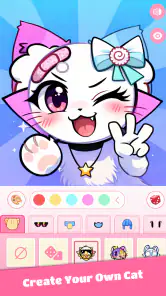
Yes. PFP Maker: Cat Emoji is designed around customizing cat-themed profile pictures, so you can shape a playful avatar instead of simply choosing a finished image. Its appeal is the variety of visual choices, including character features, expressions, colors, accessories, and backgrounds. It is a handy option for cat lovers who want a cartoon-style image that feels more like their own.
What is PFP Maker: Cat Emoji, and what can I create with it?
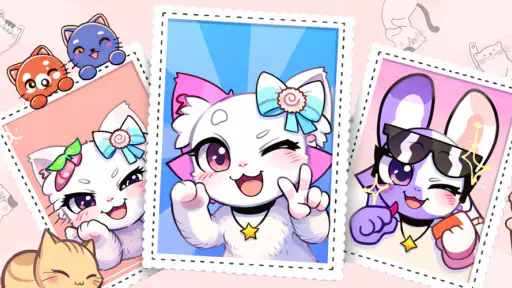
PFP Maker: Cat Emoji is a creative customization app focused on making profile pictures featuring cute cat characters and emoji-style designs. After exploring its tools, the main appeal is the ability to combine different faces, ears, expressions, colors, accessories, backgrounds, and decorative elements. It is designed for users who want a playful avatar for social media, messaging apps, gaming profiles, or personal accounts without needing advanced drawing skills.
Is PFP Maker: Cat Emoji free to download and use?
PFP Maker: Cat Emoji is free to download. The availability of specific design elements may depend on the version, advertisements, or optional in-app purchases. Before creating your final profile picture, it is worth checking which cats, accessories, backgrounds, and export options are included for free. Some users may be satisfied with the basic collection, while others could encounter locked content or prompts to upgrade for additional customization choices.
Can I use the profile pictures created in PFP Maker: Cat Emoji on social media?
Yes, the designs are intended to be saved and used as profile pictures on platforms such as Instagram, TikTok, Facebook, Discord, messaging services, and gaming accounts. The app makes the most sense for casual personal use, especially when you want a recognizable cartoon identity rather than a realistic photograph. However, you should review the app’s current terms before using exported artwork commercially, for branding, or in content that generates revenue.
Does PFP Maker: Cat Emoji require an internet connection?
An internet connection may be needed for the initial download, advertisements, updates, cloud-related features, or access to certain design packs. Basic editing can sometimes work offline once the available assets are loaded, but this may vary by device and app version. If you plan to create an avatar while traveling or without mobile data, open the app beforehand and confirm that the editor and saving functions work as expected offline.
Pros
- Quickly creates profile pictures with cute cat-themed designs.
- Simple interface suitable for users of all ages.
- Offers many expressive cat faces and emoji-style options.
- Useful for social media avatars
- chats
- and gaming profiles.
- Lightweight app that is easy to browse and use.
Cons
- Some designs or customization options may require in-app purchases.
- Limited appeal for users who prefer realistic or non-cat avatars.
- Export quality may vary depending on the selected design.
- Ads can interrupt browsing and the creation process.
- Customization may feel basic compared with full photo-editing apps.
- Category
- Art & Design
- Version
- 1.1.4