Anime Avatar Maker & Creator
- 10.00
- 3.5
- Installs
- 100.00K
- Price
- Free

Screenshots
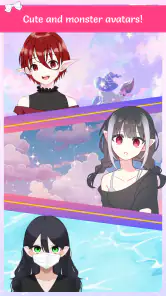
Analysis by Reviewed
I see Anime Avatar Maker & Creator as a playful character-design app rather than a tool for turning a real selfie into anime art. That distinction matters: the appeal is making a stylized character by choosing its look, not expecting an automatic portrait conversion. If you enjoy experimenting with cute fashion and anime-inspired appearances, it offers an easy place to start; if you want precise illustration controls or a faithful likeness, you may find it too limited.
Start with a character, not a perfect picture
I get the most out of a character maker when I treat it as a quick way to explore an idea, rather than a place to finish a polished illustration. That mindset suits this app’s accessible, fashion-led approach. You can focus on the impression you want a character to give—friendly, dramatic, shy, or confident—without first learning how to draw a face or build an image from scratch.
A useful first session is to choose one simple prompt, such as “a cheerful character for a group chat,” and make only the decisions that help communicate it. If the result feels muddled, change one element at a time instead of restarting after every choice. This gives you a better sense of which part is shaping the character’s personality and keeps casual experimentation from turning into aimless tapping.
A low-pressure way to explore character ideas
The app is free and comes from MayZing Tech. It sits in the beauty category, has an Everyone content rating, and is listed for devices running Android 6.0 or later. Its average rating is 3.5 from around 360 ratings, with over 100,000 installs. Those figures suggest a modest, established audience, but they are not a promise that every person will enjoy the same experience.
My practical advice is to begin with a simple concept instead of trying to perfect every detail at once. Pick a general mood—soft, bold, or playful—then make a few choices that support it. That gives the design a clearer identity and makes it easier to notice whether the available style is working for you. A small change to the face or outfit can have more impact than piling on every decorative option.
It also helps to decide what you want to do with the finished character before investing time in tiny adjustments. A design intended as a casual profile image can succeed by being readable at a glance; a character you are developing for a story may need a more deliberate set of visual cues. If the app’s options let you get close to the idea but not all the way there, that still tells you something useful: you have a starting point, and you can decide whether the concept deserves a more capable art tool.
Where it fits among avatar apps
Compared with drawing apps, a character maker is less demanding: you can explore a visual idea without needing to sketch, shade, or learn a complex toolset. Compared with selfie filters, the trade-off is different too. You guide a designed character rather than simply applying an effect to a photo, so the result suits profile-picture experimentation and casual character concepts better than realistic transformation.
More From Our News Desk

Clash of Clans Is Won Between the Battles

Android Auto Makes the Case for Quieter Car Software

MobiOffice: Transforming Mobile Productivity with Seamless Integration

EA SPORTS FC™ Mobile Soccer: Redefining Mobile Sports Gaming

How Microsoft OneDrive Became a Mobile Productivity Giant

How Google Translate Breaks Language Barriers Effortlessly
That makes it a reasonable choice for a quick creative break, for someone who wants to try a few anime-inspired looks, or for friends comparing character ideas. It is less suitable if you need a carefully controlled design for a project, consistent art across several characters, or a polished illustration with fine-grained editing. In those cases, a dedicated drawing or design app is likely a better fit.
There is a third comparison worth keeping in mind: some avatar tools are built around elaborate role-play identities, while others aim for quick customization and a result you can use casually. I would place this app closer to the low-pressure end of that spectrum. It is most appealing when the act of choosing a look is part of the entertainment; it is less compelling if you expect a structured character-building system or a long-term design workspace.
That difference matters if you are choosing between several kinds of creative apps. For a quick visual idea, this sort of maker asks less of you than a blank canvas. For a brand mascot, a comic character that must look identical in many poses, or an illustration you plan to refine carefully, a drawing app gives you more control even if it takes longer to learn. I would use the avatar maker to test a mood, then move to a specialist tool only if the idea needs more precision.
Small choices that make a difference
One useful way to judge a design is to save or share a version only after stepping back from it for a moment. When you return, ask whether the face, clothing, and overall mood feel like they belong together. This simple pause helps avoid adding details just because they are available. It also turns the app into a handy visual brainstorming tool: try one version for a character’s everyday look and another for a more dramatic persona, then compare which communicates the idea best.
A second practical trick is to keep a clear distinction between “the character” and “the current outfit.” If you are exploring several styles, hold the character’s central mood steady while changing the fashion direction. That makes the comparison more meaningful: you can see whether a new look improves the same concept, rather than accidentally changing the whole personality with every edit. It is a simple workflow, but it can make a short session feel more intentional.
For a realistic everyday use, imagine having a few spare minutes while waiting for a friend. You can make a character that matches the mood of a group chat, show it to your friends, and use their reactions as a prompt for a different design. I would treat sharing as part of the fun, not as a guarantee of a particular social feature or destination; the value is in creating something you want to show.
Another good use is preparing a few visual options before deciding on a character for a story or role-play. Rather than trying to settle on the “right” design in one pass, make separate versions with distinct moods and compare them side by side in your own mind. The trade-off is that a character maker is better at quick visual exploration than at recording a detailed design brief. If continuity matters later, note the choices that define the character so you can reproduce the look as closely as the available customization allows.
Unleash Your Inner Artist
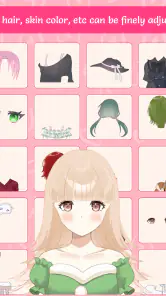
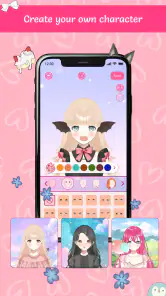
One of the first things you'll notice about the Anime Avatar Maker & Creator is just how easy it is to use. You don't need to be an expert artist or have any drawing skills at all. The app provides a plethora of customization options that make avatar creation a breeze. From hairstyles to eye shapes, you can tweak every little detail to your heart's content. And the best part? You can mix and match different styles to create a truly unique anime persona!
Features Galore
What sets this app apart from other avatar creators is its extensive feature set. Here's a quick rundown of what you can expect:
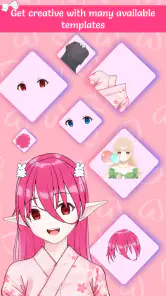
- Wide Variety of Templates: Whether you're into fantasy, sci-fi, or slice-of-life anime, there's a template for every genre.
- Advanced Editing Tools: Fine-tune your avatar with tools that adjust skin tone, eye color, and more.
- Accessories Galore: Add glasses, hats, and even pets to make your avatar stand out.
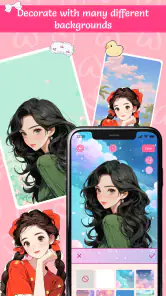
- Background Selection: Choose from a range of backgrounds to set the perfect scene for your avatar.
The app even allows you to adjust the lighting and shadows, giving your avatar a professional look. It's almost like having a mini photo studio right in your pocket!
What the customization is best for
The practical value of customization is not simply having many things to alter; it is being able to make a design feel intentional. When I work on an avatar, I try to establish a visual anchor first, such as a distinctive hairstyle or a clear expression, and then let the other choices support it. This is especially helpful when a character is meant to be recognizable as a small profile image, where a strong overall impression can matter more than tiny details.
For a casual user, that can be enough to make a character feel personal without requiring an art background. For someone planning a set of coordinated characters, the challenge is different: each one needs a distinct identity, and a similar visual style can make differences harder to communicate. I would vary the main impression deliberately—rather than changing several details at random—and check whether each character still reads as a separate person.
The app’s appeal is therefore strongest when you want to explore appearance, not when you need complete artistic authorship. A preset-driven approach can help you get to a pleasing result quickly, but it also means your ideas have to work within the visual language the app offers. If your concept depends on an unusual pose, a specific costume detail, or exact proportions, the convenience may not make up for the limits of a guided creator.
Why I Love It
Now, I have to say, what truly captivates me about this app is the sheer joy of creativity it inspires. Every time I open it, I find myself lost in the endless possibilities. It’s a fantastic way to unwind and let your imagination run wild. Plus, sharing your creations with friends is super fun. I'm always curious to see what kinds of avatars my friends come up with!
There is a practical limit to that freedom: customization only helps when the available choices match the character you have in mind. If you find yourself repeatedly wishing for a different art style or more exact control, that is a sign to switch tools rather than keep adjusting details around the edges. The version is 1.0.4, so I would approach it as a straightforward casual creator, not assume it will replace a more specialized art workflow.
Who should give it a try—and who should move on
I would recommend it first to people who enjoy anime-inspired fashion, want a low-effort creative pastime, or need a simple character concept without drawing by hand. It can also suit someone who is unsure what look they want: trying combinations is a practical way to discover a direction before committing to a more involved project. Because it is free, there is no purchase price to weigh against that casual use.
I would steer away from it if your main goal is to turn your own photograph into a convincing anime portrait, make production-ready art, or maintain exact continuity across a sequence of illustrations. Those needs call for a different kind of tool. Likewise, if you prefer open-ended drawing and dislike working within a creator’s available options, a blank-canvas app will probably feel more satisfying, even if it asks for more effort.
For parents considering it for a child, the Everyone rating makes the intended age classification easy to understand. I would still treat the app as a creative activity to try together if you want to see whether its style and workflow suit them. The key question is not whether character design is appealing in theory, but whether the child enjoys making choices within this particular anime-inspired look.
Final Thoughts
In a world where digital expression is becoming increasingly important, the Anime Avatar Maker & Creator offers a delightful avenue for self-expression. Whether you're an anime aficionado or just someone looking to try something new, this app is definitely worth a download. It's user-friendly, packed with features, and most importantly, it's a whole lot of fun. Go ahead, give it a try, and bring your anime alter ego to life!
My recommendation is focused: try it if you want a free, approachable way to play with cute anime character styling, especially when you have no interest in drawing from scratch. Skip it if your priority is a close selfie likeness, professional asset creation, or deep control over every visual element. For casual experimentation, the low barrier is the point; for more demanding work, a specialist editor is the more sensible choice.
Before settling on it, I would ask myself one simple question: am I looking for a fun way to shape a character, or a tool to produce a precise finished image? This app is easier to recommend for the first purpose. Its 1.0.4 version keeps the expectation grounded: treat it as a casual creator you can explore, not as a substitute for a dedicated illustration workflow.
For me, that is a useful boundary rather than a reason to dismiss it. A focused, low-pressure app can be exactly what you want during a short break, when opening a complex editor would feel like too much work. If that describes your use, the character-making experience is worth trying; if not, you will likely be happier choosing a tool designed around your specific visual goals.
Anime Avatar Maker & Creator Frequently Asked Questions
Is Anime Avatar Maker & Creator suitable for children?
Anime Avatar Maker & Creator is a beauty app rated for Everyone, so its listed age classification makes it suitable for a broad audience. Its focus is on creating, designing, and dressing up cute anime-style characters. As with any app, parents may want to check the experience with their child and review any device permissions or purchase prompts together.
Will Anime Avatar Maker & Creator work on my phone?
The app requires Android 6.0 or later, so check your device’s operating system before downloading. It is an Android app, and compatibility can also depend on the device itself. If your phone meets the minimum OS requirement, you can look for Anime Avatar Maker & Creator in the app store and confirm that it is available for your device.
What is Anime Avatar Maker & Creator?
Anime Avatar Maker & Creator is a mobile application designed for users who want to create personalized anime-style avatars. With a wide range of customization options, users can create unique characters by choosing different hairstyles, facial features, outfits, and accessories. The app offers a fun and creative way to express oneself through anime art.
Is Anime Avatar Maker & Creator free to use?
Yes, Anime Avatar Maker & Creator is free to download and use. However, it may offer in-app purchases for additional features or premium content. Users can enjoy basic functionalities without any cost, but if they wish to access exclusive items or remove ads, they might need to make a purchase.
What customization options are available in Anime Avatar Maker & Creator?
Anime Avatar Maker & Creator provides a diverse array of customization options, allowing users to modify nearly every aspect of their avatar. Users can select from various hair styles, eye shapes, skin tones, and outfits. Additionally, accessories like hats, glasses, and jewelry can be added to enhance the avatar's appearance. This extensive customization ensures that each avatar is truly unique.
Pros
- Highly customizable avatars
- User-friendly interface
- Wide range of accessories
- Regular updates
- Free to use
Cons
- Contains ads
- Limited hairstyle options
- In-app purchases
- Occasional bugs
- Requires internet connection
- Category
- Beauty
- Version
- 1.0.4













