PDF Viewer&Scanner
- 376.00
- 3.7
- Installs
- 10.00M
- Price
- Free

Screenshots
Analysis by Reviewed
I often notice the same small nuisance with documents: a form arrives as a PDF, a paper receipt needs to be kept, and a useful page is buried among files on my phone. Switching between a viewer, camera scanner, and sharing app can take longer than the task itself. PDF Viewer&Scanner is meant to bring those jobs together, and I judge it by whether it actually cuts those extra steps rather than by how many tools it claims to offer.
Where a single document app can save time
For occasional paperwork, the appeal is straightforward: open a document, look through it, or make a digital copy of a page without first searching for a separate utility. That is most useful when a document is part of a quick errand rather than a larger filing system. I would consider it for students keeping handouts together, people handling household forms, or anyone who needs to check a file while away from a computer.
A realistic example is receiving a permission form or appointment document while out. You can open the file on your phone, review the details, and use the scanner for a paper page that needs to be kept alongside it. The practical win is having fewer app changes in the moment. I would still give the resulting scan a quick visual check before sending it: a shadow, a tilted page, or small print near an edge can matter even when a scan looks fine at first glance.
A sensible first workflow
I’d start with one low-stakes document rather than moving an entire archive into a new app. Open a file you already need, check that its text and page layout are readable on your screen, then try scanning a clean sheet in even light. That gives you a useful sense of the app’s everyday fit before you rely on it for a signed form or a deadline-sensitive document.
For better phone scans, place the paper on a contrasting, flat surface and hold the camera parallel to the page. Leave a little space around the edges so cropping has room to work, and review every corner before saving or sharing. These small habits matter because automatic adjustments can help with framing and lighting, but they cannot correct every obstruction or make faint handwriting clear.
As a tools app from Broad Wang, it has a practical, focused purpose rather than the feel of a full office suite. It is free, rated for Everyone, and its current version is 1.3.1, with Android 6.0 as the minimum requirement. That makes it accessible to many Android users, though I would still check that the version available on my device behaves well with the particular files I use.
How it fits into everyday document handling
I find this kind of app most useful in the small gap between receiving a file and deciding what to do with it: checking a PDF, capturing a paper page, and making sure the copy is readable before moving on. I’d use that moment to establish a simple naming habit, too, so a scan is easier to recognize when I need it later. That practical routine leads naturally to the question of which everyday tasks benefit most.
More From Our News Desk

Weather by Xiaomi Review: Clear at a Glance, Less Clear Up Close

X Under Pressure: Can It Recover When Posting Goes Wrong?

Clash of Clans Is Won Between the Battles

Android Auto Makes the Case for Quieter Car Software

MobiOffice: Transforming Mobile Productivity with Seamless Integration

EA SPORTS FC™ Mobile Soccer: Redefining Mobile Sports Gaming
Useful moments, and a small quality check
The strongest case for a viewer-and-scanner combination is handling mixed paper and digital tasks in one sitting. Think of sorting travel paperwork at a kitchen table: you might inspect a confirmation on your phone, scan a printed receipt, then keep the new copy ready for later. It can also help with study notes or a one-off work document when reaching for a desktop scanner would be overkill.
A useful habit is to name files in a way that makes sense later, such as including the subject and date in the filename where the app’s saving workflow allows it. Then open the saved copy once before relying on it. A scan that is legible in the camera preview may be less convenient when viewed as a PDF, especially if the page is rotated or the text is small. That final check takes little time and can prevent a frustrating second trip back to the paper original.
Where I’d choose another option
Compared with using a phone’s built-in file viewer and a separate scanning tool, the advantage here is the prospect of a more compact routine. Separate tools can still be better if you already have a dependable scanner app or a carefully organized cloud workflow. I would not switch systems just to avoid one extra tap if the alternative gives me clearer scans, easier retrieval, or more control over document organization.
I’d also avoid treating a general document utility as a substitute for a dedicated workflow when the files are sensitive, legally important, or part of a large business archive. Check the finished document before sharing, and use the storage and sharing method you already trust for confidential material. Convenience is valuable, but it is not a reason to skip basic care with personal paperwork.
What its reach says—and what it doesn’t
With over 10 million installs and an average rating of 3.7 from around 26,000 ratings, the app has reached a broad audience, while those figures also suggest it may not be an ideal fit for everyone. I’d treat it as a convenient everyday option, not assume it will match a specialist PDF editor or a dedicated scanning tool in every detail. Its free price makes trying a simple task an easy way to decide whether the workflow suits you.
The key question is whether you mainly need to view documents and make occasional scans, or whether you need advanced editing, dependable long-term filing, or a tightly controlled sharing process. For the first group, combining these basic jobs can remove needless app-hopping. For the second, a more specialized alternative may be worth the extra setup.
How I’d fit it into a weekly routine
I would use it as a practical stop between receiving a document and deciding where it belongs, rather than as the permanent home for every file. For example, after collecting a paper receipt, I could scan it, inspect the resulting page, and then move or share the copy according to my existing routine. This distinction matters: a scanner can make a paper record digital, but the usefulness of that record later still depends on where I keep it and how I label it.
For a family or study task, I’d also separate the capture step from the cleanup step. Scan several related pages in one go when the lighting and surface are already set up, then review the saved pages before sending them. That can be faster than repeatedly setting up the camera, but it only helps if I check page order and legibility while the originals are still nearby. A quick batch is convenient; a batch of poorly framed pages simply creates more work later.
Choosing it over familiar alternatives
The usual alternatives are a built-in document viewer for reading and a separate camera-scanning app for paper. Those can be excellent when each already does its job reliably, and they may offer a more familiar route for people who have built habits around them. The reason I’d try this combined tool is not that separate apps are inherently worse, but that switching between them can interrupt a small task when I only need to inspect a file and preserve one page.
There is a trade-off to that convenience. A single app is easier to reach for, but it does not automatically become the best place to edit, organize, back up, or securely distribute every document. If my main need is detailed changes to PDF text, a robust archive, or precise control over collaboration, I’d choose a dedicated tool built around that job. If the task is simply to read a PDF and make an occasional scan, a compact routine is more compelling than a long feature checklist.
Questions I’d settle before relying on it
Can it replace a desktop scanner for every page? I would not assume so. A phone camera is handy for a receipt, handout, or signed page, but the result depends on light, focus, paper condition, and how carefully I check the edges. For very small print, multiple pages that must look consistent, or documents where exact reproduction matters, I’d use equipment and a workflow suited to that need.
Is it a good choice for private paperwork? I’d treat the answer as a matter of careful handling, not convenience alone. Before sharing a scan, I would inspect the whole page and choose a destination I trust. For especially sensitive records, I would stay with a process whose storage and access controls I already understand rather than assuming that any all-in-one utility is automatically the right place for them.
Will it suit someone who only reads PDFs? It may still be useful if having a scanner available is worth the extra app, but a built-in viewer could be enough for a person who never handles paper documents. Likewise, anyone who needs extensive editing or an established filing system may find that the combined approach does not replace their specialist tools. I see its best audience as people with modest, recurring document chores—not users seeking a complete office or records-management system.
The first thing that caught my eye about PDF Viewer&Scanner is its simplicity. Right off the bat, the user interface is clean and intuitive, making navigation a breeze. I didn’t have to play hide and seek with the features; everything is right where you'd expect it to be. From viewing to scanning and even sharing, it covers all bases without making me feel like I need a tech degree to operate it.
Document Viewing
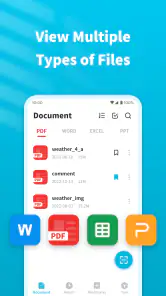
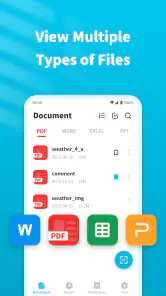
Let’s talk about the core feature: document viewing. The app supports a wide range of file formats, not just PDFs. This means you can open up your Word documents, Excel sheets, and even PowerPoint presentations without any hassle. The loading speed is impressive, and scrolling through pages is smooth as butter, which is perfect when you’re flipping through hefty documents.
Scanning Capabilities
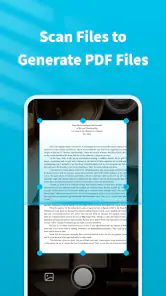
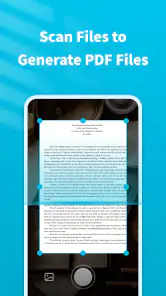
Now, onto the scanner. I was skeptical at first—I mean, how good can a mobile scanner really be? But surprisingly, the quality is pretty darn good! The app allows you to scan documents with your phone camera, and it turns them into crisp PDFs. It even has a nifty feature that automatically crops and adjusts the lighting to ensure your scanned document looks professional.
Sharing and Storage
Sharing documents is a breeze. With the integration of various cloud services like Google Drive and Dropbox, you can store and share your documents seamlessly. I found this particularly handy for collaborating on projects or sharing study notes with friends. Plus, the app supports encrypted sharing, which means your documents stay secure—big thumbs up for that!
Who I’d recommend it to
So, why should you give this app a shot? Well, if you’re someone who juggles multiple documents daily and values convenience and efficiency, PDF Viewer&Scanner is right up your alley. Its user-friendly design, combined with robust functionality, makes managing documents on the go a hassle-free experience. And let’s not forget the added bonus of having a scanner right in your pocket!
To wrap it up, while there are plenty of document management apps out there, PDF Viewer&Scanner stands out for its simplicity and reliability. Whether you're managing work documents, study materials, or personal files, this app has got you covered. So go ahead, give it a whirl, and let it transform how you handle documents!
PDF Viewer&Scanner Frequently Asked Questions
What file types can I scan or convert with PDF Viewer&Scanner?
PDF Viewer&Scanner is presented as a document processing assistant, and its short description focuses on PDF viewing and scanning. That makes it worth considering if your main goal is to work with PDF documents on a mobile device. Before relying on it for a particular conversion workflow, check that the app’s available options match the file types and tasks you need.
Can I use PDF Viewer&Scanner without an internet connection?
Whether you can complete a task offline depends on the feature you want to use and how the document is stored on your device. If you mainly need to open a PDF saved locally, that is different from accessing or sending a document through an online service. Consider your usual workflow before downloading, especially if you expect to work without a connection.
Is PDF Viewer&Scanner suitable for sensitive documents?
If you plan to handle personal, work, or otherwise sensitive documents, take a moment to review the app’s privacy information and permissions before using it. The app is designed around document processing, so it may be useful for everyday PDF tasks, but you should decide whether its handling of files fits your own privacy requirements before importing anything confidential.
Can I print documents directly from PDF Viewer&Scanner?
PDF Viewer&Scanner is described as a PDF viewer and scanner, which points to document handling on a mobile device. If printing is an important part of your workflow, check the available in-app options and your device’s printing setup before depending on it. That way, you can confirm it fits your needs alongside viewing or scanning documents.
Is PDF Viewer&Scanner a good choice for occasional PDF tasks?
It may be worth considering if you only need a mobile tool for everyday PDF viewing or document processing rather than a dedicated desktop workflow. The app is free to download and is categorized among Tools apps. As with any document app, it is sensible to try the tasks you expect to use and see whether the interface and available functions suit your routine.
Pros
- Fast PDF loading and rendering
- Easy document scanning
- User-friendly interface
- Supports multiple file formats
- Offline access available
Cons
- Limited free version features
- Advertisements in free version
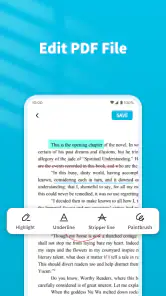
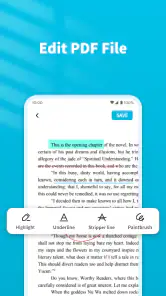
- No advanced editing tools
- Occasional sync issues
- Requires in-app purchases for full access
- Category
- Tools
- Version
- 1.3.1









