PDF Reader: PDF Scanner & Edit
- 96.00
- 4.4
- Installs
- 1.00M
- Price
- Free
Screenshots
Analysis by Reviewed
When I need to read or mark up a document away from my desk, I want the basics close at hand without turning a quick task into a file-management project. PDF Reader: PDF Scanner & Edit brings reading, scanning and editing together, so I can use one app for common document jobs rather than switching between separate tools. It is a free tools app from UsefulLife App, with optional in-app purchases ranging from $6.99 to $34.99 per item.
A sensible place to begin
I’d start with a low-stakes document and run it through the full routine I expect to use: open a PDF, make a small annotation, save it, and reopen it. That quick check helps establish what the app’s workflow feels like before I use it for a form or something I need to send promptly. It also gives me a chance to see whether the saved version is easy to find and whether the annotation appears as expected.
For a paper document, I’d capture it in good light, keep the phone steady, and inspect the resulting pages before treating the scan as finished. A quick review for clipped edges or hard-to-read text can prevent an avoidable second scan. I’d also keep a clear distinction between a working copy and the version I intend to share; a simple filename that identifies the document and its date makes that habit easier to maintain.
Seamless Document Management
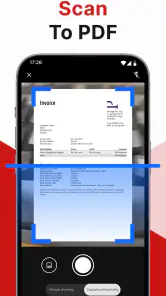
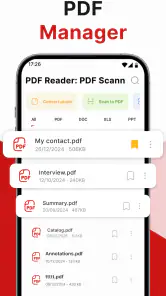
First things first, let’s talk about what makes PDF Reader: PDF Scanner & Edit stand out. This app offers a seamless integration of document management features that really blew my mind. Imagine having a scanner, editor, and reader combined into one app on your phone. It’s like having a mini office in your pocket! I found the scanning feature particularly impressive because it uses your phone’s camera to create high-quality scans of documents, which you can then edit or annotate.
A practical routine for paper and PDFs
The combination is most useful when a task begins on paper and ends as a digital document. For example, I can picture photographing a form after an appointment, turning it into a PDF, then checking the result and adding a note before sending it on. The useful habit is to review the scan before sharing: check that the page edges are visible, the text is readable, and no part of the document has been cut off. A phone camera makes capture convenient, but good lighting and a steady hand still matter.
For a document that is already digital, I would start by opening it in the reader and deciding whether I need to make a note or change the file itself. That distinction helps avoid unnecessary edits. Highlights and comments are handy when I want to remember a point or flag a question; they are not a substitute for carefully revising the document’s actual content. If someone needs a clean, formally edited file, a dedicated desktop PDF editor may be the better choice.
User-Friendly Interface
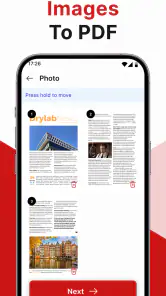
One of the things I appreciate most is the app's user-friendly interface. Navigating through the features is a breeze, even for someone who isn’t tech-savvy. The developers have clearly put a lot of thought into making this app accessible for all users. I had no trouble finding what I needed, whether it was converting a picture to PDF or adding annotations to a document.
More From Our News Desk

Clash of Clans Is Won Between the Battles

Android Auto Makes the Case for Quieter Car Software

MobiOffice: Transforming Mobile Productivity with Seamless Integration

EA SPORTS FC™ Mobile Soccer: Redefining Mobile Sports Gaming

How Microsoft OneDrive Became a Mobile Productivity Giant

How Google Translate Breaks Language Barriers Effortlessly
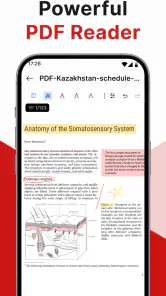
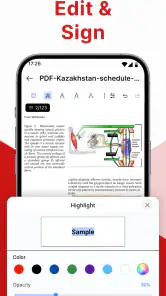
The editing features are robust, too. You can highlight sections, add comments, and even insert images. It’s perfect for students or professionals who need to mark up documents frequently. I’ve found it super helpful for reviewing contracts and making quick notes.
Settings and repeatable habits
Before relying on any mobile document app for regular work, I make a small test file and try the entire route I expect to use: open, annotate, save, then reopen. This catches practical snags early, such as being unsure whether a change has been retained or where a finished file is stored. I’d also check the app’s available preferences and the device’s sharing options rather than assuming every workflow behaves the same way. A short test is especially sensible before handling an important form or sending a marked-up contract.
For recurring paperwork, a simple naming habit can save more time than extra features: use a clear subject and date in the filename when saving, and keep the final copy distinct from a working copy. That makes it easier to find the right version later, particularly if a document has gone through several rounds of comments. These are small habits, but they reduce the chance of sharing an unfinished draft.
Building a faster, dependable routine
When I handle several related pages, I try to decide what the finished file should contain before I start capturing or marking anything. For instance, if I’m digitising a receipt together with a signed form, I’d check that each page belongs in the same file and that the order makes sense before sharing it. This is a practical safeguard, not a special feature: reviewing the result as a recipient would helps catch a missing page or an accidental extra one.
For study notes or a meeting document, I find it useful to annotate only what I will need to act on later. A short comment beside a question is easier to revisit than highlighting whole paragraphs indiscriminately. I’d also avoid making annotations while rushing through a crowded commute; mobile editing is convenient, but small screens make careful placement harder. The app’s value is greatest when it lets me complete a modest task promptly, not when I try to replace a full desk-based review.
On-the-Go Efficiency
Let’s not forget about the convenience factor. With this app, you can manage your PDFs anytime, anywhere. Whether you’re sitting in a coffee shop or commuting on a train, you have the power to scan, edit, and share documents right from your device. It’s as if the app was designed with the modern, mobile lifestyle in mind.
Another feature worth mentioning is the cloud integration. You can easily sync your documents with services like Google Drive or Dropbox, which means your files are always backed up and accessible from any device. This is a game-changer for anyone who works across multiple devices or needs to collaborate with others.
Choosing it over a basic viewer or a specialist editor
Compared with using a phone’s built-in file viewer, this app’s appeal is having scanning and annotation alongside PDF reading. That can make sense when a task involves both a paper page and an existing file. On the other hand, if I only need to open an occasional PDF, the viewer already on my device may be simpler. For detailed layout work, large batches of files, or precise changes to document text, I’d choose a more specialised editor on a computer instead of expecting a mobile reader to replace it.
The app has an average rating of 4.4 from around 27,000 ratings and has been installed over a million times. It is rated for Everyone, and its current version is 2.2.3, with Android 9 as the minimum operating system requirement. Those details make it approachable for many users, but they do not remove the need to consider the purchase model: the app is free to start, while some in-app purchases are available. I’d check what is included before paying, especially if I only need basic reading and occasional notes.
Where a phone workflow has limits
A compact all-in-one setup is convenient, but it is not automatically the best fit for every document job. If I’m preparing a polished report, correcting substantial text, or checking fine page-layout details, I’d rather work on a larger screen with a specialised editor. Similarly, a built-in viewer is often enough when I only need to open a file and read it. The useful question is whether scanning and annotation are frequent enough in my routine to justify keeping another tool in the mix.
I’d also be cautious about treating a scan as a perfect substitute for the original paper. A camera capture depends on positioning and lighting, so I would inspect the result before relying on it for a signature, small print, or a page with important details near the edge. For sensitive paperwork, I’d take care when choosing where to save or share the finished file and avoid sending it until I have checked the recipient and the final version.
Final Thoughts
In conclusion, PDF Reader: PDF Scanner & Edit is more than just a PDF reader. It’s a comprehensive tool that enhances productivity and simplifies document management. Whether you’re a student, a working professional, or just someone who deals with a lot of PDFs, this app is definitely worth checking out.
Overall, I highly recommend giving it a try. It’s user-friendly, efficient, and packed with features that make handling documents a breeze. Plus, the convenience of having all these tools in your pocket is invaluable. So go ahead, download it, and see how it can transform your document management experience!
Who will get the most from it
I’d consider it a good fit for someone who often receives forms, reads course material, or needs to make quick comments while away from a computer. It is less compelling for a person who already has a reliable scanner and PDF editor, or who needs advanced control over page layout and precise document revisions. My recommendation is to try it with a low-stakes file first, then decide whether its combined workflow genuinely saves you a step. The app was released on January 19, 2025, and its 96 reviews offer another place to look for practical user experiences before deciding whether optional purchases suit your needs.
My take on making it part of a routine
For someone who regularly turns paper into something they can read and annotate on a phone, I can see the appeal: fewer handoffs between separate apps, and a straightforward way to make quick notes while a document is in front of me. A student could scan a handout and mark a few passages; someone managing household paperwork could keep a digital copy of a form and add a reminder for a follow-up. In both cases, the key is to check the file after saving rather than assuming a quick mobile workflow has produced a share-ready result.
I would skip it if my main need were intensive document production or if my existing reader already handles everything I do. I’d also avoid paying for optional extras before I know which parts of my routine the free experience covers. The best test is simple: use a nonessential document, follow the whole process from capture or opening through saving and sharing, then judge whether the combined tool genuinely removes friction. For that everyday middle ground, this app makes a reasonable case for a place on my phone.
PDF Reader: PDF Scanner & Edit Frequently Asked Questions
Does PDF Reader: PDF Scanner & Edit let me share or combine documents?
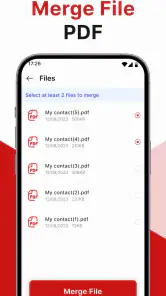
Yes. The app includes tools for merging multiple PDFs into one file and sharing documents by email or through cloud services. These options can be useful when you need to assemble pages into a single document or send a finished PDF to someone else. Check the resulting file before sharing to make sure it contains the pages and edits you intended.
Can I use PDF Reader: PDF Scanner & Edit to make notes on a PDF?
The app supports annotating PDFs with text, highlights, and drawings, so it can help when you want to mark up a document while reading. These tools may be handy for reviewing study material, highlighting key passages, or adding a visible note before sharing a file. The app also offers editing features, making it a mobile option for basic PDF work.
Is PDF Reader: PDF Scanner & Edit suitable for a first-time PDF app user?
Its main purpose is straightforward: reading, scanning, and editing PDF files on a mobile device. Someone new to PDF utilities can start with those core tasks and explore the other tools as needed, including annotations, document conversion, and merging. The app is free to download, so you can try its general workflow before deciding whether paid options suit your needs.
What should I check before scanning paper documents with the app?
Consider whether your phone or tablet is ready to capture a clear image of the paper, since scan quality depends on the document being legible in the image. After scanning, the app can convert the result into a PDF, and its OCR feature can extract text from scanned documents. Review the scan and extracted text before relying on them or sharing the file.
Can PDF Reader: PDF Scanner & Edit convert documents into PDF files?
Yes. Converting documents into PDF format is among the app’s listed tools, alongside reading, scanning, and editing PDFs. This can be useful when you want to keep a document in a format that is convenient to read and share. If you also need to combine files or annotate the result, the app includes merging and markup features.
Pros
- Fast document scanning
- Easy PDF editing
- User-friendly interface
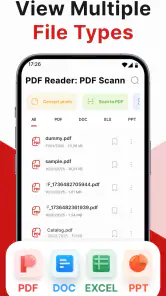
- Supports multiple formats
- Secure document storage
Cons
- Limited free version
- Requires internet for some features
- Occasional ads
- No OCR for handwriting
- Large app size
- Category
- Tools
- Version
- 2.2.3