Paycom
- 28.31K
- 4.5
- Installs
- 5.00M
- Price
- Free

Screenshots
Analysis by Reviewed
Paycom makes the most sense when your employer already uses it and you want to handle routine payroll and HR tasks without tracking down a manager or HR contact. I see its value less as a general-purpose work app and more as a practical employee portal: useful when the information and actions you need are available through your organization’s setup, but not a replacement for every workplace system. Its focused purpose is also its main trade-off. If you are looking for an HR platform to choose and configure for a business, this mobile app alone is not the whole decision.
A work portal, not a universal HR toolkit
Paycom is a free Tools app from Paycom Software, Inc., built around letting people manage their own payroll and HR information. It has a 4.6 average from around 100,000 ratings, and it has been installed over 5 million times. Those figures suggest that it serves a broad audience, but the day-to-day value depends on whether your employer uses the service and which tasks your organization makes available to you.
That distinction matters before you download it. A payroll app cannot show or change workplace records that your employer has not made accessible through its system. I would first check with your HR team or manager that your organization uses Paycom and ask which employee tasks are handled in the app. That simple check can save you from expecting a standalone tool to organize payroll for a workplace that does not use it.
The app is free and rated for Everyone, and its current version is 7.0.16, with a minimum operating system requirement of 10. It was released on May 30, 2017. I would treat the OS requirement as a practical first check, especially on an older phone: if your device does not meet it, the app may not be an option even if your employer relies on Paycom.
Where self-service can save time
The strongest case for this kind of employee portal is not that it makes work disappear; it cuts out small, avoidable back-and-forth. When employees can check their own pay information or update details through an employer’s system, they do not need to send a message for every basic question. That can be especially helpful for people whose shifts do not line up with HR office hours, or who work away from a desk and need to handle a quick administrative task from a phone.
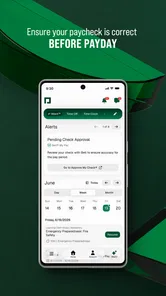
Picture a realistic payday situation: you notice that your deposit looks different from what you expected and want to review the relevant payroll information before asking someone to investigate. Having a mobile route to your records can help you check first and then contact the right person with a more specific question. I would still use HR or payroll for anything that needs an explanation or correction; a self-service screen is a useful first stop, not proof that a pay issue has been resolved.
A similarly practical use is keeping personal details current. If your employer makes those records available for self-service, updating them promptly can prevent outdated information from lingering in workplace files. My tip is to make changes when you have time to review them carefully rather than rushing through a form between tasks. Payroll and HR details are worth checking for accuracy before you submit anything.
More From Our News Desk

 Lark Player:Music Player & MP3
Switching to Lark Player: A Better Fit for Music Stored on Your Phone?
Lark Player makes sense if your music already lives on your phone. Here is what changes, what does not transfer by assumption, and how to test the switch without regret.

 Tile Master® - Matching Game
Tile Master Finds Its Place in the Gaps of a Noisy Phone
OS changes rarely transform a tile puzzle, but they reshape the small rituals around it. Tile Master’s appeal lies in how well its brief, tactile rounds fit the modern phone.

 Google Docs
 Shows What Mobile Writing Still Gets Wrong
Google Docs still makes a strong case for the shared document, but its real significance is how it exposes the gap between cloud convenience and genuinely capable mobile work.

 YouTube Studio
 Is Becoming a Creator’s Daily Control Room
As publishing turns into a daily, data-led habit, YouTube Studio is becoming the control room creators reach for between uploads—not another tool for making videos.

 Tiles Hop Music & Ball Game
Tiles Hop Review: When the Beat Is Clear, Every Miss Counts
Tiles Hop turns a simple bouncing-ball premise into a sharp test of timing. Its best design is immediate and readable; its weakest moments come when recovery feels less clear than the beat.

 Piano - Music Keyboard & Tiles
: Inviting Rhythm, Unproven Recovery
A tile-tapping piano game lives or dies by timing. This resilience-focused review separates what its format promises from what players still need to verify.
Latest News



What it feels like in everyday use
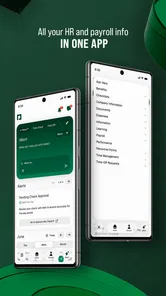
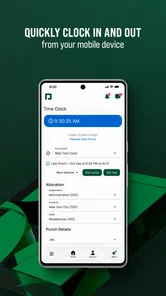
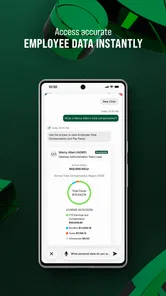
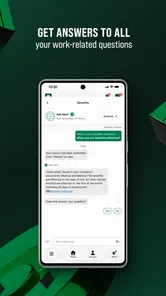
Let's talk features first. Paycom is like the Swiss Army knife of HR management. From payroll processing to talent acquisition, it's got everything. The standout feature? Its self-service functionality. Employees can view their pay stubs, request time off, and even update their personal information without bugging HR. It's all about empowerment here.
Ease of Use
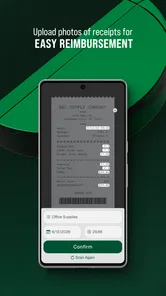
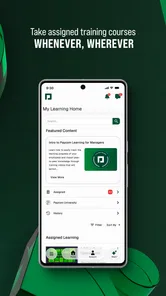
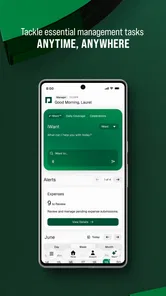
Now, I'm no tech wizard, but getting around this app was a breeze. The interface is intuitive, with everything neatly organized. Whether you're approving expenses or managing employee benefits, it's all just a few taps away. Plus, the app is available on both Android and iOS, so no one's left out.
Security and Compliance
In the age of digital everything, security is king. Paycom doesn't skimp on this front. With robust security protocols and compliance with regulations like GDPR, your data feels safe and sound. It's reassuring to know that sensitive information isn't just floating around in cyberspace.
For a careful user, I would keep a few habits in mind with any app that handles employment information. Use a device you control, keep its operating system current, and avoid checking sensitive records on a shared phone. If you need help with access, ask your employer’s HR or payroll contact rather than trying to work around an account problem. These are sensible precautions, not a reason to avoid mobile access altogether.
Customer Support
Ever had an issue and dreaded calling support? Me too. But with Paycom, the customer service is top-notch. Whether it's through a phone call or their responsive chat feature, getting help is straightforward. They seem to genuinely care about resolving issues promptly, which is a huge plus in my book.
In practice, I would separate technical access problems from questions about workplace policy or pay. If the app will not let you sign in, support may be the right route; if a time-off request or payroll record needs approval or explanation, your employer’s process is likely the place to start. Knowing which team owns the issue can make a frustrating moment shorter, and it avoids expecting app support to make decisions that belong to your workplace.
Integration with Other Systems
For those of you already using different management tools, integration is key. Paycom plays nice with various other systems, making it easier to transition and sync data across platforms. No more double data entry, which is a win for productivity.
Compared with the usual alternatives, this is a different proposition from a generic paycheck calculator, a banking app, or a personal spreadsheet. Those tools can help you budget or track deposits, but they do not replace an employer-connected place to handle HR records and workplace requests. On the other hand, if your only goal is to understand spending after payday, a budgeting app may be more useful and less tied to your employer. I would not choose this app expecting it to manage personal finances or consolidate every work tool.
When the employer setup matters
The app is best suited to employees whose workplace has adopted Paycom and who want convenient access to the tasks their organization has enabled. It may also suit managers who have relevant responsibilities in their employer’s setup, though the available actions can depend on the person’s role. That makes the experience naturally different from one employee to another: two people can install the same app yet have different reasons to use it.
It is not the right choice for someone whose employer uses another payroll provider, or for a business owner who needs to compare HR systems before committing to a company-wide platform. In those cases, the more useful next step is to talk to the employer or assess business options directly, rather than treating a phone app as an independent service. Likewise, if you rarely need mobile access and prefer to discuss every employment matter with HR, the convenience may not change your routine much.
One useful habit is to treat the app as a way to find and manage information, not as a substitute for keeping your own important records. If you are reviewing a pay detail or submitting a request, take a moment to confirm that the information is correct and that you understand what action you have completed. For anything with a deadline or a policy consequence, follow your employer’s normal procedure as well. That small bit of care helps avoid confusing a submitted request with an approved one.
The Final Word
So, is Paycom worth the hype? If you're looking for a comprehensive HR solution that simplifies processes and boosts efficiency, I'd say give it a shot. The mix of features, ease of use, and excellent support make it a solid choice for businesses of any size. And let's be honest, anything that makes work life a bit easier is worth considering.
In a world where time is money, Paycom might just be the app to save you both. Happy managing!
My recommendation
My verdict is positive with an important qualification: this app’s usefulness comes from the connection to your employer, not from installing it in isolation. For an employee who wants to check work-related information and handle available HR tasks on a phone, that can be a genuinely convenient arrangement. Before relying on it, confirm that your workplace uses Paycom, make sure your device meets the operating system requirement, and learn which requests still need a separate conversation with HR.
I would recommend it to people who value self-service and want a clearer route to their employer’s payroll and HR processes. I would not recommend it as a universal solution for payroll questions, personal budgeting, or choosing software for a business without first understanding the employer’s setup. With those expectations in place, it is easier to judge the app fairly: a useful work companion when your organization supports it, and a poor fit when it does not.
Paycom Frequently Asked Questions
Do I need a workplace account to use Paycom?
Paycom is intended to help users manage their own payroll and HR data, so it is most useful when your employer uses Paycom and gives you access to its workplace services. Before downloading, check that you have the work account and sign-in details needed to get started. The app is not a substitute for an employer’s payroll or HR system.
What can employees use Paycom for on a phone?
Paycom gives users mobile access to payroll and HR information managed through their workplace. What you can do in the app depends on the services and access your employer has set up for your account. If you are considering installing it for a particular task, such as checking work-related information, first make sure your organization uses Paycom and that your account is active.
Is Paycom free to download, and what should I know before installing it?
Paycom is a free app in the Tools category, developed by Paycom Software, Inc. Its purpose is to help users manage their own payroll and HR data. The app is rated for Everyone, and it requires Android 10 or later on Android devices. Before installing, it is worth checking that your employer uses Paycom and that you have the account access needed to use its workplace services.
What is Paycom and how does it work?
Paycom is a comprehensive human capital management (HCM) software that streamlines various HR functions, such as payroll processing, talent acquisition, and employee management. Users can access a range of tools within a single platform, allowing for efficient handling of HR-related tasks. The software's user-friendly interface facilitates seamless integration and improves overall productivity within organizations.
Is Paycom secure for handling sensitive employee data?
Yes, Paycom is designed with robust security measures to protect sensitive employee data. The platform employs encryption and multi-factor authentication to ensure data safety. Additionally, Paycom complies with industry standards and regulations like GDPR and SOC 1, providing peace of mind to businesses regarding data protection and privacy.
Pros
- User-friendly interface for seamless navigation.
- Comprehensive payroll management features.
- Timely customer support response.
- Secure and compliant with regulations.
- Integrates well with other business tools.
Cons
- Steep learning curve for new users.
- Limited customization options.
- Higher cost for small businesses.
- Occasional technical issues.
- Mobile app lacks some desktop features.