

Parallax 3D Live Wallpapers
- 1.16K
- 4.7
- Installs
- 5.00M
- Price
- Free

Screenshots
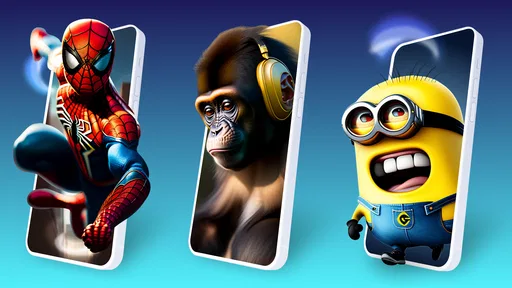
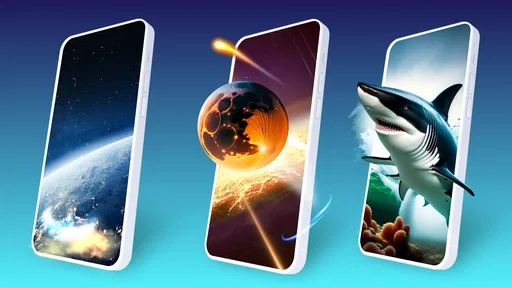
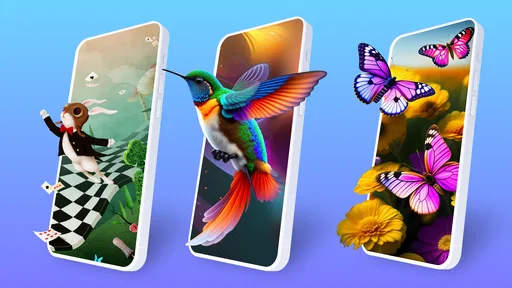

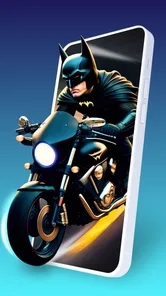
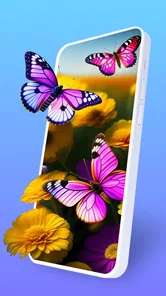
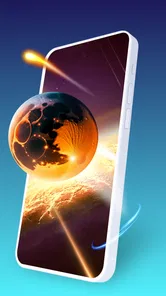
Analysis by Reviewed
I like wallpaper apps best when they change how a phone feels without making everyday use harder. Parallax 3D Live Wallpapers is aimed at people who want their home screen to have visible depth and movement rather than a single still image. Its focus is personalization: the effect responds as you move the device, giving selected backgrounds a layered look. That can make unlocking your phone feel a little more lively, though it is a different kind of appeal from a clean, static wallpaper.
What the motion feels like in daily use
The main attraction is the parallax effect: as you tilt the phone, the foreground and background appear to shift at different rates. I’d treat it as a small visual accent, not a reason to keep waving the phone around. A quick tilt while checking a notification is enough to appreciate the depth; if you rarely notice your wallpaper, or prefer a distraction-free screen, the effect may not be worth changing your setup.
For a practical routine, I’d browse while connected to Wi-Fi, choose a background that stays readable behind app icons, and then leave it in place for a day before deciding whether to keep it. That last step matters: a dramatic preview can look busy once your actual icons and widgets cover parts of the image. Choosing a calmer composition often makes the motion more enjoyable over time.
Immersive 3D Experience
Let me tell you, the first time I set up a wallpaper from Parallax 3D Live Wallpapers, I was blown away by the immersive experience. It's like having a mini-hologram right there on your screen! The wallpapers use the phone's gyroscope and accelerometer to create a sense of depth, making the images appear to move as you tilt your device. It's not just eye candy; it feels like an interactive experience every time you unlock your phone.
Variety at Your Fingertips
The app boasts an extensive library of wallpapers, catering to a wide range of tastes. Whether you're into serene landscapes, abstract designs, or futuristic cityscapes, there's something in there for you. I found myself spending a good chunk of time just scrolling through the options, each one more captivating than the last. The best part? New wallpapers are added regularly, so there's always something fresh to check out.
Choosing a background that works
One useful way to narrow the choices is to think about your lock screen and home screen separately. A detailed image may look striking on its own but compete with icons on the home screen; a simpler background can preserve contrast and make labels easier to scan. I’d also test the tilt effect while holding the phone as I normally do. If the movement feels exaggerated at that angle, adjusting the depth rather than abandoning the wallpaper may make it more comfortable.
The app’s range makes it a better fit for people who enjoy changing their phone’s look than for someone who wants one fixed, minimal setup. Compared with choosing a still image from the phone’s built-in wallpaper picker, the appeal here is motion and depth; the trade-off is that a live effect is another layer of visual activity. If you want a dependable static image, the built-in option is simpler. If you like a screen that reacts to small movements, this app has a more distinctive purpose.
More From Our News Desk

 Gmail
GmailGmail in a Busy Inbox: Who Benefits Most?
From first account to crowded workday, Gmail earns its place through dependable search and flexible sorting—but its best fit depends on how much inbox maintenance you can tolerate.

 Prime Video
Switching to Prime Video: What Changes in Your Viewing Routine
Prime Video can make a compelling second home for streaming, but switching means learning a different catalog, rental layer, and route from browsing to playback.

 Universal TV Remote Control
Universal TV Remote Control Works Best as a Reliable Backup
A phone remote earns its place through quick setup and reliable habits. Here is how to get more from Universal TV Remote Control—and where its limits show.

 Weather - By Xiaomi
Weather by Xiaomi Review: Clear at a Glance, Less Clear Up Close
Xiaomi’s weather app makes everyday forecasts quick to scan, but its calm surface can leave useful details and recovery paths harder to find than they should be.

 X
XX Under Pressure: Can It Recover When Posting Goes Wrong?
A resilience-focused review of X, examining setup, mistaken posts, interruptions, weak connections, and the gaps that matter when recovery needs to be dependable.

 Clash of Clans
Clash of Clans Is Won Between the Battles
Its raids are quick; its community is a long-term project of coordination, teaching, rivalry, and shared responsibility—with all the friction that entails.
Latest News



Customization Galore
One of the standout features of the app is its customization options. You can adjust the depth effect to suit your preference, ensuring that the 3D effect is just right for you. Plus, you can even create your own 3D wallpapers if you're feeling a bit creative. The user interface is intuitive and user-friendly, making the customization process a breeze even for those who aren't particularly tech-savvy.
There’s a useful trade-off in that control: stronger depth can make a scene feel more dimensional, but it can also make motion more noticeable when you pick up or reposition the phone. I’d start with a restrained setting, then increase it only if the effect feels too subtle. If you create a background, consider how its focal point will sit beneath your icons before settling on it; a visually impressive image is not automatically the most usable one.
Speed, stability, and device fit
Parallax 3D Live Wallpapers is a free personalization app from TarrySoft, with optional in-app purchases ranging from $0.49 to $99.99 per item. It is rated for Everyone, has a 4.7 average from around 64,000 ratings, and has been installed over 5 million times. Version 3.7.13.1 supports Android 7.0 and later. Those details make it easy to judge the basic fit, but the experience of a live background can still depend on the phone, its sensors, and how demanding your usual setup is.
For speed, I would separate browsing from the wallpaper’s everyday effect. Scrolling through a visual catalog can take longer than choosing one background from a built-in picker, especially if you keep comparing styles. Once you have chosen a wallpaper, the useful test is whether unlocking and navigating still feel comfortable on your own device. I wouldn’t assume every phone handles animated backgrounds identically, so try a single wallpaper before spending time building a more elaborate setup.
Heavy-use moments are mostly about repeated browsing, adjusting the depth, and switching backgrounds while you are already using the phone. If the device feels warm or the battery seems to drain faster than usual, the sensible first step is to return to a simpler wallpaper and see whether that changes your routine; avoid attributing every performance change to this app alone. The practical trade-off is straightforward: more motion gives the screen personality, while a still image asks less of the display and keeps the interface quieter.
What to expect from reliability
A live wallpaper has to keep looking right beyond the preview, so I’d check it after locking and unlocking the phone and after a normal restart. If the effect does not behave as expected, reselecting the wallpaper and adjusting its depth is a reasonable first troubleshooting step. Sensor response and system behavior can differ across devices, which is why I’d judge stability over ordinary use rather than from a short look at the selection screen.
This app is most appealing if visual customization is part of the fun for you, and you’re willing to spend a few minutes choosing a scene that works with your icons. It is less suitable if you prioritize the simplest possible home screen, want a still image, or are particularly careful about battery use and background activity. In those cases, your phone’s standard wallpaper choices may be the better fit. The same goes for anyone whose device does not offer a comfortable parallax response: a beautiful effect is not useful if it feels distracting or unreliable in your hand.
Making it fit a real routine
Imagine checking your phone between errands: you glance at a reminder, unlock the screen to reply to a message, and put the phone away again. In that kind of short, repeated use, the wallpaper works best when it adds a quick visual detail without pulling attention away from the task. I’d choose a composition with a clear central subject and less visual clutter under the icons, then keep the depth modest. That approach is more practical than selecting the most dramatic preview and discovering later that movement competes with notifications.
It also helps to decide whether you want the same background on every screen or simply want a livelier lock screen. A scene that looks polished before unlocking may become busy once widgets and app labels appear. Testing both contexts before settling on a choice avoids that mismatch. If you frequently reorganize your home screen, reassess the image after moving icons; a focal point that was clear before may end up hidden behind a row of shortcuts.
Who will enjoy the extra movement
I’d recommend this app to someone who likes personalizing a phone and enjoys small visual details more than a perfectly static layout. It can be especially satisfying if you already change wallpapers to match your mood and want the image to respond to how you handle the device. The ability to tune depth gives you a middle ground between barely noticeable movement and an effect that feels too strong, while making a wallpaper offers a creative option for people who want to shape the result rather than simply choose a preset.
On the other hand, people who organize their screen around dense widgets, need maximum visual calm, or rarely look at their wallpaper may get more value from a still image. A live background is not automatically an upgrade: it adds activity to a surface that is often meant to keep information easy to read. If you use a phone with older hardware or simply prefer predictable battery behavior, start with one modest effect and pay attention to your normal routine before committing to it. There is no need to keep an animated choice just because it looked impressive in a preview.
How it compares with other wallpaper choices
The usual alternatives are a photo from your gallery, a built-in static background, or another animated wallpaper. A personal photo is the most direct choice if you care about a particular memory and want no extra motion. The system picker is usually the quickest route to a simple look. This app makes more sense when the point is the parallax response itself, rather than merely finding a picture to fill the screen. That difference is useful to keep in mind before spending time browsing its collection.
Compared with a video-style live wallpaper, a tilt-responsive scene has a different feel: the movement is linked to how you hold the phone, rather than asking you to watch a loop. That can make the effect feel more connected to handling the device, but it also means sensor response matters. I would choose a conventional animated background if I wanted continuous motion regardless of how I move the phone; I would choose a static image if consistency and simplicity mattered more. Parallax sits between those choices, adding depth without turning the screen into a showpiece that demands attention.
Getting a fair performance read
When judging speed, don’t make the decision while you are still rapidly browsing and previewing backgrounds. That activity is different from leaving one selected for ordinary use. Set a single option, use the phone as you normally would, and compare how the screen feels over a typical day. If you notice a problem, switch back to a still image and see whether the experience changes. This simple comparison is more informative than guessing from the appearance of the wallpaper alone.
For recovery, I’d keep the troubleshooting steps small and reversible: reselect the wallpaper, reduce the depth, and check again after locking and unlocking. If those changes do not make the effect comfortable, remove it and return to a static option. A wallpaper should not require ongoing attention to stay pleasant. The app’s appeal is visual, so any delay, odd movement, or extra distraction matters more than it would in an app you open only for a specific task.
Performance and Battery Impact
Okay, let's address the elephant in the room. You might be wondering how these stunning wallpapers affect your phone's performance and battery life. In my experience, the app is surprisingly efficient. It didn't slow down my device at all, and the impact on battery life was minimal, thanks to the app's smart optimization settings. Of course, if you're constantly playing around with the depth settings, you might notice a slight dip in battery, but it's nothing too drastic.
My practical verdict is to treat performance as something to check on your own phone, not a guarantee that every device will feel the same. If you enjoy the motion and your everyday use remains comfortable, the extra visual character can be worth keeping. If you notice a downside, try a subtler depth setting or switch back to a still background rather than continuing to tweak it. That gives you a clear way to decide whether the animated look earns its place on your screen.
Final thoughts on the performance trade-off
My overall view is that this is a focused choice for people who want their Android screen to feel more dimensional, not a general-purpose tool everyone needs. Its strongest case is a user who enjoys visual variety, has room for a little movement, and is willing to choose a background carefully. Its weakest case is a person who wants the quietest, simplest interface or whose device does not make the parallax effect feel smooth and comfortable. For that person, a still wallpaper is not settling; it is the better match.
The app is free to start, with optional purchases, so I’d approach it as something to try thoughtfully rather than as a commitment to rebuild your entire phone. Pick one wallpaper, assess readability and motion during normal use, and keep it only if it makes the screen more enjoyable without getting in the way. That is the clearest way to answer whether the extra visual layer suits your habits.
In conclusion, if you're looking to spice up your phone's appearance and enjoy a truly unique visual experience, Parallax 3D Live Wallpapers is a must-try. It's not just about aesthetics; it's about transforming your interaction with your device in a way that's both entertaining and visually stunning. So go ahead, give it a whirl, and prepare to be mesmerized every time you glance at your screen!
Parallax 3D Live Wallpapers Frequently Asked Questions
Does Parallax 3D Live Wallpapers require much storage space?
Live backgrounds and other visual content can take up more room than a single static image, so it is sensible to check that your device has enough free storage before downloading. The app offers HD parallax scenes and hologram-style effects, as well as ringtones. If storage is limited, consider how much wallpaper content you plan to keep and use.
What Android version do I need to install Parallax 3D Live Wallpapers?
The app supports Android 7.0 and later, so check your phone’s operating system version before installing. Parallax 3D Live Wallpapers is a personalization app from TarrySoft, focused on animated backgrounds and related content. A compatible Android version is an important first step; the device’s sensors and its own wallpaper settings also affect how the live effect behaves.
What kind of wallpapers and content can I expect to find in Parallax 3D Live Wallpapers?
Parallax 3D Live Wallpapers focuses on animated backgrounds with a layered 3D look, including HD parallax scenes and hologram-style effects. Its description also mentions ringtones, so the app is not limited to visual wallpaper content. It is a personalization app from TarrySoft, intended for people who want their phone’s background to feel more dynamic than a static image.
What is Parallax 3D Live Wallpapers and how does it work?
Parallax 3D Live Wallpapers is an innovative application that provides users with a dynamic and interactive wallpaper experience for their smartphones. By utilizing the device's gyroscope and accelerometer sensors, the app creates a multi-layered, 3D effect that moves as you tilt your phone. This offers a more immersive and visually appealing background compared to static images.
Is Parallax 3D Live Wallpapers compatible with all Android and iOS devices?
While Parallax 3D Live Wallpapers is designed to be compatible with a wide range of Android and iOS devices, it is important to check the specific system requirements before downloading. The app requires a device with a gyroscope and accelerometer to function properly, which may not be available on all older or budget models. Ensure your device meets these specifications for the best experience.
Pros
- Stunning visual effects
- Highly customizable settings
- Battery efficient
- Wide variety of themes
- Supports all screen sizes
Cons
- Consumes more memory
- May slow down older devices
- Ads in free version
- Limited free features
- Not compatible with all devices













