Papa Johns Pizza & Delivery
- 75.09K
- 4.8
- Installs
- 10.00M
- Price
- Free

Screenshots
Analysis by Reviewed
When I want pizza from a place I already have in mind, I value a short route from choosing a meal to placing the order. Papa Johns Pizza & Delivery is built around that specific job: it takes me to Papa John’s menu rather than asking me to compare a whole neighborhood of restaurants first. That focus makes the app useful on a settled pizza night, but it also defines its limits. I see it as a convenient way to order from one brand, not as a general-purpose food discovery tool.
What makes this particular app worth considering is its focus: it is a direct ordering route for Papa John’s, rather than a marketplace built around restaurants from many different brands. That distinction matters when I already know which pizza place I want. I can browse that restaurant’s choices and build an order without first sorting through a broad list of competing menus. The trade-off is just as clear: if I want to compare several nearby pizza shops, a multi-restaurant delivery app is the more useful starting point.
Ordering from One Familiar Menu
First things first, downloading the Papa Johns Pizza & Delivery app was a breeze. Available on both Android and iOS, it took me just a couple of taps and a few moments of waiting before I was all set to dive into the world of cheesy goodness. The app’s interface is pretty intuitive, which is a big plus for someone like me who doesn’t have the patience to fiddle around complicated menus when all I want is my pizza, pronto!
It is a free Food & Drink app from Papa John's Pizza, and its broad audience is reflected in its Everyone age rating. The app has an average rating of 4.8 from around 251,000 ratings, with more than 10 million installs. Those figures suggest that plenty of people use it, but I would still judge it by whether your local ordering options suit you. It was released in 2011, and version 5.12.0 is listed for devices running Android 7.0 or later.
One practical point before getting hungry: a restaurant’s own app is most helpful when you have settled on that restaurant and want a familiar path to ordering. If you are still deciding what to eat, comparing menus and delivery choices across providers may be easier elsewhere. I would use this app for a Papa John’s night, not as my all-purpose guide to every food option nearby.
Menu Choices and Customization
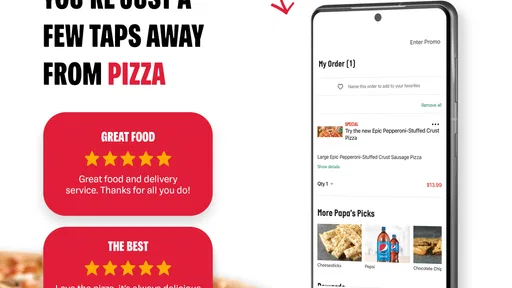
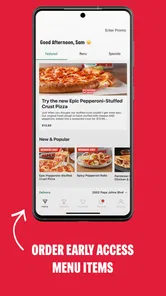
Once inside, I was greeted by a colorful array of choices. From classic pepperoni to more exotic options like buffalo chicken, the menu was a feast for the eyes. What I particularly appreciated was the detailed descriptions accompanying each item. It’s like having a server right there with you, explaining each dish in mouth-watering detail. Plus, the app lets you customize your pizza just the way you like it, with a wide range of toppings and crusts. Want to go halfsies on toppings? No problem!
Customization is where I would slow down rather than tap through on autopilot. For a shared meal, deciding the split toppings before opening the menu can make the choices easier and reduce the chance of overlooking a preference while building the pizza. I also find it useful to check the description of each item instead of relying on a familiar name; that is a simple way to make a more deliberate choice when ordering for someone else. The key benefit here is control over the order, not a guarantee that every combination will suit every diner.
More From Our News Desk

Weather by Xiaomi Review: Clear at a Glance, Less Clear Up Close

X Under Pressure: Can It Recover When Posting Goes Wrong?

Clash of Clans Is Won Between the Battles

Android Auto Makes the Case for Quieter Car Software

MobiOffice: Transforming Mobile Productivity with Seamless Integration

EA SPORTS FC™ Mobile Soccer: Redefining Mobile Sports Gaming
For a group with different tastes, I would settle the basic plan before ordering: which pizza is meant to be shared, whether a split topping makes sense, and whether anyone needs a separate choice. That little bit of coordination makes customization more useful than simply adding options because they are available. A single pizza can be easier to agree on, but a complicated set of preferences is also where it pays to inspect the finished selections carefully before moving on.
Reordering and Following Progress
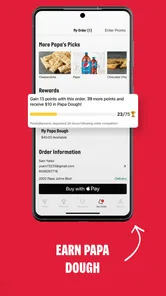
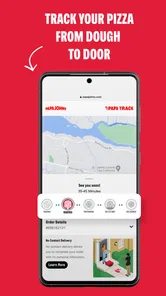
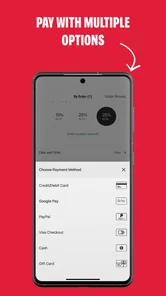
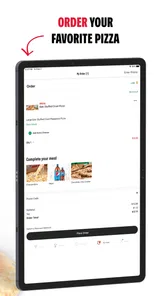
Placing an order was a straightforward process. The app guides you through each step, ensuring you don’t miss any details. I especially loved the option to save my favorite orders for quick reordering. Talk about convenience! And for those who are extra cautious, the app provides a tracker to keep tabs on your pizza’s journey from oven to your doorstep. Watching that little icon move closer and closer is oddly satisfying.
Saved orders are particularly useful when the household has a dependable regular: they cut down on rebuilding the same choices, while still giving me a chance to review the basket before placing it. I would treat reordering as a shortcut, not as a reason to skip that final check. A previous choice may no longer fit the group or the occasion, and a quick review helps catch an old selection before it becomes tonight’s meal.
That final review is especially worthwhile when ordering for more than one person. A saved choice can be a handy starting point, but people’s plans change, and a familiar order may need an adjustment. I would use it to avoid repeating the whole menu journey, then verify the items and customizations in the current basket rather than assuming the old arrangement is still right.
The tracker also has a practical role beyond passing the time. If I am hosting friends, I can use its progress as a cue to get plates and drinks ready rather than repeatedly guessing when the food might arrive. I would not plan an exact schedule around an app indicator, though; it is most useful for a general sense of progress, not a promise that delivery will happen at a precise minute.
Delivery, Timing, and Support
The delivery was prompt, arriving well within the estimated time, with the pizza steaming hot and smelling divine. The delivery person was courteous, which is always a nice touch. The app even allows for contactless delivery, a feature that I find particularly useful in today’s times.
A realistic use case is a busy evening when nobody wants to cook and the group already agrees on Papa John’s. One person can settle the order, customize it for different tastes, and follow its progress while everyone gets the table ready. That is a better fit for this app than an unplanned search for dinner, where price, cuisine, or restaurant choice still needs to be compared across several places.
Delivery convenience also depends on what works for the order and the people receiving it. Contactless delivery can be useful when that is the preferred handoff, but it is not a reason to assume every delivery will feel identical. I would choose the option that suits the moment and keep an eye on the order details, especially when coordinating food for a group.
For someone wondering whether the app is only useful for delivery, I would frame it more simply: its value is ordering from Papa John’s through a dedicated route. The details that matter most are the choices available for your order and the handoff that suits your situation. If you prefer to collect food or need a particular arrangement, check the options presented during your own ordering flow before relying on it for a plan.
Customer support is another area where this app shines. I had a minor issue with my order once, and their customer service was quick to respond and resolve it. It’s reassuring to know that help is just a tap away if things don’t go as planned.
Even with a smooth ordering flow, I would not recommend it to someone who wants a broad comparison of restaurants or who rarely chooses Papa John’s. A dedicated restaurant app naturally narrows the decision to that brand, which is convenient when the choice is settled and limiting when it is not. For a one-off pizza craving, a familiar alternative or a wider delivery service may make more sense if it offers the restaurant or choices you actually want.
Compared with ordering in person or calling the restaurant, the app’s strongest practical difference is that I can work through the menu and customizations at my own pace, then revisit my selections before submitting the order. That suits people who want to look over options without having to keep a conversation moving. Calling may be preferable if you need to explain an unusual request or want to talk through a question directly; the app is better when the choices on screen cover what you need.
Compared with a general delivery marketplace, the app trades variety for a more direct brand-focused experience. A marketplace is the better tool when I have not picked dinner and want to weigh alternatives. Here, I avoid that broad browsing, but I also have fewer reasons to open the app if Papa John’s is not already on my shortlist. I would choose the tool based on the decision I have made, rather than expecting one ordering route to be best for every meal.
Who Will Get the Most from It?
In a nutshell, the Papa Johns Pizza & Delivery app delivers on its promise of making pizza ordering a hassle-free experience. Whether you’re a die-hard fan of their signature pizzas or just someone looking for a quick bite, this app is like having your own pizza place right in your pocket. The ease of use, coupled with the variety it offers, makes it a must-try for any pizza lover. So, next time you’re hit with a pizza craving, you know where to tap!
For me, the strongest reason to keep it installed is the combination of a restaurant-specific menu, saved-order convenience, and an order tracker. Those are most valuable when I already know what I want and would rather spend less time repeating choices or checking manually on progress. If that describes your usual pizza night, this is a sensible option to try; if you want to browse broadly before deciding, start with a service that compares more restaurants.
I would recommend it most to people who order Papa John’s often enough to benefit from a familiar menu and a saved regular order, or to anyone organizing a straightforward meal for a few people who can decide on the food in advance. The app can also help a host keep the ordering task in one place while turning attention back to the guests. Its convenience comes from reducing repeated steps, not from removing the need to choose carefully.
It is a weaker fit for someone who orders from many different restaurants, wants to discover nearby food options, or prefers to discuss every detail with a person before committing. It may also be unnecessary if you rarely choose this brand: an app dedicated to one restaurant has little advantage when you are still weighing what to eat. In those situations, I would compare the available alternatives first and use this app only if Papa John’s becomes the clear choice.
My practical advice is to open it when the restaurant decision is already made, take a moment with the menu descriptions when choosing for other people, and check a saved basket before placing it. Use the tracker as a helpful progress signal rather than a precise clock. With those expectations, the app is a focused and convenient option for a planned Papa John’s order, while broader restaurant browsing is better left to services designed for comparison.
Papa Johns Pizza & Delivery Frequently Asked Questions
Can I browse the menu and customize an order before deciding to buy?
The app is designed for pizza ordering and lets you customize your pizza with different toppings, so you can shape an order around your preferences. You can also browse the available choices as part of the ordering process before deciding what to add. Reviewing the options in the app can make it easier to settle on a meal, whether you are ordering for yourself or planning to share.
Can I save a favorite order and place it again later?
Yes. The app lets you save favorite orders, which can make repeat purchases quicker and more convenient. Instead of rebuilding a familiar pizza order each time, you can return to a saved choice when you want it again. This is especially handy for regular customers who tend to choose the same toppings or meal, while still leaving you free to customize a new order whenever you like.
Can I check nearby Papa Johns stores through the app?
The app includes a store-finding feature that can help you locate nearby Papa Johns locations. This can be useful when deciding where to place an order, particularly if you are considering pickup rather than delivery. Having store information alongside the ordering tools keeps the process in one place and makes it easier to choose a location that works for your plans.
Does the app let me follow my order after I place it?
Yes, the app includes real-time order tracking, so you can follow your pizza’s progress after placing an order. This feature can be reassuring when you are waiting for delivery and helps you stay informed about the order’s journey. Tracking is also part of the app’s guided ordering experience, alongside choosing delivery or pickup and customizing your meal.
Is Papa Johns Pizza & Delivery free to download, and what devices can run it?
Papa Johns Pizza & Delivery is free to download and is intended for Android and iOS users. On Android, it requires version 7.0 or later, so checking your device’s operating system before installing is a sensible first step. The app is in the Food & Drink category and is rated Everyone, making it suitable for a broad audience.
Pros
- User-friendly interface with easy navigation.
- Wide variety of pizza options available.
- Fast delivery service.
- Option to track orders in real-time.
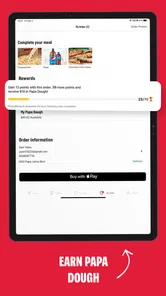
- Exclusive deals and discounts for app users.
Cons
- Limited customization options for pizzas.
- Occasional app crashes reported by users.
- Inconsistent customer service experiences.
- High delivery fees in some areas.
- Requires account creation to place an order.











